
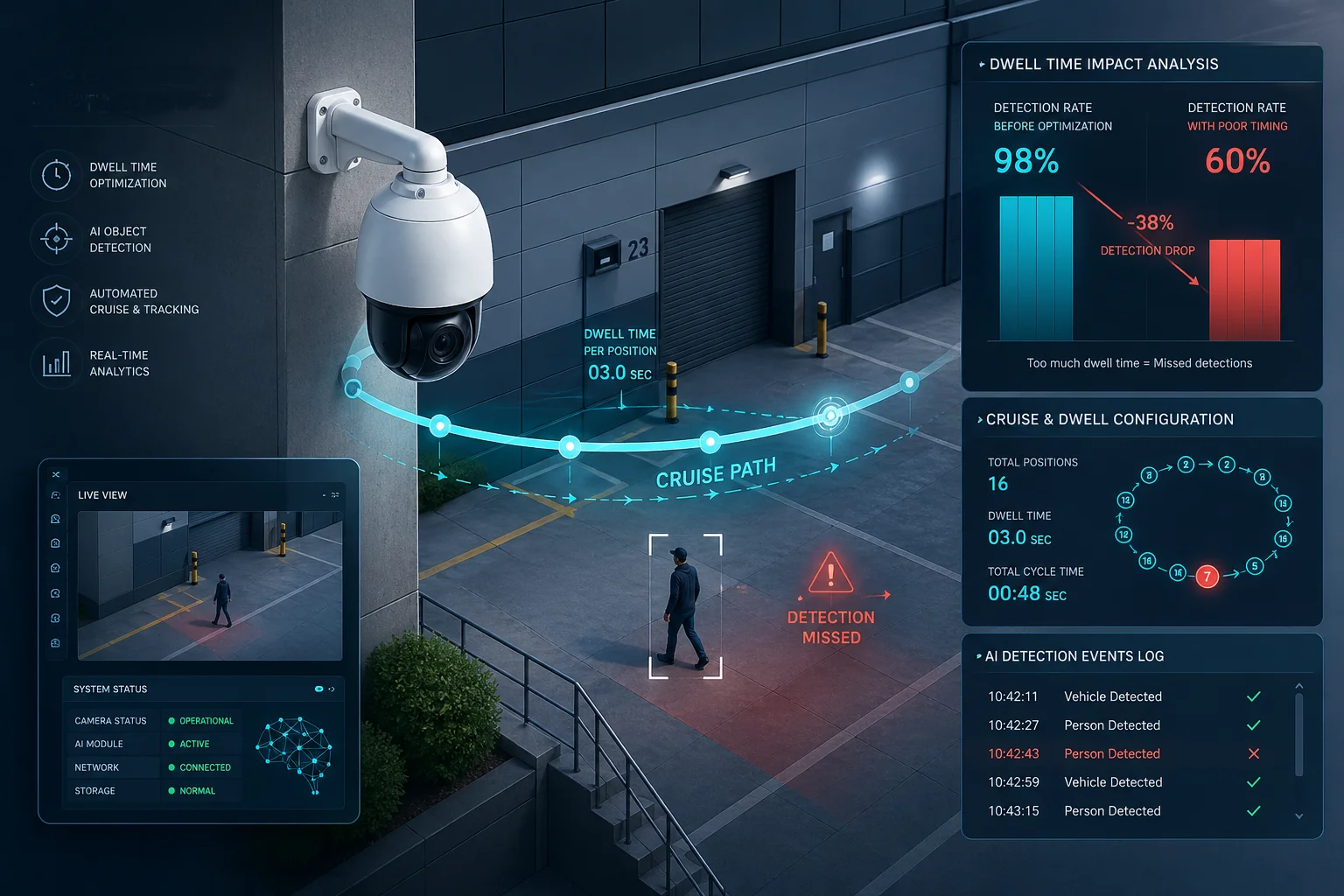
I have seen AI detection rates crash from 98% down to 60% on real projects. The root cause was always the same — bad dwell time settings in the PTZ cruise path.
Dwell time accuracy in cruise paths controls how many clear, stable frames the AI engine gets at each preset position. If the dwell time is too short, starts too early, or changes between cycles, the AI will miss targets, create false negatives, and give unreliable analytics results across the entire site.
 PTZ camera dwell time accuracy AI recognition cruise path
Below, I break down the exact timing needs, the synchronization methods, the detection risks of short dwell times, and the optimization tricks that every integrator should know before deploying AI-powered PTZ cameras.
Table of Contents
How Many Seconds of Dwell Time Are Needed for the AI to Scan a New Scene?
I used to set dwell time at 2 seconds and then wonder why my AI kept missing half the targets. The math showed me why.
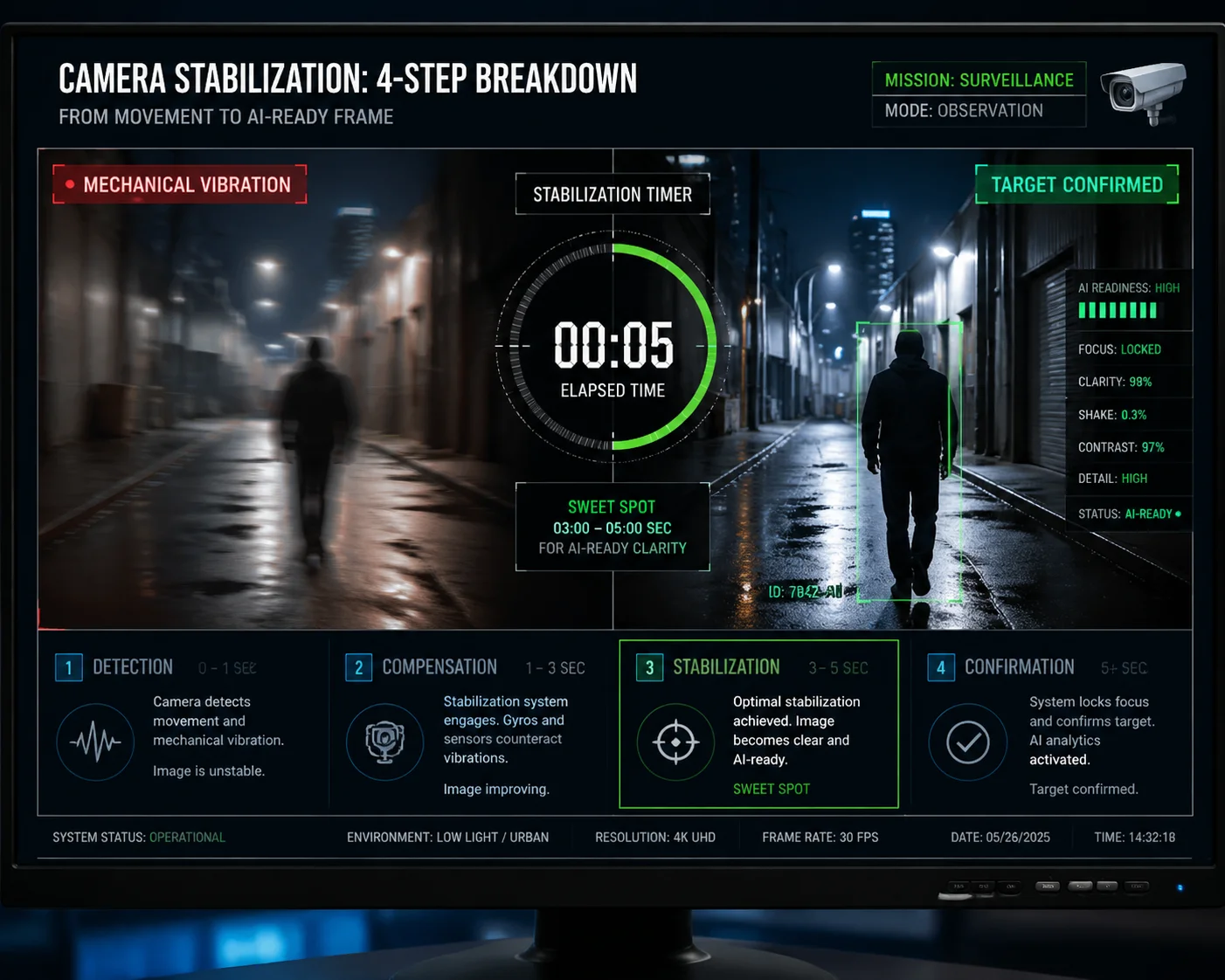
Most AI algorithms need at least 3 to 5 seconds of stable dwell time at each preset. The first 0.5 to 1 second goes to mechanical stabilization and auto-focus. The rest provides the consecutive clear frames that the AI needs for reliable target detection and confirmation.
 PTZ dwell time seconds needed AI scene scanning
Understanding the Time Budget at Each Preset
When a PTZ camera arrives at a new preset position, several things must happen before the AI can do any useful work. First, the motor stops. But the camera body does not stop instantly. There is always some physical vibration from the sudden halt. This vibration can last 0.3 to 0.5 seconds on most commercial PTZ units. During this period, every frame the camera captures has motion blur. AI models like YOLO 1 or any TensorRT-accelerated detector need sharp edges to find objects. Blurry frames are useless.
After the vibration settles, the auto-focus system kicks in. Even fast PDAF (Phase Detection Auto-Focus) 2 takes about 0.3 to 0.5 seconds to lock onto the scene. Until focus is locked, the image is soft. The AI cannot extract features like face structure or license plate characters from a soft image.
Only after both stabilization and focus are done does the AI get usable frames. Here is how the time budget breaks down at each preset:
| Phase | Duration | What Happens | AI Usability |
|---|---|---|---|
| Mechanical stabilization | 0.3–0.5 sec | Motor stops, vibration dampens | ❌ Frames are blurry |
| Auto-focus lock | 0.3–0.5 sec | Lens adjusts to new scene depth | ❌ Image is soft |
| AI capture window | 2–3 sec | Clear, stable frames stream to AI | ✅ Valid for detection |
| Buffer / retry zone | 0.5–1 sec | Handles network delay or algorithm retry | ✅ Safety margin |
| Total recommended | 3–5 sec | — | — |
Why 2 Seconds Is Almost Never Enough
I talk to integrators who set dwell time at 2 seconds because they want to cover more presets in a single cruise cycle. The logic seems sound — more stops means more coverage. But the reality is different.
If the total dwell time is 2 seconds, and the camera spends 0.5 seconds on vibration damping and another 0.5 seconds on auto-focus, the AI only gets 1 second of clear footage. At 15 FPS, that is just 15 frames. Most AI algorithms use a multi-frame voting method. They need to see a target in at least 3 to 5 consecutive frames before they mark it as “confirmed.” With only 15 frames and possible obstructions or lighting changes, the algorithm often fails to complete its detection-tracking-confirmation loop.
The result is simple. The AI sees something, but it does not have enough data to say “yes, that is a person” or “yes, that is a vehicle.” So it stays silent. And the operator never gets the alert.
Can I Synchronize the AI Detection Trigger with the Camera’s Arrival at a Preset?
I once spent a full week debugging missed detections on a perimeter project. The AI was triggering its scan before the camera even finished focusing.
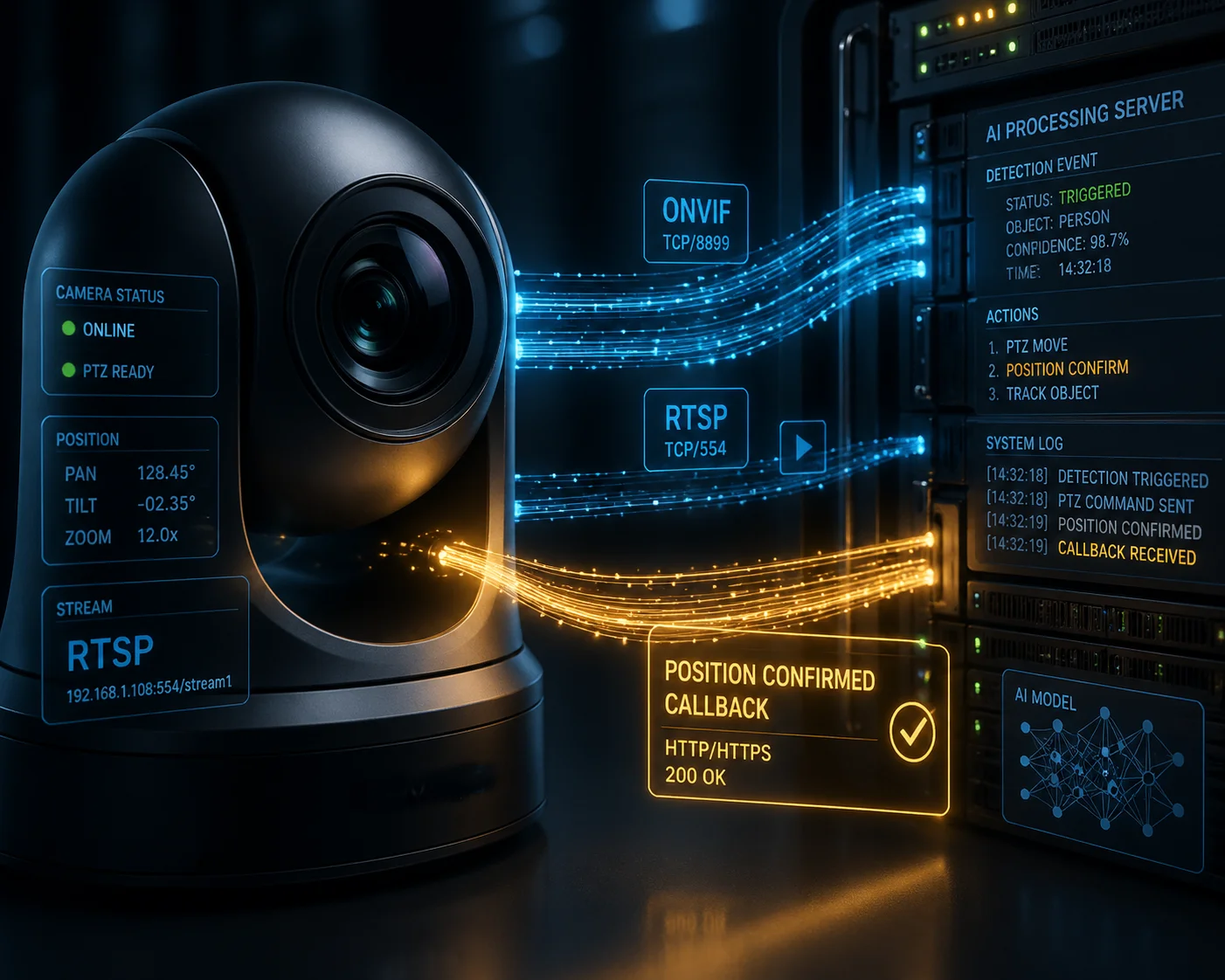
Yes, synchronization is possible. But the AI detection trigger must start after the camera confirms both mechanical stabilization and auto-focus lock. Starting the AI scan when the move command is sent — instead of when the camera reports “position reached and focused” — is the single most common integration mistake.
 AI detection trigger synchronize PTZ preset arrival
The Difference Between “Command Sent” and “Position Confirmed”
This is where many projects go wrong. In most PTZ control systems, there are two separate events. The first event is “command sent.” This is the moment the controller tells the camera to go to Preset 5. The second event is “position confirmed.” This is the moment the camera reports back that it has arrived, stopped moving, and locked focus.
The problem is that many NVR and VMS platforms start the dwell time countdown from “command sent.” This means the clock is already running while the camera is still rotating. By the time the camera actually stops and focuses, a big chunk of the dwell time is already gone.
I always recommend checking whether your PTZ protocol supports a “position reached” callback or status flag. ONVIF Profile S 3, for example, does support preset position status queries. If your system can read this flag, you can build a simple logic rule. The rule says: “Do not start the AI scan until the camera confirms it is at the target position and the focus is locked.”
How Different Sync Methods Compare
Not all PTZ systems offer the same level of synchronization. Here is a comparison of the common approaches I see in the field:
| Sync Method | How It Works | Pros | Cons |
|---|---|---|---|
| Timer-based (fixed delay) | Starts AI scan X seconds after move command | Simple to set up | Does not adapt to variable move times |
| ONVIF status polling | Checks preset status flag every 200ms | Accurate for supported cameras | Adds slight network overhead |
| Encoder-triggered | AI starts when encoder confirms stable video | Very reliable | Requires encoder-level integration |
| Manual calibration | Operator tests and sets delay per preset | Works on any system | Time-consuming, not scalable |
My Preferred Approach
For projects where I use our Loyalty-Secu PTZ cameras, I prefer the encoder-triggered method. Our cameras report a stable video flag once the motor has stopped and the PDAF cycle is complete. This flag goes through the RTSP stream metadata. The AI backend reads this flag and starts its detection window only after receiving it. This way, I never waste dwell time on blurry or unfocused frames. Every second of dwell time is a productive second for the AI.
If the VMS does not support metadata parsing, I fall back to a fixed delay method. But I always add a 1-second safety margin on top of the measured stabilization time. It is better to lose 1 second of coverage than to lose the entire detection at that preset.
Will a Short Dwell Time Cause My AI to Miss Human or Vehicle Detection Alerts?
I got a call from a client at 2 AM because their perimeter AI missed an intruder walking through a parking lot. The dwell time was set to 1.5 seconds.
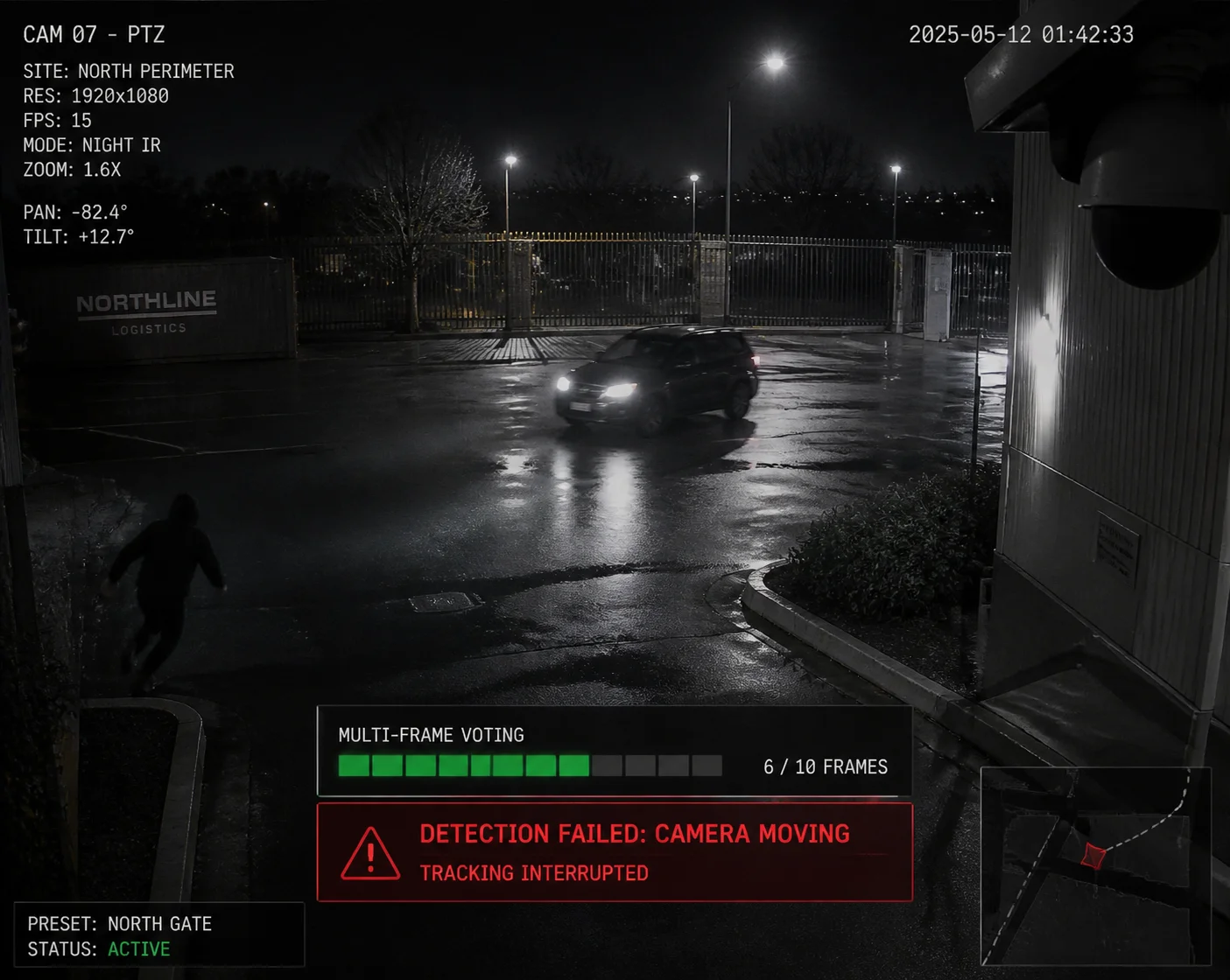
Yes. A short dwell time directly causes missed detections. AI algorithms use multi-frame voting to confirm targets. If the camera moves away before the algorithm finishes its detect-track-confirm cycle, the system will produce false negatives. Real threats walk through the scene undetected.
 short dwell time AI missed human vehicle detection
How Multi-Frame Voting Works
Most modern AI detection systems do not rely on a single frame. A single frame can contain shadows, reflections, or odd shapes that look like a person but are not. To avoid these false alarms, the AI uses a method called multi-frame voting.
The process works like this. The AI runs its detection model on Frame 1. It finds a shape that looks like a human with 72% confidence. It does not trigger an alert yet. On Frame 2, it finds the same shape in a similar position with 78% confidence. On Frame 3, 81%. On Frame 4, 85%. After seeing the target in 3 to 5 consecutive frames with rising or stable confidence, the algorithm marks it as a “confirmed target” and sends the alert.
This process takes time. At 15 FPS, five frames take about 0.33 seconds. That sounds fast. But remember, this is just the voting step. Before voting starts, the algorithm also needs to initialize its tracker, build a bounding box, and compare the target against its model classes. The full detect-track-confirm loop often takes 1 to 2 seconds of clean video.
What Happens When You Cut the Cycle Short
If the dwell time is only 1.5 seconds and the first 0.8 seconds are lost to stabilization and focus, the AI only gets 0.7 seconds of clean video. That is about 10 frames at 15 FPS. The algorithm starts its detection on Frame 1. By Frame 5, it is building confidence. By Frame 10, it might be close to confirmation. But then the camera moves. The target disappears from the frame. The tracker loses the object. The confidence score resets.
The AI never triggers the alert. The target was there. The camera saw it. But the algorithm did not have enough time to say “confirmed.” This is a false negative. And false negatives are far more dangerous than false positives. A false positive is an annoying extra alert. A false negative is a missed intruder.
The Impact on Different Detection Tasks
Not all AI tasks have the same timing needs. License plate recognition (LPR) is more demanding than simple human detection because the algorithm needs to read individual characters. Here is a rough guide based on my project experience:
| AI Task | Minimum Clear Frames Needed | Minimum Effective Dwell Time | Risk if Dwell Time Is Too Short |
|---|---|---|---|
| Human detection | 3–5 frames | 2–3 sec | Missed intruder alerts |
| Vehicle detection | 3–5 frames | 2–3 sec | Missed vehicle entry logs |
| License plate recognition | 8–15 frames | 4–5 sec | Unreadable plate characters |
| Face recognition | 10–20 frames | 5–7 sec | Failed identity matching |
| Behavioral analysis (loitering) | 30+ frames | 5–10 sec | False loitering time calculations |
This table makes one thing very clear. The more detail the AI needs to extract, the more time it needs. And that time must be clean, stable, and in-focus. There is no shortcut.
How Do I Optimize the Cruise Schedule to Balance Coverage Area and AI Accuracy?
I always tell my clients this: more presets do not mean better security. Sometimes, fewer stops with longer dwell times give you far better real-world results.
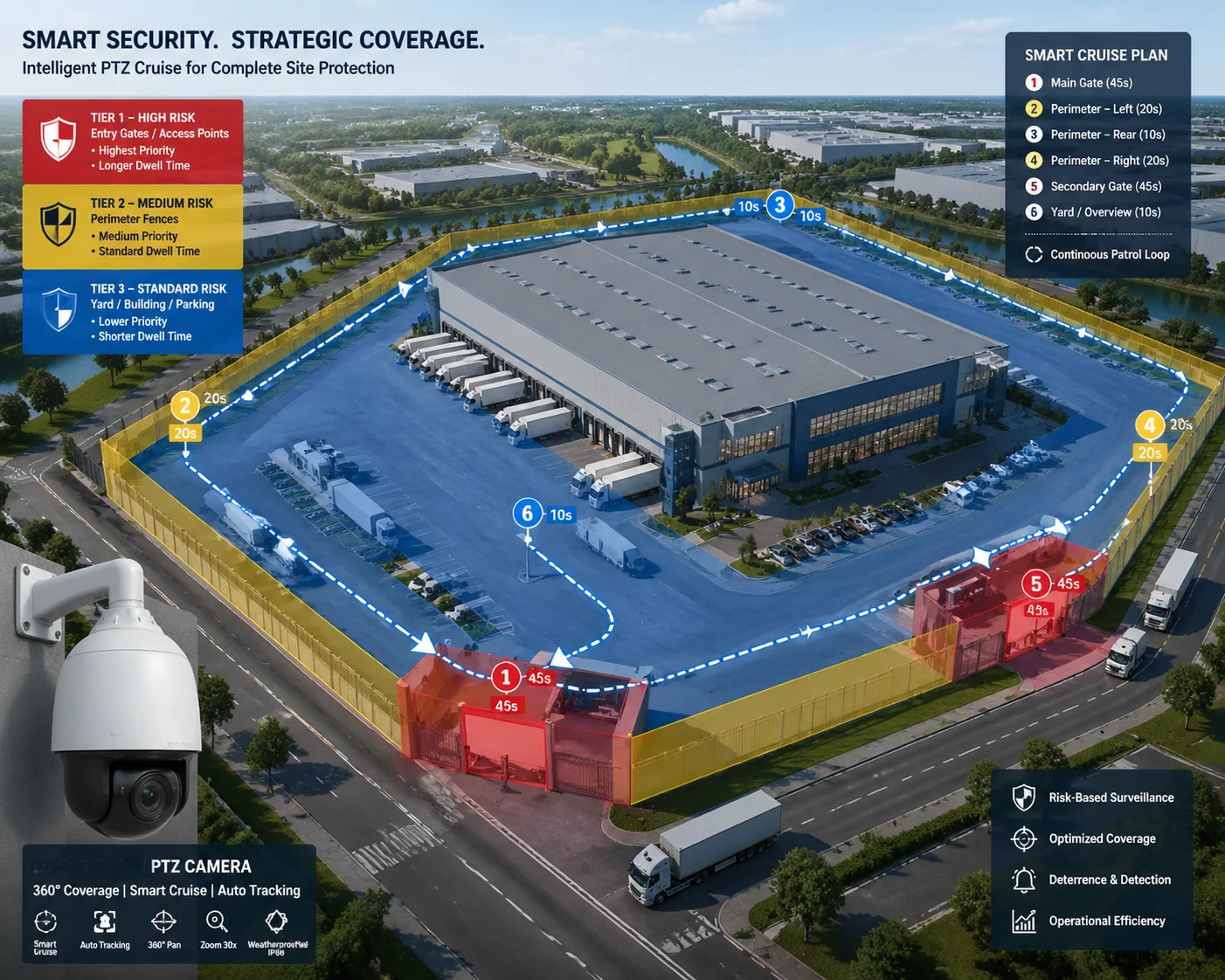
To balance coverage area and AI accuracy, cut the number of presets to only high-priority zones, give each stop at least 5 seconds of dwell time, and follow the 5-second rule — 1 second for stabilization, 3 seconds for AI capture, and 1 second for buffer against network or processing delays.
 optimize cruise schedule balance coverage AI accuracy
The 5-Second Rule
I use a simple framework for every cruise path I configure. I call it the 5-second rule. It breaks each dwell period into three phases:
- Second 1: The camera settles. Motor vibration stops. PDAF locks focus. No useful AI work happens here.
- Seconds 2 through 4: This is the core AI capture window. At 15 FPS, the AI gets 45 clean frames. This is enough for human detection, vehicle detection, and even basic LPR in good lighting.
- Second 5: This is the buffer zone. It handles network latency between the camera and the NVR, any algorithm retry cycles, and minor encoding delays.
This rule is not perfect for every scenario. For face recognition or behavioral analysis, I extend the dwell time to 7 or even 10 seconds. But for standard perimeter security with human and vehicle detection, 5 seconds per preset is a solid baseline.
Prioritizing Presets by Risk Level
Not every area in a facility needs the same attention. A main entrance gate needs more dwell time than a quiet side wall. I recommend sorting all preset positions into three priority tiers:
- Tier 1 (High Risk): Entry points, parking lots, loading docks. These get 7 to 10 seconds of dwell time.
- Tier 2 (Medium Risk): Fence lines, secondary corridors, storage areas. These get 5 seconds.
- Tier 3 (Low Risk): Open fields with no assets, decorative areas. These get 3 seconds or are removed from the cruise path entirely.
By reducing the total number of presets and giving more time to the important ones, the cruise cycle completes faster and the AI has enough data at every critical point. I have seen this approach increase overall detection rates by 20% to 30% on sites that previously used 15 or more presets with 2-second dwell times across the board.
Keep Dwell Time Consistent Between Cycles
One thing I always check is whether the dwell time stays the same from one cycle to the next. Some cheaper PTZ controllers have timing drift. They might hold a preset for 5 seconds on the first cycle and 3.2 seconds on the next. This inconsistency breaks AI analytics that depend on time-based rules, like loitering detection or queue time measurement.
If your PTZ system shows timing drift, I suggest switching to a controller or NVR that uses precise ONVIF-based scheduling. Or you can use our Loyalty-Secu PTZ cameras, which have a built-in cruise engine with millisecond-level dwell time consistency. This removes the dependency on an external controller and ensures every cycle is identical.
Preset Return Accuracy Matters Too
Even if the dwell time is perfect, the AI will still fail if the camera does not return to the same exact angle every time. If Preset 5 points at 45.0° on the first cycle and 45.3° on the next cycle, the virtual detection zone you drew in the VMS will shift in the frame. Objects that should be inside the zone will fall outside it. The AI rule will not trigger.
Top-tier PTZ cameras offer preset return accuracy of ±0.1° or better. This keeps the scene framing identical across hundreds of cycles. Our cameras at Loyalty-Secu are built to this standard. The combination of stable dwell time and precise preset return gives the AI the consistency it needs to work reliably, day after day.
Conclusion
Dwell time accuracy is not just a PTZ setting. It is the foundation that decides whether your AI detections are reliable or useless. Get the timing right, and the AI works. Get it wrong, and you are paying for a smart system that acts blind.
1. YOLO real-time object detection multi-frame processing. ↩︎ 2. Phase detection autofocus settling time for PTZ cameras. ↩︎ 3. ONVIF Profile S preset position status query. ↩︎ 4. Multi-frame voting for false positive reduction in AI. ↩︎ 5. Motor stabilization vibration damping time for PTZ heads. ↩︎ 6. Face recognition minimum dwell time for feature extraction. ↩︎ 7. License plate recognition character confirmation frames. ↩︎ 8. Loitering detection time-window calculation accuracy. ↩︎ 9. ONVIF metadata for PTZ position and focus status. ↩︎ 10. Preset return accuracy tolerance for virtual detection zones. ↩︎