
Ho visto i tassi di rilevamento dell'IA crollare da 98% a 60% su progetti reali. La causa principale era sempre la stessa: impostazioni errate del tempo di permanenza nel percorso di crociera del PTZ.
L'accuratezza del tempo di sosta nei percorsi di crociera controlla il numero di fotogrammi chiari e stabili che il motore dell'IA ottiene in ogni posizione preimpostata. Se il tempo di sosta è troppo breve, inizia troppo presto o cambia tra un ciclo e l'altro, l'IA mancherà i bersagli, creerà falsi negativi e fornirà risultati analitici inaffidabili per l'intero sito.
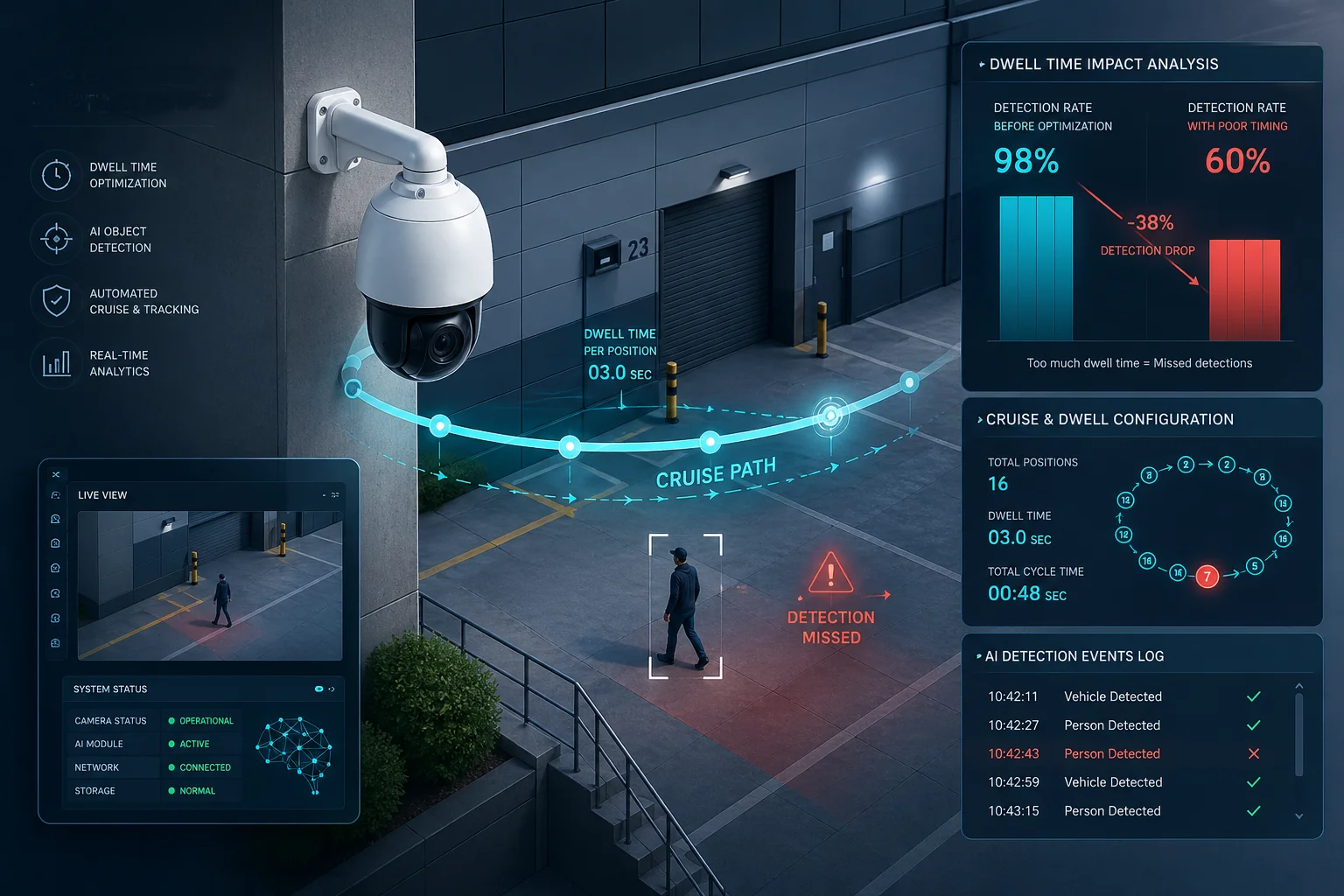 Precisione del tempo di permanenza della telecamera PTZ Riconoscimento AI percorso di crociera
Di seguito, illustro le esatte esigenze di temporizzazione, i metodi di sincronizzazione, i rischi di rilevamento di tempi di permanenza brevi e i trucchi di ottimizzazione che ogni integratore dovrebbe conoscere prima di implementare telecamere PTZ dotate di intelligenza artificiale.
Quanti secondi di tempo di permanenza sono necessari all'intelligenza artificiale per scansionare una nuova scena?
Ero solito impostare il tempo di permanenza a 2 secondi e poi mi chiedevo perché la mia IA continuasse a mancare metà dei bersagli. La matematica mi ha mostrato il perché.
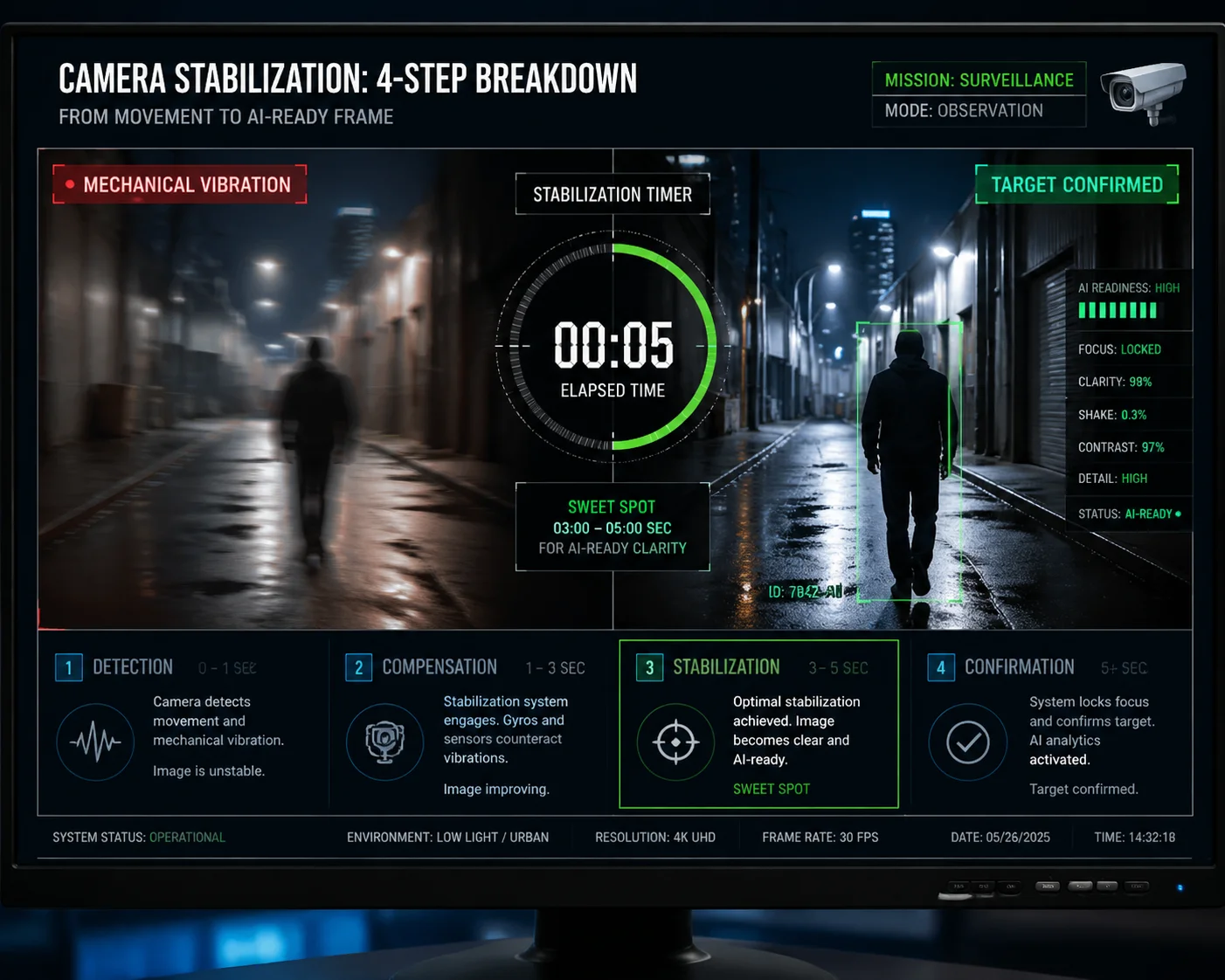
La maggior parte degli algoritmi di IA ha bisogno di almeno 3-5 secondi di tempo di permanenza stabile ad ogni preselezione. I primi 0,5-1 secondi sono destinati alla stabilizzazione meccanica e alla messa a fuoco automatica. Il resto fornisce i fotogrammi chiari consecutivi di cui l'IA ha bisogno per un rilevamento e una conferma affidabili del bersaglio.
 Tempo di permanenza PTZ secondi necessari per la scansione della scena AI
Comprendere il budget di tempo per ciascuna preimpostazione
Quando una telecamera PTZ raggiunge una nuova posizione preimpostata, prima che l'intelligenza artificiale possa svolgere qualsiasi attività utile, devono accadere diverse cose. Innanzitutto, il motore si ferma. Ma il corpo della telecamera non si ferma all'istante. L'arresto improvviso provoca sempre qualche vibrazione fisica. Questa vibrazione può durare da 0,3 a 0,5 secondi nella maggior parte delle unità PTZ commerciali. Durante questo periodo, ogni fotogramma catturato dalla telecamera presenta una sfocatura del movimento. I modelli AI come YOLO 1 o qualsiasi rilevatore accelerato da TensorRT ha bisogno di bordi netti per trovare gli oggetti. I fotogrammi sfocati sono inutili.
Dopo che le vibrazioni si sono stabilizzate, entra in funzione il sistema di messa a fuoco automatica. Anche se veloce PDAF (messa a fuoco automatica a rilevamento di fase) 2 impiega circa 0,3-0,5 secondi per agganciare la scena. Finché la messa a fuoco non viene bloccata, l'immagine è morbida. L'intelligenza artificiale non può estrarre caratteristiche come la struttura del volto o i caratteri della targa da un'immagine morbida.
Solo dopo aver effettuato la stabilizzazione e la messa a fuoco, l'AI ottiene fotogrammi utilizzabili. Ecco come si suddivide il budget di tempo per ciascuna preimpostazione:
| Fase | Durata | Cosa succede | Usabilità dell'intelligenza artificiale |
|---|---|---|---|
| Stabilizzazione meccanica | 0,3-0,5 secondi | Il motore si ferma, le vibrazioni si attenuano | Le inquadrature sono sfocate |
| Blocco della messa a fuoco automatica | 0,3-0,5 secondi | L'obiettivo si adatta alla nuova profondità della scena | L'immagine è morbida |
| Finestra di acquisizione AI | 2-3 secondi | Flusso di fotogrammi chiaro e stabile verso l'IA | ✅ Valido per il rilevamento |
| Buffer / zona di ripetizione | 0,5-1 secondo | Gestisce il ritardo della rete o la ripetizione dell'algoritmo | ✅ Margine di sicurezza |
| Totale consigliato | 3-5 secondi | — | — |
Perché 2 secondi non sono quasi mai abbastanza
Parlo con integratori che impostano il tempo di sosta a 2 secondi perché vogliono coprire più preset in un singolo ciclo di crociera. La logica sembra valida: più soste significa più copertura. Ma la realtà è diversa.
Se il tempo di permanenza totale è di 2 secondi e la telecamera impiega 0,5 secondi per smorzare le vibrazioni e altri 0,5 secondi per la messa a fuoco automatica, l'IA ottiene solo 1 secondo di riprese chiare. A 15 FPS, si tratta di soli 15 fotogrammi. La maggior parte degli algoritmi di IA utilizza un metodo di votazione su più fotogrammi. Hanno bisogno di vedere un bersaglio in almeno 3 o 5 fotogrammi consecutivi prima di contrassegnarlo come “confermato”. Con soli 15 fotogrammi e possibili ostruzioni o cambiamenti di illuminazione, l'algoritmo spesso non riesce a completare il ciclo di rilevamento-inseguimento-conferma.
Il risultato è semplice. L'intelligenza artificiale vede qualcosa, ma non ha dati sufficienti per dire “sì, quella è una persona” o “sì, quello è un veicolo”. Quindi rimane in silenzio. E l'operatore non riceve mai l'allarme.
È possibile sincronizzare l'attivazione del rilevamento AI con l'arrivo della telecamera a una preimpostazione?
Una volta ho trascorso un'intera settimana a risolvere il problema dei mancati rilevamenti in un progetto di perimetro. L'intelligenza artificiale attivava la scansione prima ancora che la telecamera finisse di mettere a fuoco.
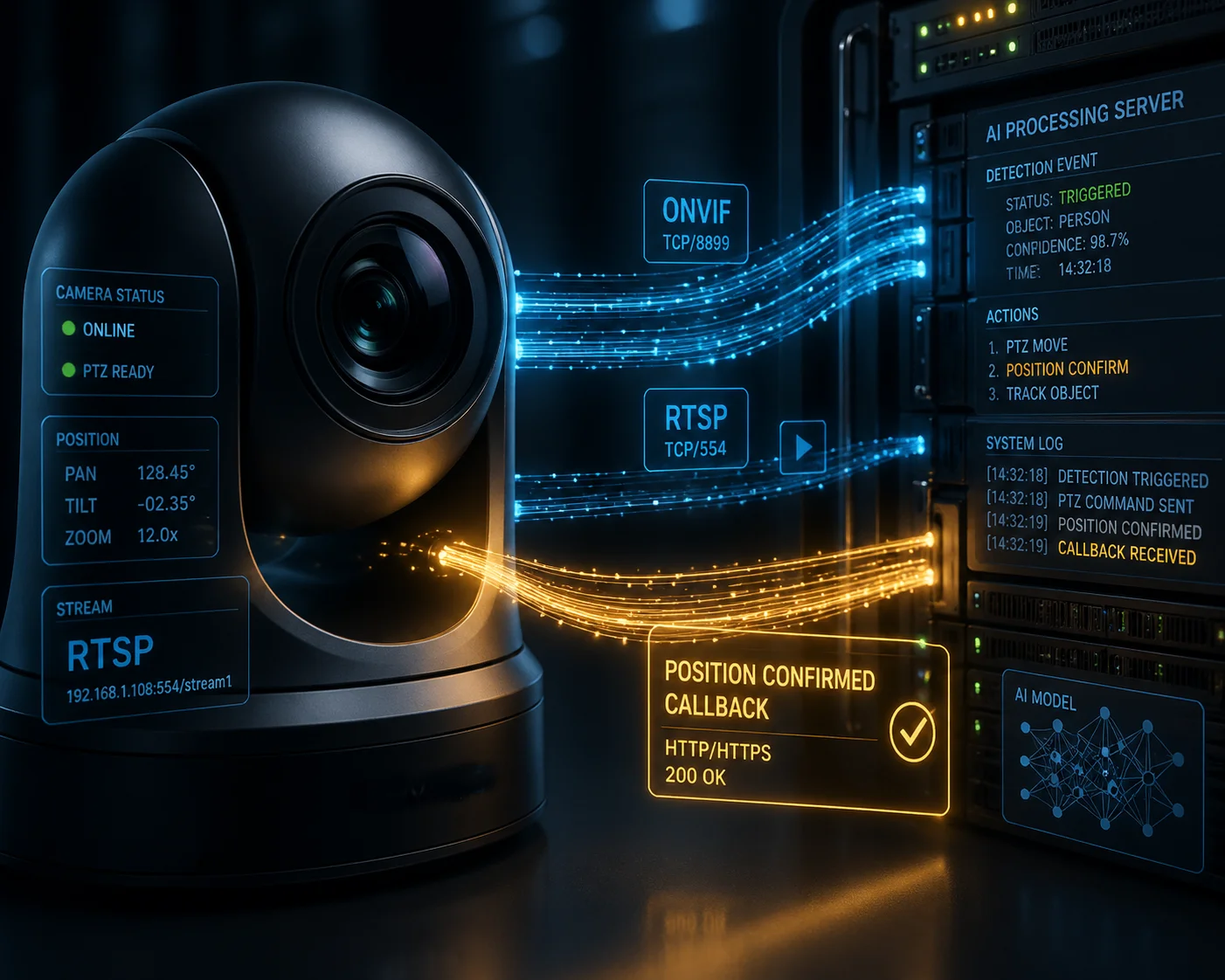
Sì, la sincronizzazione è possibile. Ma l'attivazione del rilevamento AI deve iniziare dopo che la fotocamera ha confermato la stabilizzazione meccanica e il blocco della messa a fuoco automatica. L'avvio della scansione AI quando viene inviato il comando di spostamento, anziché quando la telecamera segnala “posizione raggiunta e messa a fuoco”, è l'errore di integrazione più comune.
 L'innesco del rilevamento AI sincronizza l'arrivo della preimpostazione PTZ
La differenza tra “comando inviato” e “posizione confermata”.”
È qui che molti progetti falliscono. Nella maggior parte dei sistemi di controllo PTZ si verificano due eventi separati. Il primo evento è il “comando inviato”. È il momento in cui il controller dice alla telecamera di passare alla preselezione 5. Il secondo evento è “posizione confermata”. Il secondo evento è "posizione confermata". È il momento in cui la telecamera comunica di essere arrivata, di aver smesso di muoversi e di aver bloccato la messa a fuoco.
Il problema è che molte piattaforme NVR e VMS iniziano il conto alla rovescia del tempo di permanenza dal “comando inviato”. Ciò significa che l'orologio è già in funzione mentre la telecamera sta ancora ruotando. Quando la telecamera si ferma e mette a fuoco, una buona parte del tempo di permanenza è già trascorsa.
Consiglio sempre di verificare se il protocollo PTZ supporta un callback o un flag di stato “posizione raggiunta”. Profilo ONVIF S 3, supporta, ad esempio, le interrogazioni sullo stato della posizione preimpostata. Se il sistema è in grado di leggere questo flag, è possibile creare una semplice regola logica. La regola dice: “Non avviare la scansione AI finché la telecamera non conferma di essere nella posizione di destinazione e la messa a fuoco non è bloccata”.”
Come si confrontano i diversi metodi di sincronizzazione
Non tutti i sistemi PTZ offrono lo stesso livello di sincronizzazione. Ecco un confronto degli approcci più comuni che vedo sul campo:
| Sync Method | Come funziona | Pros | Cons |
|---|---|---|---|
| Timer-based (fixed delay) | Starts AI scan X seconds after move command | Simple to set up | Does not adapt to variable move times |
| ONVIF status polling | Checks preset status flag every 200ms | Accurate for supported cameras | Adds slight network overhead |
| Encoder-triggered | AI starts when encoder confirms stable video | Very reliable | Requires encoder-level integration |
| Manual calibration | Operator tests and sets delay per preset | Works on any system | Time-consuming, not scalable |
My Preferred Approach
For projects where I use our Loyalty-Secu PTZ cameras, I prefer the encoder-triggered method. Our cameras report a stable video flag once the motor has stopped and the PDAF cycle is complete. This flag goes through the RTSP stream metadata. The AI backend reads this flag and starts its detection window only after receiving it. This way, I never waste dwell time on blurry or unfocused frames. Every second of dwell time is a productive second for the AI.
If the VMS does not support metadata parsing, I fall back to a fixed delay method. But I always add a 1-second safety margin on top of the measured stabilization time. It is better to lose 1 second of coverage than to lose the entire detection at that preset.
Will a Short Dwell Time Cause My AI to Miss Human or Vehicle Detection Alerts?
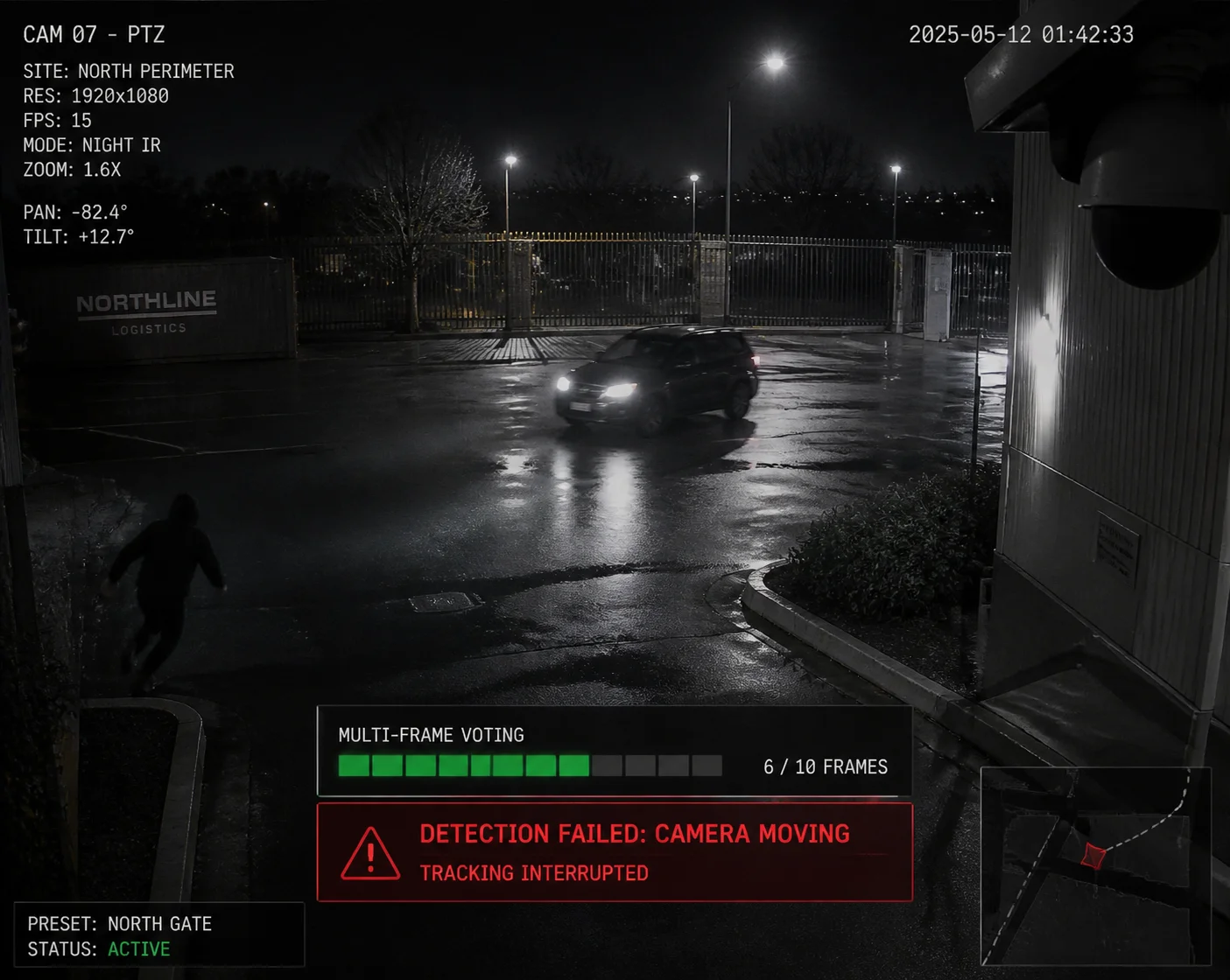
I got a call from a client at 2 AM because their perimeter AI missed an intruder walking through a parking lot. The dwell time was set to 1.5 seconds.
Yes. A short dwell time directly causes missed detections. AI algorithms use multi-frame voting to confirm targets. If the camera moves away before the algorithm finishes its detect-track-confirm cycle, the system will produce false negatives. Real threats walk through the scene undetected.
 short dwell time AI missed human vehicle detection
How Multi-Frame Voting Works
Most modern AI detection systems do not rely on a single frame. A single frame can contain shadows, reflections, or odd shapes that look like a person but are not. To avoid these false alarms, the AI uses a method called multi-frame voting.
The process works like this. The AI runs its detection model on Frame 1. It finds a shape that looks like a human with 72% confidence. It does not trigger an alert yet. On Frame 2, it finds the same shape in a similar position with 78% confidence. On Frame 3, 81%. On Frame 4, 85%. After seeing the target in 3 to 5 consecutive frames with rising or stable confidence, the algorithm marks it as a “confirmed target” and sends the alert.
This process takes time. At 15 FPS, five frames take about 0.33 seconds. That sounds fast. But remember, this is just the voting step. Before voting starts, the algorithm also needs to initialize its tracker, build a bounding box, and compare the target against its model classes. The full detect-track-confirm loop often takes 1 to 2 seconds of clean video.
What Happens When You Cut the Cycle Short
If the dwell time is only 1.5 seconds and the first 0.8 seconds are lost to stabilization and focus, the AI only gets 0.7 seconds of clean video. That is about 10 frames at 15 FPS. The algorithm starts its detection on Frame 1. By Frame 5, it is building confidence. By Frame 10, it might be close to confirmation. But then the camera moves. The target disappears from the frame. The tracker loses the object. The confidence score resets.
The AI never triggers the alert. The target was there. The camera saw it. But the algorithm did not have enough time to say “confirmed.” This is a false negative. And false negatives are far more dangerous than false positives. A false positive is an annoying extra alert. A false negative is a missed intruder.
The Impact on Different Detection Tasks
Not all AI tasks have the same timing needs. License plate recognition (LPR) is more demanding than simple human detection because the algorithm needs to read individual characters. Here is a rough guide based on my project experience:
| AI Task | Minimum Clear Frames Needed | Minimum Effective Dwell Time | Risk if Dwell Time Is Too Short |
|---|---|---|---|
| Human detection | 3–5 frames | 2-3 secondi | Missed intruder alerts |
| Vehicle detection | 3–5 frames | 2-3 secondi | Missed vehicle entry logs |
| Riconoscimento delle targhe | 8–15 frames | 4–5 sec | Unreadable plate characters |
| Face recognition | 10–20 frames | 5–7 sec | Failed identity matching |
| Behavioral analysis (loitering) | 30+ frames | 5–10 sec | False loitering time calculations |
This table makes one thing very clear. The more detail the AI needs to extract, the more time it needs. And that time must be clean, stable, and in-focus. There is no shortcut.
How Do I Optimize the Cruise Schedule to Balance Coverage Area and AI Accuracy?
I always tell my clients this: more presets do not mean better security. Sometimes, fewer stops with longer dwell times give you far better real-world results.
To balance coverage area and AI accuracy, cut the number of presets to only high-priority zones, give each stop at least 5 seconds of dwell time, and follow the 5-second rule — 1 second for stabilization, 3 seconds for AI capture, and 1 second for buffer against network or processing delays.
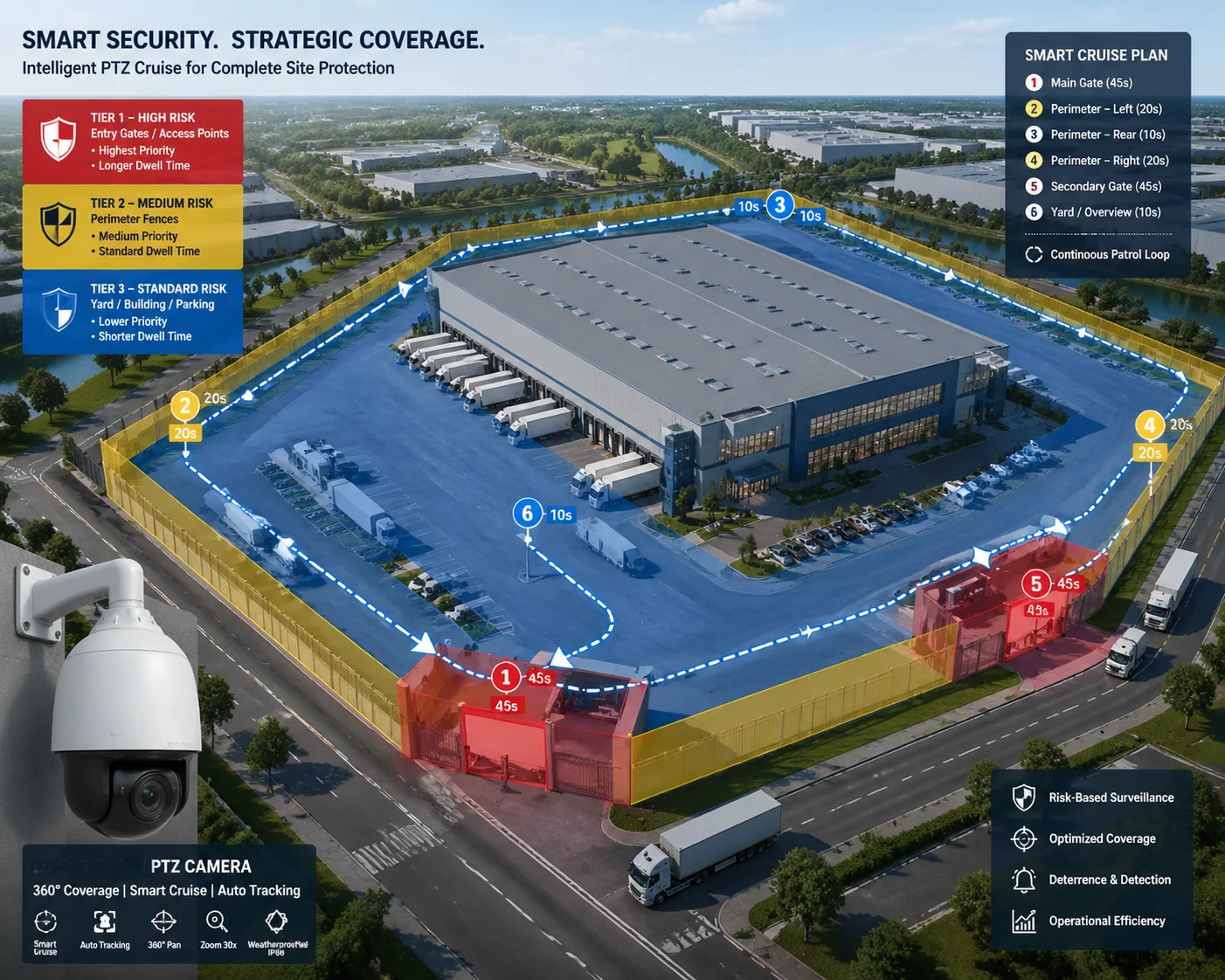 optimize cruise schedule balance coverage AI accuracy
The 5-Second Rule
I use a simple framework for every cruise path I configure. I call it the 5-second rule. It breaks each dwell period into three phases:
- Second 1: The camera settles. Motor vibration stops. PDAF locks focus. No useful AI work happens here.
- Seconds 2 through 4: This is the core AI capture window. At 15 FPS, the AI gets 45 clean frames. This is enough for human detection, vehicle detection, and even basic LPR in good lighting.
- Second 5: This is the buffer zone. It handles network latency between the camera and the NVR, any algorithm retry cycles, and minor encoding delays.
This rule is not perfect for every scenario. For face recognition or behavioral analysis, I extend the dwell time to 7 or even 10 seconds. But for standard perimeter security with human and vehicle detection, 5 seconds per preset is a solid baseline.
Prioritizing Presets by Risk Level
Not every area in a facility needs the same attention. A main entrance gate needs more dwell time than a quiet side wall. I recommend sorting all preset positions into three priority tiers:
- Tier 1 (High Risk): Entry points, parking lots, loading docks. These get 7 to 10 seconds of dwell time.
- Tier 2 (Medium Risk): Fence lines, secondary corridors, storage areas. These get 5 seconds.
- Tier 3 (Low Risk): Open fields with no assets, decorative areas. These get 3 seconds or are removed from the cruise path entirely.
By reducing the total number of presets and giving more time to the important ones, the cruise cycle completes faster and the AI has enough data at every critical point. I have seen this approach increase overall detection rates by 20% to 30% on sites that previously used 15 or more presets with 2-second dwell times across the board.
Keep Dwell Time Consistent Between Cycles
One thing I always check is whether the dwell time stays the same from one cycle to the next. Some cheaper PTZ controllers have timing drift. They might hold a preset for 5 seconds on the first cycle and 3.2 seconds on the next. This inconsistency breaks AI analytics that depend on time-based rules, like loitering detection or queue time measurement.
If your PTZ system shows timing drift, I suggest switching to a controller or NVR that uses precise ONVIF-based scheduling. Or you can use our Loyalty-Secu PTZ cameras, which have a built-in cruise engine with millisecond-level dwell time consistency. This removes the dependency on an external controller and ensures every cycle is identical.
Preset Return Accuracy Matters Too
Even if the dwell time is perfect, the AI will still fail if the camera does not return to the same exact angle every time. If Preset 5 points at 45.0° on the first cycle and 45.3° on the next cycle, the virtual detection zone you drew in the VMS will shift in the frame. Objects that should be inside the zone will fall outside it. The AI rule will not trigger.
Top-tier PTZ cameras offer preset return accuracy of ±0.1° or better. This keeps the scene framing identical across hundreds of cycles. Our cameras at Loyalty-Secu are built to this standard. The combination of stable dwell time and precise preset return gives the AI the consistency it needs to work reliably, day after day.
Conclusione
Dwell time accuracy is not just a PTZ setting. It is the foundation that decides whether your AI detections are reliable or useless. Get the timing right, and the AI works. Get it wrong, and you are paying for a smart system that acts blind.
1. YOLO real-time object detection multi-frame processing. ︎ 2. Phase detection autofocus settling time for PTZ cameras. ︎ 3. ONVIF Profile S preset position status query. ︎ 4. Multi-frame voting for false positive reduction in AI. ︎ 5. Motor stabilization vibration damping time for PTZ heads. ︎ 6. Face recognition minimum dwell time for feature extraction. ︎ 7. License plate recognition character confirmation frames. ︎ 8. Loitering detection time-window calculation accuracy. ︎ 9. ONVIF metadata for PTZ position and focus status. ︎ 10. Preset return accuracy tolerance for virtual detection zones. ︎