
I once got a call from a client at 2 AM. His cameras went dark mid-update because the OTA server was on the other side of the planet. That one failure cost him a full week of truck rolls.
To prevent download failures, professional PTZ OTA servers should be deployed on global CDN providers like AWS CloudFront 1 or Cloudflare 2 with local edge nodes inside the U.S. This setup pulls firmware from the nearest domestic data center. It cuts cross-border packet loss. It also adds fail-safe features like breakpoint resume and dual-partition rollback to keep cameras alive even when 4G drops mid-download.
 Cloud OTA server deployment for PTZ security cameras in the U.S.
Here is a dirty secret many vendors won’t tell you. A lot of them claim “global server coverage.” But in reality, they run a single FTP server in one country. When your cameras in Texas or Montana try to pull a 50MB firmware file across the ocean, the download breaks at 90%. The camera then sits in a half-updated state. It is stuck. It is offline. And you need to send a technician to fix it by hand. In this article, I break down exactly how a properly designed OTA system works, how fast it should be, and what safeguards you need to protect your fleet from bricking. Every answer here comes from real deployment experience across thousands of PTZ cameras.
Table of Contents
How Long Does It Take for My Cameras in the U.S. to Download a 50MB Firmware Update?
I have seen clients wait over 40 minutes for a 50MB download on a 4G camera. That is not a network problem. That is a server location problem.
When OTA servers use U.S.-based CDN edge nodes, a 50MB firmware file typically downloads in under 2 minutes on a stable 4G LTE connection. Without local nodes, the same file can take 10 to 40 minutes or fail entirely due to cross-border latency and packet loss.
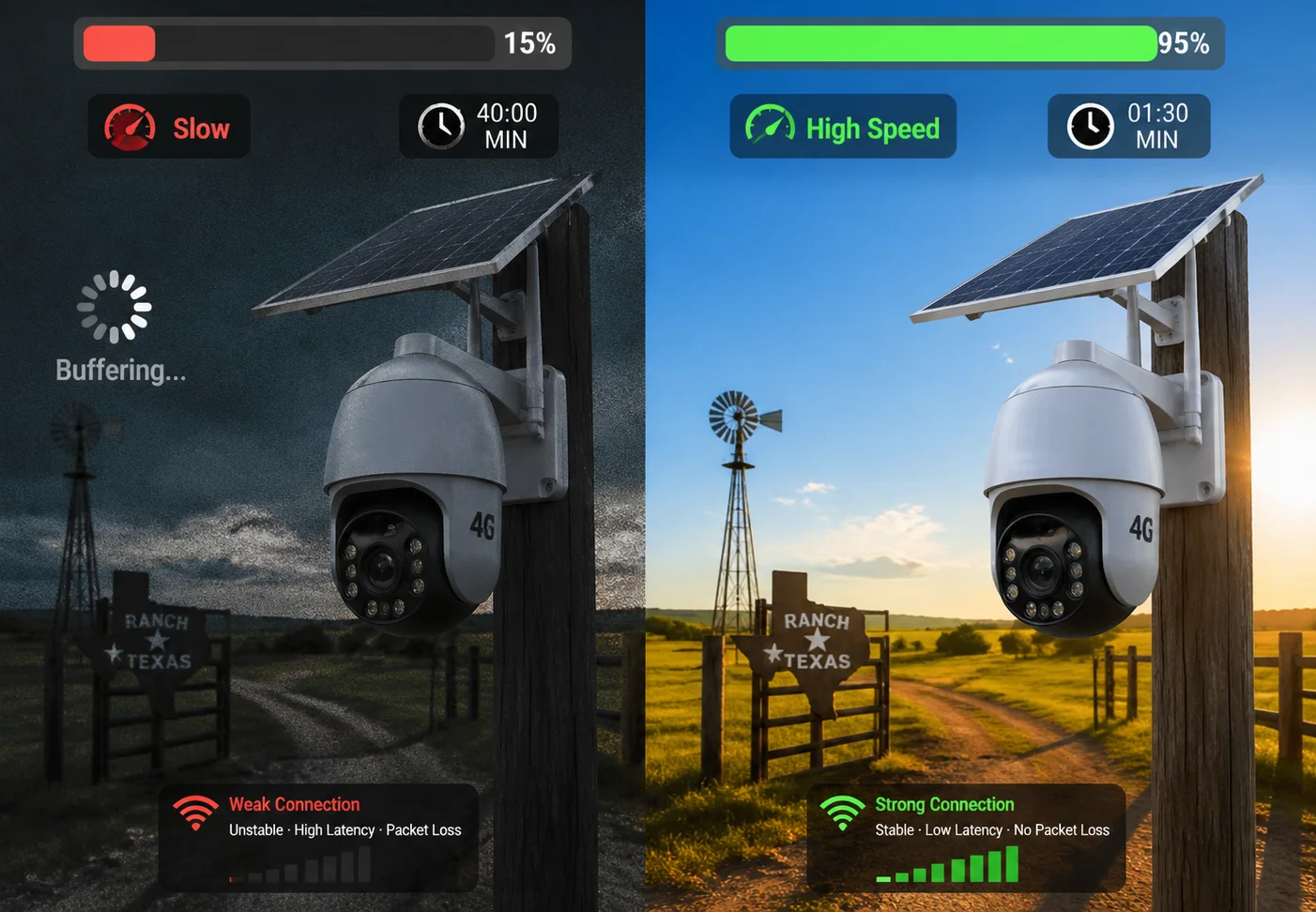 4G LTE camera firmware download speed comparison
Why Server Location Directly Affects Download Time
The math here is simple. A 4G LTE connection 3 in the U.S. usually gives you 10–30 Mbps of download speed. At 10 Mbps, a 50MB file should finish in about 40 seconds. At 5 Mbps, it takes roughly 80 seconds. But these numbers only work when the server is close.
When the OTA server sits in Asia and the camera sits in California, the data travels through undersea cables, multiple routing hops, and sometimes even firewall inspection points. Each hop adds latency. Each latency spike increases the risk of a TCP timeout. And when TCP times out, the download restarts. Or worse, it fails silently and leaves the camera in a broken state.
The CDN Difference
A CDN (Content Delivery Network) solves this by caching your firmware file on edge servers around the world. At Loyalty-Secu, we use AWS S3 4 and Cloudflare R2 for firmware hosting. This means when a camera in Los Angeles requests an update, it pulls the file from a server in Oregon or Northern California. The round-trip latency drops from 200–400ms to under 20ms.
Here is a comparison table to show the real-world impact:
| Scenario | Server Location | Avg. Latency | 50MB Download Time | Failure Risk |
|---|---|---|---|---|
| Single overseas server (FTP) | Shenzhen, China | 250–400ms | 10–40 min | High |
| Cloud with U.S. CDN edge node | Oregon / N. California | 10–20ms | 40–90 sec | Very Low |
| Client-hosted local server | On-premise (LAN) | <5ms | 10–20 sec | Minimal |
What About 4G Signal Fluctuation?
For solar-powered PTZ cameras in rural areas, 4G signal is not always stable. The connection might drop to 3G or even EDGE in bad weather. This is where breakpoint resume becomes critical. Our OTA protocol tracks exactly which bytes have been downloaded. If the signal drops, the camera waits. When the signal comes back, it picks up right where it left off. It does not start over.
This single feature has saved many of my clients from sending trucks to remote farm sites just to re-flash a camera.
Will My Firmware Update Fail if the Connection to the Overseas Server Is Unstable?
I have watched firmware updates fail at 97% because of a brief network hiccup. The camera froze. The client lost an entire day of footage from a construction site.
Yes, firmware updates can fail if the overseas connection is unstable. But a well-designed OTA system prevents bricking through breakpoint resume, dual-partition backup, and automatic rollback. These features ensure the camera stays online even when the download is interrupted.
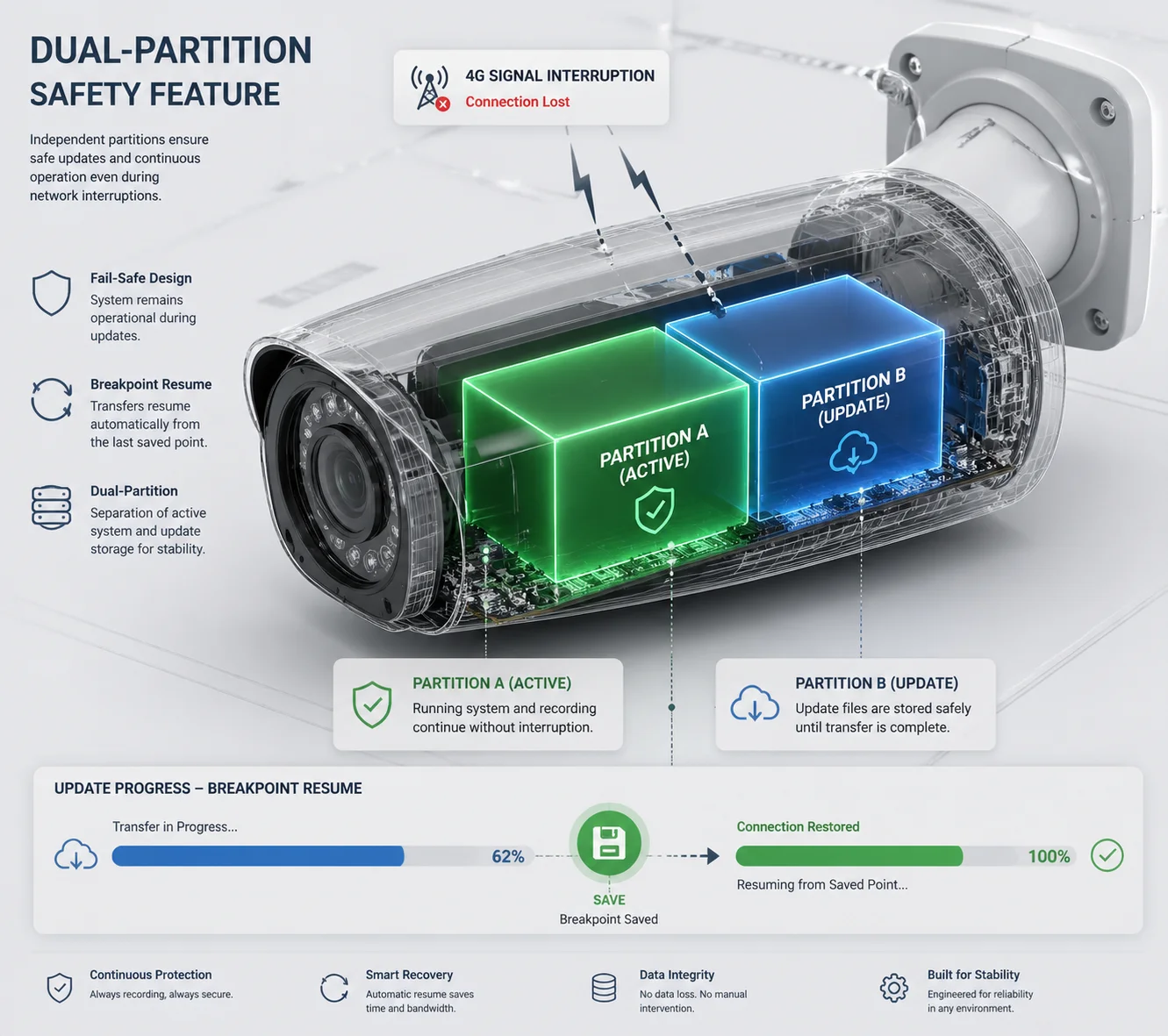 OTA firmware update fail-safe mechanism for PTZ cameras
The Real Risk: What Happens When a Download Breaks
Let me be direct. If a camera downloads half of a firmware file and then tries to install it, the result is a bricked device. The old firmware is gone. The new firmware is incomplete. The camera cannot boot. This is not a rare edge case. It happens all the time with cheap OTA systems that lack basic safety checks.
The root cause is usually one of three things:
- Cross-border packet loss from routing through congested international links.
- 4G signal drops in remote or rural areas.
- Server overload when too many cameras request the update at the same time.
How Dual-Partition Firmware Backup Works
At Loyalty-Secu, our cameras use a dual-partition (A/B) firmware architecture. Here is how it works step by step:
- The camera downloads the new firmware to Partition B while running on Partition A.
- After the full file is downloaded, the camera checks the file hash (SHA-256).
- Only if the hash matches does the camera reboot into Partition B.
- If anything goes wrong during the reboot, the bootloader automatically falls back to Partition A.
This means the camera always has a working firmware to fall back on. It never enters a state where both partitions are corrupted.
Three Layers of Protection Against Unstable Connections
| Protection Layer | What It Does | When It Activates |
|---|---|---|
| Breakpoint Resume | Saves download progress; resumes after reconnect | 4G signal drops mid-download |
| Dual-Partition Rollback | Keeps old firmware intact until new one is verified | Hash check fails or boot fails |
| Low-Battery Lock | Blocks updates when battery is below 30% | Solar-powered cameras at night |
The low-battery lock is something most vendors skip. But it is critical for solar deployments. If a camera starts a firmware write at 15% battery and the power dies halfway through, the flash memory can be corrupted beyond recovery. Our OTA logic checks battery level before every update. If it is below 30%, the update is postponed. Period.
A Note on GFW and Cross-Border Traffic
Here is an industry insider fact that most vendors will not mention. If the OTA server is hosted inside mainland China, the firmware download traffic from U.S. cameras must pass through the Great Firewall of China 5. This firewall inspects, throttles, and sometimes drops international packets. It is not designed to block firmware updates on purpose. But the effect is the same. Downloads stall. Connections reset. Files arrive corrupted.
This is why hosting firmware on a global CDN with U.S. edge nodes is not optional. It is a basic requirement for any serious B2B deployment.
Can I Host the OTA Update Files on My Own Local Server for Mass Deployment?
I had a client in Canada who managed 300 cameras across 40 remote sites. He wanted full control over when and how firmware was pushed. A cloud-only solution was not enough for him.
Yes, you can host OTA update files on your own local server. Many professional PTZ manufacturers provide firmware packages that can be uploaded to a private server or NVR 6, giving system integrators full control over deployment timing and bandwidth usage.
 Local OTA server setup for mass PTZ camera deployment
Why B2B Clients Want Local OTA Control
For system integrators like David who manage hundreds of cameras, relying on a vendor’s cloud server for every update creates several risks:
- Bandwidth competition. If 200 cameras all pull firmware from the cloud at the same time, the 4G backhaul gets saturated. Video streams stutter. Alerts get delayed.
- Scheduling conflicts. Cloud OTA systems may push updates during business hours when cameras are needed most.
- Compliance requirements. Some government or enterprise contracts require that no data leaves the local network.
A local OTA server solves all three problems. The integrator downloads the firmware package once, hosts it on a local machine or NVR, and then pushes it to cameras on the LAN or over a VPN at a scheduled time.
How to Set Up a Local OTA Workflow
Here is the basic workflow I recommend to my B2B clients:
- Download the signed firmware package from the Loyalty-Secu secure portal.
- Verify the SHA-256 hash matches the one listed on the portal.
- Upload the file to your local HTTP/HTTPS server (Apache 7, Nginx, or even a NAS device).
- Configure each camera’s OTA URL to point to your local server instead of the cloud.
- Test on 1–2 cameras first (canary deployment).
- Push to the rest of the fleet during a maintenance window.
Canary Deployment: The Smart Way to Roll Out Updates
I always tell my clients: never update all your cameras at once. Use a canary deployment strategy. Pick one or two cameras on different cellular carriers (for example, one on AT&T, one on T-Mobile). Update those first. Wait 24 hours. Check if the new firmware works well with the local 4G bands, the VMS platform, and the solar power system.
Only after the canary cameras pass all checks should you push the update to the full fleet. This approach has prevented more disasters than any single technical feature.
Silent Download: Reducing Downtime to Seconds
Our system supports a silent download mode. In this mode, the firmware file downloads to the camera’s internal storage during off-peak hours. The camera keeps running its current firmware the whole time. No interruption. No downtime.
When the integrator is ready, they click “Execute” in the management console. The camera writes the new firmware to flash in about 5–10 seconds and reboots. Total downtime: under 15 seconds.
This is a game-changer for clients who cannot afford to lose even a minute of surveillance coverage.
How Does the Camera Verify the Integrity of the Update File Before Installing?
I once tested a competitor’s camera that accepted any file with a .bin extension as valid firmware. No signature check. No hash check. That is a security hole big enough to drive a truck through.
Professional PTZ cameras verify firmware integrity using SHA-256 hash 8 comparison and digital signature validation before installation begins. This ensures the file has not been corrupted during download or tampered with by a third party. Only files that pass both checks are written to flash memory.
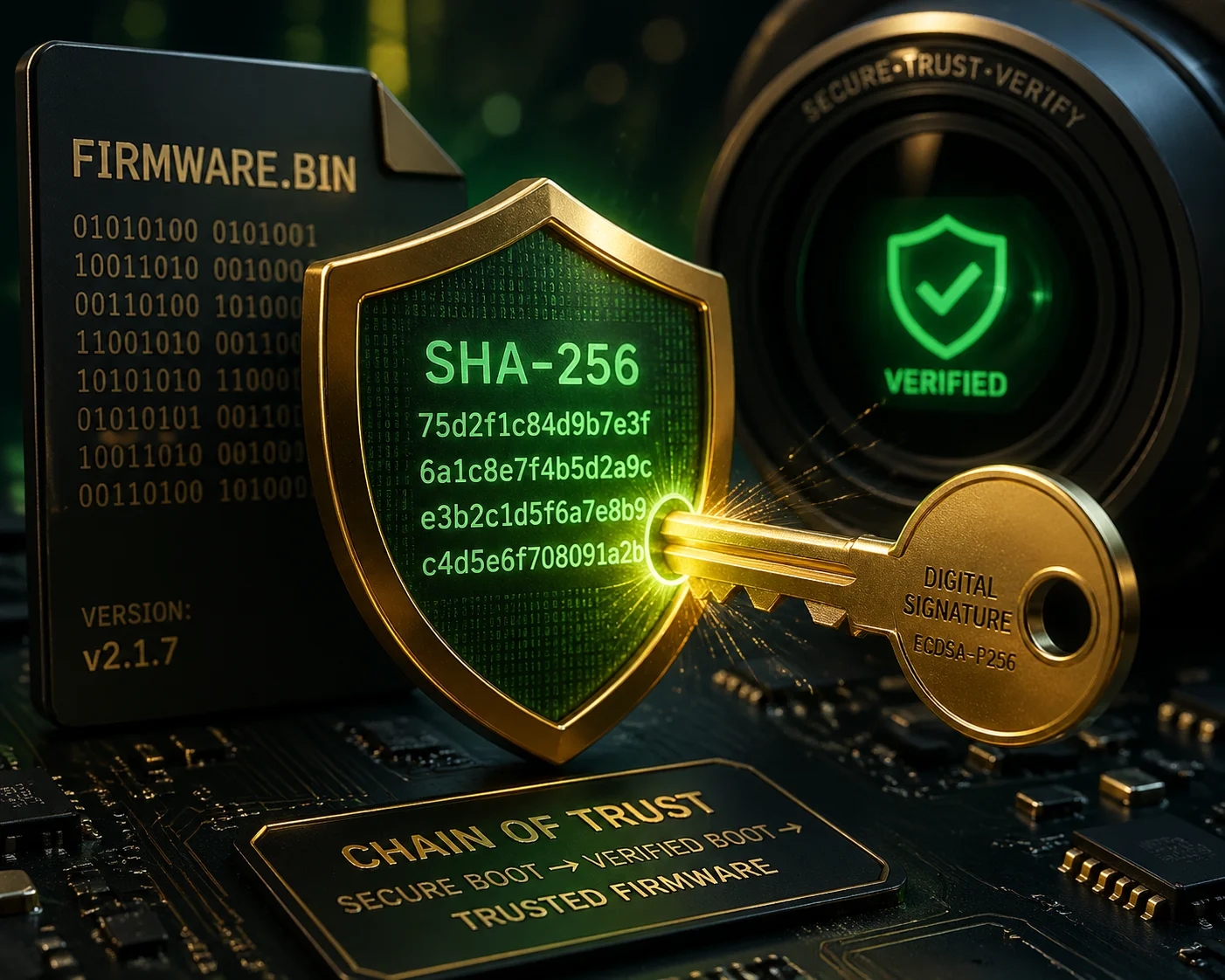 Firmware integrity verification process for security cameras
Why Firmware Verification Is Non-Negotiable
A firmware file is the brain of your camera. If someone modifies it, they can inject malware, disable recording, or open a backdoor into your client’s network. For a system integrator who deploys cameras in banks, government buildings, or critical infrastructure, this is not a theoretical risk. It is a real threat.
Verification protects against two main problems:
- Download corruption. Bits can flip during transfer over unstable 4G links. Even a single corrupted byte can make the firmware unbootable.
- Tampering. A man-in-the-middle attacker on an unsecured network could replace the firmware file with a malicious version.
The Verification Process Step by Step
Here is exactly what happens inside a Loyalty-Secu camera when it receives a firmware file:
Step 1: Hash Check (SHA-256)
The camera calculates the SHA-256 hash of the downloaded file. It then compares this hash against the expected hash provided by the OTA server. If the hashes do not match, the file is deleted and the download is retried.
Step 2: Digital Signature Validation
The firmware file is signed with Loyalty-Secu’s private key during the build process. The camera contains the matching public key. It uses this key to verify the digital signature 9 on the file. If the signature is invalid, the file is rejected. This step ensures the firmware was actually built by Loyalty-Secu and not by someone else.
Step 3: Version Check
The camera compares the firmware version number. It will not install a version older than what is currently running unless the integrator explicitly enables downgrade mode. This prevents accidental rollbacks.
Step 4: Power Level Check
For solar-powered models, the camera checks battery level. If it is below 30%, the installation is postponed. This prevents the write process from being interrupted by a power failure.
Comparing Verification Methods Across the Industry
| Verification Method | Security Level | Common In | Loyalty-Secu |
|---|---|---|---|
| No verification | None | Ultra-cheap cameras | ❌ |
| CRC32 checksum only | Low | Budget consumer cameras | ❌ |
| SHA-256 hash check | Medium | Mid-range cameras | ✅ |
| SHA-256 + Digital signature | High | Professional / B2B cameras | ✅ |
| SHA-256 + Signature + Secure Boot | Very High | Military / critical infra | ✅ (select models) |
At the professional B2B level, I consider SHA-256 plus digital signature to be the minimum acceptable standard. Anything less is a liability. If your current vendor only uses CRC32 or no check at all, I strongly recommend switching before a security incident forces you to.
What About OTA Over Unsecured Networks?
All OTA traffic from our cameras uses HTTPS (TLS 1.2 or higher) 10. The firmware file is encrypted in transit. Even if someone intercepts the traffic, they cannot read or modify the file. Combined with the on-device signature check, this creates a complete chain of trust from our build server to the camera’s flash memory.
Conclusion
A reliable OTA system needs local CDN nodes, breakpoint resume, dual-partition rollback, and firmware signature checks. These are not optional extras. They are what separate professional deployments from expensive failures.
1. AWS CloudFront global CDN with 100+ edge locations worldwide. ↩︎ 2. Cloudflare content delivery network with built-in DDoS protection. ↩︎ 3. 3GPP technical specifications for 4G LTE cellular networks. ↩︎ 4. AWS S3 cloud object storage for secure firmware hosting. ↩︎ 5. Overview of China’s Great Firewall and internet filtering. ↩︎ 6. Network Video Recorder basics for centralized surveillance storage. ↩︎ 7. Apache HTTP Server for hosting local OTA update files. ↩︎ 8. Technical explanation of SHA-256 cryptographic hash function. ↩︎ 9. How digital signatures verify firmware authenticity and integrity. ↩︎ 10. Why TLS encryption matters for secure firmware over-the-air updates. ↩︎