
I often see teams push PTZ systems too hard, and then they miss the best shot or overload the queue. I focus on balance, because good tracking depends on both AI speed and PTZ control.
The system can usually detect 30 to 60 targets in one frame and keep 8 to 16 targets in a snapshot queue for PTZ execution. The exact number depends on the SoC power1, scene density, and the PTZ scheduling rules you set.
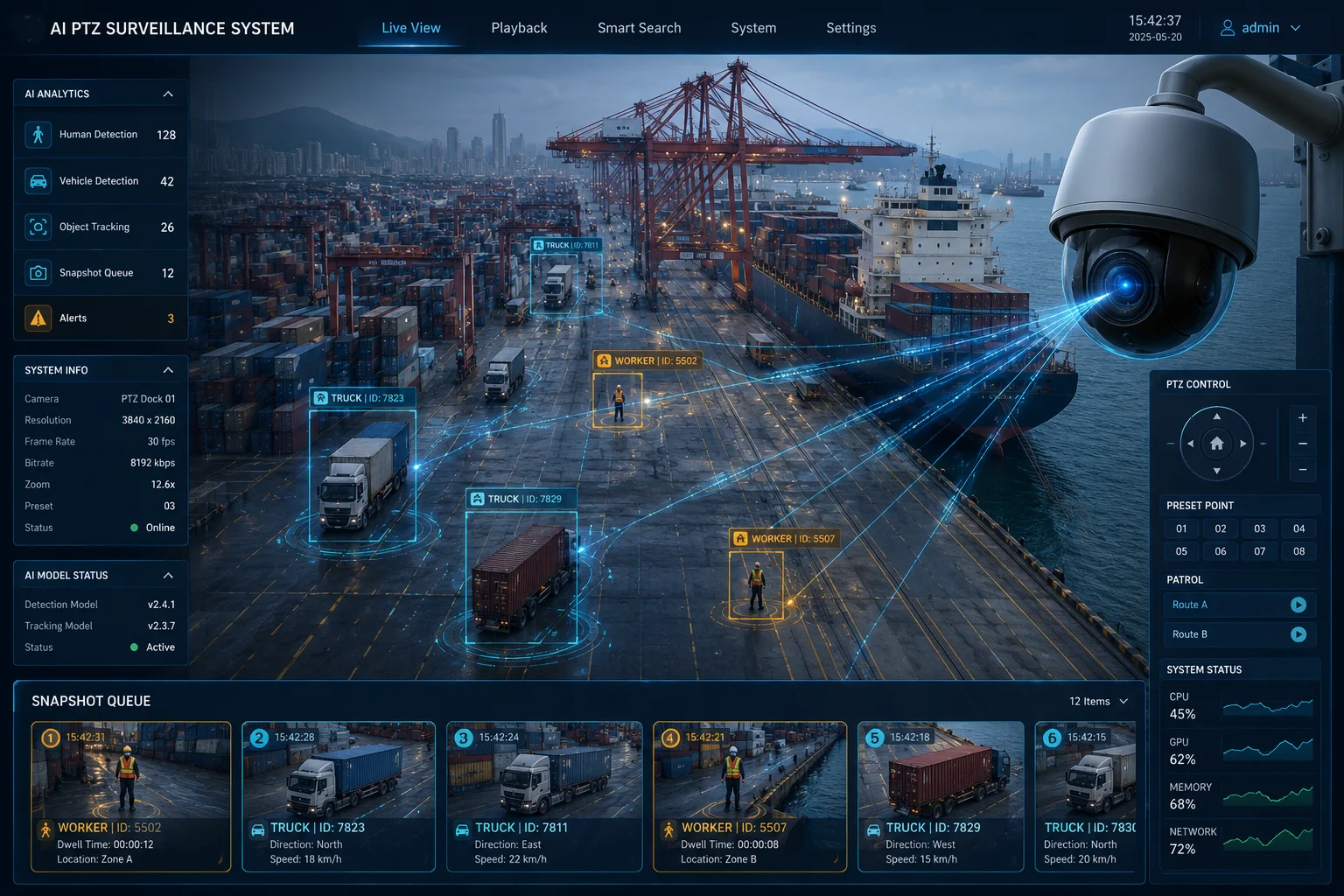
I use this kind of design when I need both a wide view and fast detail shots. If you want to know how the queue works in real time, I break it down below.
Table of Contents
Can the system track the “Top 5” most suspicious targets while maintaining a panoramic view?
I know this problem well, because a wide scene often hides the most important target right in plain sight. I want to keep the full view, but I also need to stay on the most risky target.
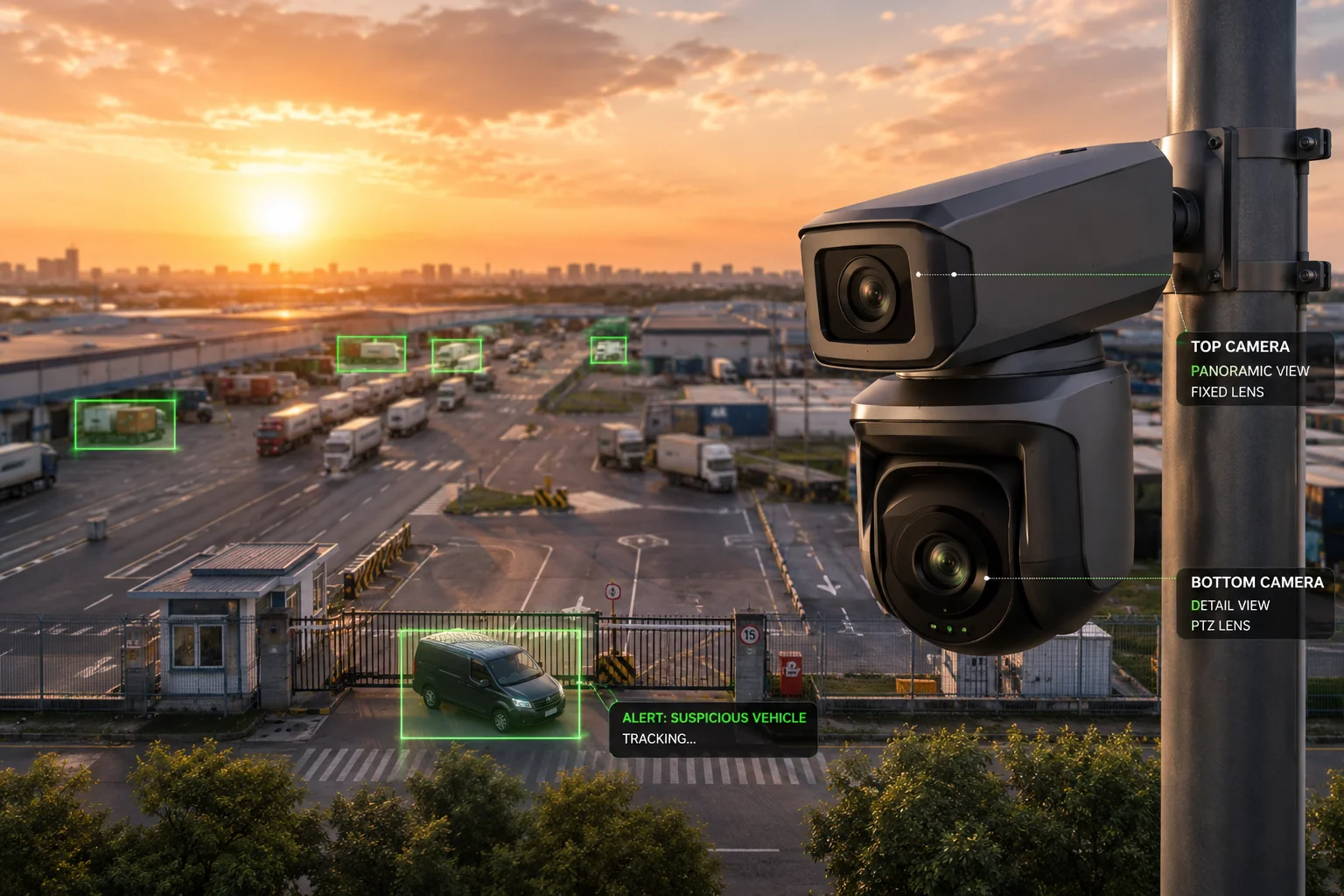
The system can track the top 5 suspicious targets while still holding a panoramic overview by using a dual-layer logic. The fixed view keeps the whole scene, and the AI scoring engine2 marks the top targets for PTZ focus without losing the global picture.
I use two levels of attention
I separate the scene into two jobs. The first job is global detection. The second job is focused tracking. The AI scans the whole frame first. Then it ranks targets by rules like motion speed3, target type, entry zone, and risk zone. After that, the PTZ can lock on to the highest priority target while the panoramic layer keeps watching the rest.
I keep the top 5 without losing context
I do not treat the top 5 as five equal targets. I treat them as five ranked items. The system always knows which one is first, second, and third. This matters because a camera with a PTZ head can only point one way at a time. If I ignore that, I lose time and miss motion. So I keep a stable overview feed and let the PTZ layer move only when the rules say it should move.
I rely on smart prioritization, not blind switching
I do not want the camera to jump around all the time. That creates weak tracking and poor evidence. I use filters first. For example, I can tell the system to give more weight to people, vehicles, or targets in a restricted area. I can also lower the score for small motion near the edge of the frame. This makes the top 5 list more useful, because the camera follows what matters most, not just what moves first.
| Priority Rule | What It Does | Why I Use It |
|---|---|---|
| Motion speed | Raises score for fast targets | It helps catch quick intrusion |
| Target type | Prefers person or vehicle | It fits site rules |
| Zone entry | Boosts targets in key areas | It protects gates and fences |
| Center distance | Favors targets near center | It reduces PTZ travel time |
I keep the panoramic view for safety and review
I always want the full scene to stay visible. The panoramic view helps me verify what happened before and after the PTZ moved. It also helps me check if another target entered the frame while the PTZ was busy. This is useful in yards, roads, farms, and large sites. In those places, one camera move should never destroy the full scene record. So I treat panoramic tracking as the base layer and PTZ tracking as the action layer.
How does the AI prioritize which target to track first based on custom security rules?
I care about this part a lot, because bad priority rules can make a strong camera act like a weak one. I want the AI to follow my site logic, not just generic motion.
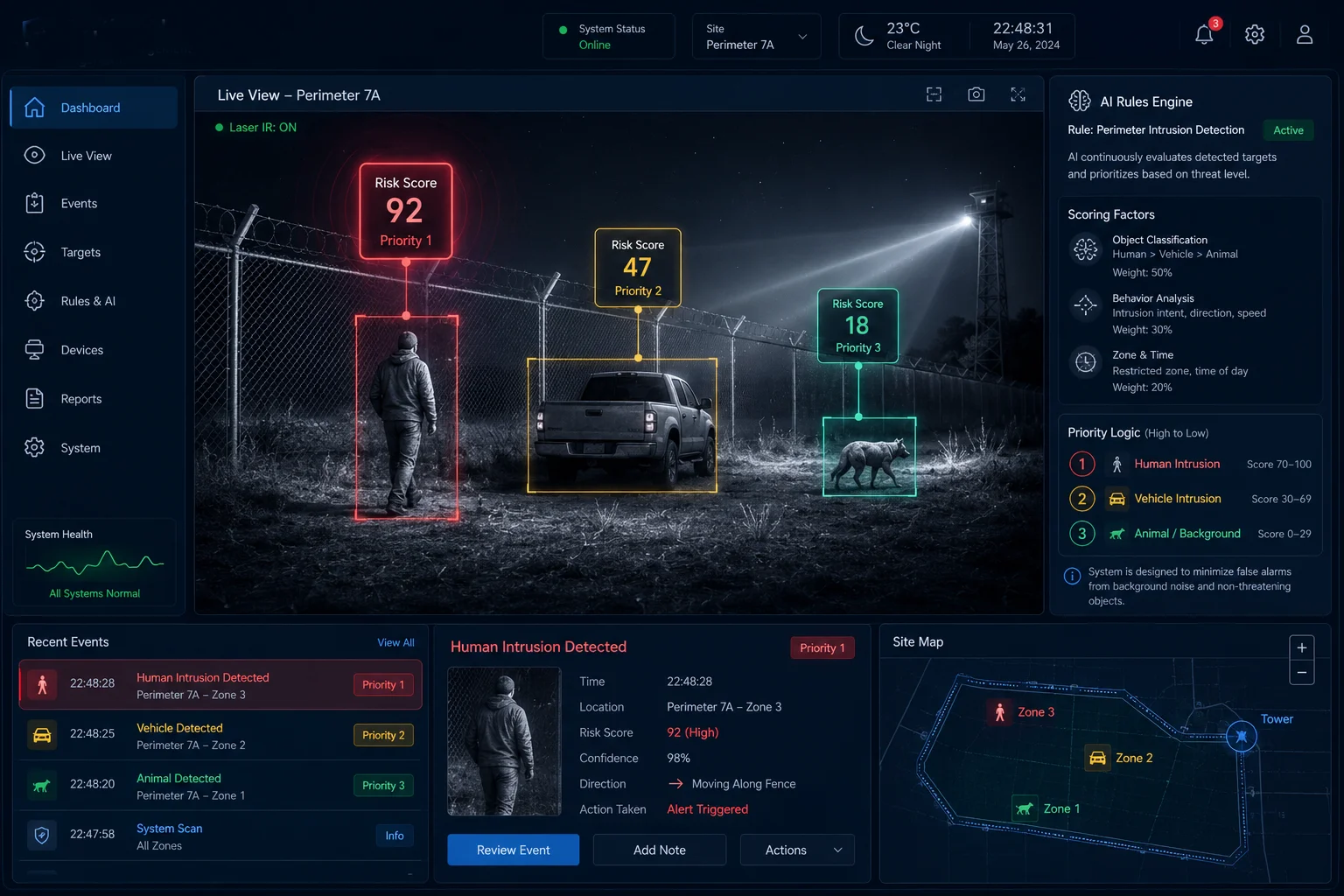
The AI prioritizes the first target by using a rule score. It checks target type, location, speed, direction, and alarm area, then selects the highest score as the first PTZ target. I can tune these rules for people, vehicles, fence lines, entrances, or any site-specific zone.
I define the rules before the camera starts
I never let the camera guess everything on its own. I set the rules first. If I run a warehouse, I may want people near loading docks to rank highest. If I run a solar farm, I may want vehicle movement near the perimeter to rank highest. The AI then uses those rules as the base score. This makes the system useful for real work, because every site has its own risk pattern.
I score each target in a simple way
I like a scoring method that is easy to read. The camera can assign points to each target. A person in a no-entry zone may get a high score. A vehicle moving toward a gate may get a high score too. A worker walking inside a safe area may get a lower score. This does not mean the lower score is ignored. It just means the PTZ gives first attention to the most important target.
I avoid false priority shifts
I also need to stop the system from changing targets too fast. If the AI keeps jumping from one object to another, the PTZ loses time and the video looks messy. So I use dwell time4, confidence checks, and zone rules. Dwell time keeps the camera on one target long enough to get useful detail. Confidence checks5 make sure the target is real and not noise. Zone rules help the AI stay focused on the area that matters.
| Rule Type | Example | Result |
|---|---|---|
| Zone rule | Fence breach area | Higher priority |
| Object rule | Person over background motion | Better target choice |
| Speed rule | Fast vehicle near gate | Faster PTZ lock |
| Confidence rule | Strong AI match score | Fewer wrong switches |
I keep the logic flexible for different sites
I do not use one fixed rule set for every project. A farm site needs a different setup from a city gate or a port yard. In one case, I may want the camera to follow people first. In another case, I may want it to follow trucks first. I like systems that let me change this without rewriting the whole project. That is where a strong OEM/ODM camera platform6 helps me, because I can adapt the priority engine to the job instead of forcing the job to fit the camera.
Will the PTZ perform a “Rapid-Fire” sequence of snapshots for multiple targets in a single area?
I have seen this request many times. People want fast evidence from many targets in one place. I understand why, because a busy scene can change in seconds.
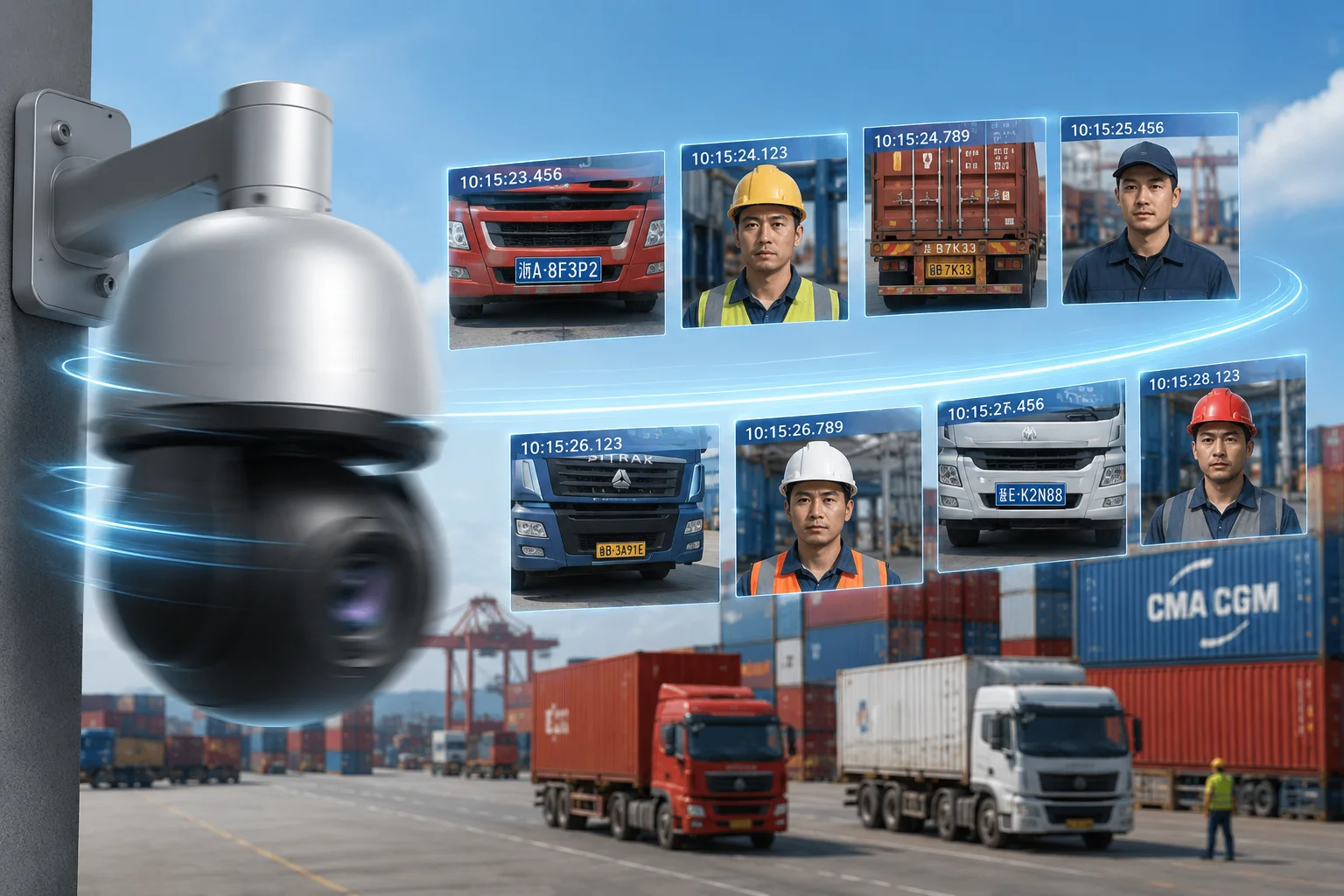
The PTZ can perform a rapid-fire snapshot sequence7 for multiple targets in the same area, but it does not do this in a random burst. It uses a queue, a motion path plan, and a timing rule so each target gets a clear shot without wasting PTZ movement.
I treat rapid-fire as controlled speed
I do not think of rapid-fire as “take as many photos as possible.” I think of it as “take the right photos fast.” The PTZ camera rotates, zooms, focuses, captures, and moves to the next target in a planned order. If the targets are close together, the system can handle several snapshots in a short time. If they are far apart, the PTZ needs more travel time, so the sequence slows down.
I use queue depth to protect speed and quality
The queue matters because the PTZ can only follow one direction at a time. If the queue is too long, the camera may become slow and less useful. If the queue is too short, it may miss targets that matter. I like a mid-range queue because it keeps the system busy without making it unstable. In practice, a queue of 8 to 16 targets often gives a good balance for industrial use.
I let the path logic reduce wasted movement
I do not want the PTZ to spin in a bad order. That wastes time and can make the camera miss the best shot. So I use path logic that reduces the angle between target moves. The idea is simple. If two targets are close, the camera should capture them one after the other. If one target is far away, the system should decide if it is still worth the move now or later. This is where a smart queue gives better results than a plain list.
I keep image quality in mind during fast capture
Rapid-fire only works if the camera still gets usable images. That means focus, zoom, and shutter timing must stay stable. A weak system may move fast but produce blurry shots. I do not accept that. I prefer a camera that moves fast and still gives sharp evidence. This is why optical zoom, predictive focus8, and stable mechanics all matter at the same time.
| Step | What Happens | Why It Matters |
|---|---|---|
| 1 | PTZ selects the next target | It follows the queue |
| 2 | Camera rotates to position | It reduces delay |
| 3 | Optical zoom adjusts | It captures detail |
| 4 | Focus locks | It keeps the image sharp |
| 5 | Snapshot saves | It records evidence |
I use rapid-fire most in dense scenes
I find rapid-fire most useful in gates, crossings, yard entrances, and crowded areas. These places often have many moving objects in one frame. A good PTZ system can turn that clutter into useful evidence. A weak system just creates noise. So I always ask a simple question: does the camera help me understand the scene faster, or does it just take more pictures? That question keeps me honest when I design the workflow.
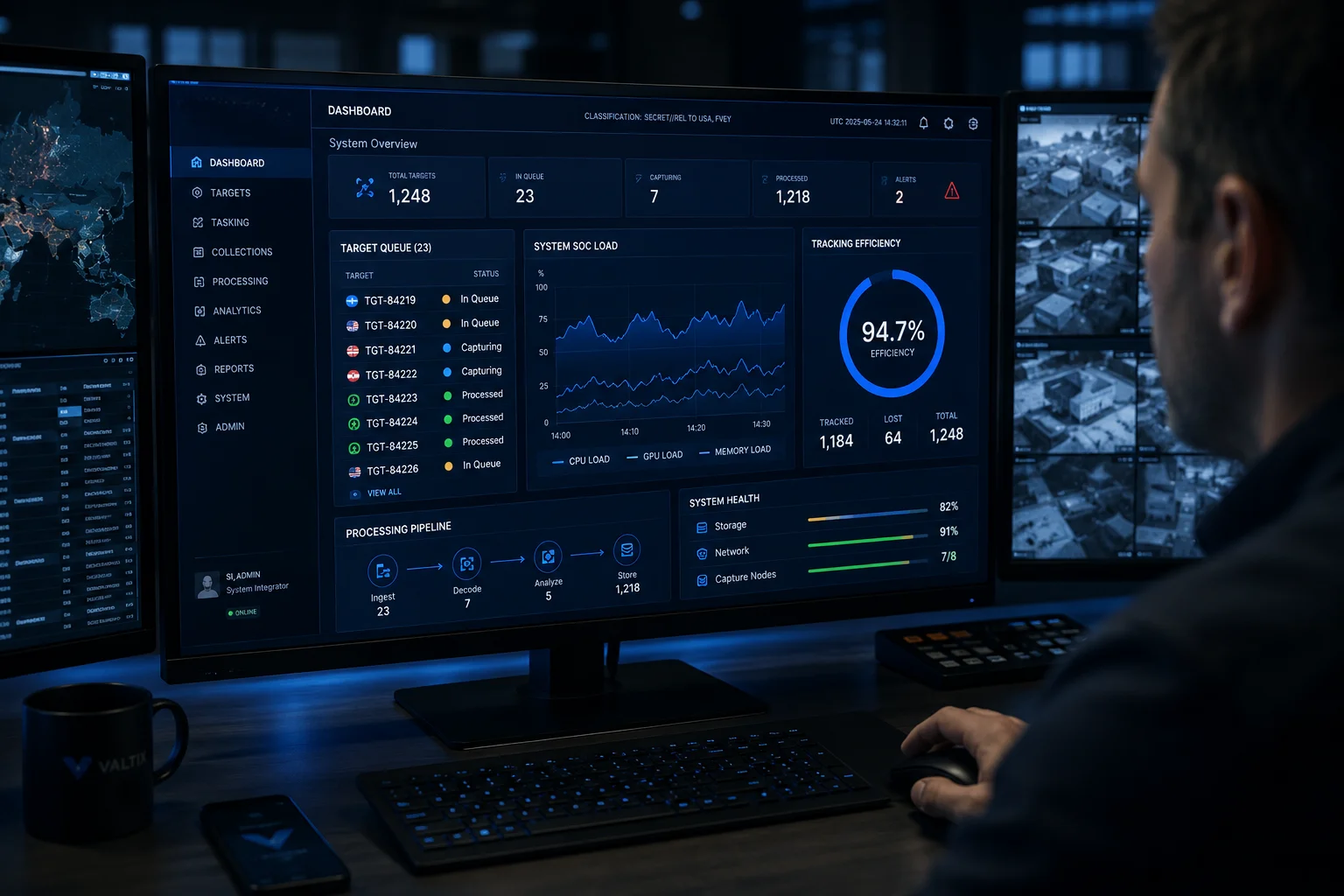
Can I see the target queue and its real-time processing status on my management dashboard?
I want this feature every time, because I do not like hidden camera logic. If I cannot see the queue, I cannot trust the workflow during a live event.
Yes, I can see the target queue and the real-time processing status on the management dashboard when the system is built with proper metadata output9. The dashboard can show queued targets, current PTZ focus, processed snapshots, skipped targets, and live status updates.
I need clear visibility, not just alerts
A good dashboard should show more than alarms. I want to know which target entered the queue, which one is active now, and which one was processed already. I also want to see why a target was skipped, if that happens. This helps me debug field issues fast. It also helps me explain the camera behavior to a customer who wants proof that the system made the right choice.
I like real-time status because it saves time
When the system is live, every second matters. If I can see the queue, I can tell if the PTZ is moving too slowly or if the AI is overloading the list. I can then adjust the rules, shorten the queue, or change the priority weights. This is much better than waiting for a user report after the event is over. Real-time status helps me fix the problem while it is still happening.
I want the dashboard to show practical data
I do not need decoration. I need useful data. I want to see target ID, type, score, time in queue, current PTZ angle, snapshot result, and upload state. If the system also stores event history, that is even better. I can then review patterns over time and improve the rule set. This is useful for security projects with many cameras and many events, because the dashboard becomes a real control tool instead of just a visual screen.
I use the dashboard to support remote operations
In many of my projects, the end user is not near the site. The site may be a farm, a construction yard, or a remote perimeter. So the dashboard must help my team work from far away. If the camera gets stuck, I need to know why. If the queue grows too long, I need to see it fast. If the target mix changes from people to vehicles, I need to see that shift and react. That is why I value strong dashboard integration. It turns PTZ tracking from a black box into a system I can manage with confidence.
Conclusion
I can handle many targets, keep the top risks in view, and show the queue in real time when the PTZ logic and AI rules are well tuned.
1. Understand how System-on-Chip performance affects target processing limits. ↩︎ 2. See how AI scoring engines rank targets for PTZ prioritisation. ↩︎ 3. Learn how motion speed is used in security camera tracking rules. ↩︎ 4. Discover why dwell time prevents unnecessary PTZ jumps. ↩︎ 5. Understand how confidence thresholds filter false alarms in AI tracking. ↩︎ 6. Explore how customisable camera platforms adapt priority rules to different sites. ↩︎ 7. Learn about burst mode or rapid snapshot sequences for multiple targets. ↩︎ 8. Understand how predictive focus maintains sharpness during fast PTZ moves. ↩︎ 9. Learn about ONVIF metadata standards for camera data integration. ↩︎