
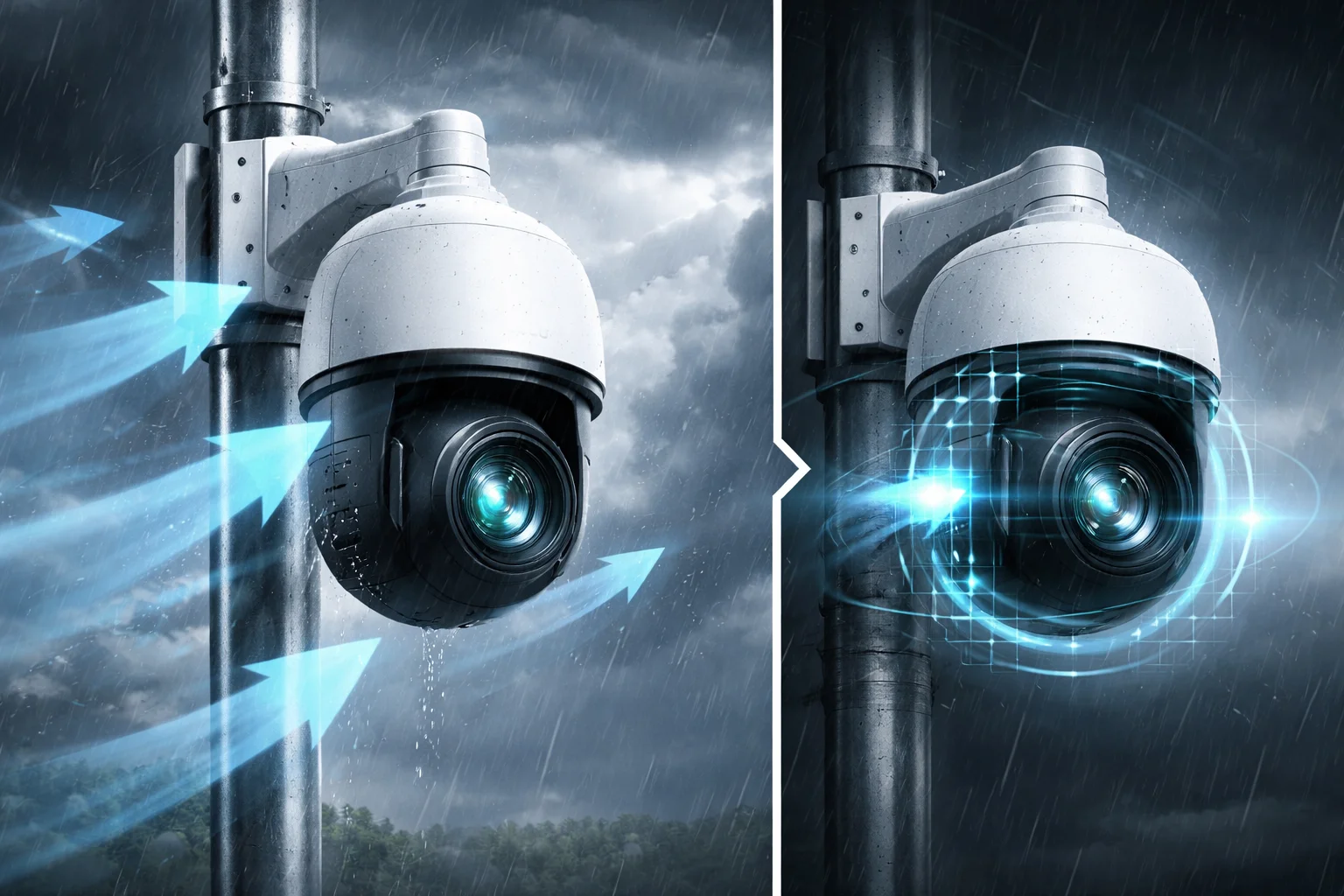
I have lost count of how many times a client called me saying their PTZ preset was pointing at a wall instead of the gate after a storm.
Auto-Flip and Auto-Correction are two hardware-level features inside PTZ cameras that fix wind-caused position drift. Auto-Correction uses internal sensors to find the true zero-point and pull the lens back to the right angle. Auto-Flip rotates the camera 180° in under a second when tracking a target past the mechanical limit. Together, they keep your presets accurate and your footage unbroken, even in high-wind environments.
 PTZ camera auto correction wind offset
Below, I will break down exactly how these features work at the hardware and software level. I will also explain what you should ask your supplier before you sign the purchase order. If you deploy cameras on tall poles, bridges, or open plains, this article is for you.
Table of Contents
Will My Camera Automatically Return to Its Exact Preset if Pushed by a Gust of Wind?
I once had a customer in Texas who set up 12 PTZ cameras along a fence line. After one windy week, every single preset was off by 5 to 15 degrees. He had to send a crew out to re-calibrate each one by hand.
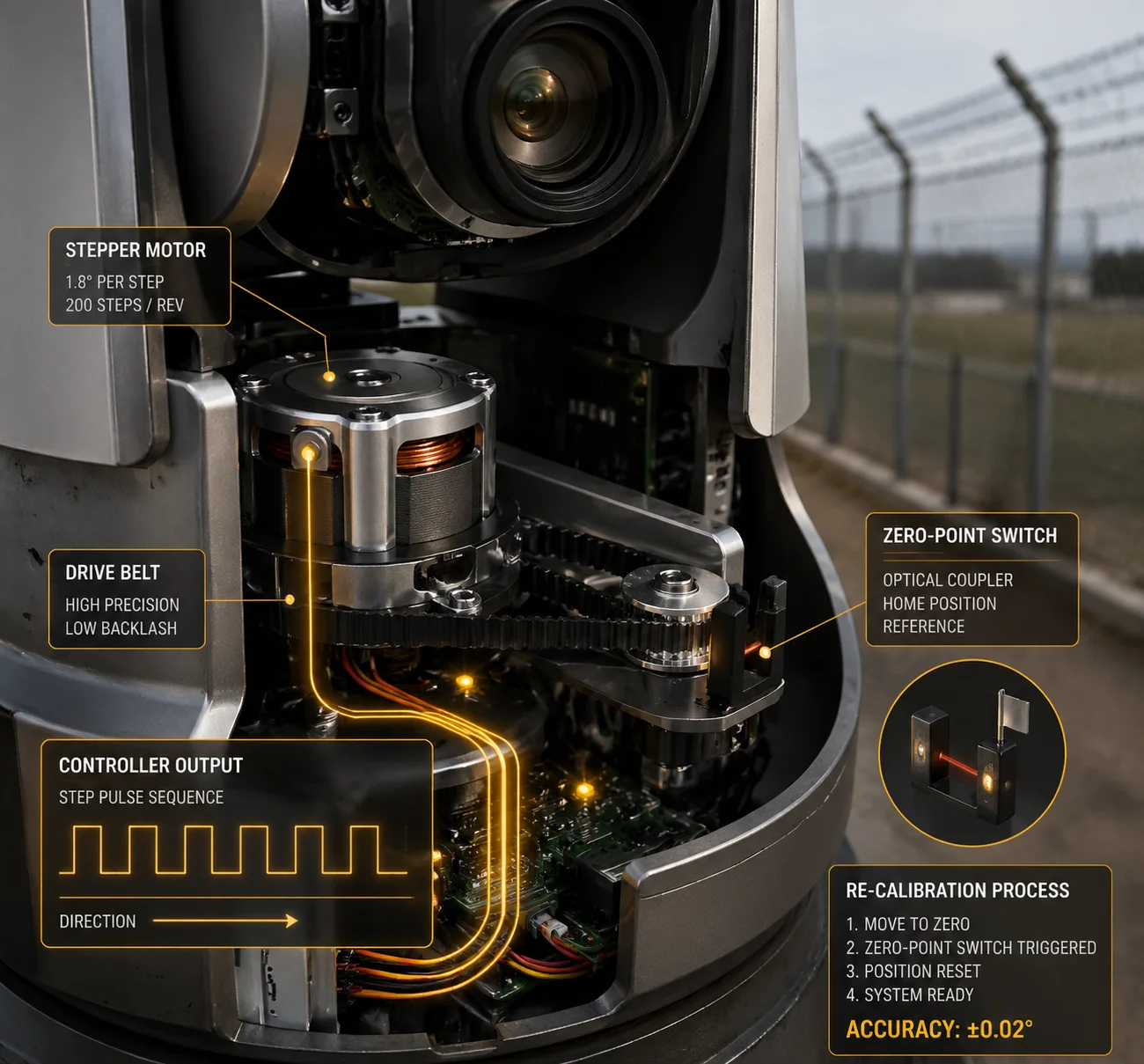
Yes, a PTZ camera with Auto-Correction will return to its exact preset after a wind gust. The system uses an internal reference sensor — usually an optical coupler or absolute encoder — to detect any position drift. It then recalculates the motor’s pulse count against the true zero-point and drives the lens back to the correct angle automatically.
 PTZ camera preset return after wind gust
How the “Return to Preset” Actually Works
The key thing to understand is that most PTZ cameras use stepper motors. A stepper motor moves in small, fixed steps. The controller counts these steps to know where the camera is pointing. This works fine under normal conditions. But when strong wind pushes the camera body, the motor shaft can slip. The controller still thinks it sent 1,000 steps. But the motor only moved 980. This gap is called “lost steps.”
Over time, lost steps add up. Your preset that was aimed at the front gate now points at the parking lot.
Auto-Correction fixes this by adding a physical reference point inside the camera. Here is how the two main approaches compare:
| Method | How It Works | Accuracy | Cost |
|---|---|---|---|
| Zero-Point Switch (Home Switch) | A small optical or mechanical switch at a fixed position on each axis. The camera rotates until it hits this switch, then resets its step count to zero. | Good (±0.1°) | Low |
| Absolute encoder 1 | A sensor attached to the motor shaft that always knows the exact angle, even after power loss. No need to “search” for zero. | Excellent (±0.01°) | Higher |
| Periodic Re-Calibration | The camera runs a scheduled “go home” routine — for example, once every 24 hours — to reset accumulated drift. | Good (depends on frequency) | Low (software-based) |
What Happens During a Correction Cycle
When the camera detects drift — or when a scheduled calibration triggers — it performs a quick sequence:
- The Pan motor rotates until it hits the zero-point switch.
- The controller resets the internal step counter to 0.
- The Tilt motor does the same thing on its axis.
- The controller now knows the true physical position.
- It compares this position against the stored preset coordinates.
- If there is a gap, it drives the motor to close that gap.
This whole process can happen in the background. On most of our Loyalty-Secu industrial PTZ units, the user does not even see it happen. The camera does it between patrol cycles or during low-activity hours.
The Bigger Problem: When the Entire Bracket Shifts
Here is something many people miss. Sometimes the camera itself is fine. The bracket or the pole twisted slightly in the wind. Now the camera’s internal zero-point is correct relative to its own body, but the body itself is rotated 3 degrees to the left relative to the ground.
In this case, simple zero-point recalibration will not help. You need a bulk preset correction algorithm. There is a well-documented Chinese patent (CN106289182A) that describes this exact method:
- Pick 3 known preset positions.
- Manually confirm how far each one has shifted.
- The system calculates the average offset across Pan, Tilt, and height.
- It applies that offset to all remaining presets at once.
This means if you have 255 presets, you do not need to fix all 255. You fix 3, and the software fixes the rest. For a project with dozens of cameras on tall poles in windy areas, this saves days of labor.
How Does the Internal “Closed-Loop” System Detect That the Motor Has Skipped a Step?
I used to think “closed-loop” was just a marketing term. Then I opened up a PTZ unit and saw the encoder board wired directly to the motor driver. That changed my understanding completely.
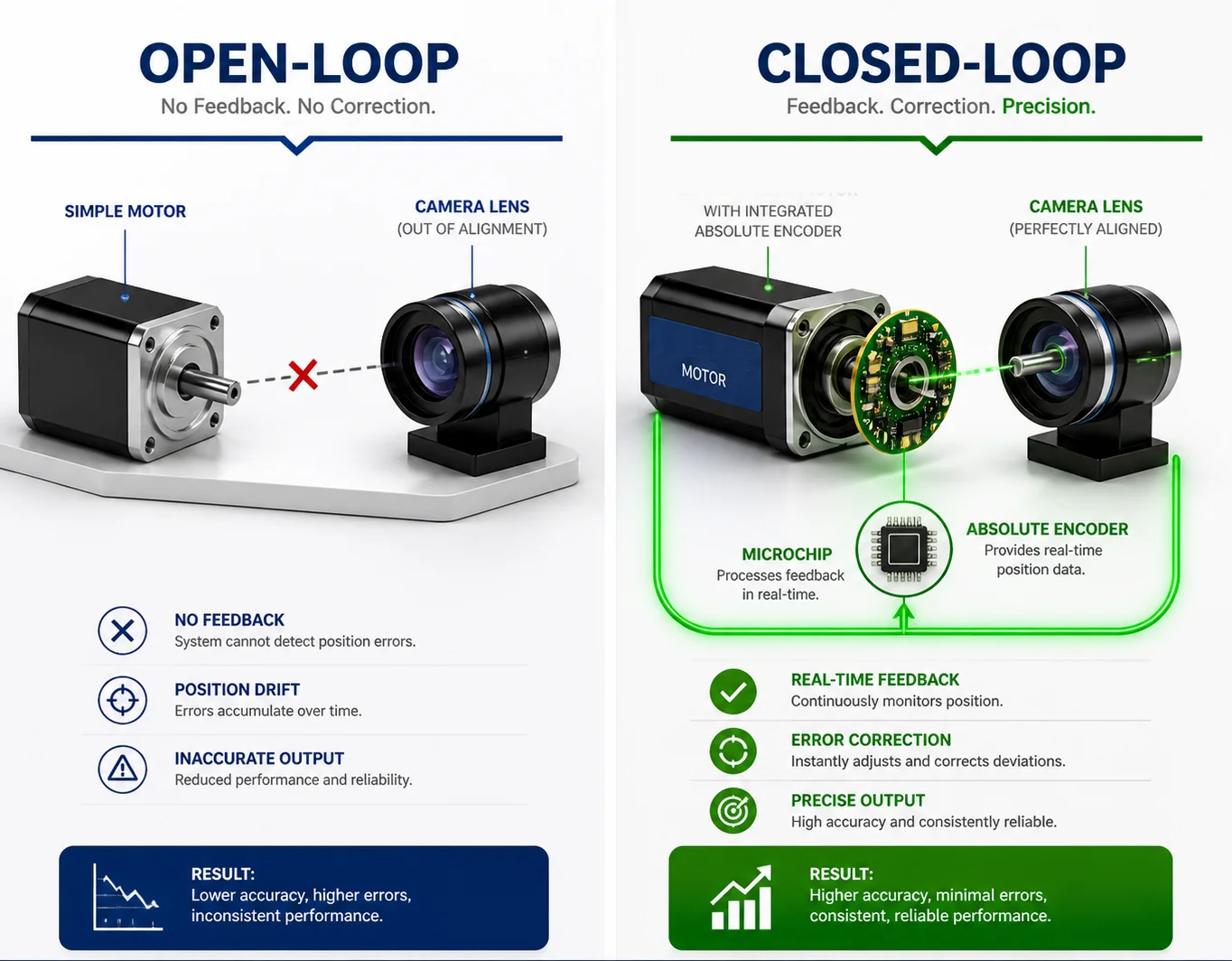
A closed-loop system detects skipped steps by constantly comparing the motor’s commanded position with the actual position reported by a sensor. If the motor was told to move 500 steps but the encoder only reads 490, the controller immediately sends 10 more steps to close the gap. This happens in real time, on every single movement.
 PTZ closed loop motor encoder system
Open-Loop vs. Closed-Loop: Why It Matters in Wind
Most budget PTZ cameras use an open-loop system. The controller sends a command: “Move 500 steps to the right.” It assumes the motor did exactly that. It never checks. This is like giving someone driving directions and hanging up the phone. You hope they arrived, but you do not know.
A closed-loop system is different. It has a sensor — usually an encoder — that reports back the actual position after every move. If the actual position does not match the commanded position, the controller corrects it immediately.
Here is a direct comparison:
| Feature | Open-Loop (Stepper Only) | Closed-Loop (Stepper + Encoder) |
|---|---|---|
| Knows actual position? | No | Yes |
| Detects lost steps? | No | Yes, in real time |
| Self-corrects after wind push? | No (needs manual recalibration) | Yes (automatic) |
| Cost | Lower | Higher |
| Best for | Indoor, low-wind environments | Outdoor, high-wind, high-pole deployments |
How the Encoder Talks to the Controller
Inside a closed-loop PTZ, the encoder is mounted on the same shaft as the stepper motor. Every time the motor turns, the encoder generates a signal. The controller reads this signal and compares it to the number of steps it sent.
There are two types of encoders commonly used:
Incremental Encoders
These count pulses from a starting point. They are cheaper but lose their position if power is cut. After a power cycle, the camera must do a full “home” routine to find zero again.
Absolute Encoders
These know their exact angle at all times, even after power loss. They are more expensive but eliminate the need for a home routine. For wind-prone deployments, absolute encoders are the better choice because power interruptions are common during storms.
What This Means for Your Project
If you are deploying PTZ cameras in open areas — plains, coastlines, rooftops, bridges — you should ask your supplier one direct question: “Is your PTZ motor system open-loop or closed-loop?”
If they say open-loop, ask how they handle lost steps. If the answer is “periodic home routine,” that is acceptable but not ideal. If the answer is “we don’t,” walk away.
At Loyalty-Secu, our industrial-grade PTZ units use closed-loop control with optical encoders on both the Pan and Tilt axes. This means every movement is verified. Every wind-induced shift is detected. And every correction happens without the operator lifting a finger.
Can I Receive an Alert if the Camera’s Physical Orientation Has Been Permanently Shifted?
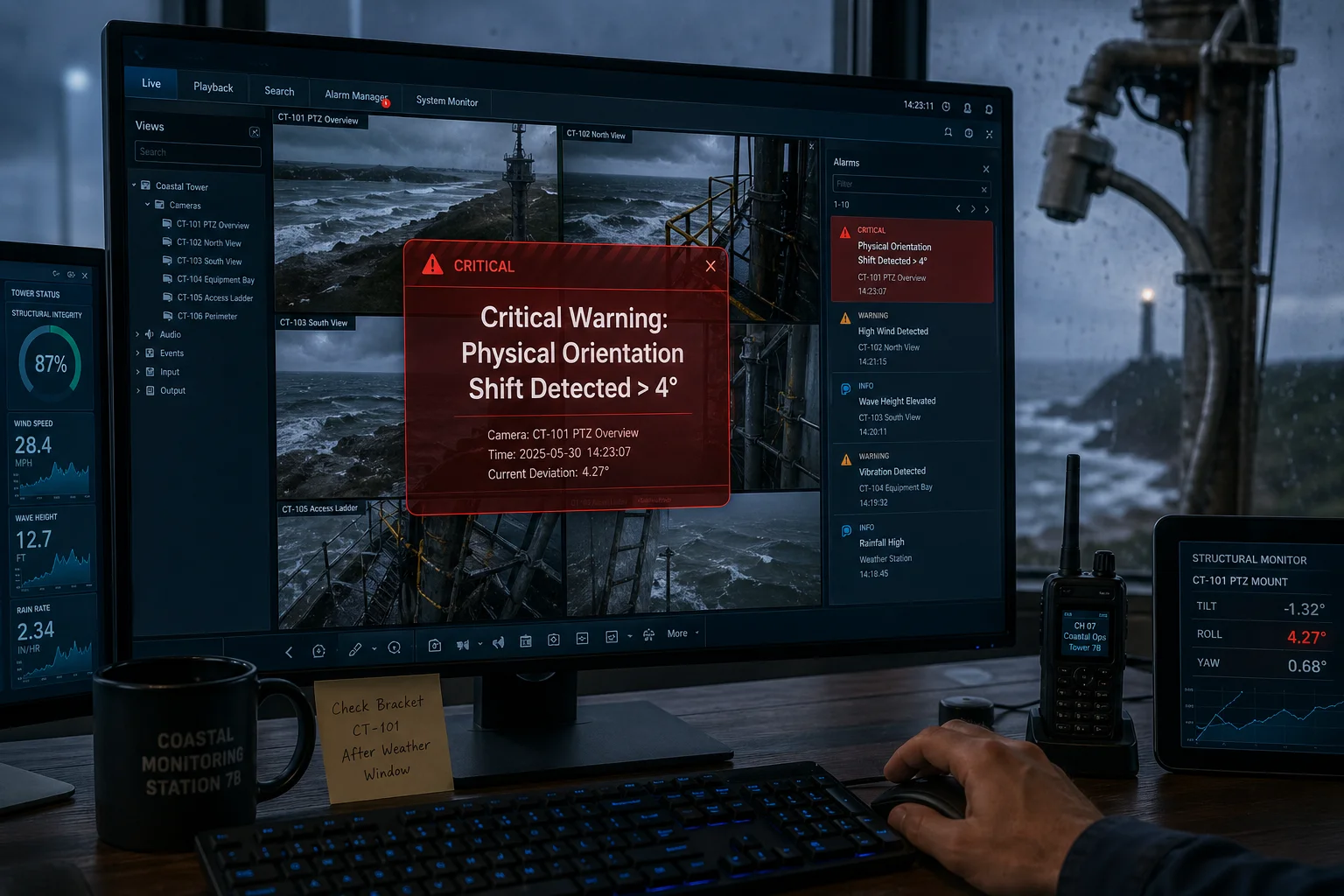
I had a project where a camera on a coastal tower was hit by a storm. The bracket bent 4 degrees. The camera kept running, but every preset was wrong. Nobody noticed for two weeks.
Yes, advanced PTZ systems can send an alert when they detect a permanent physical shift. The camera compares its current zero-point calibration data with the stored baseline. If the offset exceeds a set threshold — for example, more than 2 degrees — it triggers an alarm through the VMS or sends a notification via email or SNMP trap 2.**
 PTZ camera orientation shift alert notification
Why Permanent Shifts Are Different from Temporary Drift
Temporary drift is when wind pushes the camera during a gust, and the camera bounces back. The closed-loop system handles this in real time. No human action needed.
Permanent shift is different. It means something physical has changed. The bracket bent. A bolt loosened. The pole itself tilted. The camera’s internal motors are fine, but the entire “world coordinate system” of the camera has rotated relative to the ground.
How the Camera Knows Something Is Permanently Wrong
When the camera runs its periodic zero-point calibration, it compares the result to the last known baseline. If the offset is small (under 0.5°), it corrects silently. If the offset is large and consistent across multiple calibration cycles, the system flags it as a structural shift rather than a motor error.
Here is the typical alert logic:
| Condition | System Response |
|---|---|
| Offset < 0.5° after calibration | Auto-correct silently. No alert. |
| Offset 0.5° – 2° after calibration | Auto-correct and log a warning in the system event log. |
| Offset > 2° after calibration | Auto-correct, log an error, and send an alert to the operator via VMS/email/SNMP. |
| Offset > 5° or calibration fails | Lock the camera in safe mode and send a critical alert. Recommend physical inspection. |
What You Should Do When You Get This Alert
When you receive a “permanent shift” alert, do not just re-run the calibration and move on. The alert is telling you that something physical has changed. You need to:
- Check the bracket and mounting hardware for looseness or bending.
- Check the pole or wall for structural movement.
- If the bracket is bent but the camera is fine, straighten the bracket and then run the “one-click recalibration” from the web interface.
- If you cannot send a crew immediately, use the bulk preset correction method I described earlier. Pick 3 reference presets, confirm their new positions, and let the system shift all 255 presets to match.
Integrating Alerts with Your Existing VMS
If you use platforms like Milestone 3 or Blue Iris 4, make sure your PTZ supports ONVIF event notifications. This way, the “orientation shift” alert shows up in the same dashboard as your other alarms. You do not need a separate monitoring tool.
At Loyalty-Secu, our PTZ firmware exposes these events through standard ONVIF event channels.
Does the Correction Happen Instantly, or Is There a Delay in Re-Aligning the View?
I get this question a lot. People worry that the camera will “freeze” or “go blind” during the correction process.
The correction speed depends on the type of system. A closed-loop PTZ with an absolute encoder corrects in real time — there is essentially zero visible delay. An open-loop PTZ that relies on a periodic home routine may take 2 to 5 seconds to complete the recalibration, during which the camera briefly moves to the zero-point and back. In both cases, the delay is short enough that it does not create a meaningful gap in surveillance coverage.
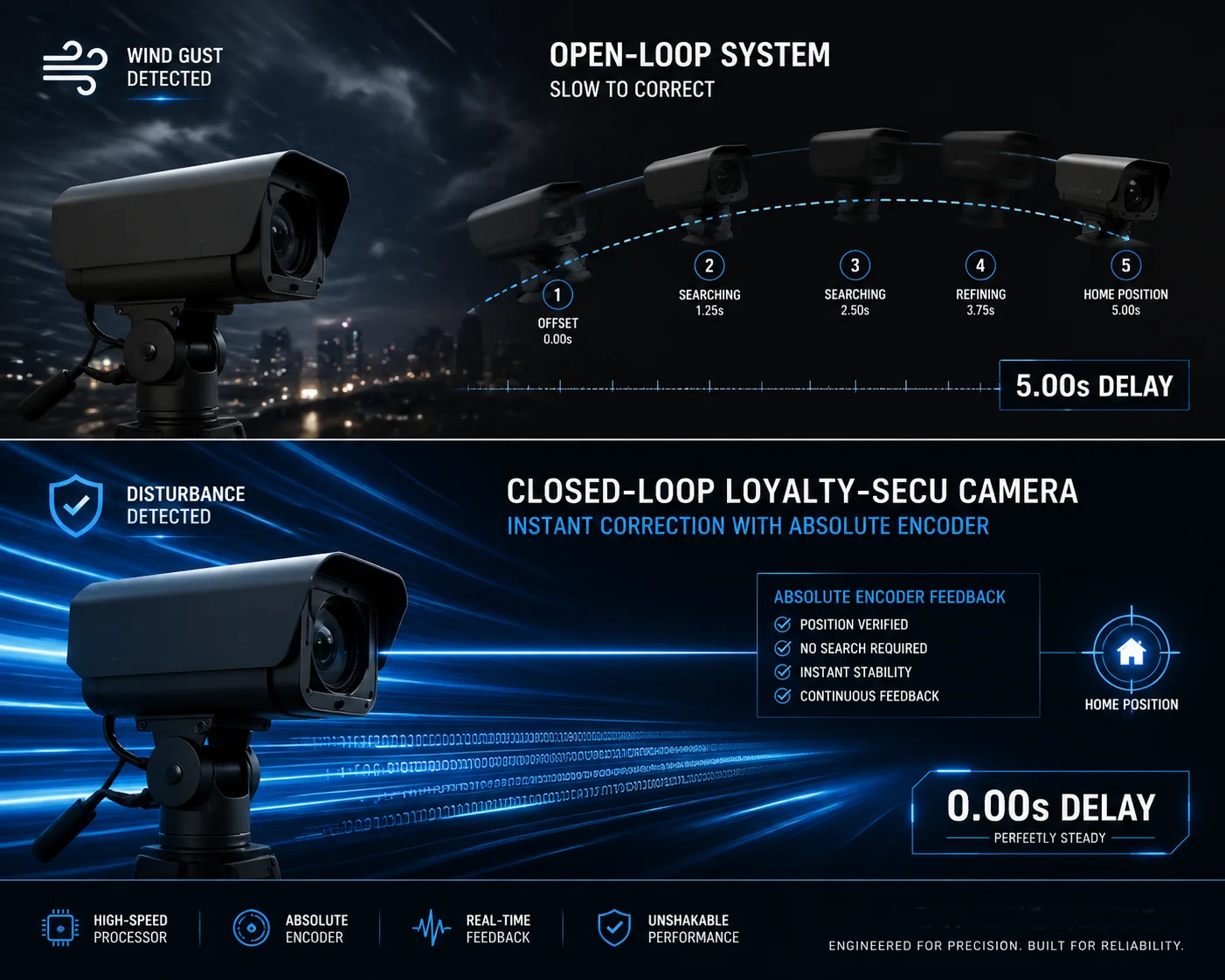 PTZ camera correction speed delay comparison
Real-Time Correction vs. Scheduled Correction
There are two correction modes, and they behave very differently.
Real-Time Correction (Closed-Loop)
In a closed-loop system, the encoder is always reporting the actual position. If wind pushes the camera 0.3° to the left, the controller sees the mismatch within milliseconds. It sends a correction command immediately. The motor nudges the camera back. The user sees nothing. There is no visible movement, no interruption, no blind spot.
This is the ideal setup for high-security environments where even a 1-second gap in coverage is unacceptable.
Scheduled Correction (Open-Loop with Home Routine)
In an open-loop system, the camera does not know it has drifted until it runs a calibration routine. This routine is usually scheduled — for example, once every 6 hours, or once a day at 3 AM. During the routine, the camera physically rotates to the zero-point switch, resets its counter, and then returns to its previous position.
This takes about 2 to 5 seconds. During those seconds, the camera is not watching its assigned area. For most commercial applications, this is acceptable. For critical infrastructure, it is not.
What About Auto-Flip Speed?
Auto-Flip is a separate feature, but speed matters here too. When a target moves directly underneath the camera, the camera hits its mechanical tilt limit. Auto-Flip kicks in and rotates the Pan axis 180° while flipping the image digitally.
On our Loyalty-Secu PTZ units, this entire flip takes less than 1 second. The image stays right-side-up throughout. The target stays in frame. There is no “dead zone” where the camera loses sight of the subject.
How to Test This Before You Buy
Ask your supplier to do a live demo. Have them set a preset, then physically push the camera housing gently to simulate wind. Watch how long it takes for the camera to return to the preset. If it takes more than 3 seconds, or if it does not return at all, that tells you everything you need to know about the quality of their correction system.
You can also ask for the camera’s correction response time specification in writing. If the supplier cannot provide this number, they probably have not tested it. And if they have not tested it, you should not trust it in the field.
At Loyalty-Secu, we run automated stress tests on every PTZ unit before it ships. We simulate wind loads and measure the correction response time. We include this data in our test reports.
Conclusion
Auto-Correction and Auto-Flip are not luxury features. They are essential for any PTZ deployed in wind-prone environments. Ask your supplier for closed-loop control, absolute encoders, and bulk preset correction — or your presets will drift.
1. Absolute rotary encoder operation for PTZ position feedback. ↩︎ 2. SNMP trap configuration for PTZ alarm notifications. ↩︎ 3. Milestone ONVIF event subscription for camera alerts. ↩︎ 4. Blue Iris PTZ alarm management and event handling. ↩︎ 5. Stepper motor lost step detection using encoder feedback. ↩︎ 6. Zero-point optical switch for PTZ home calibration. ↩︎ 7. CN106289182A patent for bulk preset correction method. ↩︎ 8. Closed-loop vs open-loop motor control comparison. ↩︎ 9. ONVIF PTZ service for position monitoring and alerts. ↩︎ 10. Auto-flip mechanical tilt limit bypass for continuous tracking. ↩︎