
I often hear this question from integrators, and I know why. In the field, a target rarely stays fully visible. Fences, bushes, shadows, and poles get in the way fast.
AI1 can still identify many targets when more than 50% is hidden, but the result depends on the model, the scene, and how much key body detail is still visible.
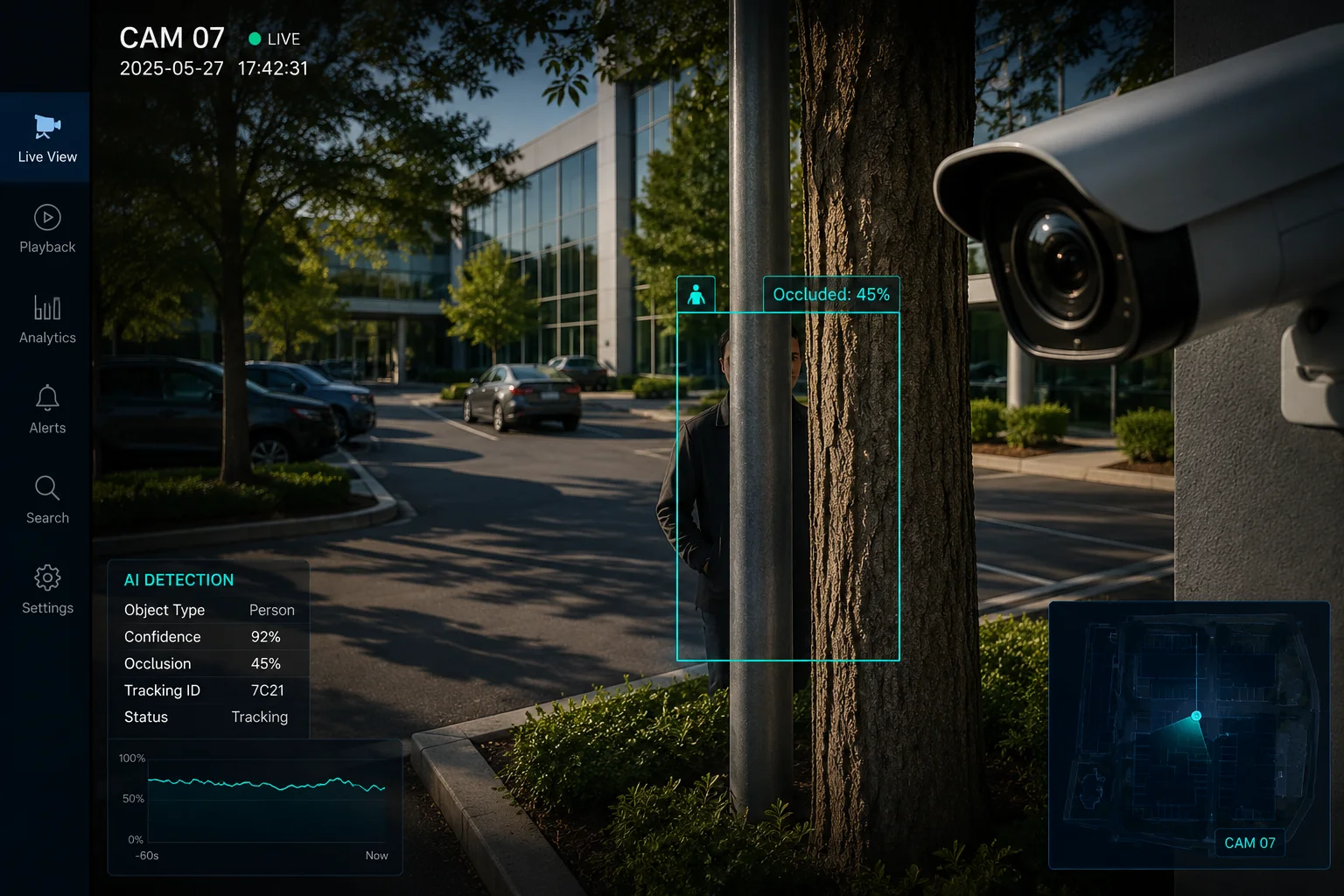 AI target occlusion detection in security camera
When I work with B2B buyers, I never treat occlusion as a simple yes or no problem. I look at it as a mix of detection, tracking, and prediction. That is where the real value starts.
Table of Contents
Will the tracking stay locked if a person walks behind a fence or a thin row of bushes?
I have seen this problem many times in outdoor sites, and I know how annoying it can be. A person looks clear one moment, then a fence breaks the track the next.
Yes, the track can stay locked for a short time if the system has strong tracking logic2, but the result depends on motion continuity, scene clutter, and how long the target stays hidden.
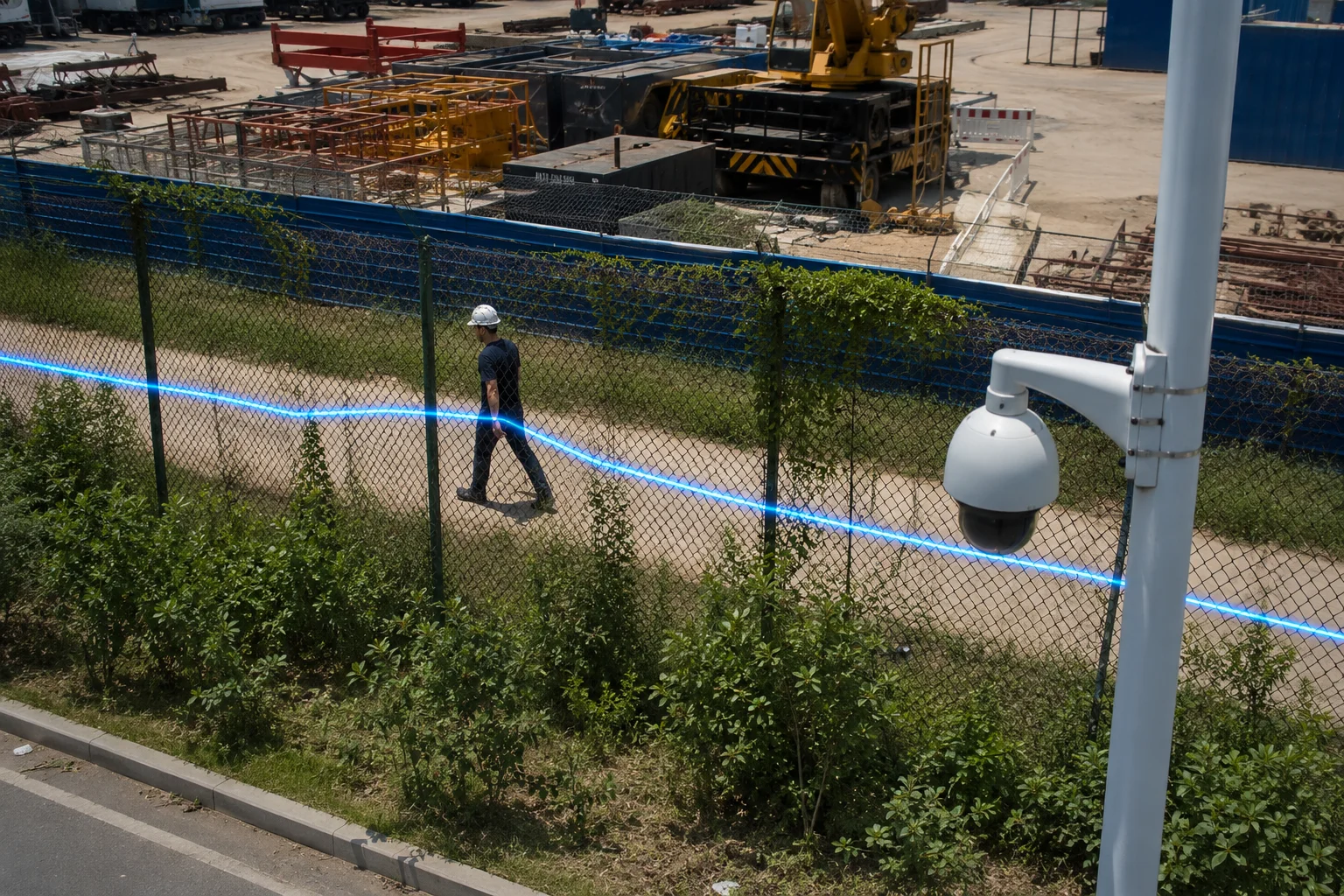 AI tracking behind fence and bushes
Why a fence does not always break tracking
I use this case to explain the gap between detection and tracking. Detection finds the person. Tracking follows the person over time. When a thin fence or bushes cover part of the body, the system may still keep the same ID if enough visual clues remain. A human shape, walking speed, and path direction all help. If the target is only partly hidden for one or two frames, a strong tracker can usually hold the lock. If the person moves behind dense plants or a wide fence for too long, the confidence drops. Then the system may lose the target or create a new ID when the person comes back. I have found that the best results come from cameras with good angle control and clean background views. If I install the camera too low, the fence line covers too much of the body. If I place it too high, I may lose face and shoulder detail. So I always balance view angle, distance, and scene layout before I promise stable tracking. For buyers like David, this matters because a lost track can mean a missed event, and that can cost real money in a field job or a remote site.
Common outcomes in partial occlusion
| Scene condition | Tracking result | What I expect |
|---|---|---|
| Thin fence for 1-2 seconds | Usually stays locked | Good continuity |
| Bushes cover legs only | Often stays locked | Stable ID if upper body is visible |
| Dense bushes cover torso | May drop soon | Higher chance of ID loss |
| Long occlusion behind a wall — Often re-acquires later — Needs Re-ID6 support |
What I check in the real world
I do not trust a spec sheet alone. I test the actual path of the person. I watch how long the person stays hidden. I also check if the camera keeps the body center in frame. A good PTZ system5 can help because it can follow motion and zoom in again after the target comes back. In many cases, the camera itself is not the weak point. The weak point is the software rule that decides when to keep the track and when to drop it. If that rule is too strict, the system loses the person too early. If it is too loose, it may confuse one person with another. I usually tell customers that tracking behind a fence is possible, but it is never magic. It works best when the camera sees enough motion history and enough body shape before the obstruction starts.
How does the “Part-based” recognition algorithm handle partially hidden targets?
I like this question because it gets to the heart of modern AI vision. A good model does not need to see everything. It needs to see the right parts.
A part-based algorithm3 splits the target into visible body parts, and it can still make a match from those parts when the full body is not visible.
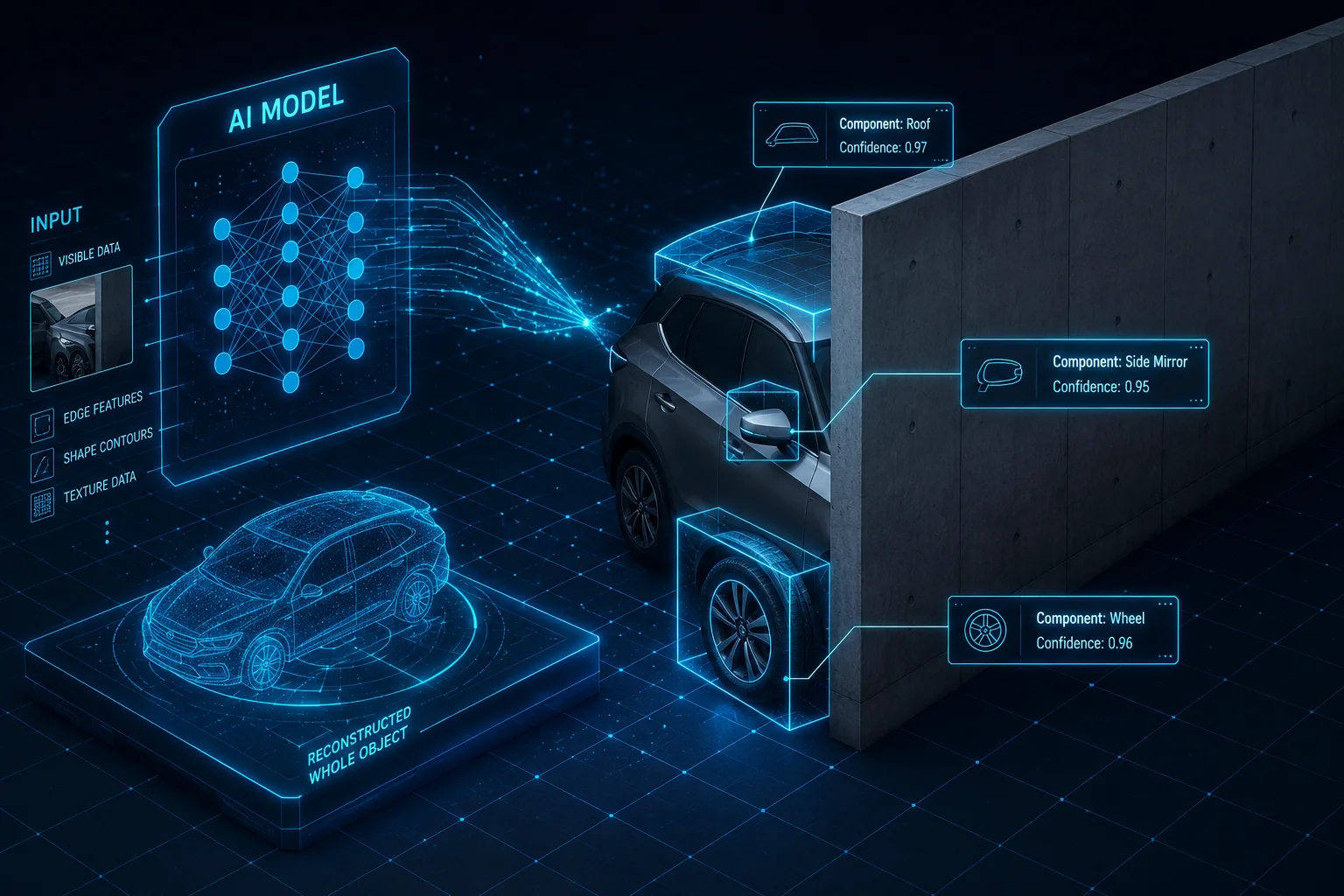 Part-based recognition for partially hidden targets
Why parts matter more than the full shape
I think about old systems as shape matchers. They wanted the whole person or the whole vehicle in view. That is fragile. A part-based model works in a smarter way. It looks at the head, shoulders, torso, legs, windows, roof lines, or wheel area. If some parts are blocked, the model can still use the parts it can see. This is very useful in outdoor sites with trees, poles, and moving shadows. For example, if I can see the upper body, the model may still say, “this is a person,” because human body proportions are still clear. If I can see the front of a car and part of the roof, the model may still know that it is a vehicle. This method is much better than a simple pixel match. It also helps with crowded scenes, where one target overlaps another. But I always remind customers that part-based recognition is not perfect. If the visible parts are too small, too blurred, or too similar to the background, the model will still struggle. In my work, the best systems use part-based logic together with motion cues and frame history. That combination gives the model more context. It does not just see one frozen frame. It sees a moving story.
What the model usually looks at
| Visible part | Useful for person ID | Useful for vehicle ID |
|---|---|---|
| Head and shoulders | High | Low |
| Torso shape | High | Low |
| Legs and walking motion | Medium | Low |
| Front grille or windshield | Low | High |
| Roof line or side panel | Low | High |
Where part-based logic helps most
I see the biggest gain in scenes with repeated partial cover. A farm gate, a roadside bush, or a site fence can block the same target again and again. A part-based model learns that the visible pieces still belong together. It also helps when the camera angle is not ideal. Many real deployments do not have perfect views. The camera may face a road, a gate, or a loading dock from the side. In those cases, the full object shape is often missing. A part-based model gives me a better chance to keep a useful detection. For buyers who need stable output in a VMS7 like Milestone8 or Blue Iris9, this matters because a better identity match means fewer false alerts and fewer manual checks.
Where it still fails
I do not want to overstate it. If a target is almost fully hidden, the model can guess wrong. A jacket in the wind can look like a body. A branch can look like an arm. A partial vehicle can look like a trailer or a box truck when it is not. This is why I test in the real site, not only in a lab. The algorithm gets better when the training data includes the same kind of fences, plants, and lighting that the customer has on site. That is one reason why OEM and ODM tuning matters. The model should not only be smart. It should be tuned for the exact scene.
Does the AI use temporal prediction to guess the target’s path while it is fully occluded?
I rely on this idea all the time in outdoor tracking. If the target disappears for a moment, the system should not act blind.
Yes, many AI tracking systems use temporal prediction4, so they estimate where the target should reappear based on speed, direction, and recent motion history.
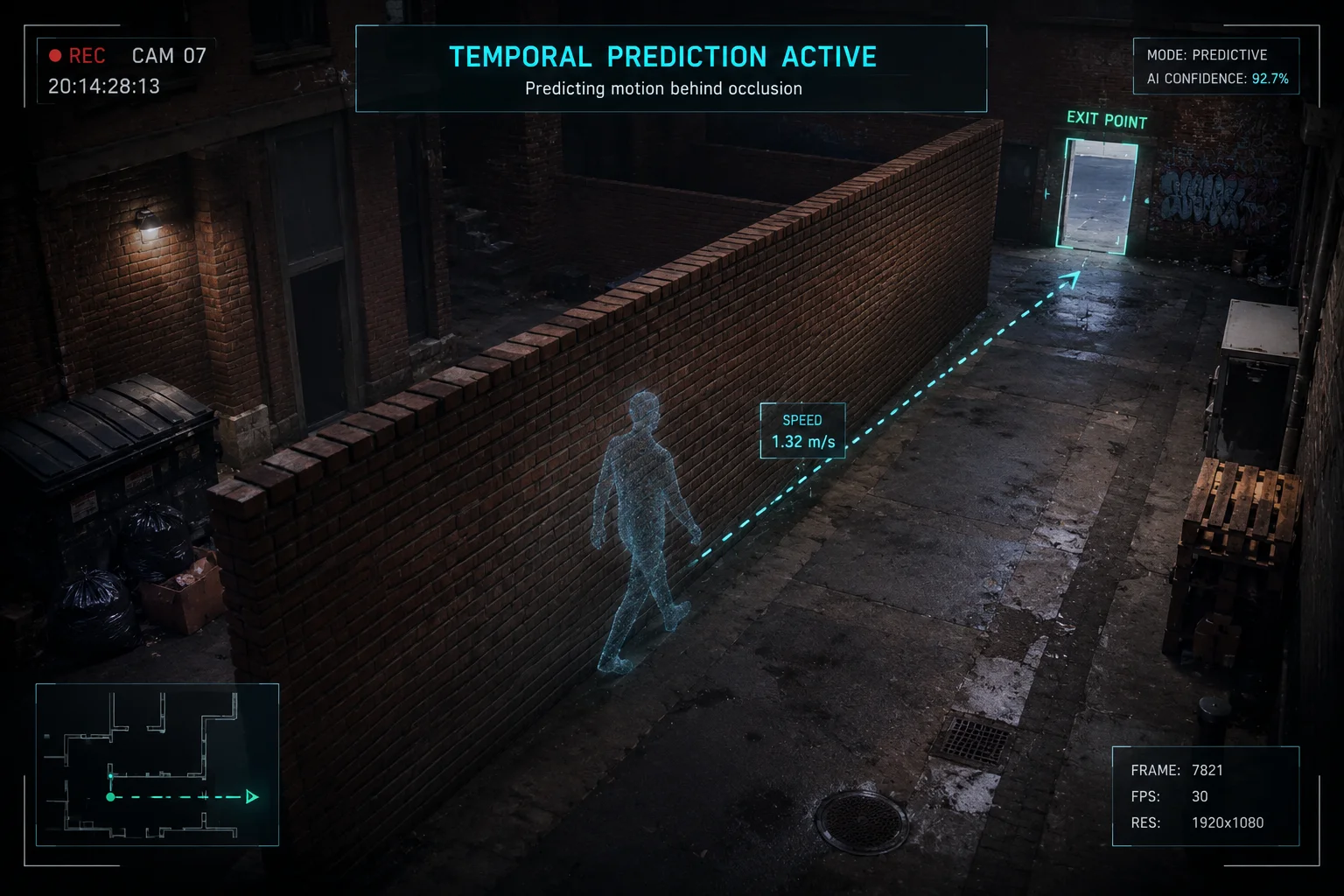 Temporal prediction during full occlusion
How prediction works in practice
I think of temporal prediction as a short-term guess engine. The system watches where the target was in the last few frames. It learns the moving direction and the speed. Then, when the target goes behind a pole, a wall, or a thick tree, the system keeps drawing an expected path. This does not mean the AI sees through the object. It means the AI makes a best guess for a short time. If the person usually walks at a steady speed, the prediction works well. If the target turns suddenly, stops, or changes direction, the guess becomes weaker. I find this especially useful in PTZ tracking, because the camera can keep moving while the target is hidden. That helps the system recover faster when the target appears again. I also use this logic to explain why a camera may still follow a person for a second or two after the person leaves clear view. It is not a mistake. It is a planned behavior. But the prediction window should not be too long. If it is too long, the camera may keep following empty space and miss a new target. The best systems keep the window short and use re-detection after reappearance.
Short-term prediction versus full recovery
| Situation | Prediction value | Risk |
|---|---|---|
| Hidden for less than 1 second | Very useful | Low |
| Hidden for 1-3 seconds | Useful | Medium |
| Hidden for more than 3 seconds | Weak | Higher |
| Target changes direction behind cover | Less useful | Higher |
| Target returns near expected path | Strong again | Low |
Why this matters for outdoor jobs
I work with customers who use cameras on farms, gates, road edges, and remote sites. These places have many short occlusions. A worker may pass behind a fence post. A truck may disappear behind a tree. A visitor may cross a hedge line. Temporal prediction helps keep the event smooth. It reduces track loss and reduces alert spam. It also helps the PTZ camera stay on the right subject instead of jumping to the background. For David and other technical buyers, this is a big deal because time lost to false track drop means more support calls and more site visits. In remote places, that cost is often bigger than the hardware itself.
What makes prediction stronger
I have found three things that help most. First, the target needs clear motion before the occlusion. Second, the background should not be too noisy. Third, the tracker needs a good re-ID feature when the target comes back. When these three things work together, the system can handle many real-world cases very well. When one of them fails, the system becomes much less stable. That is why I always test the full flow, not only the detection score.
Can I adjust the “Occlusion Tolerance” threshold to prevent losing the track too early?
I get this request a lot from integrators who want more control. They want the camera to hold the target longer, but they also do not want random false locks.
Yes, if the software offers an occlusion tolerance setting, you can often raise it to keep tracking longer, but I always tune it carefully because a higher value can also increase false positives.
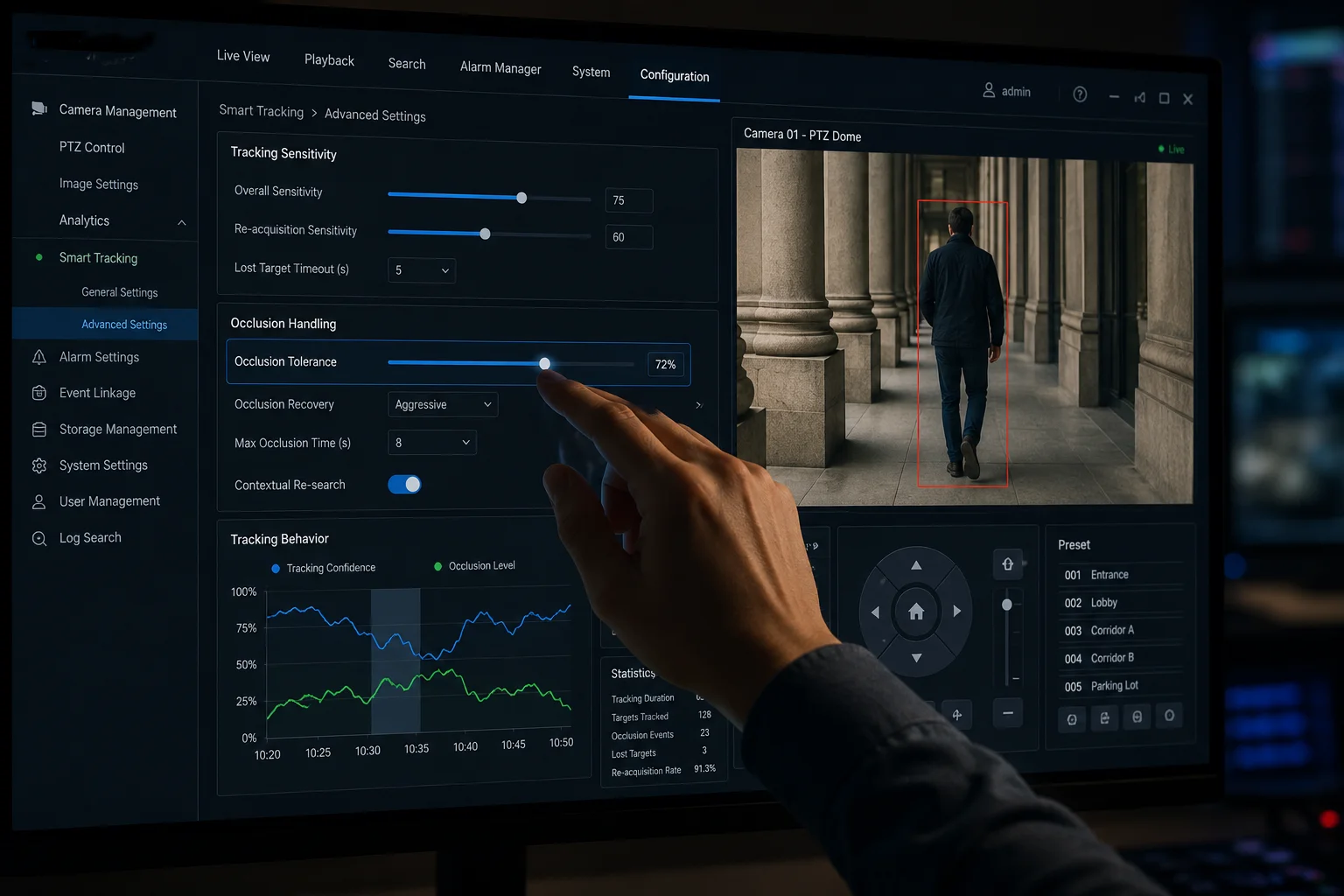 Occlusion tolerance threshold adjustment
Why threshold tuning is not one-size-fits-all
I treat threshold tuning like balancing on a narrow line. If I set the tolerance too low, the system drops the target as soon as part of the body is blocked. That creates broken tracks and missed alarms. If I set it too high, the system may keep a bad track alive for too long. Then it can follow a wrong object, and that creates confusion in the VMS. The right value depends on the site. A farm with open space may need a different setting from a busy gate with lots of people and vehicles. A site with thin bushes may need a different setting from a warehouse yard with many poles. I usually start with test clips from the real environment. Then I adjust the tolerance step by step. I watch two things at the same time: how often the system loses the real target, and how often it keeps a false one. That gives me a clean view of the trade-off. Good tuning should reduce early drop without making the system lazy. It should help the AI stay honest, not just sticky.
A simple tuning guide
| Tuning choice | Effect on tracking | Risk level |
|---|---|---|
| Lower tolerance | Drops target faster | Missed tracks |
| Medium tolerance | Balanced behavior | Best for many sites |
| Higher tolerance | Holds target longer | More false locks |
| Very high tolerance | Very sticky tracking | Wrong target risk |
What I recommend before changing the threshold
I usually tell customers to check the camera setup first. If the angle is poor, no threshold can fix that. If the target is too small in frame, the model has too little detail. If the lighting is weak, the AI may lose the body outline too early. So I fix the scene before I change the software. Then I review the occlusion setting. I also check whether the system supports multi-frame verification10, because that can help a lot. If the AI can confirm a target across several frames, it can survive short cover without dropping too fast. For buyers who care about stability and low service cost, this kind of tuning is often the difference between a good deployment and a support headache.
Conclusion
I can identify and track many targets through heavy occlusion, but the best result depends on part-based vision, motion prediction, and careful threshold tuning.
1. Learn the basics of artificial intelligence and its role in computer vision. ↩︎ 2. Explore different approaches to video tracking and how logic maintains target identity over time. ↩︎ 3. Learn how part-based models detect objects by identifying and matching visible components. ↩︎ 4. Understand how temporal prediction (often via Kalman filters) estimates future target positions based on motion history. ↩︎ 5. Learn about pan-tilt-zoom cameras and how they can be used for active tracking. ↩︎ 6. Discover how re-identification algorithms reassign identity to a target after re-appearance. ↩︎ 7. Understand video management systems and their role in integrating security camera feeds. ↩︎ 8. Visit Milestone Systems, a leading provider of open-platform VMS solutions. ↩︎ 9. Learn about Blue Iris, a popular video surveillance software for IP cameras. ↩︎ 10. Learn how multi-frame verification improves accuracy by confirming detections across consecutive frames. ↩︎