
I have seen too many 4G PTZ cameras freeze at the worst possible moment — right when the client needs live footage the most.
VBR (Variable Bitrate)1 logic in a 4G PTZ camera does not just adjust bitrate based on scene complexity. It runs a real-time feedback loop that monitors network health — including packet loss, RTT, and signal strength — and actively throttles the encoder output so the video stream never exceeds the available 4G uplink bandwidth. This is how it prevents lag.
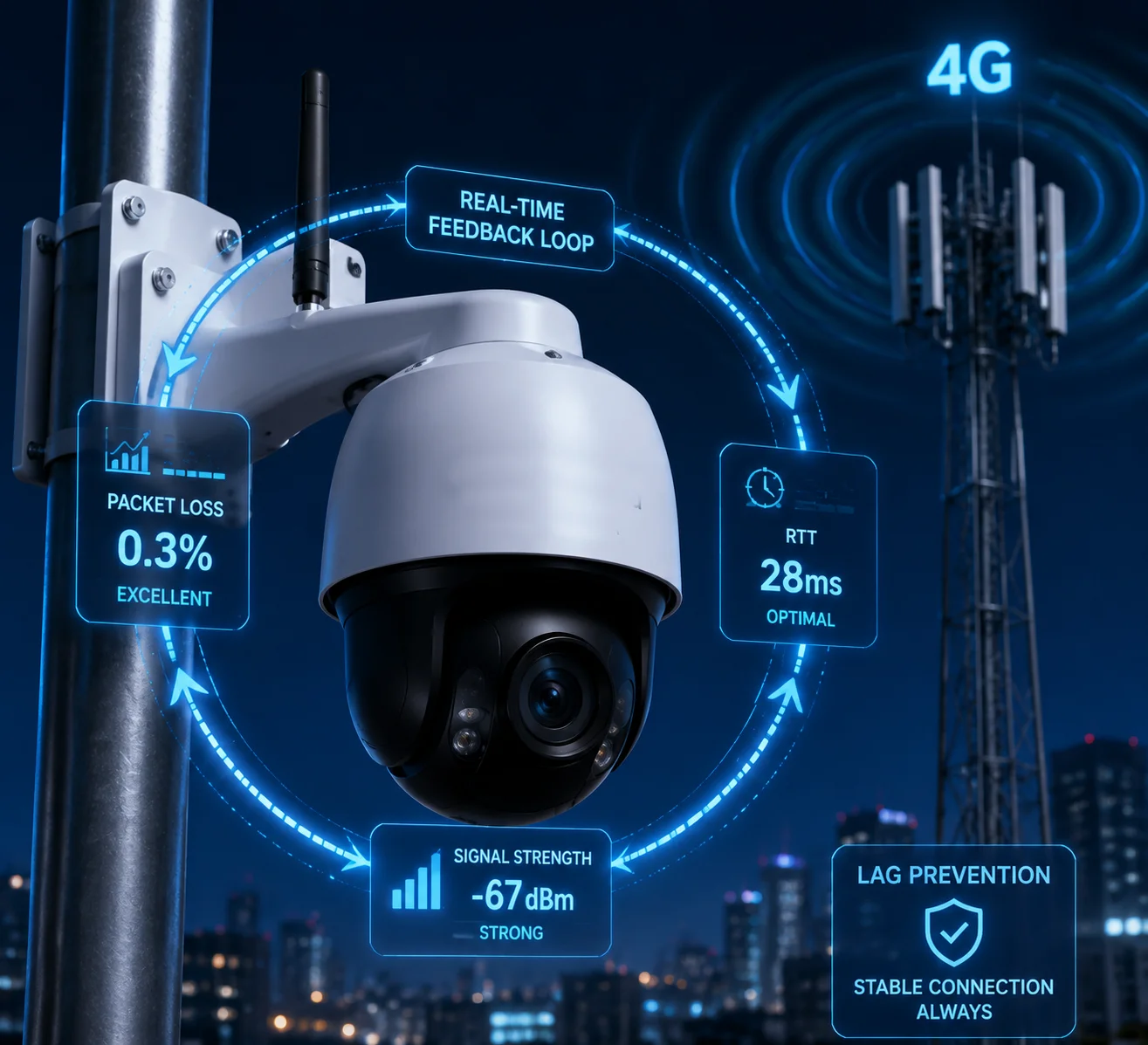
Below, I break down the four most common questions I get from system integrators about VBR behavior over LTE networks. Each answer goes deep into the engineering logic so you can evaluate whether a supplier’s claims are real or just marketing fluff.
Table of Contents
Can the VBR Drop the Quality Instantly to Maintain a Fluid 30fps Stream in Weak Signal?
Every integrator I work with asks the same thing: “Will the camera freeze when the signal drops to two bars on a remote job site?”
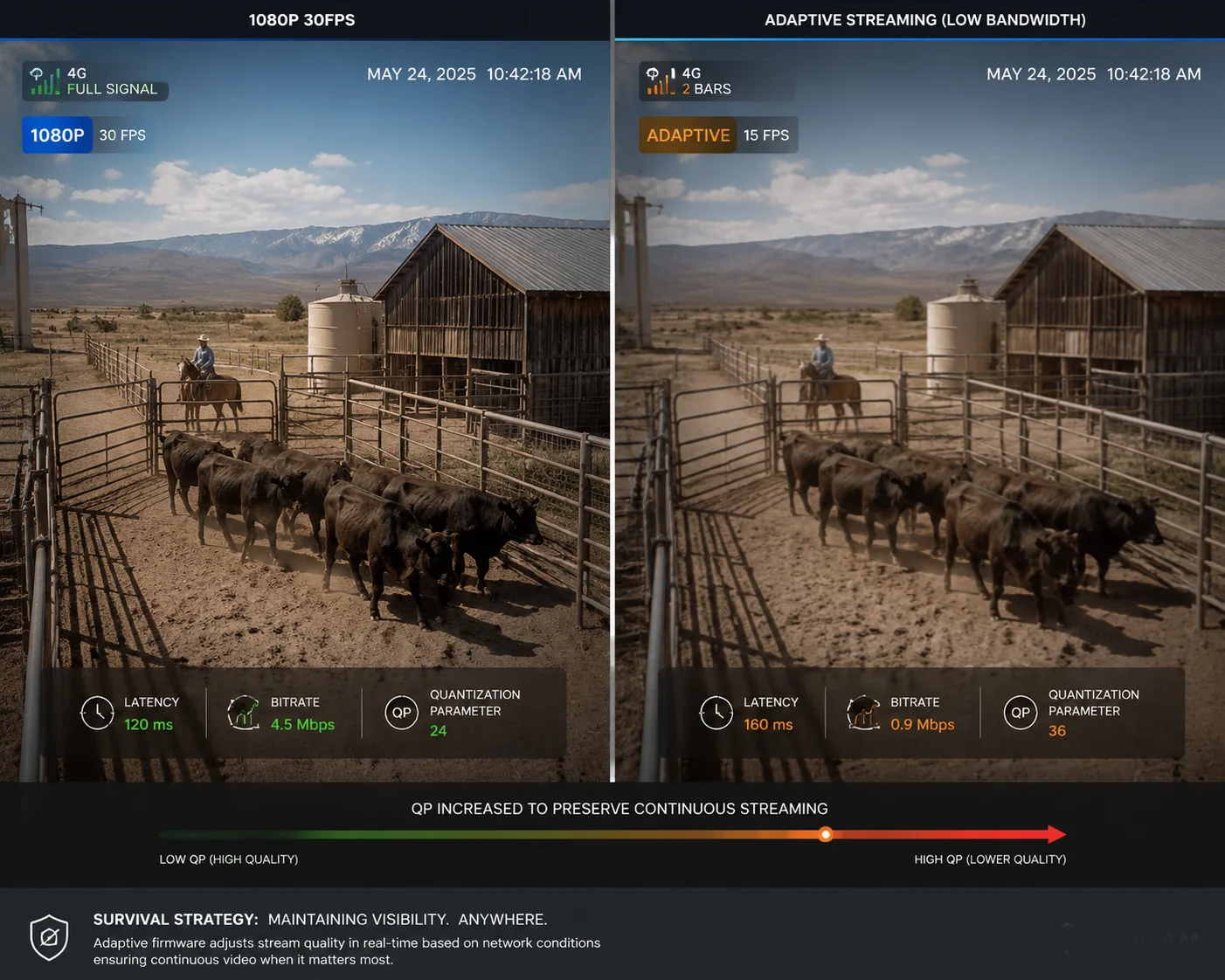
Yes, a well-designed VBR system can drop quality within milliseconds to keep the stream alive. It does this by raising the QP (Quantization Parameter)2 value in the encoder, which reduces image detail per frame. If the bandwidth drops further, the firmware will also cut the frame rate from 30fps down to 15fps or even 10fps — trading smoothness for continuity.
The Real Question: How Fast Is “Instantly”?
The word “instantly” gets thrown around a lot in spec sheets. But in engineering terms, what matters is the reaction time of the rate-control loop3. Here is what actually happens inside the camera when 4G signal weakens:
The encoder does not wait for the stream to break. It watches the send buffer. When outgoing packets start piling up because the 4G module cannot push them fast enough, the buffer fill level rises. A good firmware checks this buffer every 100 to 500 milliseconds. Once the buffer crosses a threshold — say 70% full — the encoder immediately raises the QP value.
What Does Raising QP Actually Do?
QP controls how aggressively the encoder compresses each frame. A higher QP means more compression, which means a smaller frame size, which means less data to push through the struggling 4G link. The image gets softer — you lose fine detail like license plate edges or facial texture — but the stream keeps flowing.
Here is a simplified view of how the system degrades gracefully:
| Network Condition | Action Taken | Typical Bitrate | Frame Rate | Resolution |
|---|---|---|---|---|
| Strong signal (RSRP > −85 dBm) | Normal VBR range | 2.5–3.5 Mbps | 30 fps | 1080p |
| Moderate signal (RSRP −85 to −105 dBm) | QP raised, bitrate cap lowered | 1.5–2.0 Mbps | 30 fps | 1080p |
| Weak signal (RSRP −105 to −115 dBm) | Resolution + frame rate reduced | 0.8–1.2 Mbps | 15–20 fps | 720p |
| Very weak signal (RSRP < −115 dBm) | Aggressive degradation mode | 0.3–0.6 Mbps | 10–15 fps | 480p |
The Frame Rate Decision
Dropping from 30fps to 15fps is not a failure. It is a deliberate survival strategy. Each frame you remove saves roughly 3% of the total bitrate. When you cut the frame rate in half, you cut the data demand nearly in half. For a security camera on a solar-powered pole in the middle of a Texas ranch, a 15fps stream that never freezes is far more valuable than a 30fps stream that dies every ten minutes.
What Separates a Good Camera from a Bad One
A cheap camera will keep trying to push 30fps at full resolution until the buffer overflows. Then the stream crashes. The player shows a spinning circle. The end user calls your support line. You send a truck. That truck costs $300 to $500 per visit in rural North America.
A properly engineered camera — the kind we build at Loyalty-Secu — has a layered degradation strategy. It starts by raising QP. If that is not enough, it drops the frame rate. If that is still not enough, it lowers the resolution. The stream bends but does not break. David, if you are deploying 50 cameras across a pipeline corridor, this is the difference between a profitable project and a warranty nightmare.
What Is the “Target Bitrate” vs. “Maximum Bitrate” Setup for Optimal 4G Reliability?
I get this question in almost every technical call. People confuse these two settings, and wrong configuration is the number one cause of 4G stream failures I see in the field.
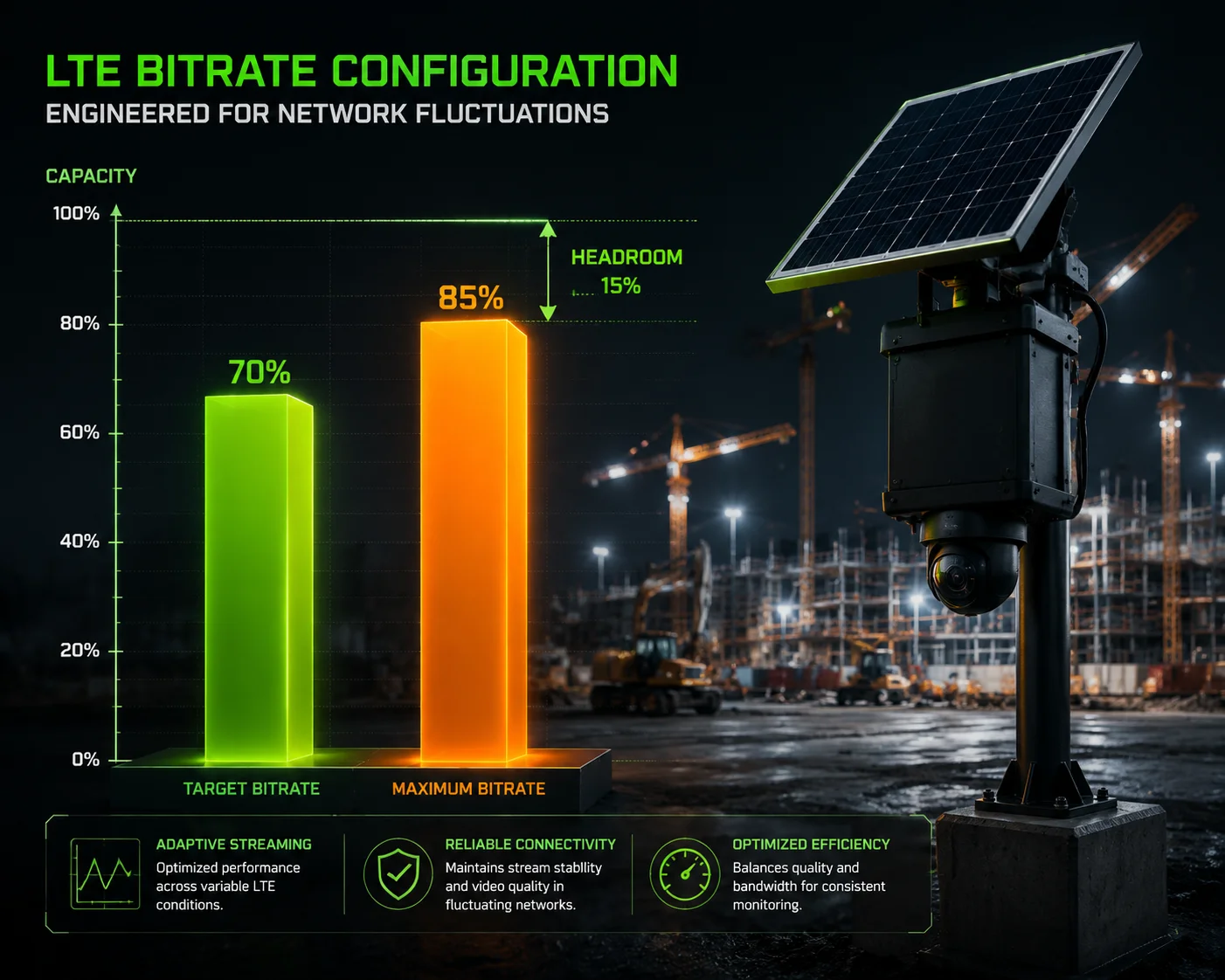
“Target Bitrate” is the average bitrate the encoder aims for under normal conditions. “Maximum Bitrate” is the hard ceiling the encoder will never exceed, even during complex scenes. For 4G reliability, set the Target to about 60–70% of your measured uplink speed, and set the Maximum to no more than 80–85% of the uplink. This leaves headroom for LTE fluctuations.
Why Two Numbers Matter
Think of it this way. Your 4G SIM card on a Verizon or AT&T network might give you 6 Mbps uplink on a good day. But that number is not constant. It can drop to 2 Mbps during peak hours when other users on the same cell tower are streaming Netflix or uploading TikTok videos. It can drop even lower during rain or when a crane moves between the camera and the tower.
If you set your Target Bitrate to 5 Mbps, the encoder will try to produce 5 Mbps most of the time. The moment the 4G uplink dips below 5 Mbps, the send buffer fills up, packets queue, and the stream lags or dies.
The Right Way to Configure
Here is the setup I recommend to every integrator I work with:
Step 1: Measure your actual uplink speed at the deployment site. Do this at different times of day. Use the worst-case number.
Step 2: Set your Target Bitrate to 60–70% of that worst-case uplink.
Step 3: Set your Maximum Bitrate to 80–85% of that worst-case uplink.
Step 4: Enable VBR mode, not CBR.
A Practical Example
| Parameter | Value | Reasoning |
|---|---|---|
| Measured worst-case uplink | 4 Mbps | Tested at peak hours on-site |
| Target Bitrate | 2.5 Mbps (62%) | Leaves room for scene complexity spikes |
| Maximum Bitrate | 3.2 Mbps (80%) | Hard ceiling prevents buffer overflow |
| Minimum Bitrate | 0.5 Mbps | Floor for static scenes to save bandwidth |
| Resolution | 1080p (with auto-downgrade to 720p) | Drops when network degrades |
| Frame Rate | 25 fps (with auto-drop to 15 fps) | Drops under sustained congestion |
What Happens If You Set Them Wrong
If the Target equals the Maximum, you are basically running CBR. The encoder has no room to breathe. Every complex scene — a PTZ pan, a truck driving through the frame, wind blowing trees — will hit the ceiling and either drop frames or produce artifacts.
If the Maximum is set too high — say 6 Mbps on a 4 Mbps link — the encoder will occasionally burst above what the network can handle. Those bursts cause packet queuing at the 4G modem. The modem’s internal buffer fills. Packets get delayed or dropped. The player on the other end stutters.
The Role of the VBR Range in Power Consumption
This matters a lot for solar-powered deployments. A wider VBR range (say 0.5 to 3.2 Mbps) means the camera transmits less data during quiet periods — a parking lot at 2 AM, for example. Less data means less radio activity on the 4G module. Less radio activity means less power draw from the battery. For a solar system sized at 60W panel and 40Ah battery, this can be the difference between the camera surviving three cloudy days or dying on day two.
At Loyalty-Secu, we pre-configure these parameters based on the deployment scenario the client describes. If David tells me he is putting cameras on construction sites in Ontario with Rogers LTE, I will set the VBR range and power profile before the units ship. That is part of the OEM service.
How Does the Camera’s Buffer Manage the “Latency Spikes” Common in LTE Networks?
LTE latency is not stable. I have seen RTT jump from 40ms to 800ms in under a second on a perfectly normal 4G connection. If the camera does not handle this, the video freezes.
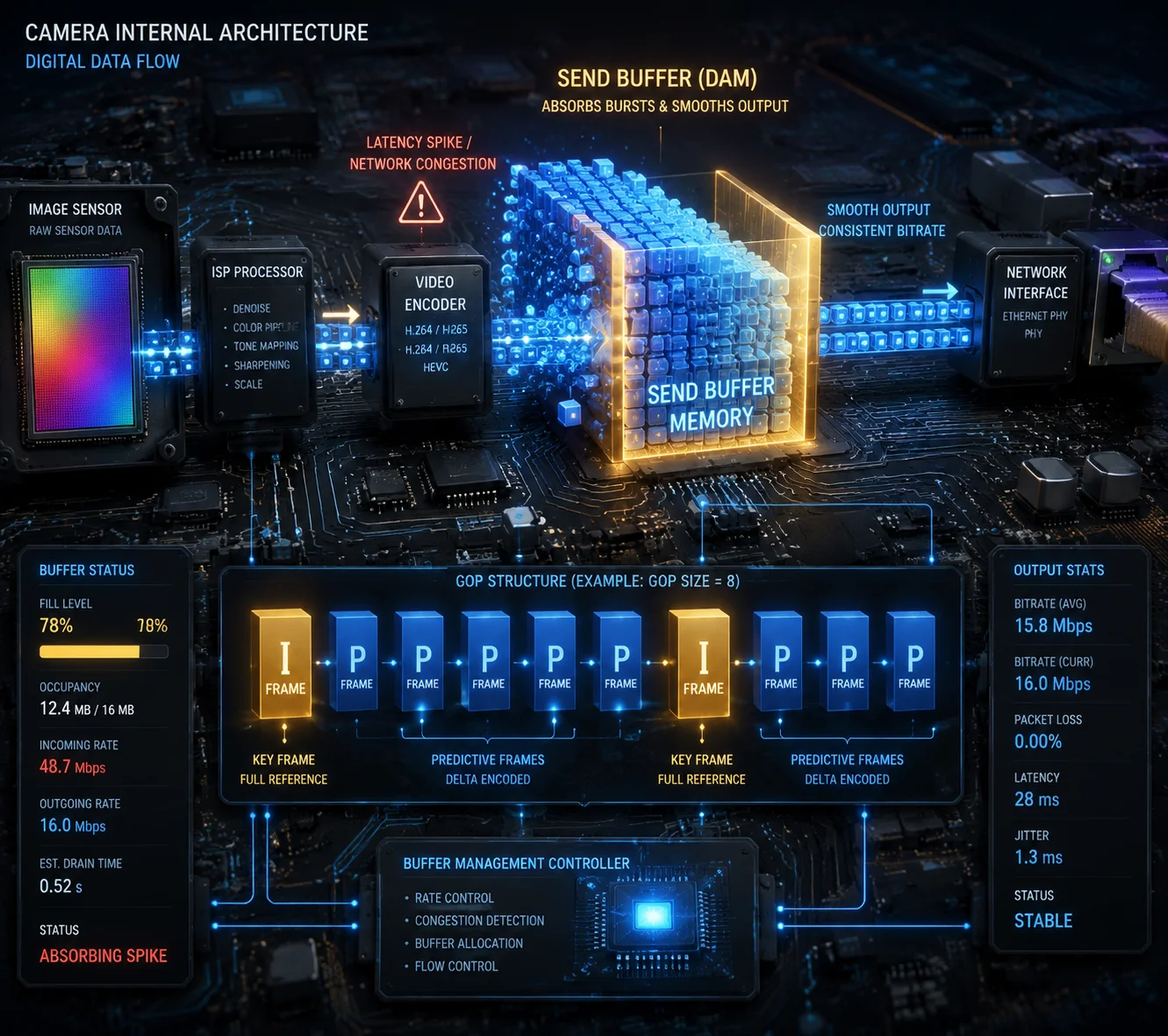
The camera uses a send buffer4 between the encoder and the 4G modem. When a latency spike hits, packets queue in this buffer instead of being dropped. The firmware monitors the buffer fill level in real time. If the buffer exceeds a safe threshold, the encoder immediately reduces its output bitrate — and if needed, resolution and frame rate — so the buffer can drain before it overflows.
Understanding the Buffer’s Job
The send buffer is a small memory space — typically a few megabytes — that sits between the video encoder and the network transmitter. Its job is simple: absorb short-term mismatches between how fast the encoder produces data and how fast the 4G modem can send it.
In a perfect network, data flows through the buffer smoothly. The encoder puts frames in. The modem sends them out. The buffer stays nearly empty.
But LTE networks are not perfect. A latency spike means the modem suddenly cannot send data for a brief period — maybe 200ms, maybe 2 seconds. During that time, the encoder keeps producing frames. Those frames pile up in the buffer.
The Three Buffer States
Here is how the firmware responds to different buffer conditions:
Buffer below 30% full: Everything is fine. The encoder runs at its normal Target Bitrate. No action needed.
Buffer between 30% and 70% full: Warning zone. The firmware starts reducing the encoder’s target bitrate. It may raise the QP value by 2 to 5 points. The image gets slightly softer, but the buffer starts draining.
Buffer above 70% full: Emergency zone. The firmware takes aggressive action:
- Raises QP significantly (image becomes noticeably softer)
- Drops frame rate (from 30fps to 15fps or lower)
- May switch resolution from 1080p to 720p
- May increase the GOP length to reduce I-frame frequency
Why I-Frames Are the Biggest Problem
An I-frame (keyframe) is a complete image. It is much larger than a P-frame (which only contains the differences from the previous frame). A typical I-frame at 1080p might be 150–300 KB. A P-frame might be 15–30 KB. That is a 10x difference.
When an I-frame hits the buffer during a latency spike, it can push the buffer from 50% to 80% in one shot. This is why smart VBR logic also adjusts the Group of Pictures (GOP)5 length during congestion.
GOP Adjustment Strategy
| Network State | GOP Length | I-Frame Frequency | Effect |
|---|---|---|---|
| Good (low latency, no loss) | 1–2 seconds | Every 30–60 frames | Normal quality, fast recovery from errors |
| Moderate congestion | 3–4 seconds | Every 75–100 frames | Fewer bandwidth spikes from I-frames |
| Severe congestion | 4–6 seconds | Every 100–150 frames | Smoothest possible data flow, slower error recovery |
The trade-off is clear. Longer GOP means smoother bandwidth usage, but if a packet is lost, it takes longer for the image to fully recover. In security applications, this is usually acceptable. A slightly corrupted frame for half a second is better than a frozen screen for five seconds.
What About the Player Side?
The buffer management is not only on the camera side. The viewing app or VMS also has a receive buffer. In weak network conditions, a smart player will increase its buffer size — accepting 1 to 2 seconds of extra delay in exchange for smooth playback. When the network recovers, the player shrinks the buffer back to minimize latency.
At Loyalty-Secu, our cameras support dual-stream output. The main stream runs at full resolution for recording. The sub-stream runs at lower resolution for live viewing. When the 4G link is under stress, the app automatically switches to the sub-stream. David sees a 720p or 480p live view on his phone, but the SD card on the camera is still recording at 1080p. When the network recovers, the full recording can be pulled later.
Does the Firmware Allow Me to Lock the Bitrate to CBR for Specific High-Security Sites?
Some of my clients ask for CBR because they want predictable bandwidth usage. I understand the logic, but the answer is more nuanced than a simple yes or no.
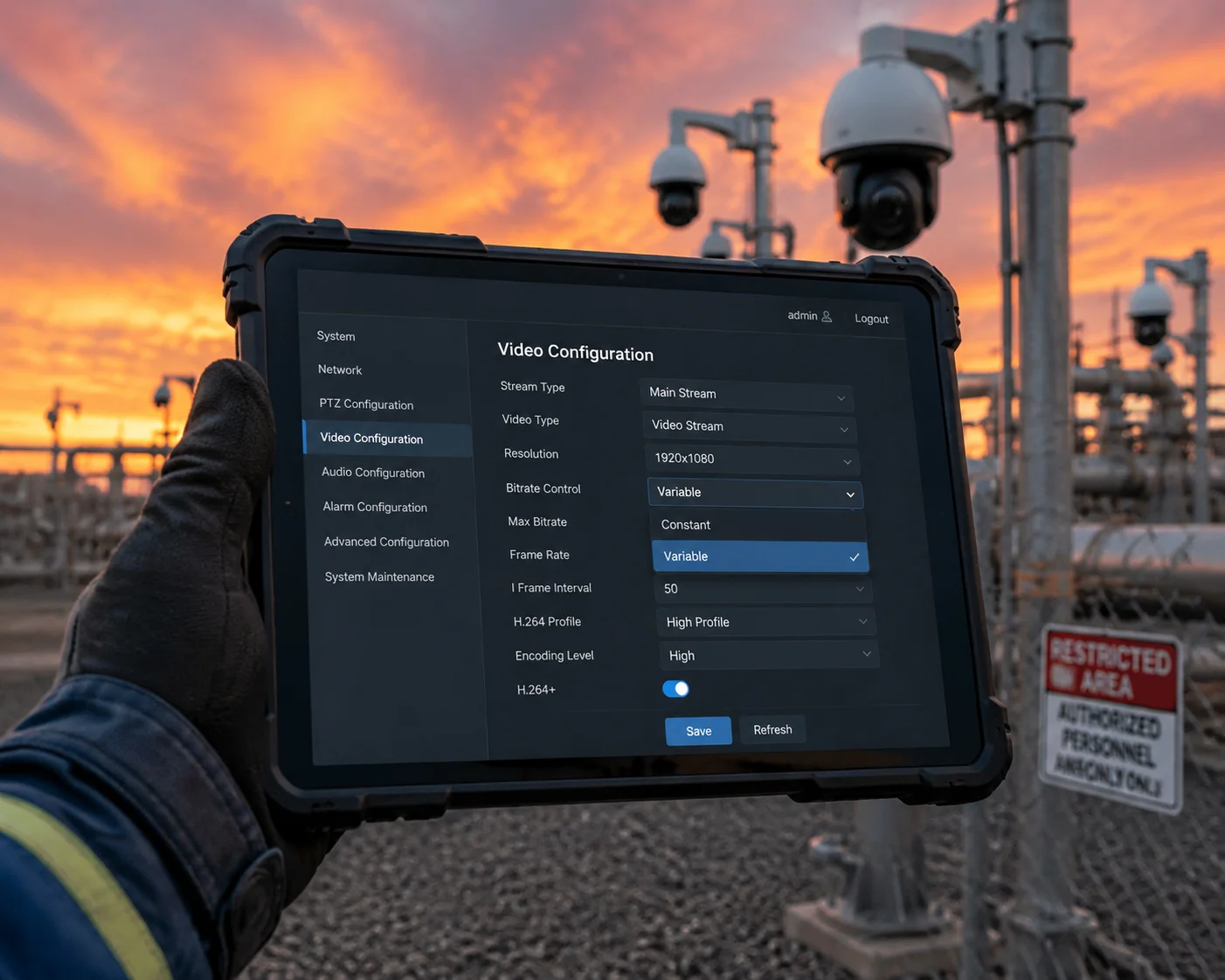
Yes, most professional PTZ cameras — including ours — allow you to switch from VBR to CBR in the firmware settings. CBR locks the bitrate to a fixed value, which makes network planning easier. But on 4G networks, CBR is risky. If the fixed bitrate exceeds the available uplink even briefly, the stream will freeze. For high-security sites on 4G, I recommend using VBR with a tightly constrained range instead of pure CBR.
When CBR Makes Sense
CBR is a good choice when the network is stable and predictable. Fiber-connected cameras in a data center, for example. The bandwidth is always there. You set 4 Mbps, and the encoder delivers 4 Mbps. The network never drops below that. Simple.
CBR also makes network capacity planning easier. If you have 20 cameras on a single switch, and each one is set to 4 Mbps CBR, you know you need exactly 80 Mbps of backhaul. No surprises.
When CBR Fails on 4G
4G is not fiber. The available bandwidth changes every second. If you lock the bitrate to 4 Mbps and the uplink drops to 2 Mbps for thirty seconds, you have a problem. The encoder keeps producing 4 Mbps. The modem can only send 2 Mbps. The extra 2 Mbps per second piles up in the buffer. Within a few seconds, the buffer overflows. Frames are dropped. The stream freezes or disconnects entirely.
This is not a theoretical risk. I have seen it happen on real deployments. A client in the Middle East set all his solar PTZ cameras to CBR at 3 Mbps. The 4G link was fine during testing in the morning. By afternoon, when the cell tower got busy, the uplink dropped to 1.5 Mbps. Every camera froze. He called us at 2 AM his time, furious.
The Better Approach: Constrained VBR
Instead of pure CBR, I recommend what we call constrained VBR. You set a very narrow range between the minimum and maximum bitrate. For example:
- Minimum: 1.8 Mbps
- Target: 2.0 Mbps
- Maximum: 2.2 Mbps
This gives the encoder just enough flexibility to handle scene changes and brief network dips without exceeding the link capacity. The bitrate stays almost constant — close enough to CBR for planning purposes — but the encoder has room to breathe when it needs to.
How to Configure This in Our Firmware
On Loyalty-Secu PTZ cameras, the bitrate mode is configurable through the web interface or via ONVIF6 commands. Here is the path:
- Log into the camera’s web UI
- Go to Configuration → Video/Audio → Video
- Select the stream (Main Stream or Sub Stream)
- Choose Bitrate Type: Variable or Bitrate Type: Constant
- If Variable, set the Target Bitrate and Maximum Bitrate
- Save and reboot
For clients who absolutely require CBR — for example, because their VMS licensing is based on bandwidth tiers — we can set it. But I always add a sub-stream in VBR mode as a fallback for live viewing over 4G. That way, the main stream records at fixed quality to the SD card or NVR, and the sub-stream adapts to the network for remote viewing.
A Note on Bandwidth Budgeting for High-Security Sites
If you are designing a high-security site — a government building, a critical infrastructure perimeter, a cannabis facility — and you must use 4G, here is my advice:
Get a dedicated SIM card with a guaranteed bandwidth SLA (Service Level Agreement)7 from the carrier. Some carriers offer Private APN8 (Access Point Name) services that reserve bandwidth for your devices. With a guaranteed 5 Mbps uplink, you can safely run CBR at 3 Mbps and still have 2 Mbps of headroom. Without that guarantee, use constrained VBR and accept that the image quality will fluctuate slightly.
At the end of the day, the goal is the same: the stream must never freeze. Whether you achieve that with CBR on a guaranteed link or VBR on a best-effort link, the result for the end user is a camera that always works.
Conclusion
VBR on 4G is not just a setting — it is a real-time survival system. Choose a camera with true network-aware rate control, and your remote deployments will stay online when it matters most.
1. Understand the difference between variable and constant bitrate encoding. ↩︎ 2. Learn how QP affects compression and image detail in video encoding. ↩︎ 3. Understand the feedback loop that adjusts encoding parameters in real time. ↩︎ 4. Explore how send buffers smooth data flow between encoder and network transmitter. ↩︎ 5. GOP length affects bandwidth spikes and error recovery in video streaming. ↩︎ 6. ONVIF is a standard for IP camera interoperability, including bitrate configuration. ↩︎ 7. An SLA defines guaranteed network performance levels from carriers. ↩︎ 8. Private APNs can provide guaranteed bandwidth and security for IoT deployments. ↩︎