
I have seen too many projects fail because of one simple problem: missing video. A 4G camera loses signal for two hours, and when the network comes back, those two hours are just gone. That gap can cost your client a contract — or worse, a lawsuit.
ANR (Automatic Network Replenishment) solves this by using the camera’s local SD card as a safety net. When the 4G link drops, the PTZ writes video to its onboard storage. Once the network recovers, the camera automatically detects the gap on the NVR timeline and backfills the missing footage — no human intervention needed.
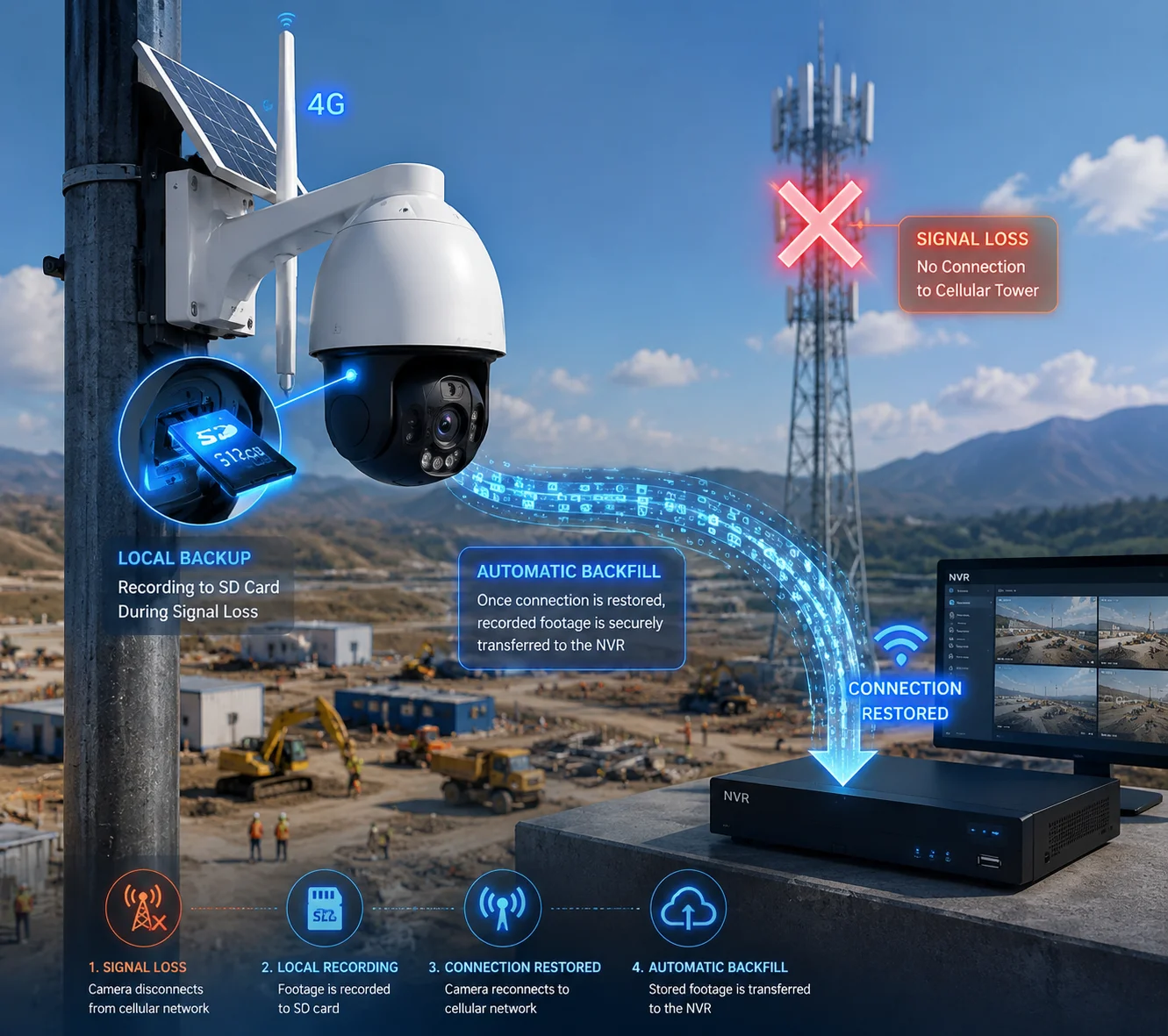
Below, I will break down the four questions I hear most from integrators like David who deploy 4G PTZ cameras in remote locations. Each answer goes beyond the marketing sheet and into the real engineering logic that decides whether ANR actually works — or silently fails in the field.
Table of Contents
Does the Camera Use a “Check-Sum” to Ensure No Data Is Lost During the Gap?
This is the first question every serious integrator asks me. You spend thousands on a solar PTZ site, the network drops for six hours, and now you need proof that every single frame made it back. “Trust me, it synced” is not an answer you can give to a government client.
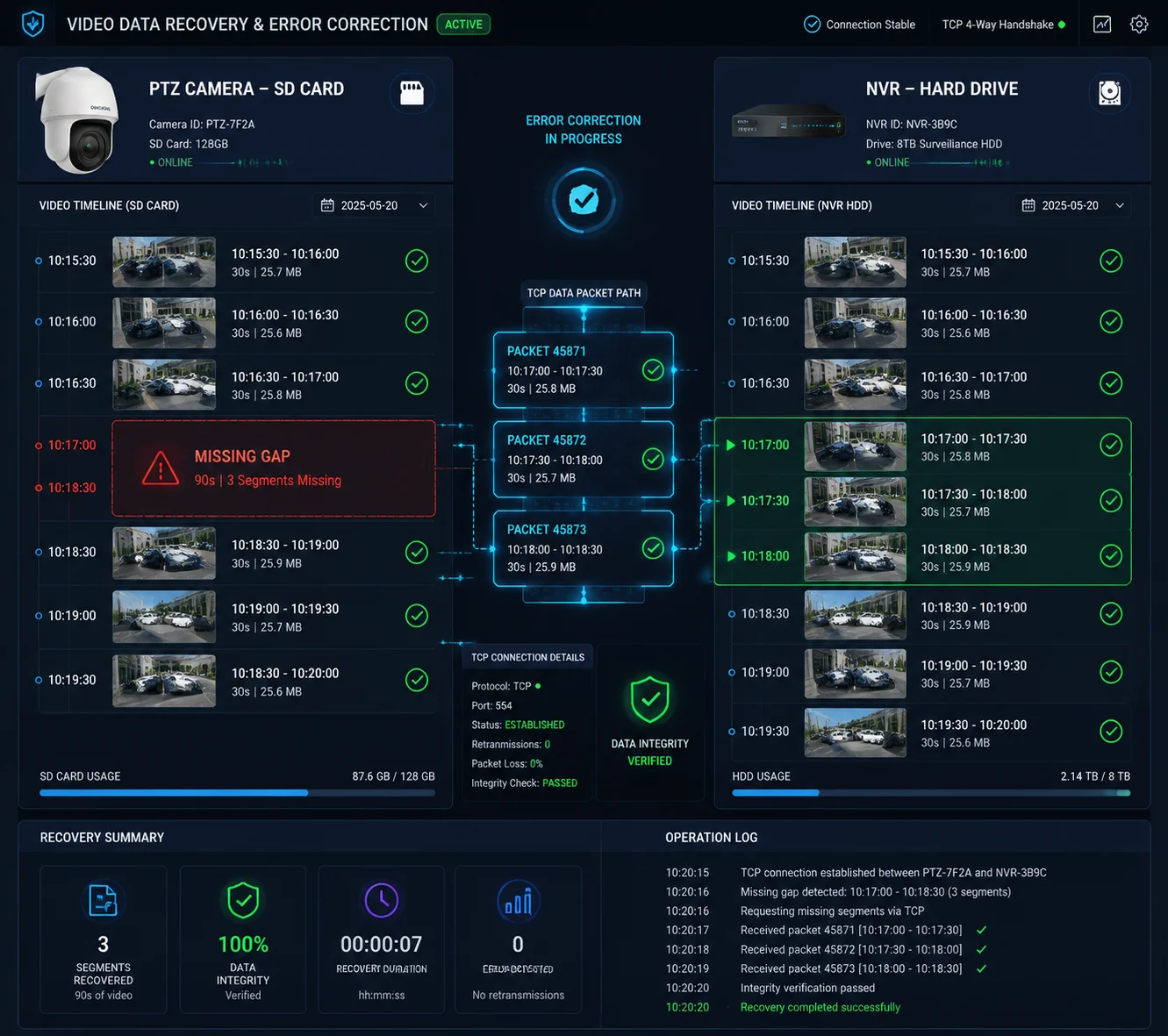
Yes, the ANR process uses timestamp-based verification and segment-level integrity checks to confirm that no data is lost. The PTZ and the NVR compare their timelines, identify the exact gap, and then the camera transmits each segment with metadata that the NVR validates before writing it to disk.
How the Verification Actually Works
Let me be clear: most manufacturers do not use a traditional file-level checksum like MD5 or SHA-256 during ANR sync. The reason is simple — computing a full cryptographic hash on a resource-constrained PTZ processor would slow down the sync and increase CPU temperature in an already hot outdoor enclosure.
Instead, the integrity check happens at the segment and timestamp level. Here is the step-by-step process:
- Gap Detection. When the NVR reconnects to the PTZ, it queries the camera for a list of locally stored recording segments. Each segment carries a start timestamp and an end timestamp.
- Timeline Comparison. The NVR compares these timestamps against its own recording timeline. It identifies the exact window where it has no footage — for example, from 14:32:07 to 16:58:43.
- Segment Request. The NVR requests each segment that falls within that window, one by one, in chronological order.
- Transport-Level Integrity. The data travels over TCP, which already includes its own error-detection mechanism (TCP checksums1). If a packet is corrupted in transit, TCP will retransmit it automatically. This is not the same as a file-level checksum, but it prevents bit-level corruption during transfer.
- Write Confirmation. After the NVR successfully writes a segment to its hard drive, it sends an acknowledgment back to the PTZ. Only then does the PTZ mark that segment as “uploaded” on the SD card.
What Can Still Go Wrong
| Failure Point | Cause | Result |
|---|---|---|
| SD card write error during outage | Low-quality SD card or extreme heat | Corrupted local file — ANR cannot recover this segment |
| Time drift between PTZ and NVR | No NTP server configured | Gap detection fails — NVR looks for the wrong time window |
| Segment partially written | Power loss during recording (e.g., solar battery dies at night) | Incomplete file — NVR may skip or reject this segment |
My Recommendation
The weakest link is almost always the SD card. I tell every client the same thing: use an industrial-grade, high-endurance MicroSD card rated at U3 or V302 minimum. A $5 consumer card from a retail store will fail within three months under 24/7 write cycles in a desert or construction site. And when it fails, ANR has nothing to sync — because the local recording never existed in the first place.
Also, always configure NTP on both the PTZ and the NVR. Time sync is not optional. It is the foundation that makes the entire ANR gap-detection logic work. Without it, the NVR and the camera are literally looking at different clocks, and the “checksum” — the timestamp comparison — becomes meaningless.
Will the ANR Sync Process Prioritize Real-Time Streaming or Background Uploading?
I have watched integrators panic when 15 cameras come back online at the same time after a cell tower reboot. Every single one tries to dump hours of cached video simultaneously, and the live feeds turn into a slideshow. That is a design problem, not a network problem.
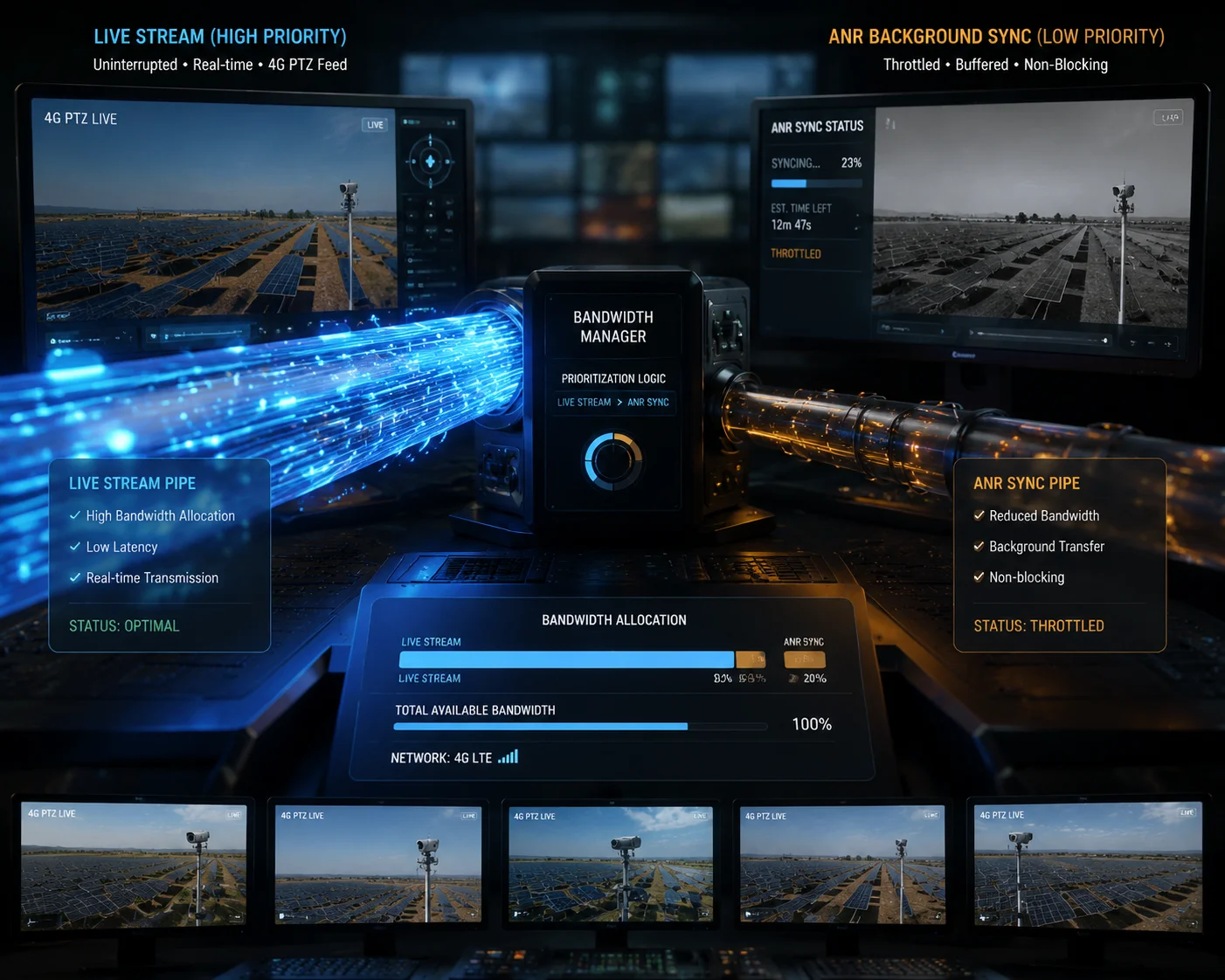
ANR is designed to prioritize real-time live streaming over background sync. The camera first restores the live video feed to the NVR, and only then begins uploading cached footage using whatever leftover bandwidth is available. This ensures that operators never lose their live view just because the system is catching up on old recordings.
How Bandwidth Allocation Works in Practice
The ANR engine inside the PTZ firmware follows a simple rule: live video is king. Everything else waits. Here is how the bandwidth gets divided in a typical 4G scenario:
Suppose your 4G uplink delivers 4 Mbps on a good day. Your PTZ is streaming H.265+3 at 2 Mbps for the main stream. That leaves 2 Mbps of headroom. The ANR engine detects this surplus and begins uploading cached segments at a throttled rate — usually around 1 to 1.5 Mbps — to leave a safety margin for network fluctuations.
The Priority Stack
| Priority Level | Task | Bandwidth Allocation |
|---|---|---|
| 1 (Highest) | Live main stream to NVR | Gets full required bandwidth first |
| 2 | Live sub-stream (mobile preview) | Allocated after main stream is stable |
| 3 | ANR background sync | Uses only remaining surplus bandwidth |
| 4 (Lowest) | Firmware update / config sync | Paused entirely during ANR sync |
What Happens When Bandwidth Is Tight
This is where things get interesting — and where cheap cameras fail. If the 4G signal is weak and the total uplink drops to, say, 2.5 Mbps, a well-designed ANR engine will do the following:
- Maintain the live stream at full quality (2 Mbps).
- Reduce ANR upload speed to 0.3–0.5 Mbps.
- If bandwidth drops below the live stream requirement, pause ANR entirely and dedicate everything to keeping the live feed alive.
A poorly designed camera, on the other hand, will try to push both streams at full speed. The result: packet loss, frame drops on the live feed, and a frustrated operator who thinks the camera is broken.
Why This Matters for Large Deployments
If you are managing 50 or 100 4G PTZ cameras — which is common in pipeline monitoring, highway projects, or large solar farm perimeters — you need the NVR or VMS platform to coordinate ANR across all channels. Without coordination, every camera will start syncing at the same moment after a regional network recovery, and your NVR’s inbound bandwidth will be overwhelmed.
Good platforms let you stagger the sync. You can assign priority tiers: cameras covering entry gates sync first, perimeter cameras sync second, and low-risk cameras sync last. Some platforms even let you set a global ANR bandwidth cap — for example, “never use more than 20 Mbps total for ANR across all channels.”
At Loyalty-Secu, our PTZ firmware exposes these controls through the web interface and through our private protocol API. If your VMS supports ONVIF Profile G4, the basic ANR handshake will work. But for fine-grained bandwidth control, I always recommend testing the integration in your lab before deploying to the field.
How Long Can the Internal Buffer Store Video During a Prolonged Cellular Outage?
This is the question that separates a weekend power outage from a real disaster. I had a client in the Middle East whose 4G tower went down for three days during a sandstorm. He called me and asked: “Han, is my footage gone?” The answer depended entirely on one thing — the size of his SD card.
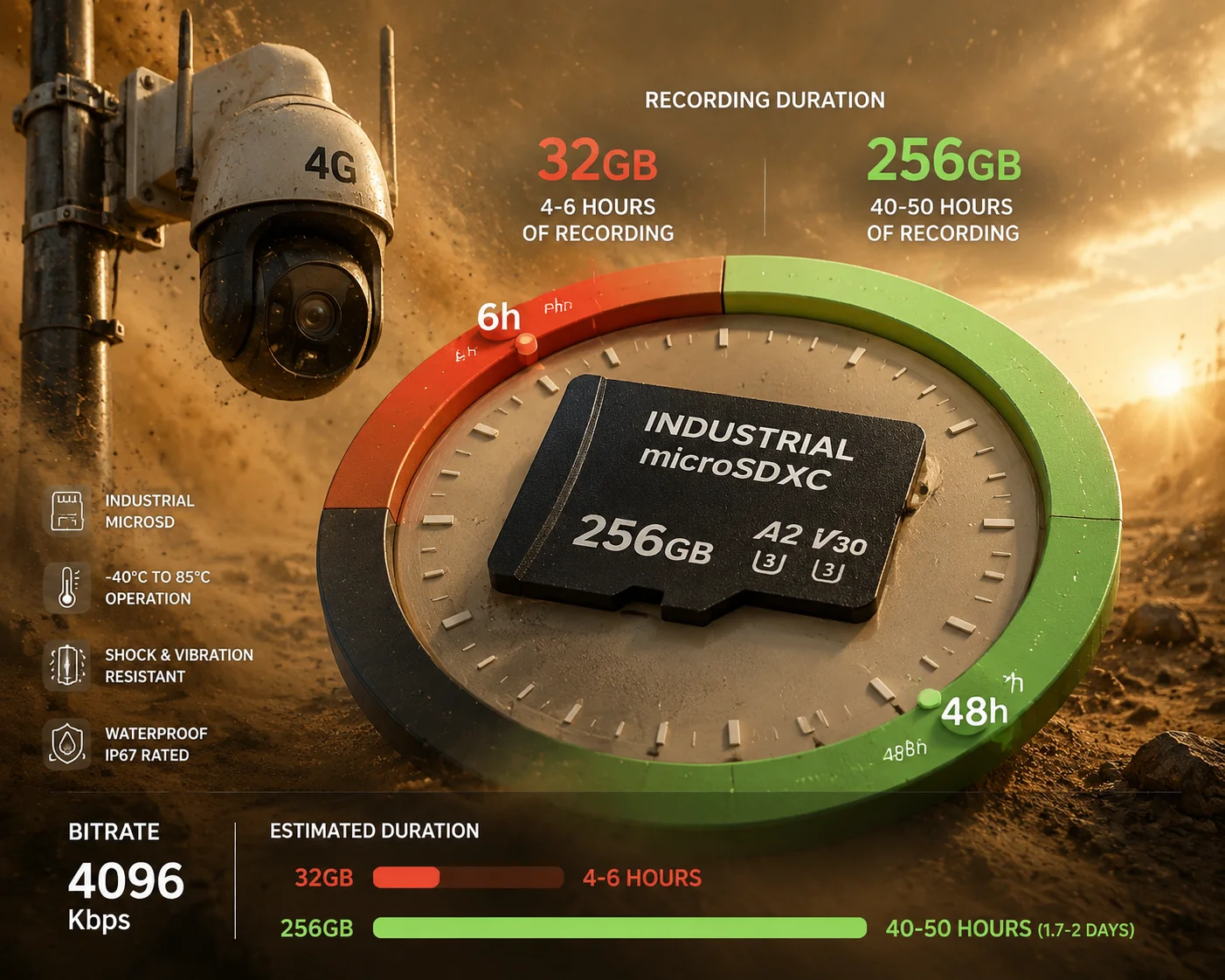
The buffer duration depends on the SD card capacity and the camera’s bitrate setting. A 256 GB industrial MicroSD card recording at 4 Mbps (H.265+) can store approximately 4 to 5 days of continuous video. A 32 GB card at the same bitrate will fill up in roughly 14 to 16 hours, after which older footage gets overwritten in a loop.
The Math Behind Buffer Duration
The calculation is straightforward, but most people get it wrong because they forget to account for the codec efficiency and the actual write overhead. Here is a simplified formula:
Buffer Hours = (Card Capacity in GB × 8 × 1000) ÷ (Bitrate in Mbps × 3600)
Let me run the numbers for the most common configurations:
| SD Card Size | Bitrate (H.265+) | Approximate Buffer Duration |
|---|---|---|
| 32 GB | 2 Mbps | ~32 hours |
| 32 GB | 4 Mbps | ~16 hours |
| 64 GB | 2 Mbps | ~64 hours |
| 64 GB | 4 Mbps | ~32 hours |
| 128 GB | 4 Mbps | ~64 hours (~2.7 days) |
| 256 GB | 4 Mbps | ~128 hours (~5.3 days) |
| 256 GB | 6 Mbps | ~85 hours (~3.5 days) |
These numbers assume continuous recording. If you use motion-detection-only recording, the actual duration can be two to five times longer, depending on scene activity.
The Loop Overwrite Problem
Most PTZ cameras use a circular recording strategy5 on the SD card. When the card is full, the oldest files get deleted to make room for new ones. This is fine for short outages — say, 30 minutes to a few hours. But for prolonged outages, it creates a serious risk:
Imagine a 72-hour network outage with a 32 GB card at 4 Mbps. The card fills up after about 16 hours. From hour 17 onward, every new hour of recording destroys the oldest hour. By the time the network comes back at hour 72, you only have the last 16 hours of footage. The first 56 hours are gone forever.
How to Protect Against This
There are a few strategies I recommend to my clients:
1. Use the largest card the camera supports. Our PTZ cameras support up to 512 GB MicroSD. For any 4G site where outages longer than 24 hours are possible — rural areas, construction sites, offshore platforms — I always spec a 256 GB card as the minimum.
2. Lower the bitrate for local recording. Some cameras let you configure a separate encoding profile for SD card recording. You can drop the local recording to 1–2 Mbps while keeping the network stream at 4 Mbps. This doubles or triples your buffer window without affecting live view quality.
3. Use event-based recording locally. If the site has low activity (e.g., a fenced solar farm at night), switch the local recording mode to motion detection only. The card will last dramatically longer.
4. Monitor SD card health remotely. Industrial SD cards have a limited number of write cycles. Our cameras report SD card health status (remaining lifespan percentage) through the web interface and SNMP traps6. When the card drops below 20% health, replace it proactively — do not wait for it to fail silently.
The bottom line: ANR cannot sync what was never recorded. The SD card is your insurance policy, and its size directly determines how long that policy covers you.
Can I Set a Schedule for ANR Syncing to Avoid Peak-Hour 4G Data Charges?
Data costs kill 4G projects. I have seen integrators build a perfect solar PTZ system, deploy it beautifully, and then get a $2,000 monthly cellular bill because ANR was syncing gigabytes of video during peak hours. The hardware worked fine. The business case did not.
Yes, many NVR platforms and advanced PTZ firmware allow you to schedule ANR sync windows. You can restrict background uploads to off-peak hours — for example, midnight to 6 AM — when 4G data rates8 are lower or when your data plan offers unlimited usage. This gives you full control over cellular costs without sacrificing recording integrity.

Where the Schedule Is Configured
The ANR sync schedule is typically set on the NVR or VMS platform side, not on the camera itself. The reason is simple: the NVR is the device that initiates the “pull” request for missing segments. It decides when to ask the camera for cached footage.
Here is how the configuration usually works:
Step 1: Define the sync window. In the NVR’s storage or ANR settings page, you set a time range. For example: “Allow ANR sync only between 00:00 and 06:00.”
Step 2: Set bandwidth limits within the window. Even during the allowed window, you can cap the upload speed. For example: “Maximum ANR upload rate: 2 Mbps per channel.”
Step 3: Assign channel priorities. If you have 20 cameras and only 6 hours to sync, the NVR needs to know which cameras matter most. You assign priority levels7 — critical cameras sync first, low-priority cameras sync if time permits.
Step 4: Handle overflow. If the sync window closes before all footage is uploaded, the remaining segments stay on the SD card and wait for the next window. They are not deleted. The NVR picks up where it left off the following night.
The Trade-Off You Need to Understand
Scheduling ANR sync introduces a delay. If the network recovers at 2 PM but your sync window does not open until midnight, those cached recordings will sit on the SD card for 10 hours before they start uploading. During those 10 hours:
- The footage exists only on the SD card — a single point of failure.
- If the SD card fails or the camera loses power, that footage is lost.
- If someone needs to review the missing footage urgently (e.g., a security incident during the outage), they cannot access it from the NVR. They would need to physically pull the SD card or use the camera’s local playback feature via its web interface.
A Practical Approach for Cost-Sensitive Projects
For clients who deploy dozens of 4G PTZ cameras across remote sites — oil fields, agricultural land, highway corridors — I usually recommend a hybrid approach:
- Immediate sync for alarm-triggered recordings. If the camera recorded a motion detection or intrusion alarm event during the outage, sync that clip immediately, regardless of the schedule. These clips are small (usually 30–60 seconds) and high-value.
- Scheduled sync for continuous recordings. Bulk continuous footage syncs during the off-peak window. This is the large-volume data that drives up your bill.
- Monthly data budget alerts. Some VMS platforms can track cumulative data usage per SIM card and pause ANR sync if the monthly budget is exceeded. This prevents bill shock.
At Loyalty-Secu, we work with integrators to pre-calculate the monthly data consumption for each site based on the recording profile, expected outage frequency, and ANR sync settings. This way, David knows exactly what his cellular bill will look like before the first camera goes on the pole — not after.
Conclusion
ANR is not magic. It is a well-defined process: local SD card recording during outages, automatic gap detection on recovery, and background sync with bandwidth control. Get the SD card right, keep your clocks in sync, and configure your sync schedule — and your 4G PTZ deployment will deliver the continuous, gap-free timeline your clients expect.
1. TCP’s built-in error detection ensures corrupted packets are retransmitted during sync. ↩︎ 2. Speed class ratings for MicroSD cards that guarantee minimum write speeds suitable for 24/7 recording. ↩︎ 3. Video compression standard that reduces bitrate while maintaining quality, extending buffer duration. ↩︎ 4. Standard for recording and storage that enables basic ANR handshake between camera and NVR. ↩︎ 5. Overwrite strategy used by cameras to manage limited SD card space during continuous recording. ↩︎ 6. Proactive monitoring of SD card health via SNMP alerts prevents silent failures. ↩︎ 7. Assigning higher priority to critical cameras ensures important footage synced first during limited windows. ↩︎ 8. Understanding cellular data costs helps schedule ANR sync during off-peak hours. ↩︎