
I’ve lost count of how many times a client called me in a panic because their remote camera died overnight after three cloudy days in a row.
Yes, the app can automatically shut down the 4G modem while keeping SD card recording active when battery drops below 20%. This “sacrifice connectivity to save evidence” strategy cuts power draw from 4-6W down to under 1W, extending local recording by 5-7 days without any solar input.
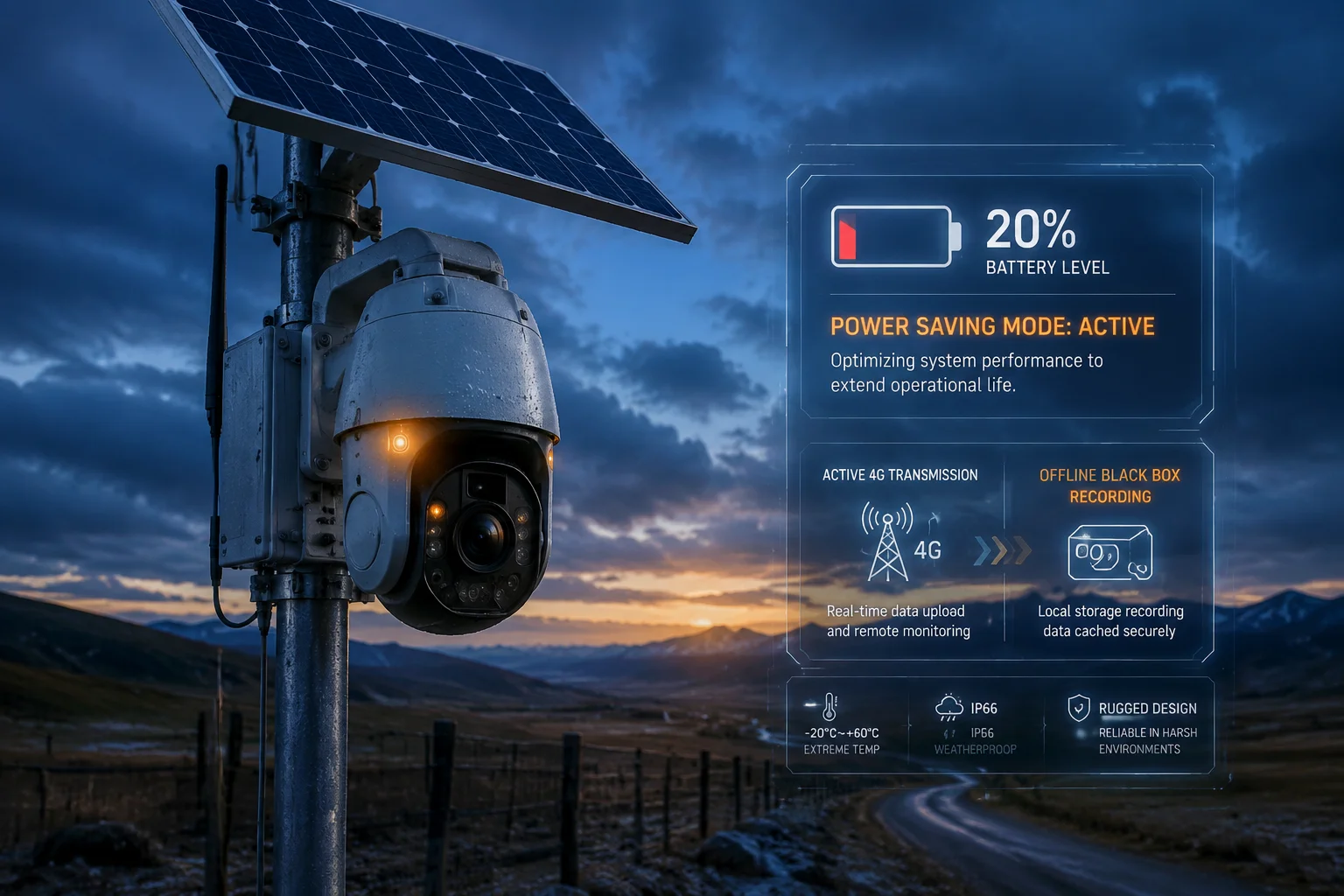
Below, I’ll walk you through exactly how this works at both the software and hardware level, how the camera reconnects on its own, and how you can fine-tune the threshold for your specific deployment.
Table of Contents
How Do I Ensure the Camera Remains a “Black Box” Recorder Even When the Network Is Cut?
When the 4G signal drops, most integrators worry they’ve lost everything. I felt that same fear the first time I deployed a solar camera1 on a remote Texas ranch with no grid power for miles.
The camera keeps recording to its local SD card regardless of network status. Think of it as a dashcam or airplane black box. The 4G module handles transmission only. Recording is a separate, low-power process that runs independently on the main SoC chip12.
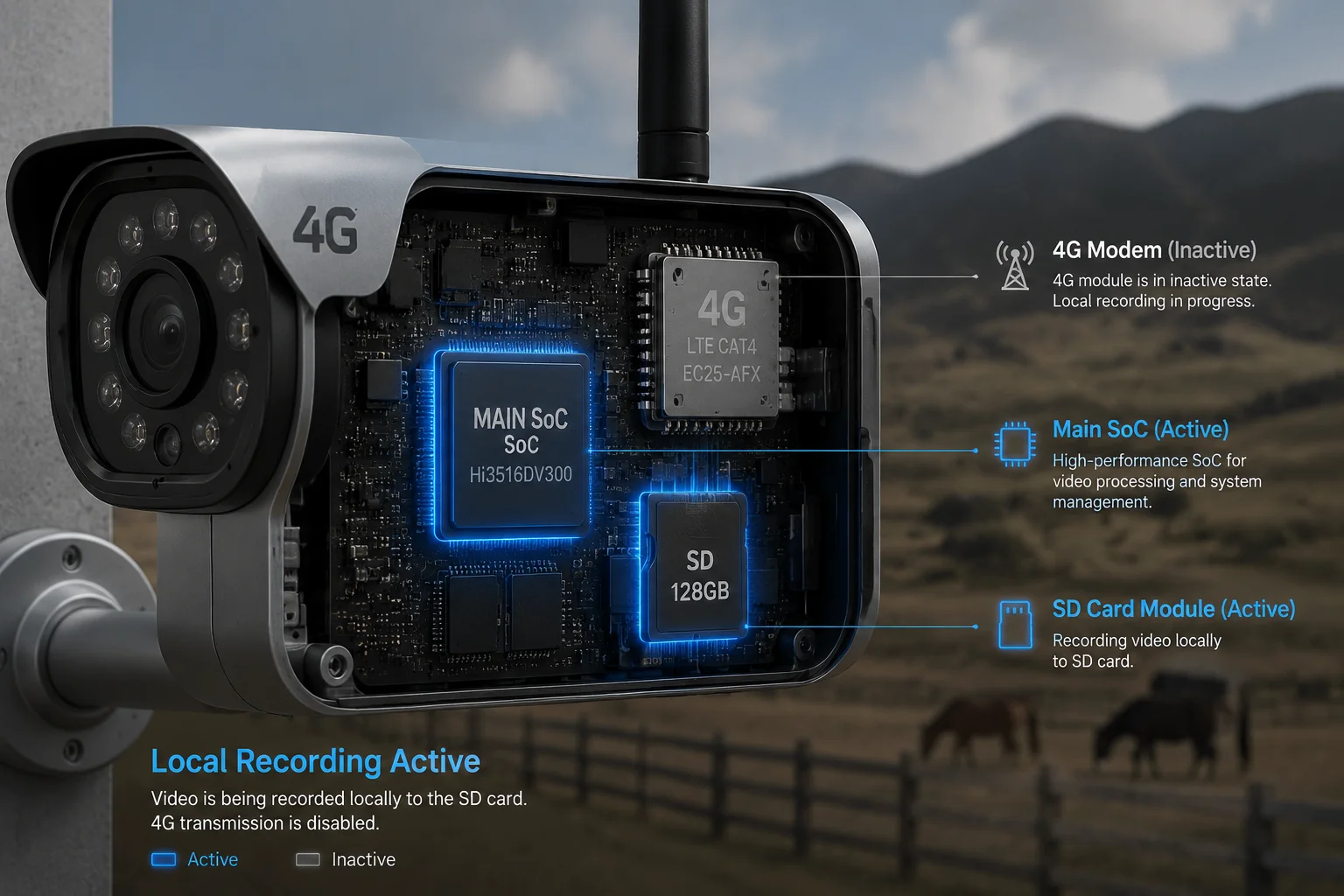
Why Local Recording and 4G Transmission Are Two Separate Systems
Let me break this down simply. Inside the camera, there are two main jobs happening:
-
Job One: Capture and store video. The image sensor grabs frames, the processor encodes them into H.264/H.2653 files, and writes them to the SD card. This uses very little power because it’s all happening inside one chip.
-
Job Two: Send video over 4G. The 4G modem powers up its radio, connects to a cell tower, and pushes data packets across the internet. This is the power-hungry part. The modem alone can draw 2-3W during active transmission.
When the battery hits 20%, the system kills Job Two but keeps Job One running. The camera still detects motion through its PIR sensor4. It still records clips. It still writes timestamps and metadata. The only thing it stops doing is talking to the outside world.
What Happens to the Footage During Offline Mode
Here’s what matters most to integrators like David: the evidence is safe. During the offline period, all recordings stack up on the SD card in chronological order. Once power returns and 4G reconnects, you can:
- Pull the footage remotely through the app
- Let the camera auto-sync event thumbnails to the cloud
- Download full clips on demand
The SD card acts as a circular buffer5. A 128GB card holds roughly 15-30 days of motion-triggered clips at 1080p, depending on scene activity.
Power Consumption Comparison: Connected vs. Black Box Mode
| Component | Standard Mode Power | Black Box Mode Power |
|---|---|---|
| Image Sensor + SoC | 0.6W – 0.8W | 0.6W – 0.8W |
| 4G LTE Modem2 (active) | 2W – 3.5W | 0W (powered off) |
| IR LEDs (night) | 0.5W – 1.5W | 0.5W – 1.5W |
| SD Card Write | 0.1W – 0.2W | 0.1W – 0.2W |
| Total | 4W – 6W | < 1W |
This table shows why cutting 4G makes such a big difference. The modem is the single largest power consumer. Remove it, and your battery life extends dramatically.
A Practical Tip for Maximum Survival Time
I always tell my clients: when the system enters this low-power black box mode, switch from continuous recording to PIR-triggered recording. This means the camera only writes to the SD card when something actually moves in front of it. In a quiet rural area, this can stretch battery life from 2 days to 5-7 days with zero solar input.
Will the 4G Modem Automatically Reconnect Once the Battery Charges Back to a Safe Level?
Nobody wants to drive two hours to a remote site just to press a reset button. I’ve heard this concern from almost every project manager I work with.
Yes, the 4G modem reconnects automatically once the battery charges back above the safe threshold, typically 12.5V for lead-acid or the equivalent state-of-charge for lithium. No manual intervention is needed. The camera comes back online and syncs its status to your app.
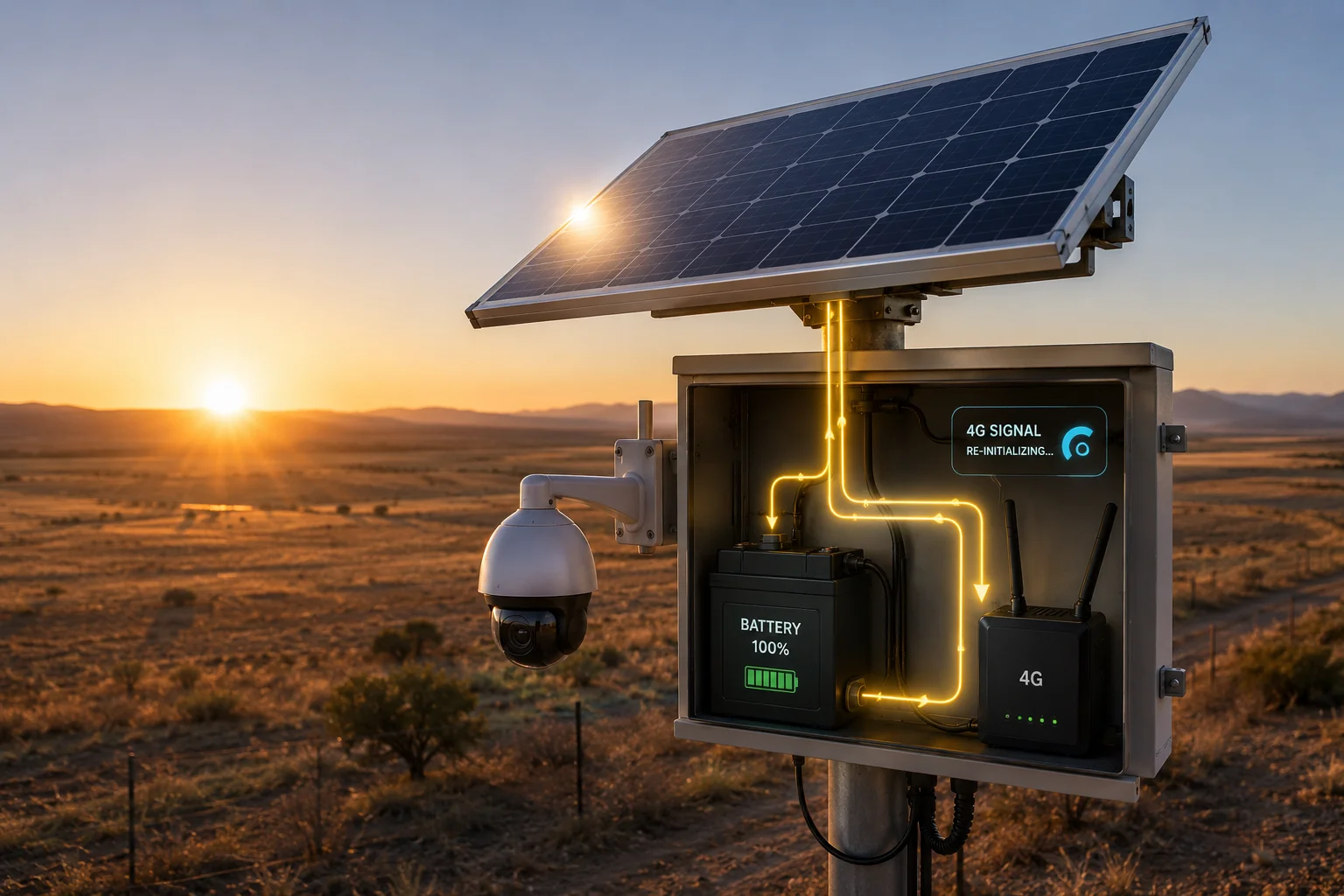
How the Auto-Recovery Process Works Step by Step
The reconnection sequence is handled by the solar charge controller13 and the camera’s firmware working together. Here’s the exact flow:
- Sun comes out. The solar panel starts feeding current into the battery.
- Voltage climbs. The charge controller monitors battery voltage in real time.
- Reconnect threshold reached. When voltage passes 12.5V (lead-acid) or the configured recovery point, the controller restores power to the 4G modem’s dedicated output port.
- Modem boots up. The 4G module takes about 30-45 seconds to register on the cellular network.
- Camera phones home. The firmware sends a status packet to the cloud server. Your app receives a push notification: “Device recovered from power-saving mode.”
- Event sync begins. The camera uploads a summary of all motion events recorded during the offline period. Full video stays on the SD card until you request it.
Why We Use Hysteresis6 in the Threshold Design
You might wonder: why not reconnect at the same 20% level where it disconnected? The answer is hysteresis. If we set both the disconnect and reconnect points at 20%, the system would bounce on and off rapidly when the battery hovers around that level. This rapid cycling damages the modem and confuses the app.
Instead, we set a gap:
- Disconnect at: 20% (approximately 11.5V for 12V lead-acid)
- Reconnect at: 35-40% (approximately 12.5V for 12V lead-acid)
This gap ensures the battery has genuinely recovered before the high-power modem kicks back in.
Recovery Behavior by Battery Type
| Battery Type | Disconnect Voltage | Reconnect Voltage | Typical Recovery Time (sunny day) |
|---|---|---|---|
| 12V Lead-Acid (20Ah) | 11.5V | 12.5V | 2-4 hours |
| 12V LiFePO4 (20Ah) | 12.0V | 13.0V | 1-3 hours |
| Built-in Lithium Pack | Firmware-defined % | Firmware-defined % | 1-2 hours |
The key takeaway: once the sun returns, your camera is back online within hours without anyone touching it. This self-healing behavior is what makes solar 4G cameras viable for truly remote deployments.
What the App Shows During Recovery
When the device comes back online, the app displays a timeline showing:
- When the camera entered power-saving mode
- How many motion events were recorded offline
- When the camera reconnected
- Current battery level and charging status
This gives you full visibility into what happened while the camera was “dark.”
Can I Customize the Battery Threshold for the Emergency Network Shutdown?
Every deployment is different. A site with a large solar panel and big battery can afford to wait longer before cutting 4G. A small, compact unit might need to trigger earlier.
Yes, the battery threshold is fully adjustable in the app settings. You can set the cutoff anywhere from 10% to 50%, depending on your battery capacity, solar panel size, and how many cloudy days your region typically experiences.
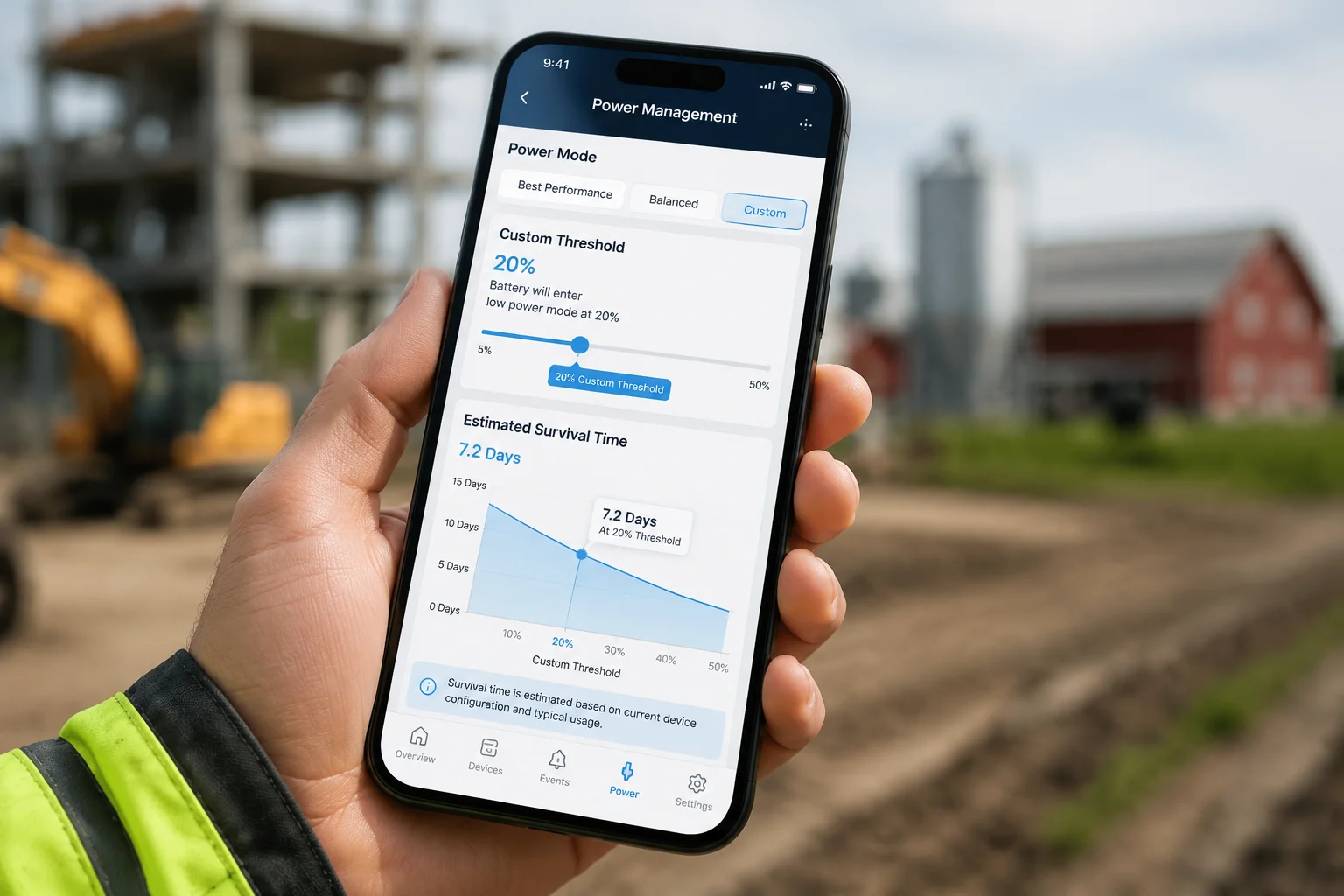
Where to Find the Setting
In the management app, go to:
Device Settings → Power Management → Low Power Action → Custom Threshold
Here you’ll see a slider that lets you pick the exact percentage. Below the slider, the app shows an estimated “survival time” based on your current battery capacity and average daily consumption.
How to Choose the Right Threshold for Your Project
This is where experience matters. I’ve helped dozens of integrators dial in the right number based on their specific conditions. Here’s my general guidance:
Set it higher (30-50%) if:
- Your solar panel is undersized relative to camera consumption
- Your region gets long stretches of cloudy weather (Pacific Northwest, Northern Europe)
- The battery is small (under 20Ah)
- You absolutely cannot afford the camera dying completely
Set it lower (10-20%) if:
- You have an oversized solar panel and large battery bank
- Your region is mostly sunny (Texas, Middle East, Australia)
- You need maximum online time and can accept the risk of occasional full shutdowns
- The site has a backup power source
The Hardware Side: Adjusting LVD on the Charge Controller
For integrators who want belt-and-suspenders protection, the solar charge controller itself has a configurable LVD (Low Voltage Disconnect) setting. This is a hardware-level cutoff that works independently of the app.
You can set it using the controller’s DIP switches or its own configuration interface. I recommend setting the hardware LVD slightly below the app threshold as a safety net. For example:
- App threshold: 20% (triggers software shutdown of 4G)
- Hardware LVD: 15% (physically cuts power to modem if software fails)
This two-layer approach means even if the firmware glitches, the hardware protects your battery from deep discharge damage.
Battery Type Matters More Than You Think
One critical point: make sure you select the correct battery type in both the app and the charge controller. Lead-acid and lithium batteries have very different voltage-to-percentage curves.
A lead-acid battery at 12.0V might be at 50% capacity. A LiFePO4 battery at 12.0V might be at 5% capacity. If you pick the wrong battery type in settings, the 20% threshold could actually correspond to 5% real capacity, meaning the camera dies before it can save itself.
I’ve seen this mistake cause unnecessary site visits. Always double-check the battery type setting during commissioning.
Does the Camera Send a “Final Status” Alert Before Going Offline to Save Power?
You don’t want to find out your camera went offline by accident three days later when you check the app. You want to know immediately.
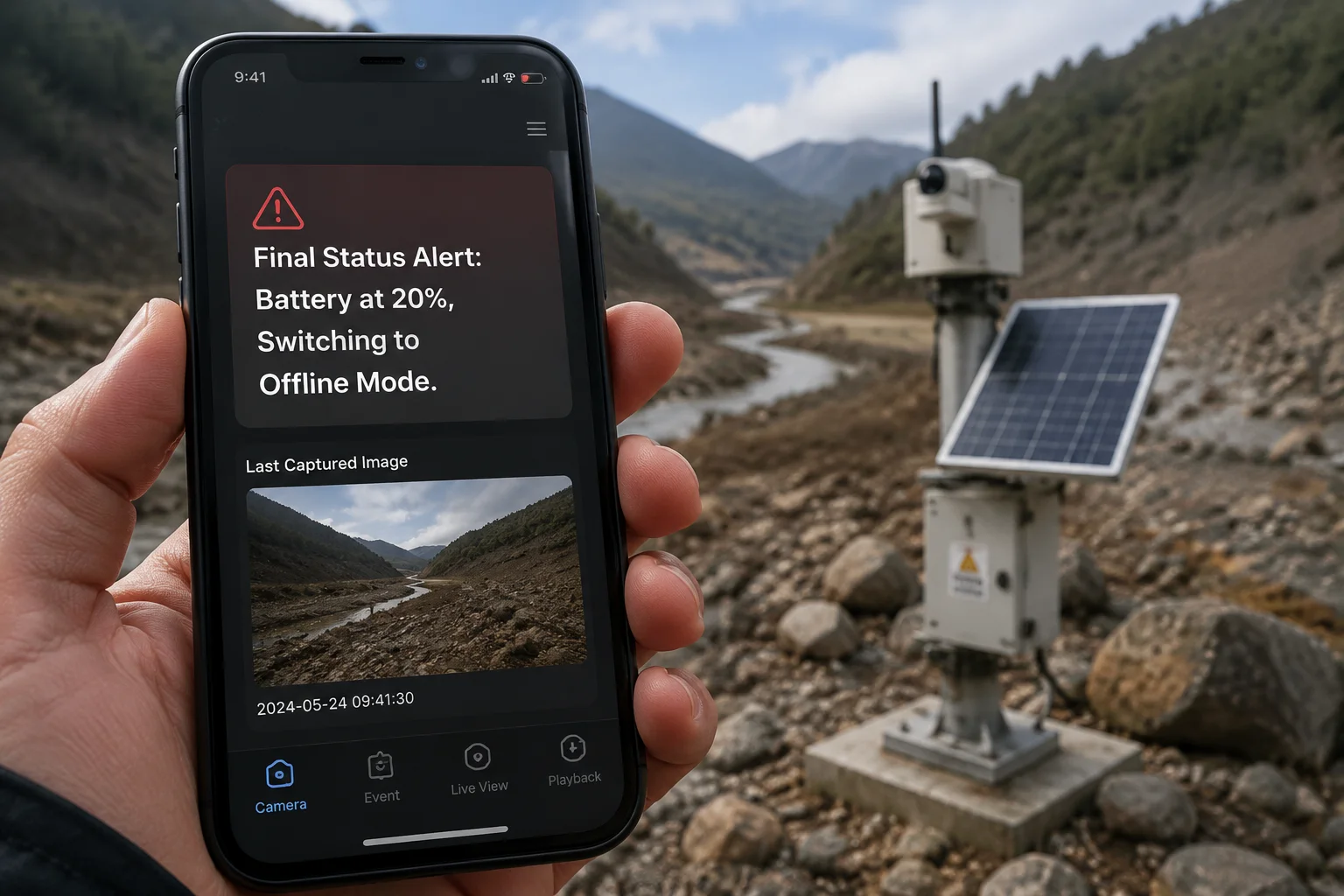
Yes, the camera sends a final push notification8 and status update to the cloud server approximately 30 seconds before it shuts down the 4G modem. This alert includes current battery level, SD card remaining space, and the number of recordings stored locally.
What the Final Alert Contains
When the battery hits your configured threshold, the camera performs a quick “last breath” communication. Here’s exactly what gets transmitted:
- Timestamp: When the power-saving mode activated
- Battery level: Exact percentage and voltage at time of shutdown
- SD card status: Remaining storage space and estimated recording hours left
- Last image: A snapshot from the current camera view (so you can confirm the scene is normal)
- Expected recovery: Estimated time until solar charging should bring the system back online (based on weather forecast data if available)
This packet is small, typically under 50KB, so it transmits in seconds even on a weak 4G signal.
Why This Alert Is Critical for Fleet Management
If you manage 50 or 100 cameras across multiple sites, you need to know which ones are entering survival mode. Without this alert, you’d have to manually check each device’s status every day. The final alert lets you:
- Prioritize which sites might need a physical visit
- Reassure your end client that the camera is still recording locally
- Plan maintenance trips efficiently based on which cameras are offline
Alert Delivery Methods
The final status alert can reach you through multiple channels:
| Delivery Method | Speed | Reliability | Notes |
|---|---|---|---|
| Push Notification (App) | Instant | High | Requires app installed on phone |
| Email Alert | 1-5 minutes | High | Good for record-keeping |
| SMS (optional) | Instant | Medium | Depends on carrier; extra cost |
| Webhook (API) | Instant | High | For integration with your own VMS/NVR platform |
For integrators running their own monitoring dashboards, the webhook9 option is the most powerful. It lets you feed the camera’s status directly into platforms like Milestone10 or your custom SCADA11 system.
What If the Battery Drops Too Fast for an Alert?
In rare cases, a sudden load spike or extremely cold weather can cause the battery voltage to plummet faster than expected. If the voltage drops below the critical hardware cutoff before the software can send its alert, the camera shuts down without notification.
To prevent this, I recommend:
- Setting your software threshold at least 5% above the hardware LVD cutoff
- Using LiFePO47 batteries in cold climates (they handle voltage drops more gracefully)
- Enabling the “heartbeat” feature, which sends a brief status ping every 6 hours so you know the camera is alive even between events
If you miss two consecutive heartbeats, the app flags the device as “potentially offline” and alerts you to investigate.
Conclusion
The app can automatically disable 4G and keep SD recording alive below 20% battery. The system self-recovers when solar charges the battery back up. You get a final alert before it goes dark, and every threshold is customizable to match your specific site conditions.
1. Overview of solar-powered cameras, their components and typical applications. ↩︎ 2. Details on 4G LTE technology, power consumption, and cellular connectivity. ↩︎ 3. Video compression standards that balance quality and file size for security cameras. ↩︎ 4. Passive infrared sensor used for motion detection in security cameras. ↩︎ 5. Memory management technique that overwrites oldest data when full, common in SD card recording. ↩︎ 6. Concept of using different thresholds for activation and deactivation to prevent rapid cycling. ↩︎ 7. Lithium iron phosphate battery chemistry, known for safety and better cold weather performance. ↩︎ 8. Real‑time alerting technology used by mobile apps to deliver status updates. ↩︎ 9. HTTP callback that allows integrations with third‑party monitoring platforms. ↩︎ 10. Popular video management software (VMS) used by integrators for centralized monitoring. ↩︎ 11. Supervisory Control and Data Acquisition system for industrial monitoring. ↩︎ 12. System‑on‑chip that integrates processor, memory, and encoding functions in one device. ↩︎ 13. Device that regulates voltage and current from solar panels to battery storage. ↩︎