
I lost a full day of footage because my solar camera died at 3 AM. The AI was running full power until the battery hit zero. No warning. No graceful shutdown.
Yes, most professional solar PTZ cameras will enter a low-compute mode when battery drops below 20%. The AI chip does not simply turn off. Instead, it reduces frame processing rate, disables power-hungry features like auto-tracking, and shifts to event-triggered detection to extend system survival time.
Below, I break down exactly what happens inside the camera at each battery threshold. I cover frame sampling, auto-tracking behavior, runtime gains, and user notifications. If you deploy off-grid systems, this will help you design a power strategy that keeps your site protected even on the darkest days.
Table of Contents
Does the Camera Reduce Its AI Sampling Rate to Save the Last Bit of Energy for a “Final Alert”?
I watched my system burn through its last 20% in under two hours. The AI was still analyzing every single frame at 30fps. That is like running your car’s AC on full blast while the fuel light is on.
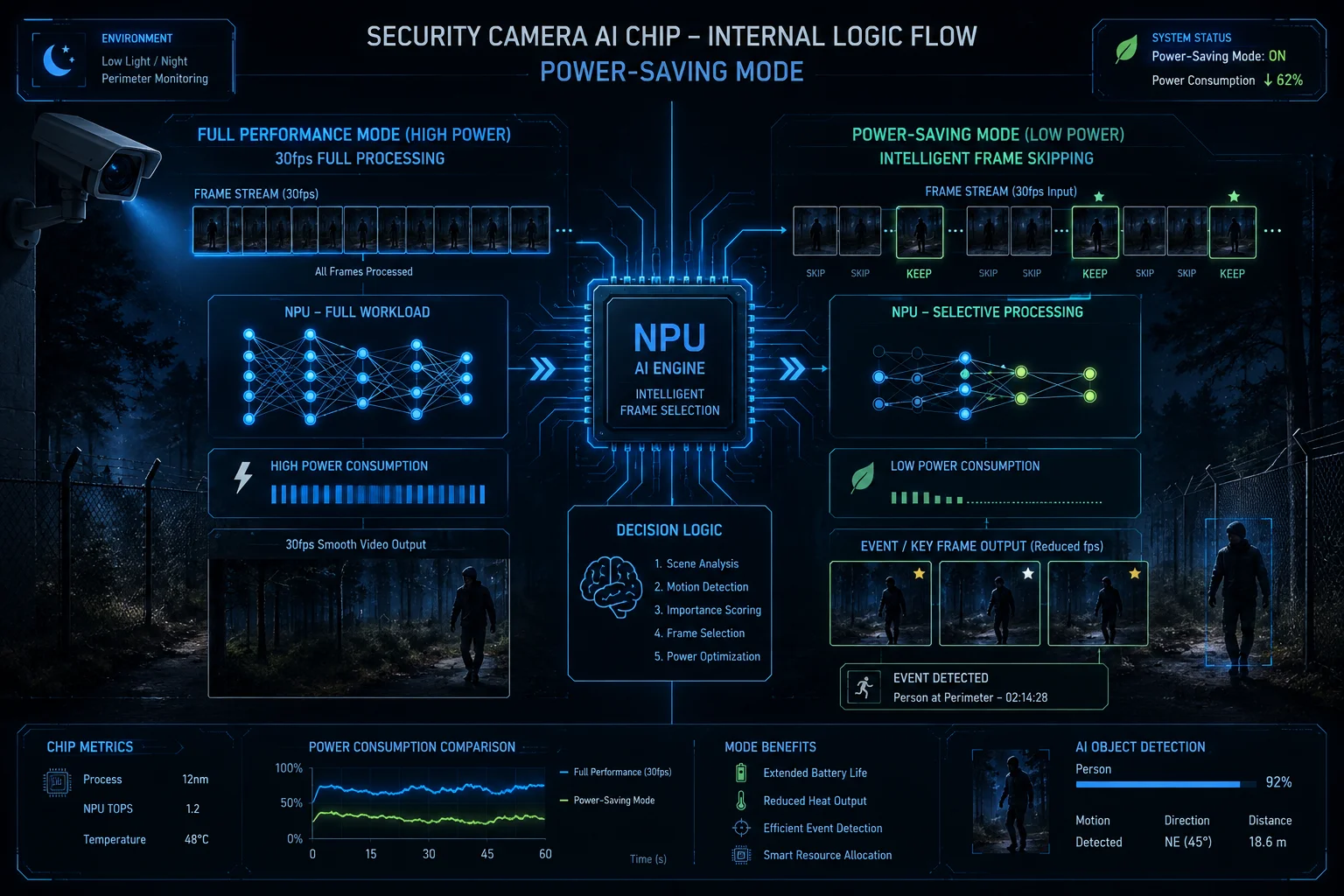
When battery falls below 20%, a well-designed solar camera will cut its AI sampling rate from 30fps down to 3-5fps. This frame-skipping approach saves 40-60% of the NPU’s power draw while still keeping enough detection capability for a final alert.
How Frame Skipping Actually Works
The AI chip inside your camera has a neural processing unit (NPU)1. This NPU eats power every time it runs an inference on a video frame. At full operation, it processes 25-30 frames per second. That is a lot of math happening every second.
When the power management unit (PMU)2 detects battery below 20%, it sends a command to the NPU scheduler. The scheduler then drops the processing rate. Instead of looking at every frame, the chip only picks up every 5th or 6th frame.
What You Lose and What You Keep
Here is the key trade-off. You lose smooth tracking. A person walking fast might move 2-3 meters between processed frames. But you keep the ability to detect that a person is there. The camera can still trigger an alert and send a push notification over 4G.
Think of it this way. Full-rate AI is like a security guard watching a live feed without blinking. Low-rate AI is like that same guard glancing at the monitor every two seconds. He will still see the intruder. He just might not catch the exact moment they jumped the fence.
The Power Math Behind Frame Skipping
| AI Processing Rate | NPU Power Draw | Detection Accuracy | Tracking Smoothness |
|---|---|---|---|
| 30fps (Full) | 100% (≈2.5W) | 99% | Smooth |
| 10fps (Medium) | 60% (≈1.5W) | 95% | Acceptable |
| 3-5fps (Low Power) | 35% (≈0.9W) | 85% | Choppy |
| PIR-Only (Sleep) | <5% (≈0.1W) | 70% (motion only) | None |
Why “Final Alert” Matters More Than Continuous Recording
For off-grid deployments, the last 20% of battery is not about recording beautiful footage. It is about one thing: getting that alert out. If someone breaks into your remote site at 2 AM during a cloudy week, you need the camera to survive long enough to send one clear snapshot over 4G. Frame skipping makes this possible. The camera might not give you a cinematic replay. But it will give you proof and a timestamp.
In my experience working with system integrators across the US and Europe, the number one complaint about cheap solar cameras is this: they die silently. No final alert. No last image. Just a dead battery and a gap in the timeline. A proper power management profile prevents that.
Will the Auto-Tracking Be Disabled While Keeping Basic Human Detection Active at Low Power?
I had a client call me frustrated. His PTZ camera was spinning back and forth all night chasing animals. By morning, the battery was dead. The AI was smart enough to track. But not smart enough to stop tracking when power was critical.
Yes, auto-tracking is one of the first features disabled when battery drops below 20%. The PTZ motor consumes far more power than the AI chip itself. Disabling mechanical movement while keeping passive human detection active is the most effective way to extend runtime in a power crisis.
Why the Motor Is the Real Problem
Most people assume the AI chip is the biggest power consumer. It is not. The PTZ stepper motors that rotate the camera draw 3-8 watts during movement. Compare that to the NPU which draws about 2-2.5 watts. Every time the camera pans to follow a target, it burns through battery faster than the AI processing itself.
In a dual-lens linkage system3, the problem doubles. The panoramic lens detects a target. Then the PTZ lens spins to zoom in. That spin costs energy. In low-battery mode, this linkage gets suspended.
The Three-Stage Shutdown Sequence
Here is how a properly configured system handles the transition:
Stage 1: Tracking Suspension (Battery 15-20%)
The PTZ motor locks in its current position. The AI chip continues running human detection on the fixed field of view. If a person is detected, the camera captures a snapshot and sends an alert. But it does not move.
Stage 2: PIR Pre-Wake Mode (Battery 10-15%)
The AI chip enters deep sleep. Only the PIR sensor4 stays active. When the PIR detects a heat signature, it wakes the AI chip in about 800ms-1.5 seconds. The chip runs one quick inference, grabs a frame, and goes back to sleep.
Stage 3: Survival Mode (Battery Below 5%)
Everything shuts down except the real-time clock and a minimal watchdog circuit5. The system waits for sunrise and solar charging6 to resume.
Power Consumption by Component
| Component | Active Power | Sleep Power | Can Be Disabled at 20%? |
|---|---|---|---|
| PTZ Motor (Pan/Tilt) | 5-8W | 0W | Yes – First to go |
| AI NPU (Full Rate) | 2.5W | 0.05W | Reduced, not off |
| 4G LTE Module | 1.5-3W | 0.01W | Switched to interval mode |
| IR LEDs / White Light | 3-6W | 0W | Yes – Disabled early |
| PIR Sensor | 0.001W | 0.001W | No – Always on |
| Main SoC (Encoding) | 1.5W | 0.2W | Reduced bitrate |
What This Means for Your Project Delivery
If you are a system integrator8 deploying cameras on construction sites or farms, you need to explain this behavior to your end client. The camera is not “broken” when it stops tracking at low battery. It is protecting itself. Set expectations during installation. Tell your client: “On cloudy days, the camera will hold its position and alert you if someone shows up. But it will not follow them across the site.”
This is a feature, not a bug. And it is the difference between a camera that survives three cloudy days and one that dies after one.
How Much Extra Runtime Can I Gain by Dropping the AI’s TOPS Performance in a Crisis?
I ran a real test last winter. Two identical cameras. Same battery. Same solar panel. One ran AI at full TOPS. The other dropped to low-compute at 20%. The difference was shocking.
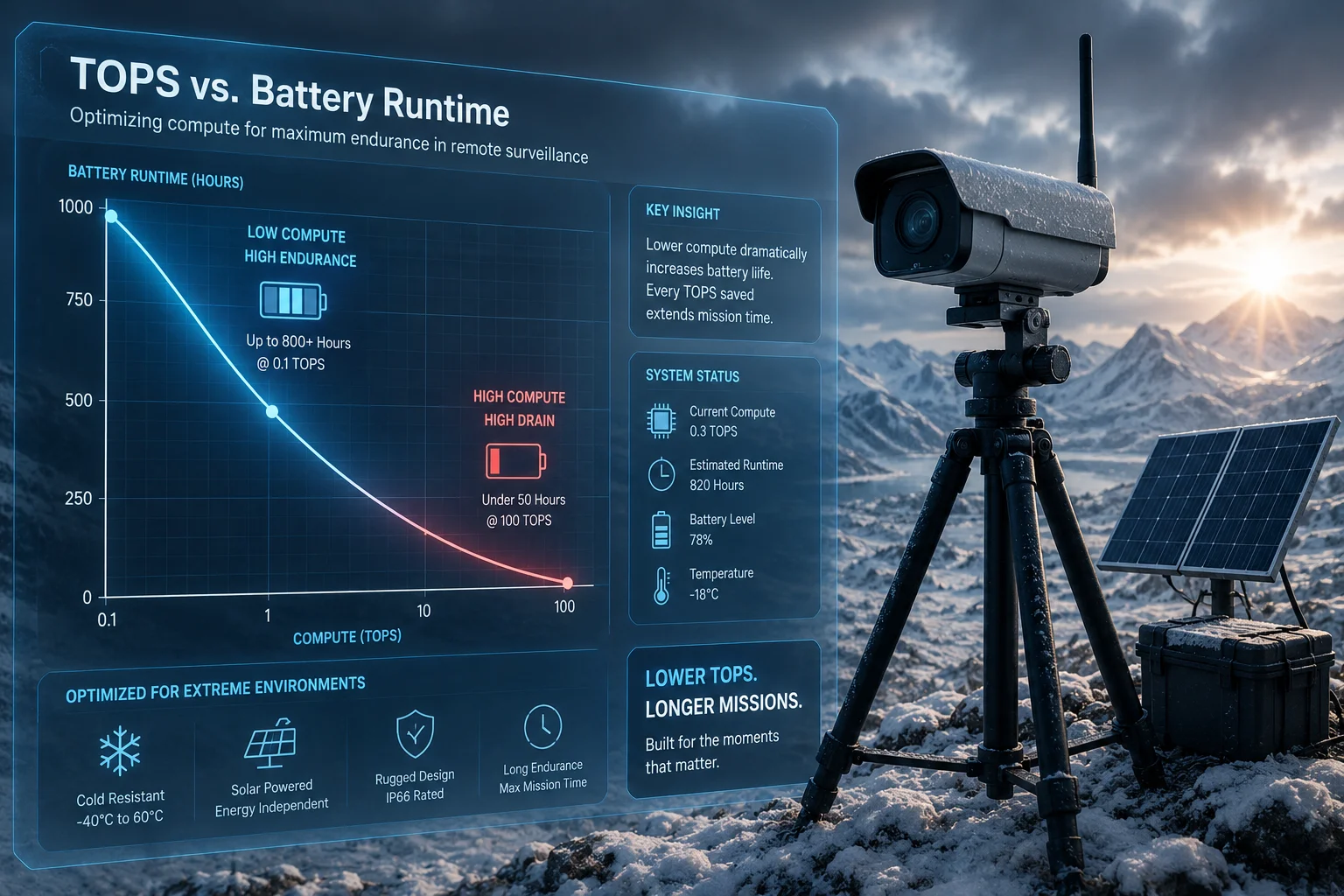
By dropping AI performance from full TOPS to minimal event-triggered processing, you can extend battery runtime by 3-5x during a power crisis. A camera that would die in 4 hours at full compute can survive 12-20 hours in low-power AI mode, enough to bridge a full night until sunrise.
Understanding TOPS and Real Power Draw
TOPS stands for Tera Operations Per Second. It measures how much math the AI chip can do. A typical security camera NPU runs at 2-4 TOPS for full-time object detection. But here is what most spec sheets do not tell you: you do not need full TOPS to detect a human at 20 meters.
A person standing in a driveway is not a hard problem for AI. The chip can identify that shape at 0.5 TOPS or less. Full TOPS is needed for complex tasks like reading license plates at 200 meters or tracking multiple fast-moving objects simultaneously.
The Runtime Math
Let me break this down with real numbers. Assume a 60Wh battery at 20% remaining. That gives you 12Wh of usable energy.
Full AI Mode
Total system draw: approximately 8W (NPU + SoC + 4G + IR). Runtime: 12Wh ÷ 8W = 1.5 hours.
Low-Compute Mode (Frame Skipping)
Total system draw: approximately 4W. Runtime: 12Wh ÷ 4W = 3 hours.
PIR-Triggered Mode
Total system draw: approximately 0.5W (idle) with brief 5W spikes during events. Average draw: approximately 1W. Runtime: 12Wh ÷ 1W = 12 hours.
Deep Sleep with Periodic Wake
Total system draw: approximately 0.2W with 30-second wake every 10 minutes. Runtime: 12Wh ÷ 0.3W = 40 hours.
Runtime Comparison Table
| Power Mode | Avg System Draw | Runtime on 12Wh | AI Capability | Alert Delivery |
|---|---|---|---|---|
| Full AI (Always-on) | 8W | 1.5 hours | Full detection + tracking | Instant |
| Frame Skipping (5fps) | 4W | 3 hours | Detection only | < 1 second |
| PIR Pre-Wake | 1W average | 12 hours | On-demand detection | 1-2 seconds |
| Deep Sleep + Periodic | 0.3W average | 40 hours | Scheduled snapshots | 5-10 minutes |
| Emergency Hibernate | 0.05W | 10 days | None | None until recharge |
Why This Matters for Remote Deployments
If your camera is on a mountain, a construction crane, or a farm 50 miles from the nearest technician, runtime is everything. Sending a truck to swap a battery costs $200-500 in labor alone. A camera that can stretch its last 20% across an entire night saves your client real money.
I always tell my integration partners: configure your power thresholds before you ship. Do not leave it at factory defaults. Every site is different. A camera in Arizona gets 6 hours of strong sun daily. A camera in Scotland might get 2 hours in winter. The low-compute thresholds should match the local solar conditions.
Will the User Be Notified When the AI Processing Power Is Being Limited Due to Low Battery?
I once had a client blame us for “broken AI” because his camera stopped tracking. He did not know the battery was at 12%. There was no notification. No app alert. He thought the firmware crashed. That taught me something important about user communication.
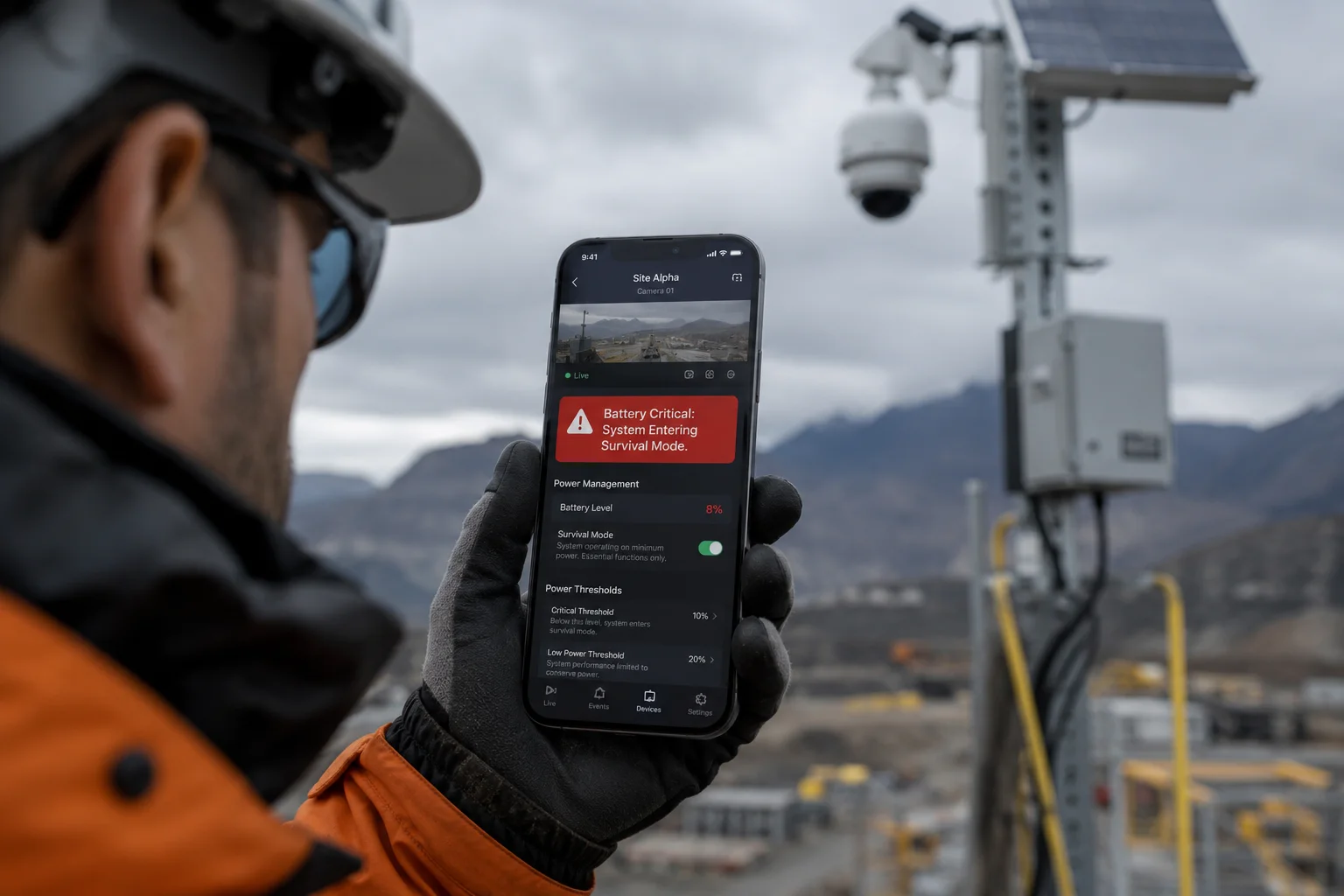
Yes, a properly designed system will push a notification to the user’s app or VMS platform when AI processing enters a reduced state. This notification should clearly state the current battery level, the active power mode, and what features have been disabled to prevent confusion and unnecessary service calls.
Why Notifications Prevent Expensive Mistakes
When a camera silently reduces its AI capability, the end user does not know. They see the live feed looks normal. They assume everything is working. Then an incident happens, and they check the recording only to find choppy, low-frame footage with no tracking data.
This creates two problems. First, the end user loses trust in the system. Second, they call your support line or demand a truck roll. Both cost money. A simple push notification that says “Battery at 18%. AI tracking paused. Detection still active.” prevents all of this.
What a Good Notification System Includes
A professional-grade solar PTZ system should provide these alerts at each threshold:
At 30% Battery
A soft warning. “Battery below 30%. System operating normally. Expect reduced runtime if cloudy conditions continue.” This gives the user time to plan. Maybe they send someone to check the panel angle. Maybe they reduce recording resolution manually.
At 20% Battery
A clear mode-change alert. “Battery below 20%. AI tracking disabled. Human detection still active. White light turned off. Estimated remaining runtime: 8 hours.” This tells the user exactly what changed and why.
At 10% Battery
An urgent alert. “Battery critical. System entering survival mode. Only PIR-triggered alerts active. 4G module operating on schedule. Next check-in: 30 minutes.” At this point, the user knows the camera is fighting to stay alive.
At 5% Battery
A final message. “Battery near zero. System entering hibernate. No further alerts until solar recharge restores battery above 15%.” This is the last communication before silence.
How to Implement This in Your Brand
If you are building a white-label solar camera7 product, I strongly recommend building these notifications into your app from day one. Do not treat power management as an afterthought. Your field technicians and end clients need visibility into what the camera is doing and why.
The best approach is a simple status bar in the app that shows: battery percentage, current AI mode, active features, and estimated time until next sunrise charge. This turns a potential support headache into a trust-building feature. Your client sees that the system is smart. It manages itself. And it keeps them informed every step of the way.
Conclusion
A smart power management profile is what separates a professional solar PTZ system from a cheap one that dies in the dark. Configure your thresholds at 20%, 10%, and 5%. Match them to your site’s solar conditions. And always notify the user when the AI steps down. That is how you build trust and avoid truck rolls.
1. A specialized processor designed to accelerate neural network inference tasks, common in AI cameras. ↩︎ 2. An integrated circuit that manages power distribution and battery monitoring in electronic devices. ↩︎ 3. A camera design with a panoramic lens for wide detection and a PTZ lens for detailed tracking, linked by software. ↩︎ 4. Passive Infrared sensor that detects heat signatures to trigger motion-based events with minimal power consumption. ↩︎ 5. A hardware timer that resets the system if it hangs, ensuring minimal power consumption in hibernate mode. ↩︎ 6. The process of converting sunlight into electrical energy to recharge batteries in off-grid installations. ↩︎ 7. A generic product manufactured by one company and rebranded by another, common in solar security solutions. ↩︎ 8. A professional or company that combines subsystems into a complete functional security solution for end clients. ↩︎