
I have seen too many projects fail because the camera vendor handed over a “SDK” that was just an outdated DLL file with zero documentation. It is frustrating and expensive.
To integrate professional PTZ cameras into your security platform, you can typically access three levels of documentation: Native SDKs (C++/C#/Java) for high-performance apps, RESTful Web APIs 1 for cloud-based SaaS platforms, and AI Metadata Protocols that let your system receive structured data like vehicle types and human attributes directly from the camera’s onboard processor.
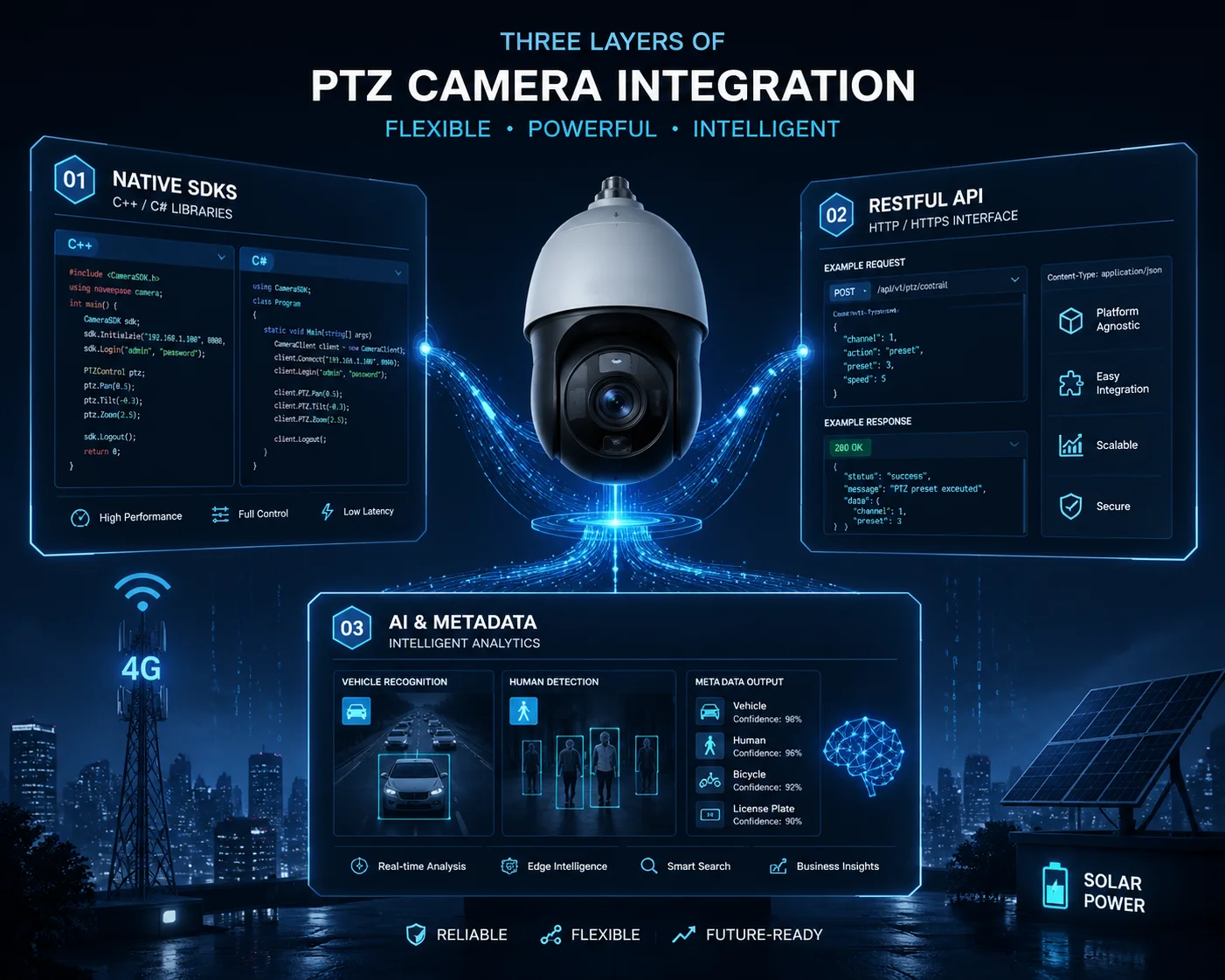 SDK documentation for PTZ camera integration into security platform
In this article, I will walk you through every layer of SDK integration. I will cover language support, API manuals, cross-platform compatibility, and how to get real technical support when things break. If you are building a custom security platform and need deep hardware control, keep reading. This is the guide I wish I had 10 years ago.
Can I Access the C++ or Python SDKs for Deep Integration Into My Custom Software?
I have worked with clients who wasted months trying to reverse-engineer a camera’s protocol because the vendor only gave them a basic ActiveX control. That should never happen.
Yes, industrial-grade manufacturers like Loyalty-Secu provide native C++ and C# SDKs for deep integration. You can also use Python ONVIF client libraries 2 for rapid prototyping. The key is to ask your vendor for SDKs that include sample code, demo projects, and full API references — not just a bare DLL file.
 C++ and Python SDK access for PTZ camera integration
Why Most “SDKs” Are Not Real SDKs
Here is something most vendors will not tell you. Many factories ship what they call an SDK. But when you open the package, you find a single DLL file, a brief text readme, and maybe one outdated demo built for Windows XP. In 2025, this is useless. If your platform runs on Linux containers or Docker, that DLL does nothing for you.
A real SDK gives you full source-level control. It lets your developers call specific camera functions — like setting the exact pan angle to 127.5 degrees, or reading the current zoom position as a numeric value. It also lets you pull AI metadata from the camera’s onboard processor. This means your platform can receive structured data like “red sedan, moving north, speed 35 km/h” without doing any video analysis on your own server.
What to Look for in a Vendor SDK Package
When I evaluate a new camera vendor for a client, I check for these items:
| Componente | Por que é importante | Bandeira vermelha se estiver faltando |
|---|---|---|
| Native SDK (C++/C#) | Needed for high-performance desktop or server apps | Vendor only offers ActiveX or OCX controls |
| RESTful API Docs | Critical for cloud/SaaS platforms using HTTP calls | No web API available at all |
| Sample Code & Demo App | Cuts development time from months to weeks | Only a PDF with function names, no working code |
| AI Metadata Protocol Guide | Lets your system receive structured analytics data | Camera does AI but cannot export the results |
| Multi-platform Support | Your servers may run Linux, not just Windows | SDK only works on Windows 7/10 |
ONVIF Client Libraries You Can Use Right Now
If your vendor does not provide a native SDK, you can still get basic integration working through ONVIF. Here are the best open-source libraries:
- C# / .NET:
SharpOnvifon GitHub gives you a full ONVIF client and server implementation. It supports all profiles and includes aSimpleOnvifClientwrapper for quick discovery, configuration, and streaming. - Python:
onvif-clienton PyPI provides WS-Discovery and a simple camera client. For more control, tryonvif-py3, which is a Python 3 fork with helpers for Device, Media, Events, and PTZ services.
These libraries work with any ONVIF-conformant camera. So even if you are mixing Axis, Hanwha, Reolink, and Loyalty-Secu cameras in one project, your core platform logic stays the same. You write it once, and it talks to all of them.
At Loyalty-Secu, we go further. We provide a full C++ SDK plus a RESTful API layer. This means David’s team can choose the right tool for each part of their platform. Use the native SDK for the high-speed video pipeline. Use the REST API for the web dashboard. Both talk to the same camera.
Is There a Comprehensive API Manual for Controlling the Lens Zoom and Focus?
I once had a client whose developer spent two weeks trying to figure out the zoom command format because the vendor’s “manual” was a 3-page PDF in broken English. That project almost missed its deadline.
Yes, a professional PTZ camera manufacturer should provide a complete API manual covering absolute positioning, continuous zoom, focus control, and preset management. The manual should include HTTP request examples, parameter ranges, return codes, and real-world sample code for each function.
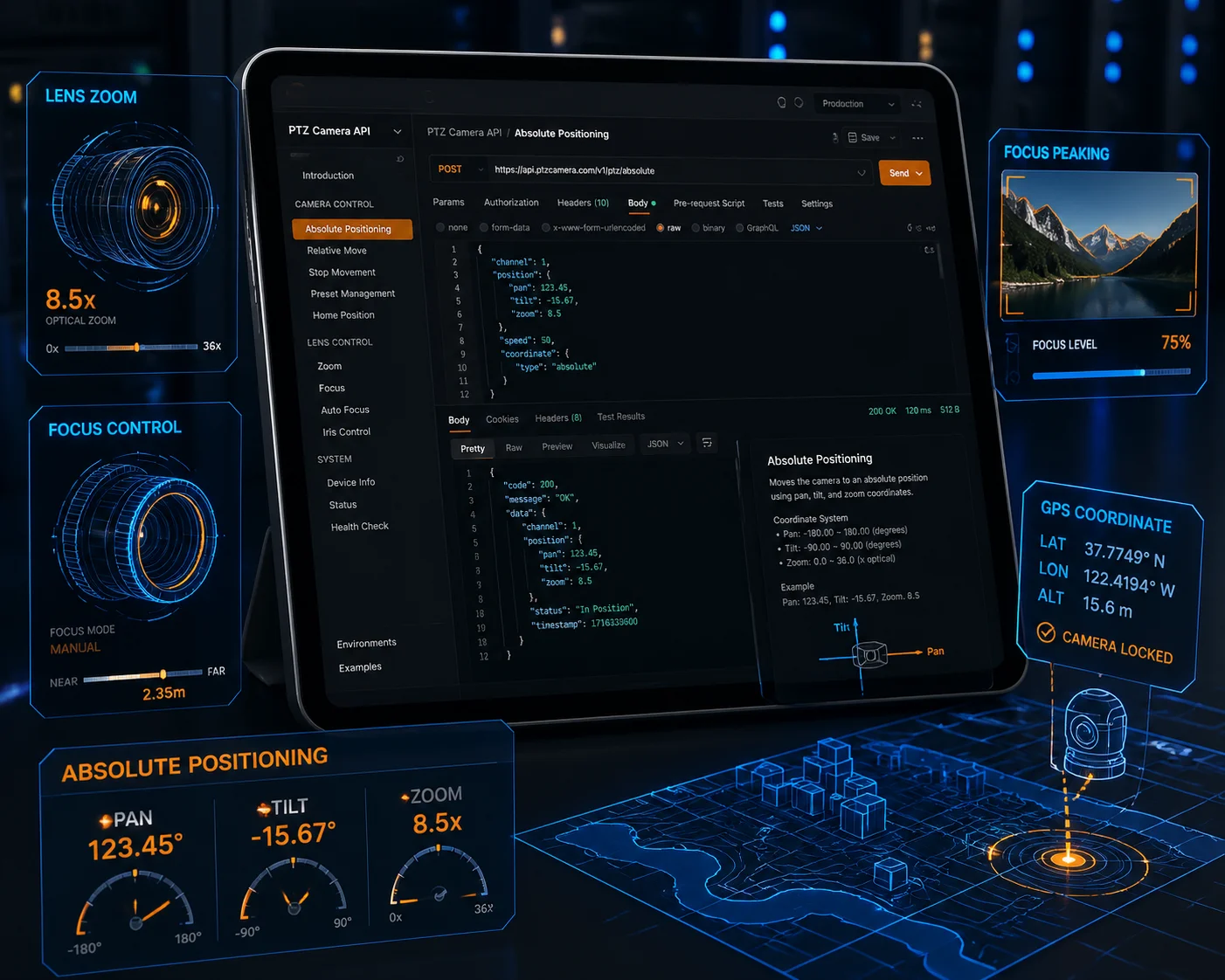 API manual for PTZ camera lens zoom and focus control
The Three Types of Interfaces David Must Care About
When you are building a security platform that controls PTZ cameras, not all API calls are equal. Some are nice to have. Others are critical. Let me break down the three categories that matter most.
1. PTZ Real-Time Control
This is the core of any PTZ integration. Your platform needs to send commands like “pan left 10 degrees,” “zoom to 20X,” or “go to preset 5.” But here is the detail most people miss: you need Absolute Positioning, not just relative movement.
Absolute Positioning means you can tell the camera “go to pan 185.0°, tilt -12.5°, zoom 25X” and it will go there instantly. This is what makes map-based control possible. Your operator clicks a point on a GIS map, your software calculates the angle, and the camera snaps to that exact position. Without absolute positioning, your operators are stuck using joystick-style controls, which is slow and imprecise.
2. Audio Integration
If your project involves construction sites, warehouses, or perimeter security, two-way audio is not optional. Your API manual should document how to send and receive audio streams. Look for support for AAC or G.711 encoding. The API should let you push an audio clip to the camera’s speaker or pull the microphone feed into your platform.
3. Configuration Management
This is the part most people forget until deployment day. Can your platform remotely change the camera’s 4G APN settings? Can it adjust the solar power management thresholds — like setting the camera to auto-shutdown at 15% battery? Can it update the firmware over the network?
These are not things ONVIF covers well. You need the vendor’s proprietary API for this level of control. And this is exactly why choosing a manufacturer with a real SDK matters.
| API Category | Key Functions | Protocol |
|---|---|---|
| PTZ Control | Absolute position, continuous move, preset recall, tour management | ONVIF PTZ Service or vendor HTTP API |
| Audio | Two-way talk, broadcast, audio clip playback | Vendor HTTP API (AAC/G.711) |
| Config Management | 4G APN setup, solar threshold, firmware update, reboot | Vendor proprietary REST API |
At Loyalty-Secu, our API manual covers all three categories. Every function includes the HTTP request format, a curl example, the expected JSON response, and error codes. We also provide a Postman collection 3 so your developers can test every endpoint in minutes, not days.
How Do I Get Technical Support if My Developers Find a Bug in the SDK?
I have been on the other side of this problem. A client’s developer found a memory leak in a vendor’s SDK, submitted a ticket, and waited 6 weeks for a reply. By then, the project was already behind schedule and the client was furious.
When your developers find a bug, you need a direct line to the manufacturer’s R&D team — not a generic support inbox. Professional vendors like Loyalty-Secu assign a dedicated technical engineer to each integration project, with response times under 24 hours and firmware patch delivery within one to two weeks.
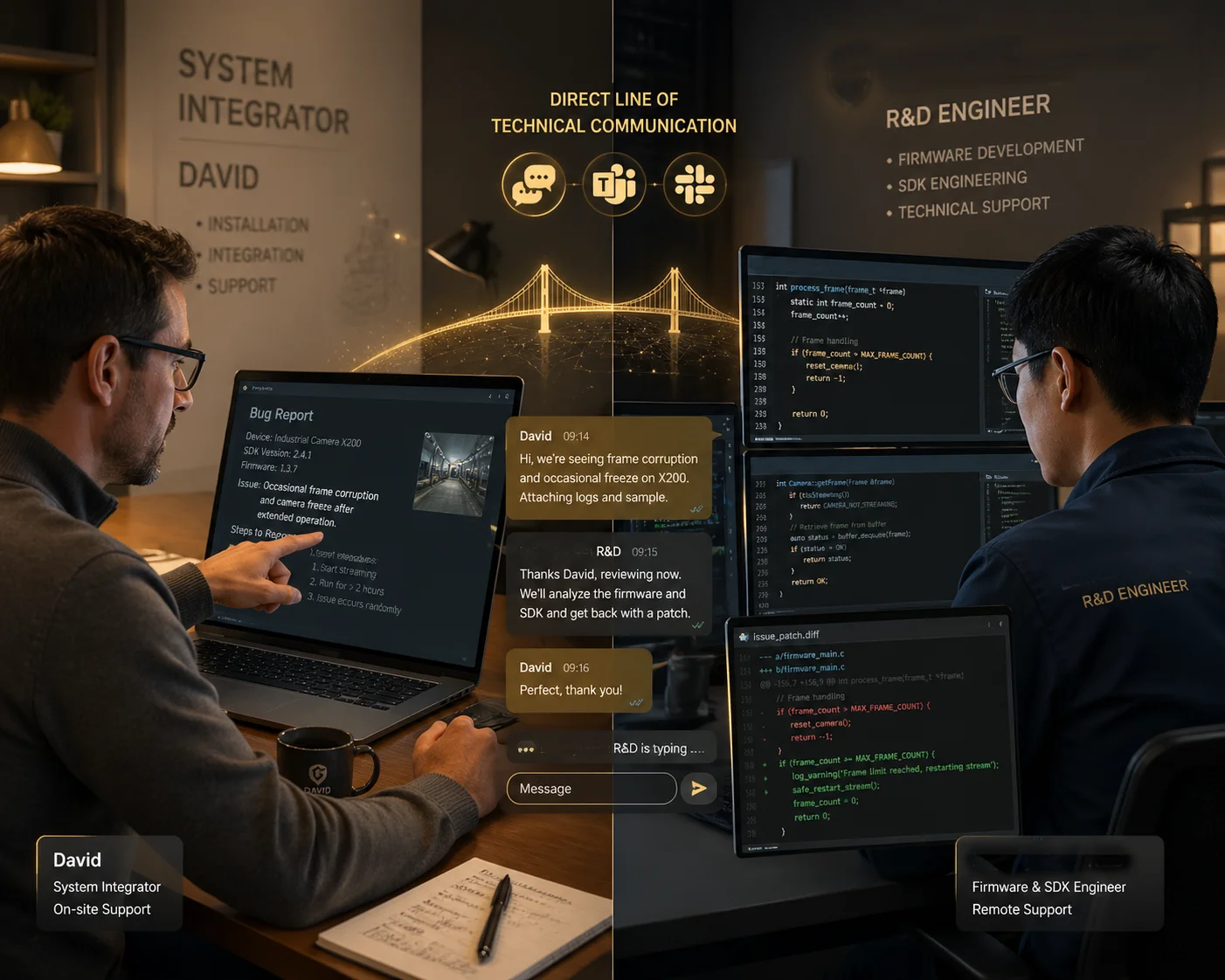 Technical support for SDK bug reporting and resolution
Why Generic Support Channels Fail for SDK Issues
SDK bugs are not the same as “my camera is offline” support tickets. They require deep technical knowledge. The support agent needs to understand your code, reproduce the issue in a test environment, and coordinate with the firmware team to push a fix. A tier-1 support agent reading from a script cannot do this.
This is why I always tell my clients to ask one question before choosing a vendor: “If my developer finds a bug in your SDK, who will I talk to — a support agent or an engineer?”
What Good SDK Support Looks Like
Here is what we do at Loyalty-Secu for every integration project:
- Dedicated Engineer: We assign one engineer from our R&D team to your project. This person knows the SDK inside and out. Your developer talks to them directly on WhatsApp, Teams, or email.
- Bug Reproduction Environment: When your developer reports a bug, our engineer reproduces it on the same hardware and firmware version. No guessing.
- Patch Delivery: For confirmed SDK bugs, we deliver a patched SDK or firmware within 7 to 14 business days. For critical issues (like a crash bug), we escalate to a 48-hour turnaround.
- Version Control: Every SDK release has a changelog. You always know what changed and why.
What to Ask Your Vendor Before Signing
Before you commit to any camera vendor for a platform integration project, ask these questions:
- Can I get direct contact with your SDK engineer?
- What is your average response time for SDK bug reports?
- Do you provide a staging firmware for testing before production rollout?
- How often do you update the SDK, and do you maintain backward compatibility?
If the vendor cannot answer these clearly, that is a red flag. SDK integration is a long-term relationship, not a one-time purchase. You need a partner who will support your team through the entire lifecycle of your platform.
Does the SDK Support Both Windows and Linux Environments for My Server-Side App?
I have met developers who built their entire backend on Ubuntu, only to find out the camera SDK they chose only runs on Windows. That is a project-killing discovery at the worst possible time.
Yes, professional-grade SDKs should support both Windows and Linux. At Loyalty-Secu, we provide native libraries for Windows (DLL), Linux (SO), Android, and iOS. For server-side applications running in Docker 4 ou Kubernetes 5, our RESTful API layer works on any operating system without installing local drivers.
The Platform Reality in 2025
Most serious security platforms today do not run on a single Windows desktop. They run on mixed environments. The video recording server might be Ubuntu with Docker. The web frontend might be a React app served from Nginx. The mobile app is on Android and iOS. The analytics engine might be a Python service running in a Kubernetes pod.
Your camera SDK needs to work in all of these places. Or at minimum, it needs to offer an API layer that any platform can call over HTTP.
How We Solve Cross-Platform at Loyalty-Secu
We provide two paths for integration:
| Integration Path | Melhor para | Platform Support | Key Benefit |
|---|---|---|---|
| Native SDK (C++/C# libraries) | High-performance video pipeline, local recording | Windows (.dll), Linux (.so) | Lowest latency, full hardware access |
| RESTful Web API | Cloud dashboards, SaaS platforms, mobile apps | Any OS (HTTP-based) | No driver install, works in Docker/K8s |
Native SDK Details
Our C++ SDK ships as a shared library. On Windows, it is a standard DLL. On Linux, it is a .so file. Both versions expose the same API surface. Your developers write the same code on both platforms. We include CMake build scripts 6 for Linux and Visual Studio project files for Windows.
The SDK covers:
- Live video decoding and rendering
- PTZ absolute and relative control
- AI metadata subscription (receive object detection results in real time)
- Audio send and receive
- Device configuration (network, storage, 4G, solar power settings)
RESTful API Details
For teams that prefer HTTP-based integration, we expose every camera function through a RESTful API. You send a POST request to move the PTZ. You send a GET request to read the current position. You subscribe to a WebSocket endpoint to receive AI detection events in real time.
This approach is perfect for David’s team if they are building a cloud-based SaaS platform. There is no need to install any driver or library on the server. Any language that can make HTTP requests — Python, Node.js, Go, Java, Ruby — can control the camera.
ONVIF as the Universal Fallback
Even if you are not using our SDK, you can always fall back to ONVIF Profile S. This gives you vendor-neutral video streaming, PTZ control, and device discovery. I listed the best ONVIF client libraries earlier in this article. They work on both Windows and Linux, and they talk to any ONVIF-conformant camera from any brand.
The bottom line is this: in 2025, if a vendor tells you their SDK only works on Windows, walk away. Your platform deserves better.
Conclusão
SDK quality decides whether your integration takes two weeks or six months. Ask for native SDKs, RESTful APIs, sample code, and direct R&D support — before you commit to any camera vendor.
1. Official OpenAPI Specification for RESTful API design standards. ︎ 2. ONVIF client Python library for rapid camera integration prototyping. ︎ 3. Postman API testing platform for validating camera endpoints. ︎ 4. Docker container platform for cross-platform server deployments. ︎ 5. Kubernetes orchestration for scalable security platform backends. ︎ 6. CMake build system for cross-platform C++ project compilation. ︎ 7. Official ONVIF Profile S standard for PTZ and video streaming. ︎ 8. GitHub repository for SharpOnvif C#/.NET client library. ︎ 9. WebSocket protocol for real-time AI metadata streaming. ︎ 10. Best practices for Git-based SDK versioning and changelog maintenance. ︎