
He visto fracasar demasiados proyectos porque el proveedor de la cámara entregó un “SDK” que no era más que un archivo DLL obsoleto sin documentación. Es frustrante y caro.
Para integrar cámaras PTZ profesionales en su plataforma de seguridad, normalmente puede acceder a tres niveles de documentación: SDK nativos (C++/C#/Java) para aplicaciones de alto rendimiento, API web RESTful 1 para plataformas SaaS basadas en la nube, y AI Metadata Protocols, que permiten al sistema recibir datos estructurados, como tipos de vehículos y atributos humanos, directamente del procesador integrado de la cámara.
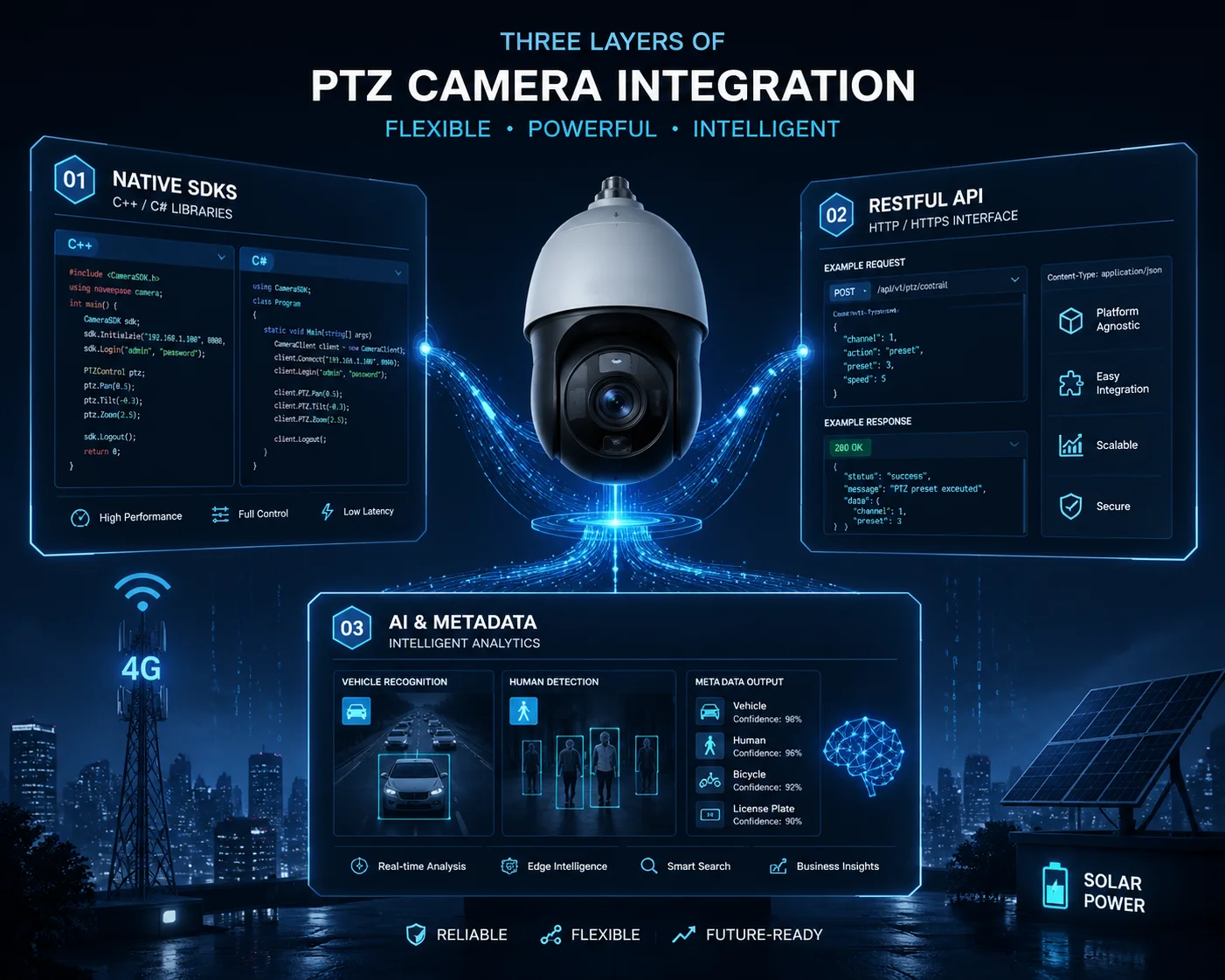 Documentación SDK para la integración de cámaras PTZ en plataformas de seguridad
En este artículo, te guiaré a través de cada capa de la integración SDK. Cubriré el soporte de idiomas, manuales API, compatibilidad entre plataformas, y cómo obtener soporte técnico real cuando las cosas se rompen. Si estás creando una plataforma de seguridad personalizada y necesitas un control exhaustivo del hardware, sigue leyendo. Esta es la guía que desearía haber tenido hace 10 años.
¿Puedo acceder a los SDK de C++ o Python para integrarlos en profundidad en mi software personalizado?
He trabajado con clientes que perdieron meses intentando aplicar ingeniería inversa al protocolo de una cámara porque el proveedor sólo les proporcionó un control ActiveX básico. Eso no debería ocurrir nunca.
Sí, los fabricantes de nivel industrial como Loyalty-Secu proporcionan SDK nativos C++ y C# para una integración profunda. También puede utilizar Python Bibliotecas cliente ONVIF 2 para la creación rápida de prototipos. La clave está en pedir a su proveedor SDKs que incluyan código de ejemplo, proyectos de demostración y referencias completas a la API, no sólo un archivo DLL.
 Acceso al SDK de C++ y Python para la integración de cámaras PTZ
Por qué la mayoría de los “SDKs” no son verdaderos SDKs
Aquí hay algo que la mayoría de los vendedores no le dirán. Muchas fábricas entregan lo que llaman un SDK. Pero cuando abres el paquete, encuentras un único archivo DLL, un breve léame de texto y quizá una demo anticuada creada para Windows XP. En 2025, esto es inútil. Si tu plataforma funciona con contenedores Linux o Docker, esa DLL no te sirve de nada.
Un SDK real le ofrece un control total a nivel de código fuente. Permite a los desarrolladores llamar a funciones específicas de la cámara, como establecer el ángulo exacto de barrido en 127,5 grados o leer la posición actual del zoom como un valor numérico. También permite extraer metadatos de inteligencia artificial del procesador integrado de la cámara. Esto significa que su plataforma puede recibir datos estructurados como “sedán rojo, en movimiento hacia el norte, velocidad 35 km/h” sin realizar ningún análisis de vídeo en su propio servidor.
Qué buscar en un paquete SDK para proveedores
Cuando evalúo a un nuevo proveedor de cámaras para un cliente, compruebo estos aspectos:
| Componente | Por qué es importante | Bandera roja si falta |
|---|---|---|
| SDK nativo (C++/C#) | Necesario para aplicaciones de escritorio o servidor de alto rendimiento | El proveedor sólo ofrece controles ActiveX u OCX |
| Documentación sobre la API RESTful | Crítico para plataformas en nube/SaaS que utilizan llamadas HTTP | Ninguna API web disponible |
| Código de ejemplo y aplicación de demostración | Reduce el tiempo de desarrollo de meses a semanas | Sólo un PDF con los nombres de las funciones, sin código de trabajo |
| Guía del protocolo de metadatos AI | Permite que su sistema reciba datos analíticos estructurados | La cámara hace IA pero no puede exportar los resultados |
| Soporte multiplataforma | Sus servidores pueden funcionar con Linux, no sólo con Windows | El SDK sólo funciona en Windows 7/10 |
Bibliotecas cliente ONVIF que puede utilizar ahora mismo
Si su proveedor no proporciona un SDK nativo, aún puede conseguir que la integración básica funcione a través de ONVIF. Aquí están las mejores bibliotecas de código abierto:
- C# / .NET:
SharpOnvifen GitHub te ofrece una implementación completa de cliente y servidor ONVIF. Soporta todos los perfiles e incluye unSimpleOnvifClientpara una rápida detección, configuración y transmisión. - Python:
onvif-clienten PyPI proporciona WS-Discovery y un sencillo cliente de cámara. Para un mayor control, pruebeonvif-py3, que es un fork de Python 3 con helpers para los servicios Device, Media, Events y PTZ.
Estas librerías funcionan con cualquier cámara compatible con ONVIF. Así que incluso si usted está mezclando Axis, Hanwha, Reolink, y Loyalty-Secu cámaras en un proyecto, su lógica de la plataforma central sigue siendo la misma. La escribes una vez y se comunica con todas ellas.
En Loyalty-Secu, vamos más allá. Proporcionamos un SDK C++ completo además de una capa API RESTful. Esto significa que el equipo de David puede elegir la herramienta adecuada para cada parte de su plataforma. Utilizar el SDK nativo para el canal de vídeo de alta velocidad. Utilizar la API REST para el panel de control web. Ambos se comunican con la misma cámara.
¿Existe un manual API completo para controlar el zoom y el enfoque del objetivo?
Una vez tuve un cliente cuyo desarrollador se pasó dos semanas intentando descifrar el formato del comando zoom porque el “manual” del proveedor era un PDF de 3 páginas en un inglés chapucero. El proyecto estuvo a punto de incumplir el plazo de entrega.
Sí, un fabricante profesional de cámaras PTZ debe proporcionar un manual completo de la API que cubra el posicionamiento absoluto, el zoom continuo, el control del enfoque y la gestión de preajustes. El manual debe incluir ejemplos de solicitudes HTTP, rangos de parámetros, códigos de retorno y código de ejemplo real para cada función.
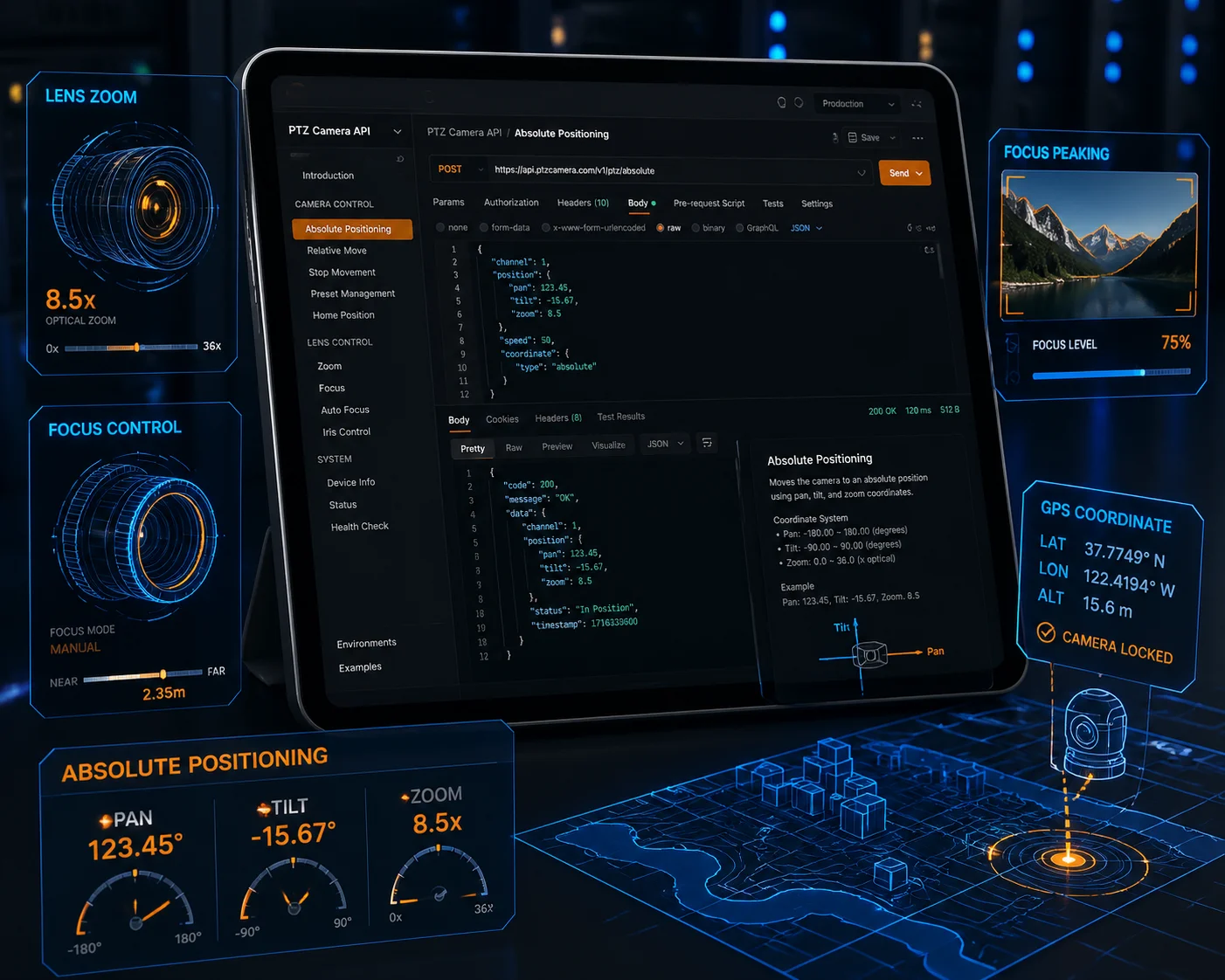 API manual for PTZ camera lens zoom and focus control
The Three Types of Interfaces David Must Care About
When you are building a security platform that controls PTZ cameras, not all API calls are equal. Some are nice to have. Others are critical. Let me break down the three categories that matter most.
1. PTZ Real-Time Control
This is the core of any PTZ integration. Your platform needs to send commands like “pan left 10 degrees,” “zoom to 20X,” or “go to preset 5.” But here is the detail most people miss: you need Absolute Positioning, not just relative movement.
Absolute Positioning means you can tell the camera “go to pan 185.0°, tilt -12.5°, zoom 25X” and it will go there instantly. This is what makes map-based control possible. Your operator clicks a point on a GIS map, your software calculates the angle, and the camera snaps to that exact position. Without absolute positioning, your operators are stuck using joystick-style controls, which is slow and imprecise.
2. Audio Integration
If your project involves construction sites, warehouses, or perimeter security, two-way audio is not optional. Your API manual should document how to send and receive audio streams. Look for support for AAC or G.711 encoding. The API should let you push an audio clip to the camera’s speaker or pull the microphone feed into your platform.
3. Configuration Management
This is the part most people forget until deployment day. Can your platform remotely change the camera’s 4G APN settings? Can it adjust the solar power management thresholds — like setting the camera to auto-shutdown at 15% battery? Can it update the firmware over the network?
These are not things ONVIF covers well. You need the vendor’s proprietary API for this level of control. And this is exactly why choosing a manufacturer with a real SDK matters.
| API Category | Key Functions | Protocol |
|---|---|---|
| PTZ Control | Absolute position, continuous move, preset recall, tour management | ONVIF PTZ Service or vendor HTTP API |
| Audio | Two-way talk, broadcast, audio clip playback | Vendor HTTP API (AAC/G.711) |
| Config Management | 4G APN setup, solar threshold, firmware update, reboot | Vendor proprietary REST API |
At Loyalty-Secu, our API manual covers all three categories. Every function includes the HTTP request format, a curl example, the expected JSON response, and error codes. We also provide a Postman collection 3 so your developers can test every endpoint in minutes, not days.
How Do I Get Technical Support if My Developers Find a Bug in the SDK?
I have been on the other side of this problem. A client’s developer found a memory leak in a vendor’s SDK, submitted a ticket, and waited 6 weeks for a reply. By then, the project was already behind schedule and the client was furious.
When your developers find a bug, you need a direct line to the manufacturer’s R&D team — not a generic support inbox. Professional vendors like Loyalty-Secu assign a dedicated technical engineer to each integration project, with response times under 24 hours and firmware patch delivery within one to two weeks.
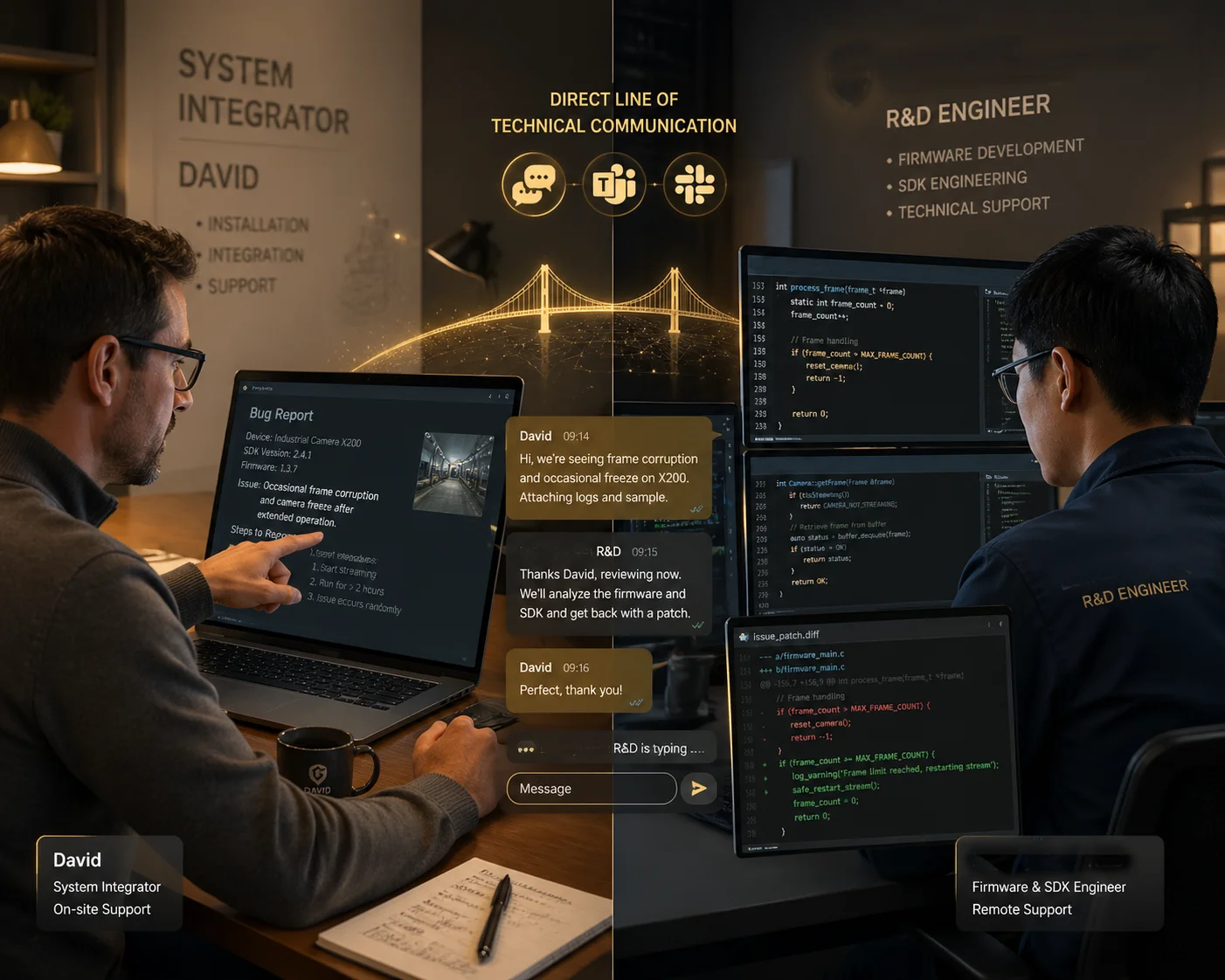 Technical support for SDK bug reporting and resolution
Why Generic Support Channels Fail for SDK Issues
SDK bugs are not the same as “my camera is offline” support tickets. They require deep technical knowledge. The support agent needs to understand your code, reproduce the issue in a test environment, and coordinate with the firmware team to push a fix. A tier-1 support agent reading from a script cannot do this.
This is why I always tell my clients to ask one question before choosing a vendor: “If my developer finds a bug in your SDK, who will I talk to — a support agent or an engineer?”
What Good SDK Support Looks Like
Here is what we do at Loyalty-Secu for every integration project:
- Dedicated Engineer: We assign one engineer from our R&D team to your project. This person knows the SDK inside and out. Your developer talks to them directly on WhatsApp, Teams, or email.
- Bug Reproduction Environment: When your developer reports a bug, our engineer reproduces it on the same hardware and firmware version. No guessing.
- Patch Delivery: For confirmed SDK bugs, we deliver a patched SDK or firmware within 7 to 14 business days. For critical issues (like a crash bug), we escalate to a 48-hour turnaround.
- Version Control: Every SDK release has a changelog. You always know what changed and why.
What to Ask Your Vendor Before Signing
Before you commit to any camera vendor for a platform integration project, ask these questions:
- Can I get direct contact with your SDK engineer?
- What is your average response time for SDK bug reports?
- Do you provide a staging firmware for testing before production rollout?
- How often do you update the SDK, and do you maintain backward compatibility?
If the vendor cannot answer these clearly, that is a red flag. SDK integration is a long-term relationship, not a one-time purchase. You need a partner who will support your team through the entire lifecycle of your platform.
Does the SDK Support Both Windows and Linux Environments for My Server-Side App?
I have met developers who built their entire backend on Ubuntu, only to find out the camera SDK they chose only runs on Windows. That is a project-killing discovery at the worst possible time.
Yes, professional-grade SDKs should support both Windows and Linux. At Loyalty-Secu, we provide native libraries for Windows (DLL), Linux (SO), Android, and iOS. For server-side applications running in Docker 4 o Kubernetes 5, our RESTful API layer works on any operating system without installing local drivers.
The Platform Reality in 2025
Most serious security platforms today do not run on a single Windows desktop. They run on mixed environments. The video recording server might be Ubuntu with Docker. The web frontend might be a React app served from Nginx. The mobile app is on Android and iOS. The analytics engine might be a Python service running in a Kubernetes pod.
Your camera SDK needs to work in all of these places. Or at minimum, it needs to offer an API layer that any platform can call over HTTP.
How We Solve Cross-Platform at Loyalty-Secu
We provide two paths for integration:
| Integration Path | Lo mejor para | Platform Support | Key Benefit |
|---|---|---|---|
| Native SDK (C++/C# libraries) | High-performance video pipeline, local recording | Windows (.dll), Linux (.so) | Lowest latency, full hardware access |
| RESTful Web API | Cloud dashboards, SaaS platforms, mobile apps | Any OS (HTTP-based) | No driver install, works in Docker/K8s |
Native SDK Details
Our C++ SDK ships as a shared library. On Windows, it is a standard DLL. On Linux, it is a .so file. Both versions expose the same API surface. Your developers write the same code on both platforms. We include CMake build scripts 6 for Linux and Visual Studio project files for Windows.
The SDK covers:
- Live video decoding and rendering
- PTZ absolute and relative control
- AI metadata subscription (receive object detection results in real time)
- Audio send and receive
- Device configuration (network, storage, 4G, solar power settings)
RESTful API Details
For teams that prefer HTTP-based integration, we expose every camera function through a RESTful API. You send a POST request to move the PTZ. You send a GET request to read the current position. You subscribe to a WebSocket endpoint to receive AI detection events in real time.
This approach is perfect for David’s team if they are building a cloud-based SaaS platform. There is no need to install any driver or library on the server. Any language that can make HTTP requests — Python, Node.js, Go, Java, Ruby — can control the camera.
ONVIF as the Universal Fallback
Even if you are not using our SDK, you can always fall back to ONVIF Profile S. This gives you vendor-neutral video streaming, PTZ control, and device discovery. I listed the best ONVIF client libraries earlier in this article. They work on both Windows and Linux, and they talk to any ONVIF-conformant camera from any brand.
The bottom line is this: in 2025, if a vendor tells you their SDK only works on Windows, walk away. Your platform deserves better.
Conclusión
SDK quality decides whether your integration takes two weeks or six months. Ask for native SDKs, RESTful APIs, sample code, and direct R&D support — before you commit to any camera vendor.
1. Official OpenAPI Specification for RESTful API design standards. ︎ 2. ONVIF client Python library for rapid camera integration prototyping. ︎ 3. Postman API testing platform for validating camera endpoints. ︎ 4. Docker container platform for cross-platform server deployments. ︎ 5. Kubernetes orchestration for scalable security platform backends. ︎ 6. CMake build system for cross-platform C++ project compilation. ︎ 7. Official ONVIF Profile S standard for PTZ and video streaming. ︎ 8. GitHub repository for SharpOnvif C#/.NET client library. ︎ 9. WebSocket protocol for real-time AI metadata streaming. ︎ 10. Best practices for Git-based SDK versioning and changelog maintenance. ︎