
I build solar camera systems for hard places, and I know one weak choice can ruin the whole project. I want the camera to wake fast, save power, and still stay ready.
The best answer is a hybrid wake-up design8. PIR should handle local motion alerts, while low-power network wake-up should handle remote access. This gives me low idle power, quick response, and flexible control.
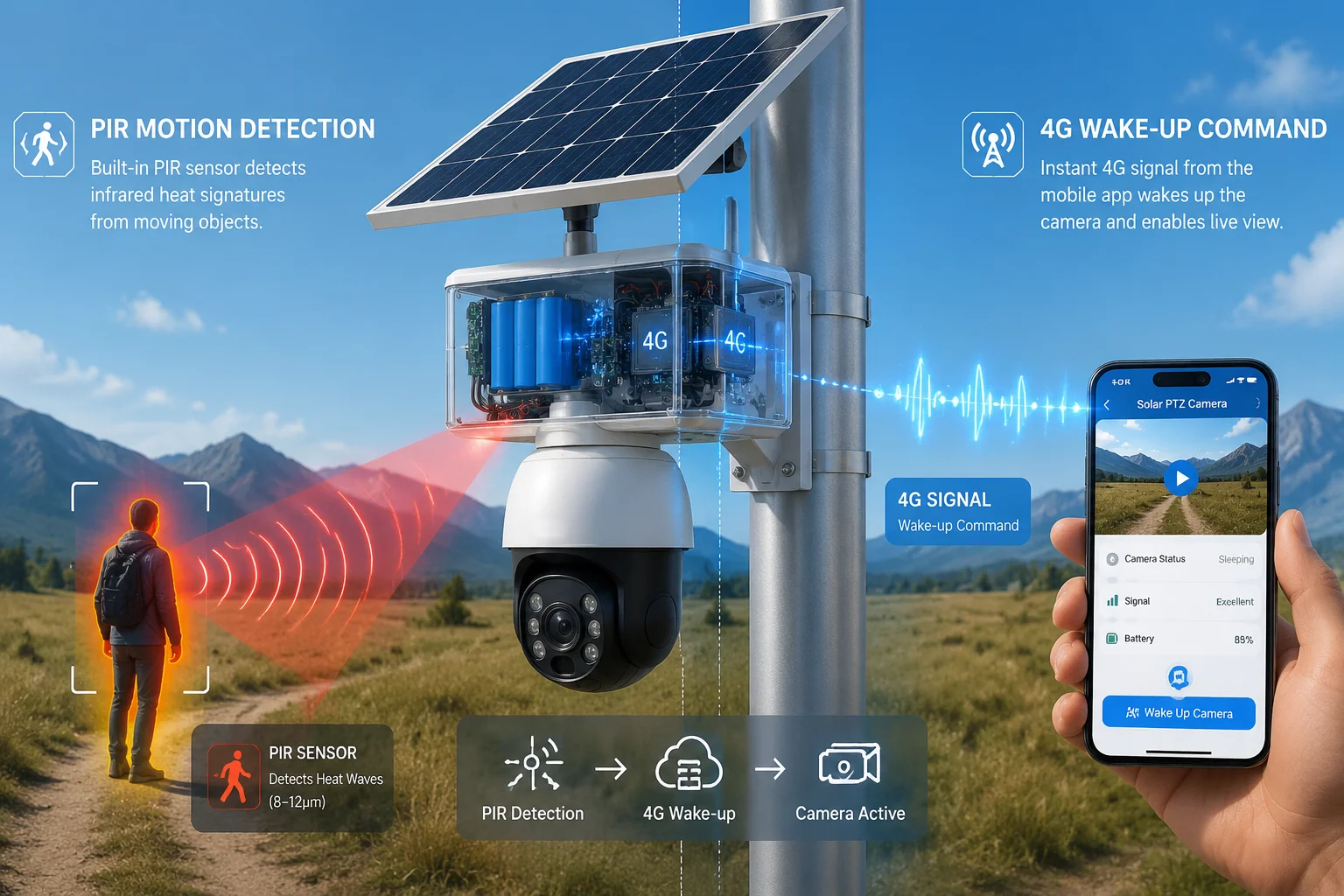
I use this question a lot because it shapes the whole system design. If I pick the wrong wake-up method, I lose battery life, speed, or both. That is why I look at the full path, not only one trigger.
Table of Contents
What is the power consumption difference between a PIR-only wake-up and an “Always-on” 4G link?
I often face this issue when I design systems for remote farms, yards, and sites with no grid power. I need the camera to sleep deeply, but I also need it to stay useful. If I keep the 4G link always on, the battery drains fast and the solar system gets bigger and more expensive.
The power gap is huge. A PIR-only wake-up keeps most of the system asleep and usually uses only microamp to low milliwatt standby power, while an always-on 4G link keeps the radio active and raises idle consumption a lot. In real projects, that difference can decide if the camera runs for days or for months.
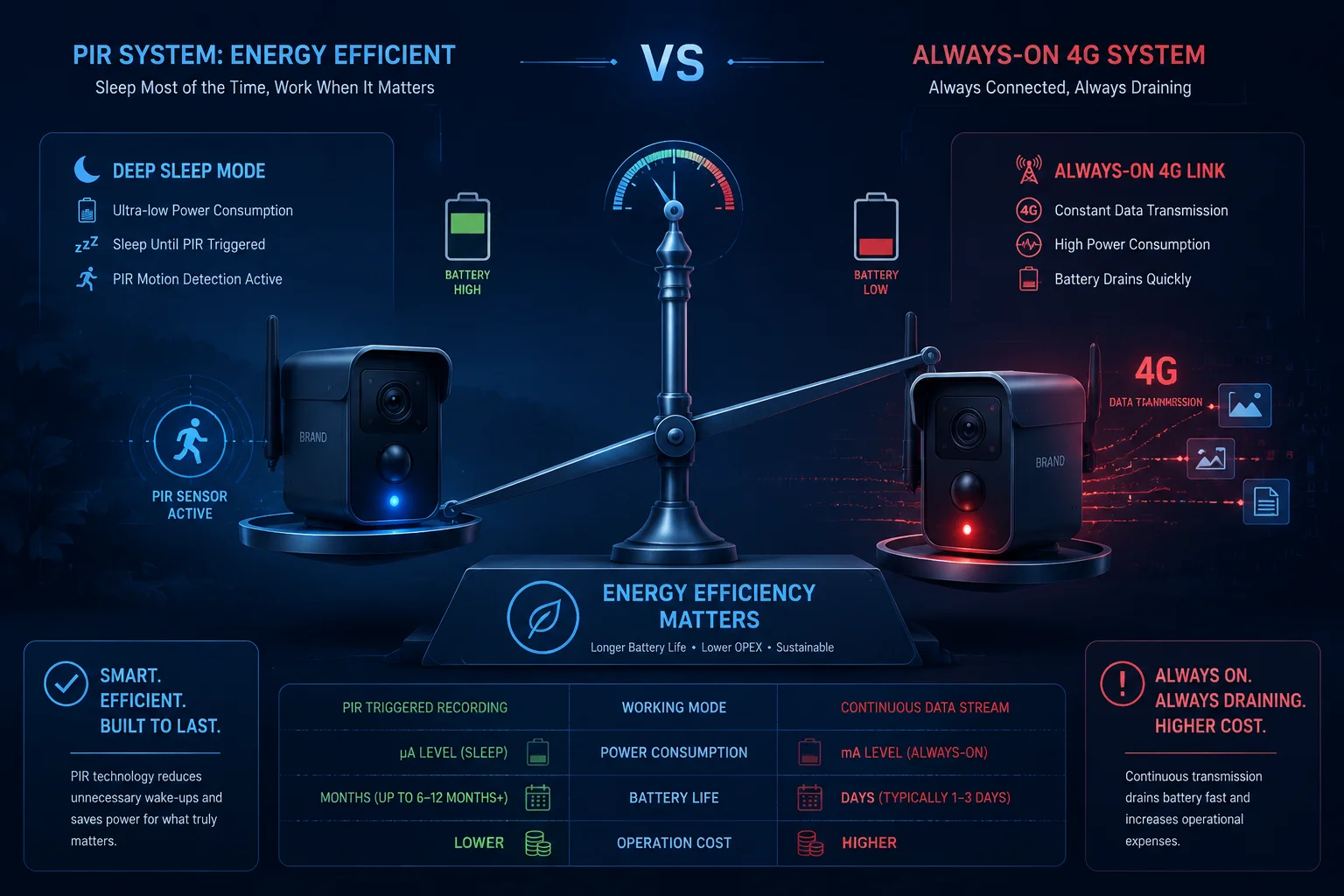
I look at this from the view of a system integrator, not just a spec sheet reader. The key issue is not only the camera itself. It is the full energy chain. That chain includes the PIR module, the MCU, the 4G modem, the encoder, the storage, and the solar battery. If I keep the modem awake all day, I force the battery to work harder. Then I need more solar panel area, a bigger battery, and more backup margin for cloudy days. That adds cost fast.
Why PIR is so efficient
PIR sensor1 is a small sensor with a simple job. It watches for heat change. It does not need the main SoC to stay awake all the time. In a good design, the PIR module listens while the rest of the system sleeps. That means the idle drain stays very low. I like this because it protects battery life first. For solar projects, that matters more than a fancy always-online badge.
Why always-on 4G is expensive
A live 4G link must keep the modem registered and ready. Even if the camera is not streaming, the modem still needs power for network keep-alive, paging, and radio activity. If the signal is weak, the modem can also spend more energy trying to stay attached. That is why remote sites often suffer the most. The modem works harder, the battery runs lower, and the solar buffer gets small.
Power use comparison table
| Mode | Main idea | Idle power level | Best use |
|---|---|---|---|
| PIR-only wake-up | Sleep until local motion | Very low | Alarm and capture |
| Always-on 4G link | Stay ready for remote access | High | Continuous live connection |
| Hybrid mode | PIR plus low-power network logic | Low to moderate | Balanced field deployment |
I prefer the hybrid model because it gives me control. PIR covers the local event. Low-power network logic covers remote access. I do not need to pay the full energy cost of always-on 4G all the time. I get enough readiness without wasting battery.
Can the network-based wake-up provide a faster live view response than a physical PIR trigger?
I get this question from buyers who want both security and convenience. They want to open the app and see video fast. I understand that need because no one wants to wait when an alarm matters. But I also know that a network-based wake-up is not the same as a physical trigger. Each one solves a different problem.
Network-based wake-up can give me fast remote access, but it is still limited by paging cycles, modem state, carrier behavior, and signal quality. A PIR trigger is usually faster for local alert response because it wakes the camera right where the motion happens. So the network path can be convenient, but it is not always faster than a direct physical trigger.
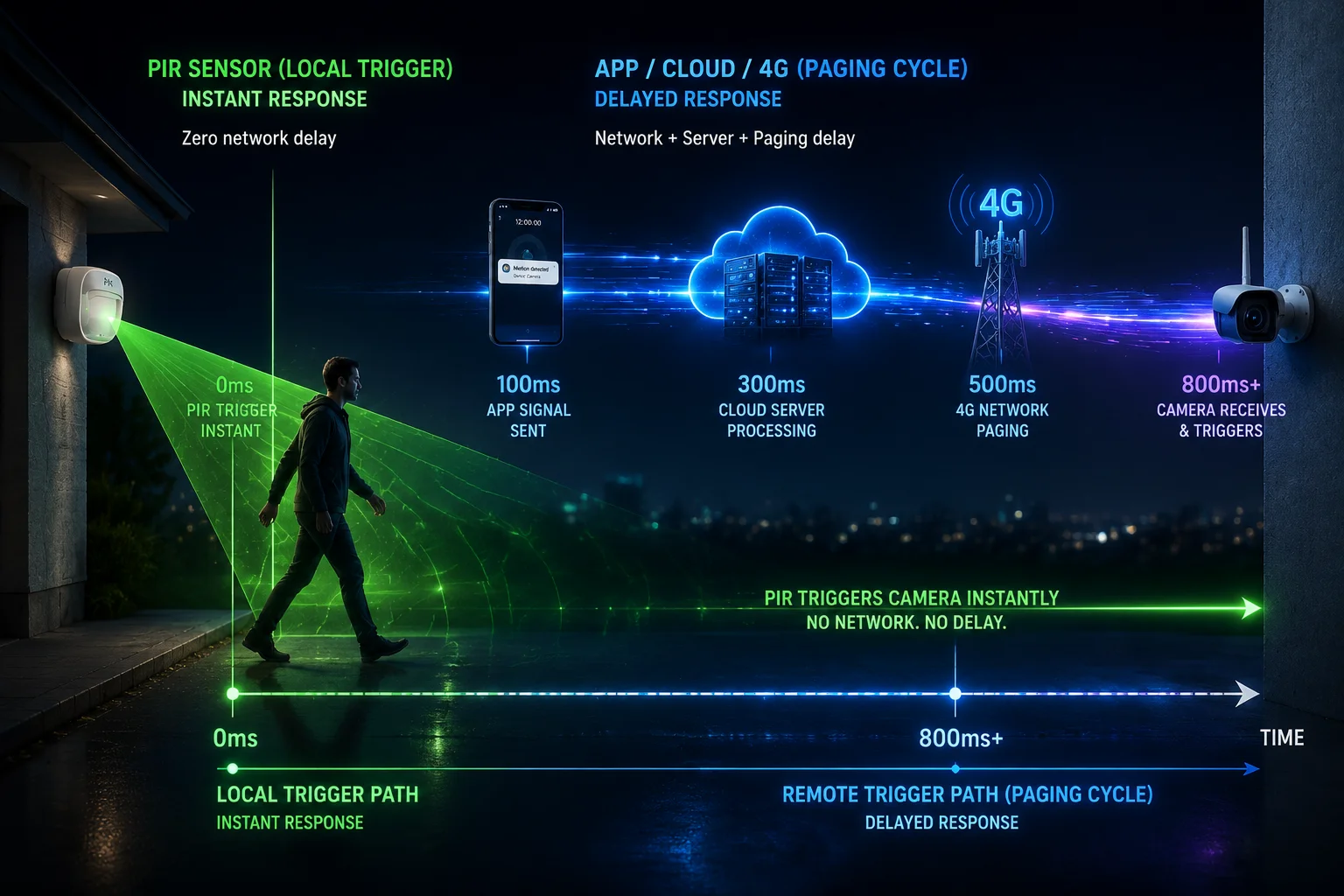
I break this down in a simple way. When PIR detects motion, the camera can wake right away. The SoC boots, the modem reconnects, and the camera starts recording. That chain is short. When I use network wake-up, I depend on the cloud, the carrier, and the modem’s low-power state. If the modem uses eDRX3, it may wait for the next receive window. If it uses PSM4, the remote wake path may be even slower or limited. So “remote on-demand” is useful, but it is not magic.
What affects response speed
I watch three things:
-
Network state If the modem is in a deeper sleep, it takes longer to wake.
-
Signal quality If the 4G signal is weak, the modem needs more time to reconnect.
-
Cloud and server path If the app, server, and carrier path all work well, the result is better. If one part is slow, the full chain slows down.
Response speed table
| Trigger type | Typical speed path | Strength | Weak point |
|---|---|---|---|
| PIR trigger | Local sensor to SoC wake | Very fast for local events | Needs motion in range |
| Network wake-up | App to cloud to modem paging | Good for remote control | Depends on paging cycle |
| Hybrid wake-up | PIR plus on-demand network access | Best balance | More setup work |
What I tell my buyers
I tell them to use PIR for the first response and network wake-up for convenience. If the goal is to catch an intruder or a moving vehicle, PIR is the better first trigger. If the goal is to check a site on demand, the network path is useful. If I try to force the network path to do everything, I usually lose either speed or battery life.
Why live view is not only about wake-up
Live view also depends on codec startup, stream negotiation, and server response. Even if the modem wakes fast, the video still needs time to initialize. That is why I do not judge the system by one number. I look at the full path from wake signal to first frame. In real projects, that full path matters more than a single spec claim.
Is the PIR sensor immune to “False Wake-ups” caused by blowing leaves or shadows?
I wish I could say yes, but I cannot. PIR sensors are not immune to false wake-ups. I see this a lot in real outdoor sites. Wind moves trees. Sunlight shifts. Shadows pass over the ground. Heat changes fast near roads, metal fences, or open fields. All of these can confuse a poor setup.
The real answer is that a PIR sensor can be made much better, but not perfect. I need good placement, the right sensitivity, and smart filtering. If I ignore that, I wake the camera too often and waste power.
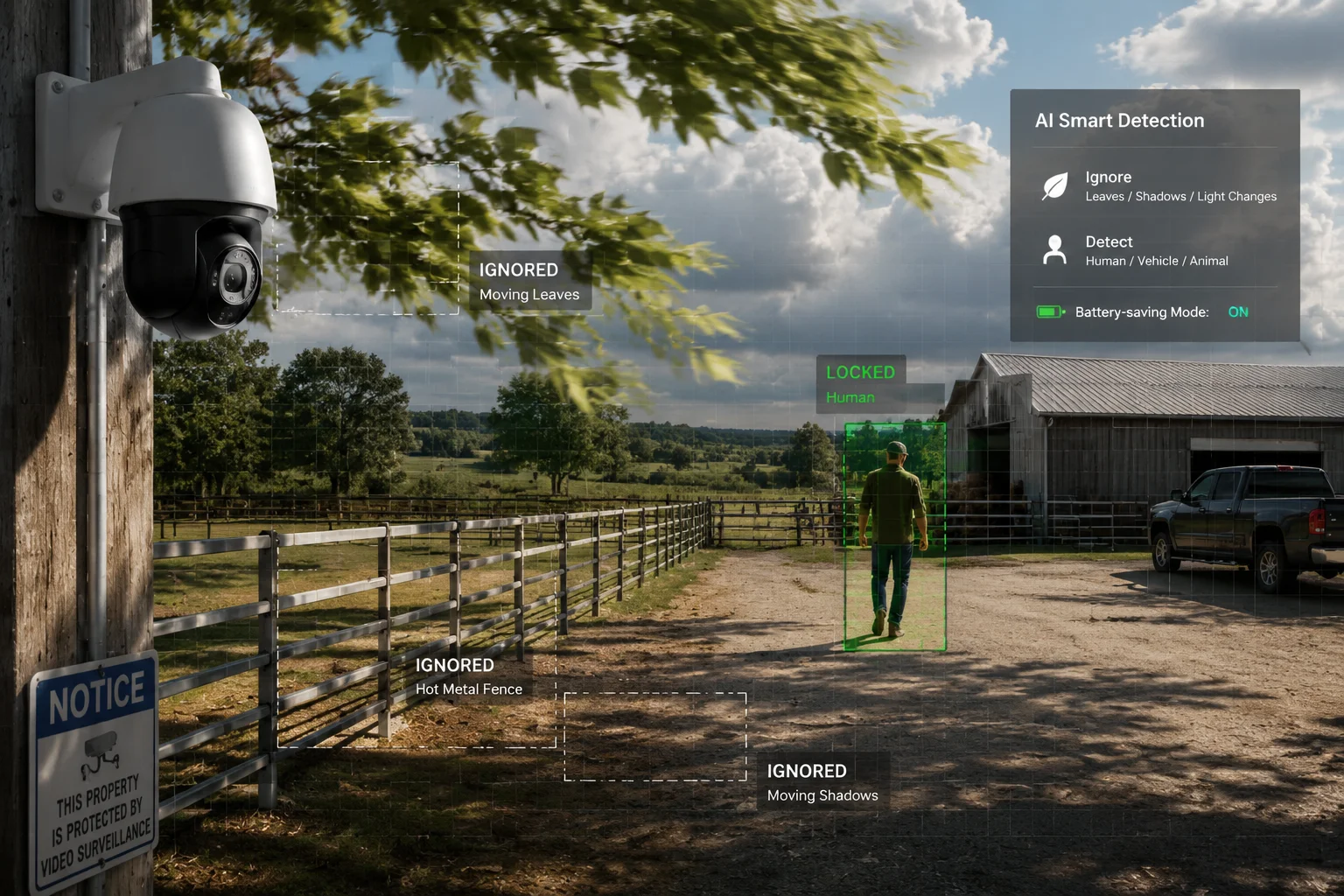
I deal with false wake-ups by treating PIR as a useful first filter, not as a perfect judge. PIR sees heat movement, not human intent. That means a blowing leaf in strong sun may create a small trigger in a weak system. A shadow from a cloud may also cause trouble if the sensor is badly placed. The goal is not to remove all false wakes. The goal is to reduce them enough that the system stays stable and the battery stays healthy.
What causes false wake-ups
I usually see four common causes:
- Fast sunlight changes
- Moving branches or leaves
- Heat from cars, engines, or hot metal
- Bad installation angle or height
How I reduce the problem
I use a few simple steps:
- Set PIR sensitivity to a medium level first
- Use AI human filtering7 if the platform supports it
- Mount the camera at a stable height and angle
- Avoid pointing the sensor at trees, roads, or reflective metal
- Test the site in day, night, wind, and rain
False wake-up control table
| Problem source | What it looks like | What I do |
|---|---|---|
| Wind and leaves | Random repeated alerts | Change angle, lower sensitivity |
| Shadows | Alerts during cloud movement | Move sensor away from high-shadow zones |
| Hot objects | Alerts near engines or metal | Reposition camera and use AI filter |
| Bad install | Many useless triggers | Reinstall with better field of view |
Why AI filtering matters
I like PIR plus AI because it gives me two layers. PIR gives me a quick physical trigger. AI checks if the movement is human or vehicle-like. That helps me cut down useless wake-ups. It also protects the battery. This matters a lot in solar systems because every false wake-up costs energy. If the camera wakes 20 extra times a day, that can become a real power problem over time.
What I tell field teams
I tell installers not to trust a default PIR setting. Each site is different. A farm gate is not the same as a warehouse wall. A dusty road is not the same as a quiet yard. I want them to test the site before final handover. That is the best way to lower false triggers and keep the system reliable.
Can I use a hybrid mode that uses PIR for alerts but keeps the network alive for remote access?
Yes, and I think this is the best choice for most serious solar camera projects. I use hybrid mode when I need low power, fast alerts, and remote access in one system. PIR handles local motion. The network stays in a low-power state, so I can still reach the camera when I need live view or settings changes.
This design fits real-world business needs. My customers do not just want alarms. They want control. They want to check a site from the office, from another country, or after a late-night alert. Hybrid mode gives them both sides without forcing the system to stay fully awake all day.
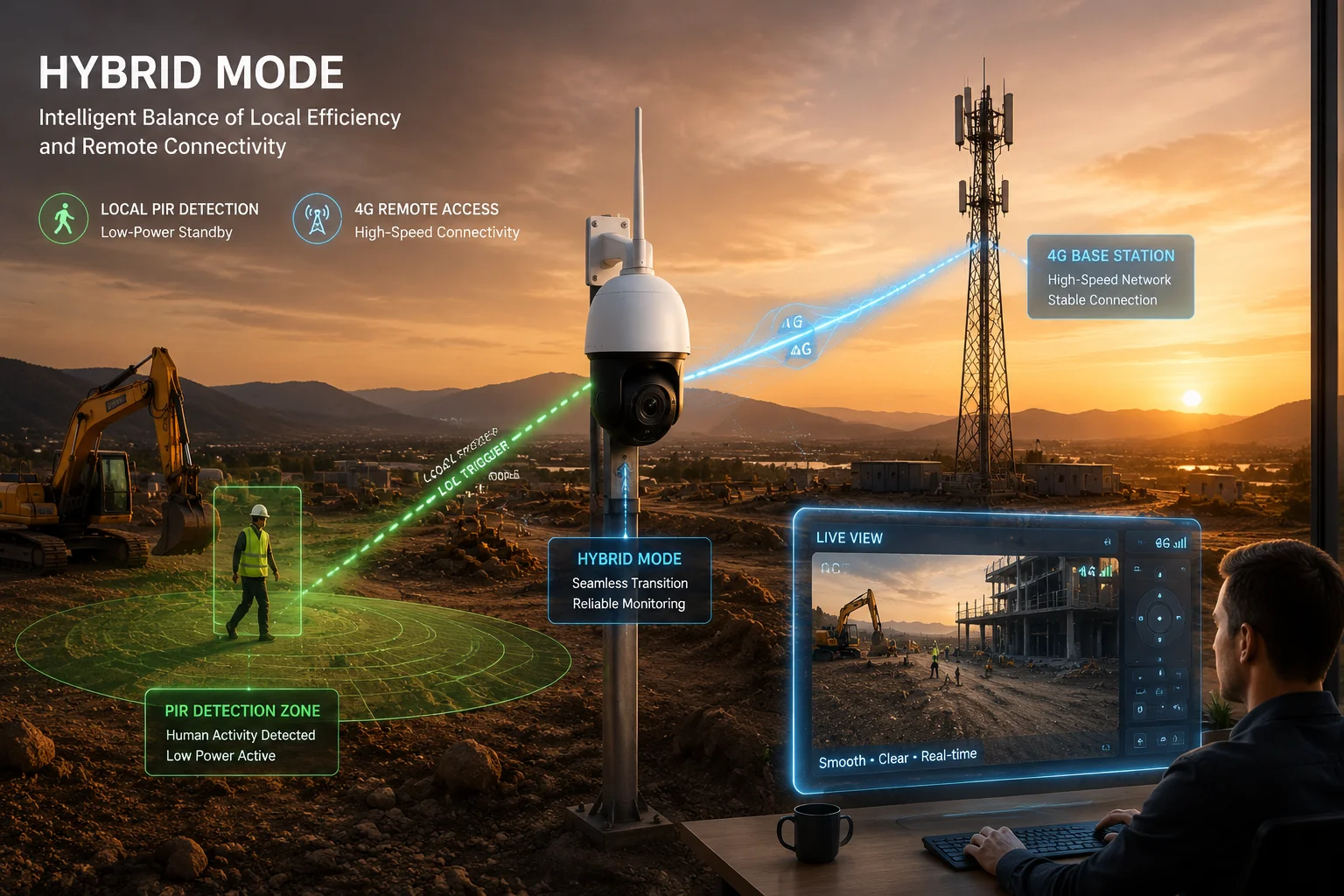
I see hybrid mode as a practical compromise, but not a weak one. It is a smart system choice. If I keep the network totally off, I save power but lose remote access. If I keep it fully on, I get access but waste battery. Hybrid mode sits in the middle. The camera sleeps most of the time. PIR wakes it when something moves. The modem stays ready enough to receive remote commands through low-power network behavior like eDRX, and in some cases limited paging support. This design is very useful for B2B projects where uptime and service cost both matter.
Why hybrid mode fits field projects
I use hybrid mode because it supports three needs at once:
- It keeps standby power low
- It allows fast alarm response
- It supports remote service and live view
That matters for remote farms, construction sites, border areas, and large yards. In these places, a technician visit is expensive. If I can push settings remotely, I save time and money. If the camera also wakes fast on PIR, I protect the site better.
Hybrid mode logic table
| Function | PIR role | Network role | Result |
|---|---|---|---|
| Alert trigger | Main wake source | Backup support | Fast alarm event |
| Remote view | Not used | Main access path | On-demand live view |
| Battery saving | Very important | Important | Lower idle drain |
| Maintenance | Local event start | Remote control | Less truck roll cost |
What I focus on in real deployment
I focus on signal quality, battery size, solar margin, and firmware behavior. I also check if the platform supports ONVIF5, RTSP6, and stable reconnect logic. My buyers often care about Milestone, Blue Iris, and similar systems. So I need the camera to wake and stream without trouble. A hybrid model helps here because I can keep the camera ready for alarm work while still allowing remote checks when the customer needs them.
Why this matters for OEM and ODM buyers
For OEM and ODM clients, hybrid design also gives me room to tune the product for different markets. Some buyers want faster wake-up. Some want longer battery life. Some want better remote access. With a hybrid model, I can adjust PIR sensitivity, paging behavior, heartbeat intervals, and firmware rules. That makes the product easier to fit into a real project. It also helps me avoid the common trap of selling one “universal” setup that works badly in the field.
Conclusion
I prefer hybrid wake-up because it gives me the best balance of speed, power saving, and remote access for real outdoor solar camera projects.
1. Learn how passive infrared sensors detect heat changes for motion detection. ↩︎ 2. Find specifications for low-power 4G modules used in IoT cameras. ↩︎ 3. Understand extended Discontinuous Reception for reduced power consumption in cellular IoT. ↩︎ 4. Learn about Power Saving Mode for deep sleep in LTE devices. ↩︎ 5. Check ONVIF profiles for interoperability of security cameras. ↩︎ 6. Understand the Real-Time Streaming Protocol for video streaming. ↩︎ 7. See how edge AI reduces false alarms by detecting humans or vehicles. ↩︎ 8. Read about combining sensors and network triggers for optimal power efficiency. ↩︎