
I’ve seen too many projects fail not because of the camera, but because of a $15 SD card dying silently in the field.
To solve SD card lifespan issues under high-frequency recording, you need to work on four areas together: pick industrial-grade storage, optimize your recording strategy with AI-based event triggers, use a wear-aware file system, and set up remote health monitoring to replace cards before they fail.

In this article, I’ll walk you through each layer of this problem. From the storage chip itself, to the firmware tricks that cut unnecessary writes, to the alert system that tells you when a card is about to die. If you deploy cameras in remote locations, especially solar-powered 4G systems, every single tip here can save you a costly truck roll.
Table of Contents
Does the Firmware Use “Wear-Leveling” Algorithms to Distribute Data Across the SD Card?
Most people think all SD cards work the same way. They don’t. And if your firmware writes to the same blocks over and over, even a good card will die fast.
Yes, professional-grade firmware uses both static and dynamic wear-leveling to spread write operations evenly across all storage blocks. This prevents any single area from wearing out early and can extend the card’s usable life by 5x to 10x compared to systems without wear-leveling.

What Is Wear-Leveling and Why Does It Matter?
Every flash memory cell on an SD card has a limited number of times it can be written to and erased. This is called a P/E cycle (Program/Erase cycle). Once a cell hits its limit, it becomes unreliable. Data stored there can corrupt or disappear.
Without wear-leveling, the firmware writes to the same physical blocks again and again. Think of it like always parking in the same spot in a parking lot. That one spot wears out while the rest of the lot stays empty.
Wear-leveling fixes this. It acts like a traffic controller. It makes sure every block gets used roughly the same number of times.
There are two types:
| Type | How It Works | Best For |
|---|---|---|
| Dynamic Wear-Leveling | Only moves data among blocks that are actively being written to. Idle blocks are ignored. | Basic consumer cards |
| Static Wear-Leveling | Moves even static (rarely changed) data to high-wear blocks, so low-wear blocks can take new writes. | Industrial cards, surveillance use |
| Hybrid | Combines both methods. The controller decides in real time which strategy to apply. | High-endurance cards with smart controllers |
For surveillance, you need static wear-leveling2. Here’s why. In a typical camera, the firmware writes video files to the card, fills it up, then loops back and overwrites the oldest files. Without static wear-leveling, the “hot zones” where new data lands get hammered while the “cold zones” holding old data sit untouched. Static wear-leveling forces the controller to rotate cold data out, so every cell shares the load.
How Our Firmware Helps
At , our firmware doesn’t just rely on the SD card’s built-in controller. We add a layer on top.
We use a stream-based file system. Instead of creating thousands of small video files (like a typical 1-minute-per-file setup), our firmware pre-allocates large contiguous blocks on the card. Video data flows into these blocks sequentially, like water filling a tank. This approach has two benefits:
- It reduces FAT table updates. Every time a traditional file system creates or deletes a file, it updates the File Allocation Table. That table lives in a fixed location on the card. It gets rewritten thousands of times a day. Our stream FS cuts those updates by over 90%.
- It minimizes fragmentation. Fragmented writes force the card’s controller to do extra internal housekeeping (called garbage collection). That housekeeping burns extra P/E cycles silently in the background.
The Formatting Habit That Saves Cards
Here’s a tip I always share with our integration partners: do a full format on your SD card every 6 months. Not a quick format. A full one. This rebuilds the bad block mapping table10 and resets the file system structure. It’s like defragmenting a hard drive, but for flash memory. David Miller, one of our long-term partners in Texas, made this part of his standard maintenance checklist. He told me his field failure rate on SD cards dropped by nearly 40% after adopting this practice.
Should I Set My Camera to “Event-Only” Recording to Extend the Card’s Life by 3 Years?
Continuous 24/7 recording sounds safe. But in reality, it’s the fastest way to kill your SD card and fill it with hours of useless footage.
Yes, switching from continuous recording to event-only recording can realistically extend your SD card’s life by 3 years or more. By combining AI-powered human and vehicle detection with H.265 encoding3, you can reduce daily write volume by up to 90%, which directly multiplies the card’s total lifespan.
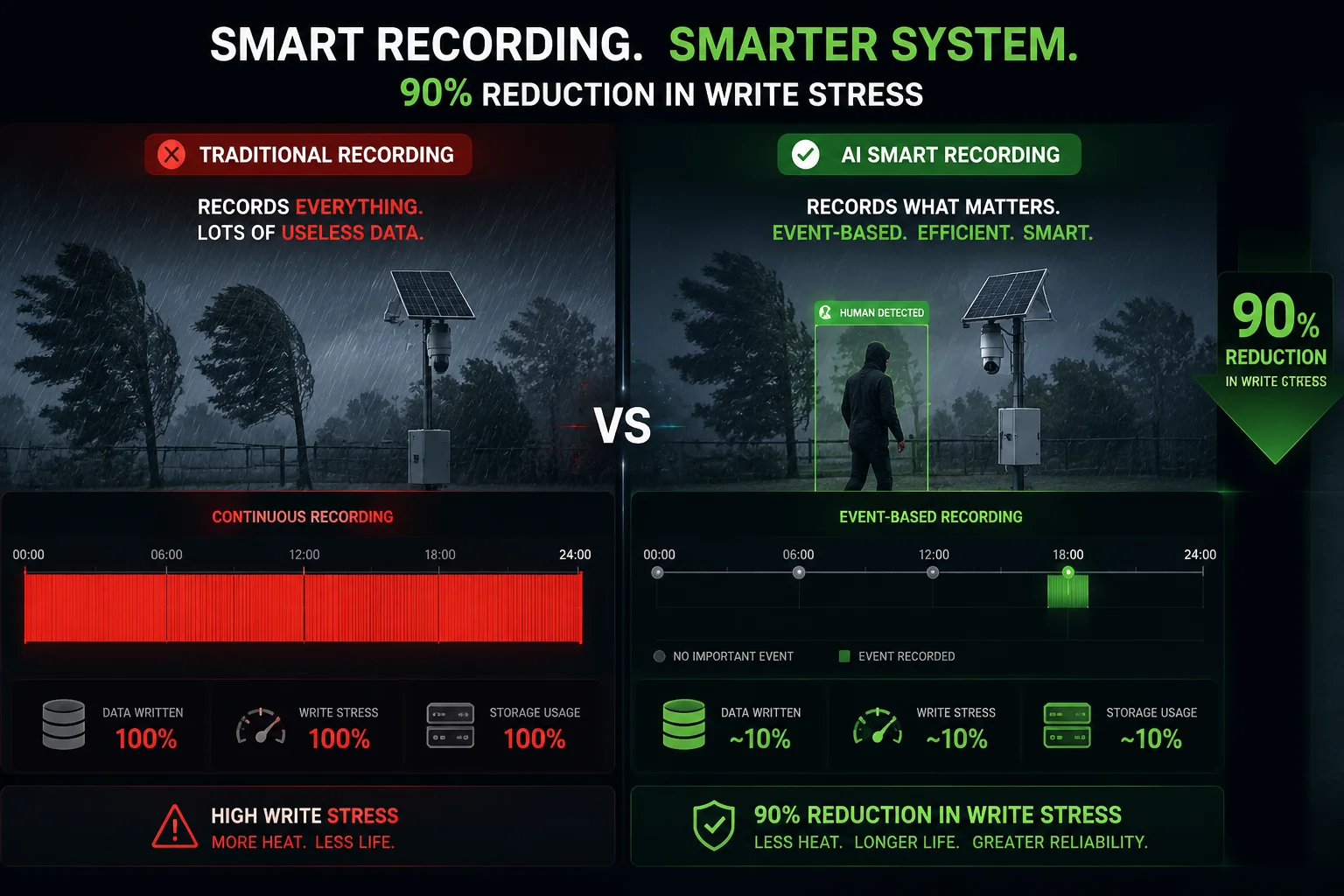
The Math Behind Write Reduction
Let me break this down with real numbers. Say you have a 4MP camera recording 24/7 at a bitrate of 4 Mbps using H.264. Here’s how much data it writes per day:
4 Mbps × 3,600 seconds × 24 hours ÷ 8 = 43.2 GB per day
On a 256 GB card, that means the card fills up and starts overwriting in about 6 days. Over one year, the card endures roughly 60 full overwrite cycles.
Now, let’s apply two changes:
| Setting | Daily Write Volume | Overwrite Cycles per Year (256 GB Card) | Estimated Card Life (High Endurance, 10,000 P/E) |
|---|---|---|---|
| H.264 + Continuous | 43.2 GB | ~60 | ~2.7 years |
| H.265 + Continuous | 21.6 GB | ~30 | ~5.5 years |
| H.265 + Event-Only (10% trigger rate) | 2.16 GB | ~3 | ~55+ years (theoretical) |
Obviously, the card will fail from age or other factors long before 55 years. But the point is clear: the combination of H.265 and event-only recording drops your write stress by a factor of 20.
How AI Filtering Makes Event-Only Recording Practical
The old problem with motion-triggered recording was false alarms. Wind, rain, shadows, animals — they all triggered recording. So people gave up and went back to continuous mode.
AI changes this completely. Our cameras run on-device neural network models that classify objects in real time. The camera only starts recording when it detects a human body or a vehicle. A tree branch swaying in the wind? Ignored. A stray cat? Ignored. A person walking toward your equipment? Recorded immediately.
Pre-Record Buffer: Don’t Miss the First 5 Seconds
One concern I hear often: “If the camera only starts recording after it detects a person, won’t I miss the moment they first appear?”
No. Our firmware keeps a rolling 5 to 10 second pre-record buffer4 in RAM. When the AI triggers a recording event, the system grabs those buffered seconds and writes them to the SD card as part of the clip. You get the full picture. But the key detail is this: the buffer lives in volatile memory (RAM), not on the SD card. So those seconds of buffering cost zero SD card writes during idle time.
Dual-Stream Architecture
Our cameras output two streams simultaneously:
- Main stream: High resolution (4MP or higher), stored locally on the SD card using H.265.
- Sub stream: Lower resolution (D1 or 720p), sent over 4G for live viewing and cloud backup.
This means the SD card only handles the main stream. The 4G module handles the sub stream. You don’t double-write. And when you need to review footage in full quality, you pull it from the SD card remotely or during a site visit.
Can the Camera Notify Me When the SD Card Reaches 90% of Its Estimated Write Cycles?
Waiting until the card fails is not a strategy. It’s a gamble. And in remote deployments, a dead card means lost evidence and an expensive truck roll.
Yes, our system monitors the SD card’s ‘Life-Used Percentage’ in real time and pushes an alert to your phone or CMS when the card reaches a configurable threshold — typically 80% or 90% of its estimated write cycles. This gives you weeks of lead time to schedule a replacement before any data is lost.
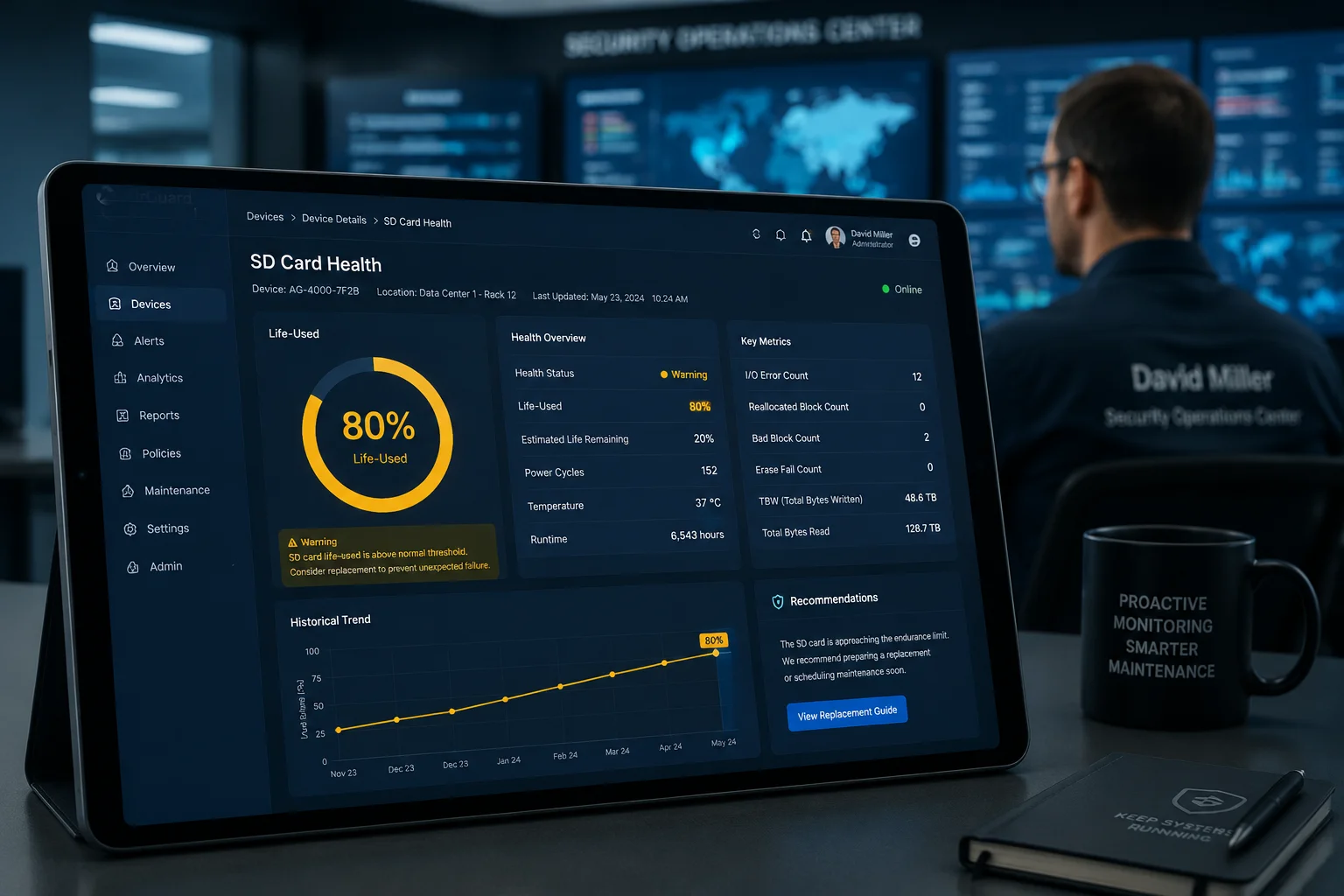
How the Health Monitoring Works
Modern industrial SD cards expose health data through a set of internal registers, similar to the S.M.A.R.T. system6 used in hard drives and SSDs. Our firmware reads these registers periodically and translates them into simple metrics you can see on the Web UI or mobile app.
The key metrics include:
| Metric | What It Tells You | Action Threshold |
|---|---|---|
| Life-Used % | How much of the card’s total P/E budget has been consumed. | Push alert at 80%. Plan replacement at 90%. |
| Spare Blocks Remaining | How many reserve blocks the controller has left for bad block replacement. | Alert when below 10%. |
| Total Data Written (TBW) | Cumulative data written to the card since first use. | Compare against manufacturer’s TBW rating. |
| I/O Error Count | Number of read/write errors the controller has encountered and corrected. | Any sudden spike = immediate attention. |
Setting Up Alerts
In our CMS (Central Management System), you can configure alert rules per device or per device group. For example:
- Rule 1: When Life-Used Percentage5 exceeds 80%, send an email to the project manager and a push notification to the mobile app.
- Rule 2: When I/O Error Count increases by more than 50 in a 24-hour window, flag the device as “Storage Warning” on the dashboard.
- Rule 3: When Spare Blocks Remaining drops below 5%, escalate to “Critical” and highlight the device in red.
These rules run on the camera itself, not on a cloud server. So even if your 4G connection drops temporarily, the camera stores the alert locally and sends it as soon as connectivity returns.
Overwrite Policy and Disk Quotas
Beyond health monitoring, smart storage management also means protecting your most important footage. Our firmware supports disk quota allocation7. You can split the SD card into two logical partitions:
- Partition A (70%): Normal loop recording. Oldest files get overwritten first.
- Partition B (30%): Alarm-triggered recordings only. These files are protected and will not be overwritten by normal footage.
This way, even if the card fills up with routine video, your critical alarm clips stay safe until you manually review or download them.
A Real-World Maintenance Workflow
Here’s how David Miller handles SD card maintenance across his 200+ camera deployments:
- Every Monday, his team checks the CMS dashboard for any “Storage Warning” flags.
- Cards showing above 75% life-used get added to the next month’s replacement schedule.
- During scheduled site visits (usually quarterly), technicians swap flagged cards and perform a full format on cards that are still healthy.
- Old cards are archived for 30 days as backup, then securely destroyed.
This proactive approach means David’s team has had zero unplanned SD card failures in the last 18 months. That’s zero lost recordings and zero emergency truck rolls.
How Does the System Handle “I/O Errors” if the SD Card Starts to Fail in a Remote Location?
This is the nightmare scenario. Your camera is 50 miles from the nearest technician. The SD card starts throwing errors. What happens next?
When the system detects I/O errors, it follows a three-step failover process: first, it retries the write operation on a different block; second, it switches to RAM-buffered recording to buy time; third, it sends an immediate alert to your CMS with the error details so you can plan a replacement before all recording stops.
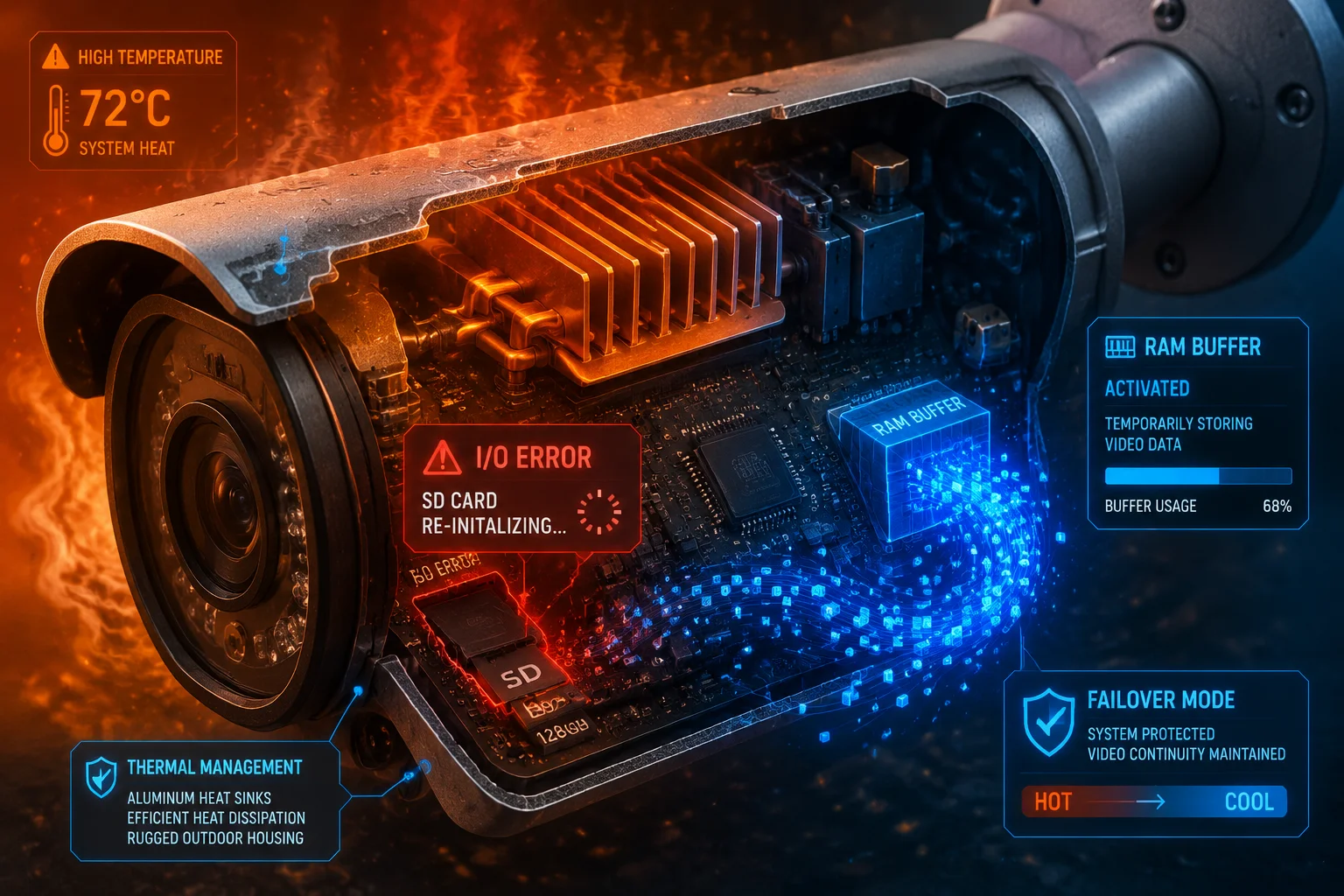
The Three-Stage Failover Process
Let me walk through what happens inside the camera when the SD card starts to degrade.
Stage 1: Block-Level Retry
The first sign of trouble is usually a write error on a specific block. The card’s internal controller marks that block as “bad” and redirects the data to a spare block from its reserve pool. This happens silently. The camera doesn’t even notice. As long as the card has spare blocks available, recording continues without interruption.
But here’s the thing — spare blocks are finite. A 256 GB industrial card might have 2-5% of its total capacity reserved as spares. Once those run out, errors start reaching the camera’s firmware.
Stage 2: RAM Buffer Mode
When our firmware detects that write errors are no longer being handled by the card’s controller, it activates RAM buffer mode8 to hold footage while attempting recovery. The camera has onboard RAM (typically 256 MB to 512 MB depending on the model). In this mode, the firmware writes video to RAM in a circular buffer instead of the SD card.
This buys you time. Depending on the resolution and bitrate, RAM buffer mode can hold anywhere from 30 seconds to 2 minutes of footage. During this window, the firmware attempts to re-initialize the SD card. Sometimes a simple re-mount fixes temporary glitches caused by heat or power fluctuation.
What If the Card Is Truly Dead?
If the re-initialization fails three times in a row, the firmware marks the SD card as “failed” and does the following:
- Sends a critical alert over 4G to your CMS and mobile app. The alert includes the device ID, location, timestamp, and error code.
- Switches to cloud-only recording (if your plan supports it). The sub stream continues uploading to the cloud via 4G. You lose local high-resolution storage, but you still have a visual record.
- Logs all events locally in non-volatile memory. Even without an SD card, the camera’s internal flash stores event logs, snapshots, and metadata. When a technician arrives with a new card, the full history of what happened is available for review.
Preventing I/O Errors Before They Start
Most I/O errors in the field are not caused by the card reaching its P/E limit. They’re caused by environmental factors:
- Heat: SD cards in sealed camera housings can reach internal temperatures above 70°C in direct sunlight. At these temperatures, NAND flash becomes unreliable. Our camera housings include thermal management features — heat sinks and ventilation channels — to keep the card slot below 60°C.
- Power instability: If the camera loses power during a write operation (common in solar setups during heavy cloud cover), the file system can corrupt. Our firmware uses power-loss protection9 — it writes data in atomic transactions so that a power cut never leaves the file system in a half-written state.
- Counterfeit cards: This is more common than people think. A card labeled as “256 GB High Endurance” might actually be a re-flashed 32 GB consumer card. We always recommend buying from authorized distributors and verifying the card’s actual capacity with tools like H2testw before deployment.
The Cost of Not Planning for Failure
Let me put this in business terms. If David Miller has a camera fail at a construction site 80 miles from his office, here’s what it costs:
- Technician time: 4 hours round trip × $75/hour = $300
- Fuel and vehicle: $80
- Lost recording time: potentially 24-48 hours of missing footage
- Client trust: hard to quantify, but real
A $25 industrial SD card and a 5-minute configuration of health alerts can prevent all of that. Every single time.
Conclusion
Pick industrial-grade SD cards, enable H.265 with AI event recording, monitor card health remotely, and plan replacements before failure. Your storage strategy should be as reliable as your camera.
2. Static wear-leveling moves seldom-changed data to balance wear across all blocks. ↩︎ 3. H.265 (HEVC) reduces bitrate by up to 50% compared to H.264, lowering SD card write load. ↩︎ 4. A rolling RAM buffer captures footage before an event trigger, ensuring you don’t miss critical moments. ↩︎ 5. SD card health metrics like Life-Used % indicate remaining write endurance. ↩︎ 6. Self-Monitoring, Analysis and Reporting Technology provides early warning of storage device failure. ↩︎ 7. Partitioning SD card into loop recording and protected alarm partitions prevents critical footage overwrite. ↩︎ 8. When SD card fails, camera writes video to RAM temporarily to buy time for re-initialization. ↩︎ 9. Atomic write transactions prevent file system corruption during unexpected power cuts. ↩︎ 10. A full format rebuilds the bad block mapping table, helping the SD card manage defects. ↩︎