
I lost three remote cameras last winter because the batteries died in under four days of cloudy weather. That failure cost me a client and a painful lesson.
By scheduling your 4G module’s power on/off times, you can extend winter runtime by 200% to 400%. In the best cases, a 40Ah battery that lasts 3.5 days on full-time 4G can survive 10 to 12 days using interval-based scheduling. The 4G modem is the single biggest power drain you can control without losing local recording.
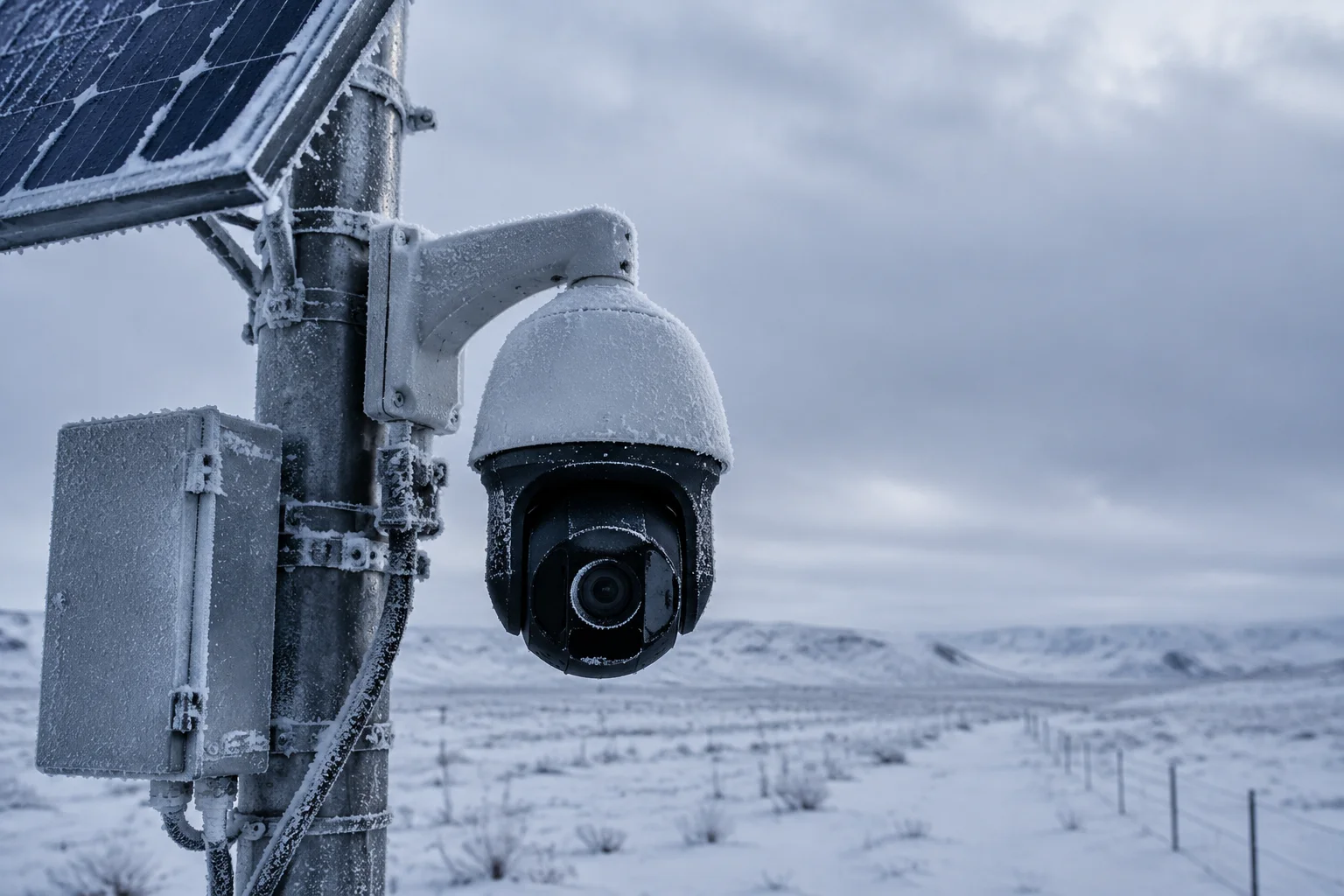
Below, I break down exactly how each scheduling mode works, what you give up, and how to set it up for real-world deployments. Whether you run a security integration business or manage remote sites, this guide gives you the numbers to make the right call.
Table of Contents
Can I Program the 4G Modem to Wake Up Only for 10 Minutes Every Hour to Save 70% of Power?
I used to think keeping the modem online 24/7 was the only way to stay connected. Then I saw my winter power bills — and my dead batteries — and I changed my mind fast.
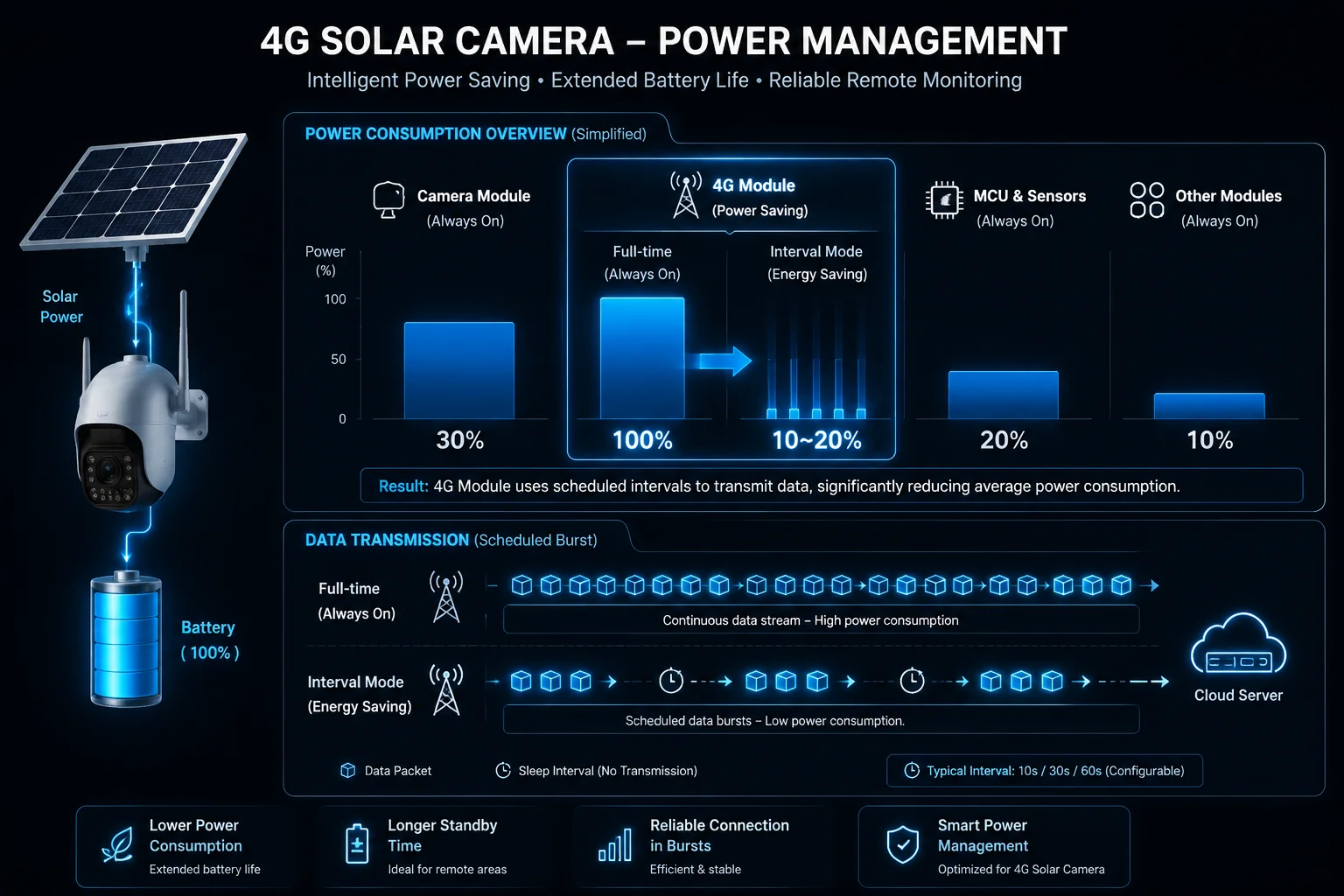
Yes, you can program the 4G modem to wake for 10 minutes every hour. This alone cuts 4G power use by roughly 70% to 83%. However, the actual savings depend on signal strength, because the modem burns the most power during its initial network search phase each time it wakes up.
Why 4G Is the Biggest Power Drain
Let me put this in plain numbers. A typical off-grid PTZ camera system has three main power consumers:
| Component | Current Draw | Share of Total |
|---|---|---|
| Camera mainboard + SD recording | 150mA – 200mA | ~25% |
| 4G module (idle heartbeat + data) | 150mA – 350mA | ~50% |
| IR illumination (night only) | 500mA – 1000mA | ~25% (night hours) |
The 4G module stays hungry even when nobody is watching the live feed. It sends keep-alive packets to the base station every 30 seconds. It re-registers when signal drops. In weak signal areas, it boosts transmit power and draws up to 350mA just to stay connected. Over 24 hours, that adds up to 3.6Ah – 8.4Ah of battery capacity gone — just for “being online.”
The 10-Minute-Per-Hour Math
If you run the modem for 10 minutes out of every 60, that is a duty cycle of about 17%. Your 4G power consumption drops from roughly 5Ah per day to about 1.2Ah per day. That is a 76% reduction in 4G-related drain.
But here is the catch most people miss. Every time the modem powers on, it enters a “network search” phase. During this phase, current spikes to 1.5A – 2A for 10 to 30 seconds. If your signal is weak, this search can take 60 seconds or more. So if you wake the modem 24 times per day, you add roughly 0.3Ah – 0.5Ah just from search spikes.
My Recommendation for Interval Scheduling
Based on testing across dozens of field deployments, here is what works:
- Set minimum wake time to 15 minutes, not 10. This gives the modem enough time to register, sync alerts, upload thumbnails, and settle into low-power connected mode.
- Set intervals to every 2 hours rather than every hour. Fewer wake cycles mean fewer search spikes. You still get 12 sync windows per day.
- If signal strength dBm8 is below -100 dBm at your site, extend wake time to 20 minutes. Weak signal means longer registration and higher retry rates.
The real-world savings with a 15-minute-every-2-hours schedule: about 80% reduction in 4G power use. That is close to the 70% target with much better reliability.
Will the Camera Still Record to the SD Card While the 4G Module Is Physically Powered Off?
I had a client in Alberta ask me this exact question before his first winter deployment. He was worried that turning off 4G meant losing footage entirely.
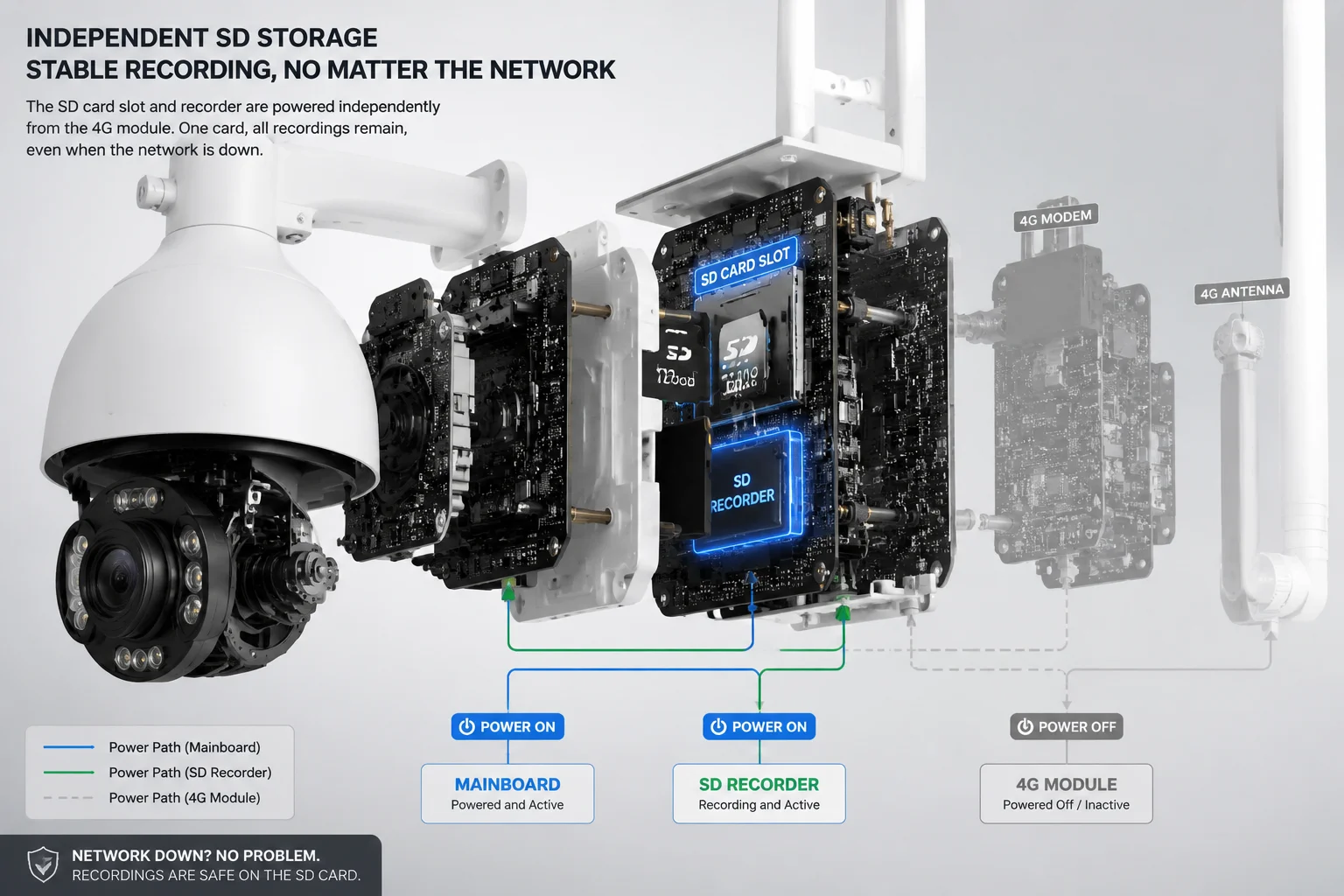
Yes, the camera continues recording to the SD card when the 4G module is powered off. The camera mainboard, image sensor, and SD card writer operate on a separate power rail. Local recording is completely independent of the 4G connectivity module.
How the Power Architecture Works
In a well-designed solar PTZ system, the internal hardware is split into independent power domains. The system-on-chip (SoC) that handles video encoding and SD card writing runs on its own voltage regulator. The 4G module sits on a separate rail with its own power switch — either a MOSFET gate1 controlled by the firmware scheduler or a physical relay.
When the scheduler cuts power to the 4G module, only the modem loses power. The SoC keeps running. The video pipeline keeps encoding. The SD card keeps writing.
What You Keep and What You Lose
| Function | 4G Module ON | 4G Module OFF |
|---|---|---|
| SD card recording | ✅ Yes | ✅ Yes |
| Motion detection (local) | ✅ Yes | ✅ Yes |
| AI alerts (local log) | ✅ Yes | ✅ Yes |
| Live view via app | ✅ Yes | ❌ No |
| Push notifications to phone | ✅ Yes | ❌ No |
| Cloud upload / sync | ✅ Yes | ❌ No |
| Remote PTZ control | ✅ Yes | ❌ No |
The SD Card as Your Safety Net
Think of the SD card as your black box recorder. Even if the 4G module stays off for 12 hours overnight, every motion event is still captured locally. When the modem wakes up at the next scheduled window, the system can batch-upload event thumbnails and alert logs to the cloud.
For David and other integrators deploying in remote areas: this means your client’s property is still protected. They just cannot watch it live during the off period. The footage is there. The AI detection is there. The evidence is there. They simply access it with a short delay.
One important note: make sure your industrial-grade SD card6 (MLC or pSLC NAND). Consumer cards fail fast under continuous write cycles in extreme cold. I have seen cheap cards corrupt after 3 months in Canadian winters. A good 128GB industrial card costs $25 more but lasts 5 years.
Does the “Timed Wake-up” Sync Automatically with the App’s Push Notification Server?
I spent two weeks debugging a system where the client complained about “missing alerts.” Turns out, the alerts were not missing. They were just queued and waiting for the next wake window.
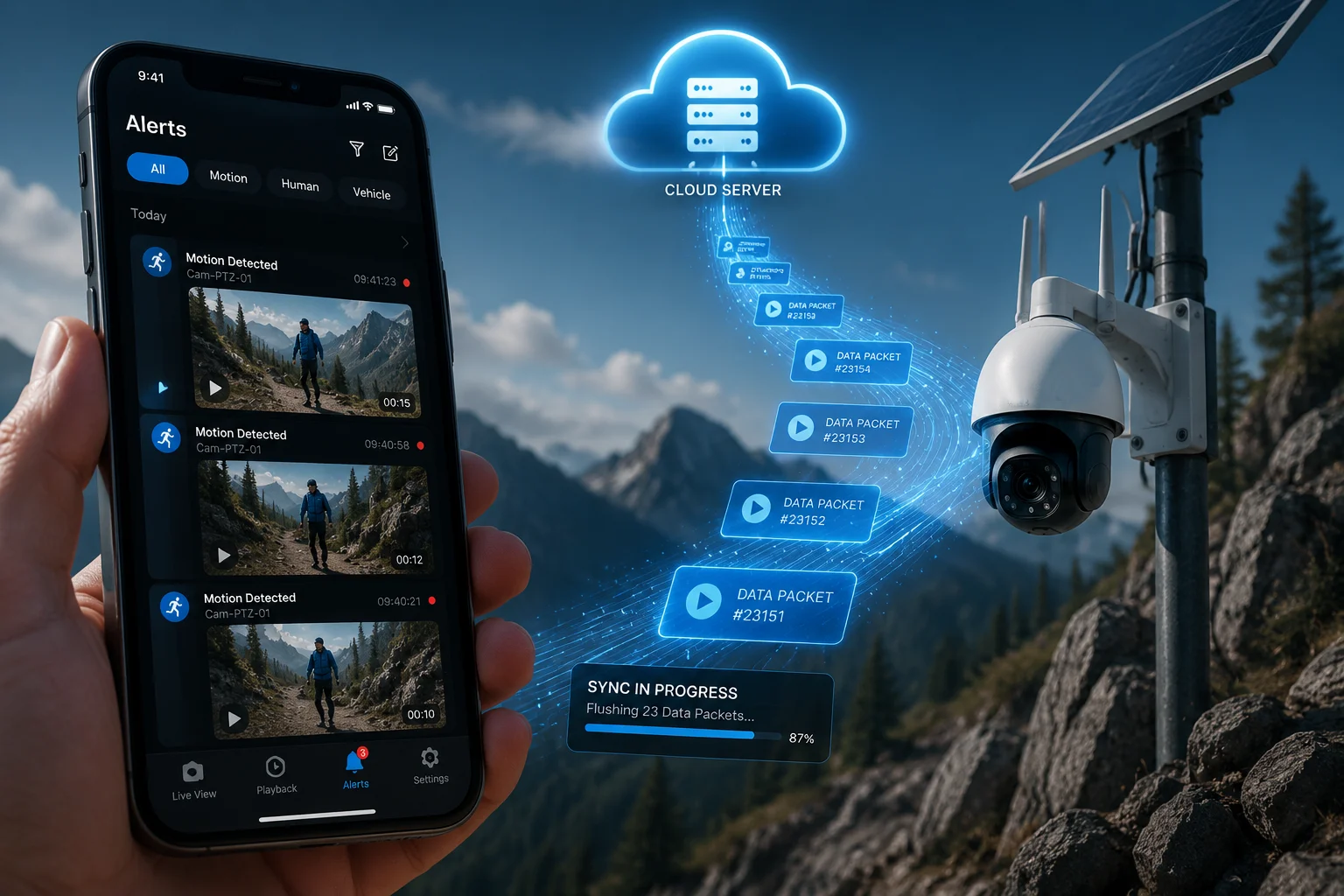
Yes, when the 4G module wakes on schedule, it automatically connects to the cloud server and pushes all queued alerts, thumbnails, and status updates. The sync is automatic — no manual trigger needed. Alerts are timestamped at detection time, not at upload time, so you always know when the event actually happened.
How the Queue System Works
When the 4G module is off, the camera does not stop detecting events. The AI engine still runs. Motion triggers still fire. The system logs each event with a timestamp, a thumbnail image, and metadata (event type, confidence score, zone ID) to a local buffer on the SD card.
The moment the 4G module powers on and registers with the network, the firmware initiates a sync routine:
- Handshake — The device authenticates with the cloud server2.
- Queue flush — All pending alerts upload in chronological order.
- Push delivery — The server sends push notifications5 to the user’s app for each new alert.
- Status report — Battery level, solar charge rate, SD card health, and signal strength upload as a system heartbeat.
- Command check — The device pulls any pending commands (PTZ preset changes, schedule updates, firmware OTA).
This entire process takes 30 to 90 seconds on a stable connection. After that, the modem stays online for the remainder of the wake window, allowing live view if the user opens the app.
What Happens If the Queue Gets Too Large?
On a busy site with frequent motion (like a construction entrance), you might accumulate 50 to 100 events during a 2-hour off period. The system handles this by prioritizing:
- High-priority events (human detection, vehicle detection) upload first with full thumbnails.
- Low-priority events (general motion, animal triggers) upload as metadata only. Thumbnails sync in the background.
- If bandwidth is limited, the system compresses thumbnails from 1080p to 360p to speed up the queue flush.
Practical Tip for Integrators
Tell your clients: “You will still get every alert. It just arrives in a batch when the camera checks in.” For most farm, ranch, and warehouse applications, a 1 to 2 hour delay on non-critical alerts is perfectly acceptable. For high-security sites, use the PIR sensor7 event-based wake-up instead — the modem powers on within 10 to 15 seconds of a human intrusion.
How Do I Bypass the Schedule for an Emergency “Manual Wake-up” via SMS?
I was on a call with a rancher in Montana who asked: “What if I need to check my cameras right now, but the modem is asleep?” Good question. You need a back door.
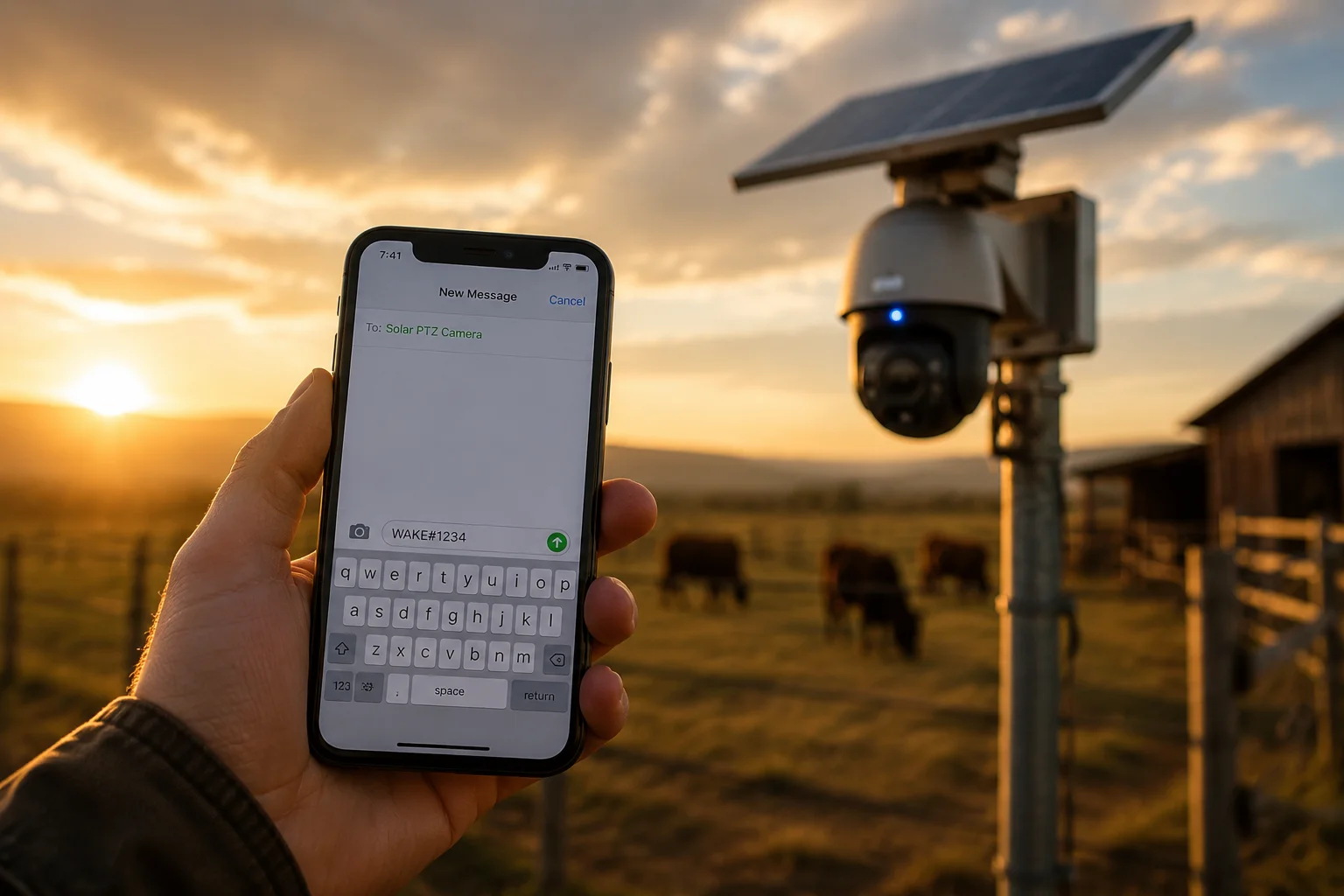
You can bypass the power schedule by sending an SMS command to the camera’s SIM card number. The system’s RTC and SMS receiver stay active even when the 4G data module is in deep sleep. A simple coded SMS triggers an immediate wake-up, and the camera comes online within 15 to 30 seconds.
How SMS Wake-up Works Technically
Even when the 4G module is “off” for data purposes, the hardware can be configured in two sleep levels:
Sleep Level 1: Data Off, SMS Listening On
The modem stays registered on the network at minimum power (about 5mA – 10mA). It cannot send or receive data, but it can receive SMS messages. When a specific SMS command arrives (for example, WAKE#1234 where 1234 is a PIN), the firmware triggers a full power-on sequence.
This mode adds very little to your power budget — roughly 0.12Ah to 0.24Ah per day — but gives you instant manual access.
Sleep Level 2: Full Power Cut (Hardware Off)
The modem is completely de-energized. No SMS reception is possible. Wake-up can only happen via:
- The RTC timer4 (scheduled wake)
- A PIR sensor trigger (event-based wake)
- A physical button press (on-site only)
Most systems I deploy use Sleep Level 1 as the default because the power cost is tiny and the benefit of SMS access is huge.
Setting Up SMS Commands
Here is a typical command set:
| SMS Command | Function | Response |
|---|---|---|
WAKE#PIN | Immediate full wake-up | Camera comes online, sends confirmation SMS |
STATUS#PIN | Request battery and signal info | Returns voltage, percentage, signal dBm |
SLEEP#PIN | Force immediate sleep | Modem powers down, confirms via SMS first |
REBOOT#PIN | Full system restart | Camera reboots, re-registers on network |
The PIN prevents unauthorized wake-ups. Without the correct PIN, the system ignores the SMS.
Why This Matters for B2B Deployments
David, if you manage 50 cameras across multiple client sites, SMS wake-up is your remote management lifeline. You do not need to drive 3 hours to a ranch just to check why a camera missed its scheduled check-in. Send one SMS. Get a status report. Decide if you need to roll a truck or not.
For fleet management, some of our integrators build simple web dashboards that send SMS commands via an API gateway (like Twilio3). One click wakes any camera in their network. This turns a $0.01 SMS into a tool that saves a $200 truck roll.
One more thing: always keep a record of the SIM card numbers and PINs for every deployed unit. I have seen integrators lose access to their own cameras because they forgot which SIM went where. A simple spreadsheet saves a lot of pain.
Conclusion
Scheduling your 4G module’s power is the single most effective way to survive winter on solar. You can stretch a 3.5-day battery to 10+ days, keep recording locally the entire time, and still get every alert — just with a short delay. Use SMS wake-up as your emergency back door, and you never truly lose access.
1. Tutorial on MOSFETs as switches, the typical component used to control power to the 4G module. ↩︎ 2. Overview of cloud computing and how push notification servers handle device sync. ↩︎ 3. Twilio is a cloud communications platform that enables SMS API integration for fleet management. ↩︎ 4. Maxim Integrated explains real-time clock (RTC) timers used for scheduled wake-ups. ↩︎ 5. Apple developer documentation on how push notifications are scheduled and delivered. ↩︎ 6. Kingston’s industrial SD cards use MLC/pSLC NAND designed for continuous writing in extreme conditions. ↩︎ 7. Defines how passive infrared sensors detect motion for event-based wake-up. ↩︎ 8. Cisco guide on interpreting wireless signal strength in dBm and its impact on networking performance. ↩︎