
I have seen 4G cameras go completely offline on coastal farms — not because of a network issue, but because the SIM contacts corroded silently inside the housing.
Yes, our industrial-grade 4G PTZ cameras use gold-plated contacts1 SIM slot contacts as standard. Gold does not oxidize or react with moisture, so the contacts maintain low resistance and reliable cellular connectivity even in 90%+ humidity and salt-spray environments for years.
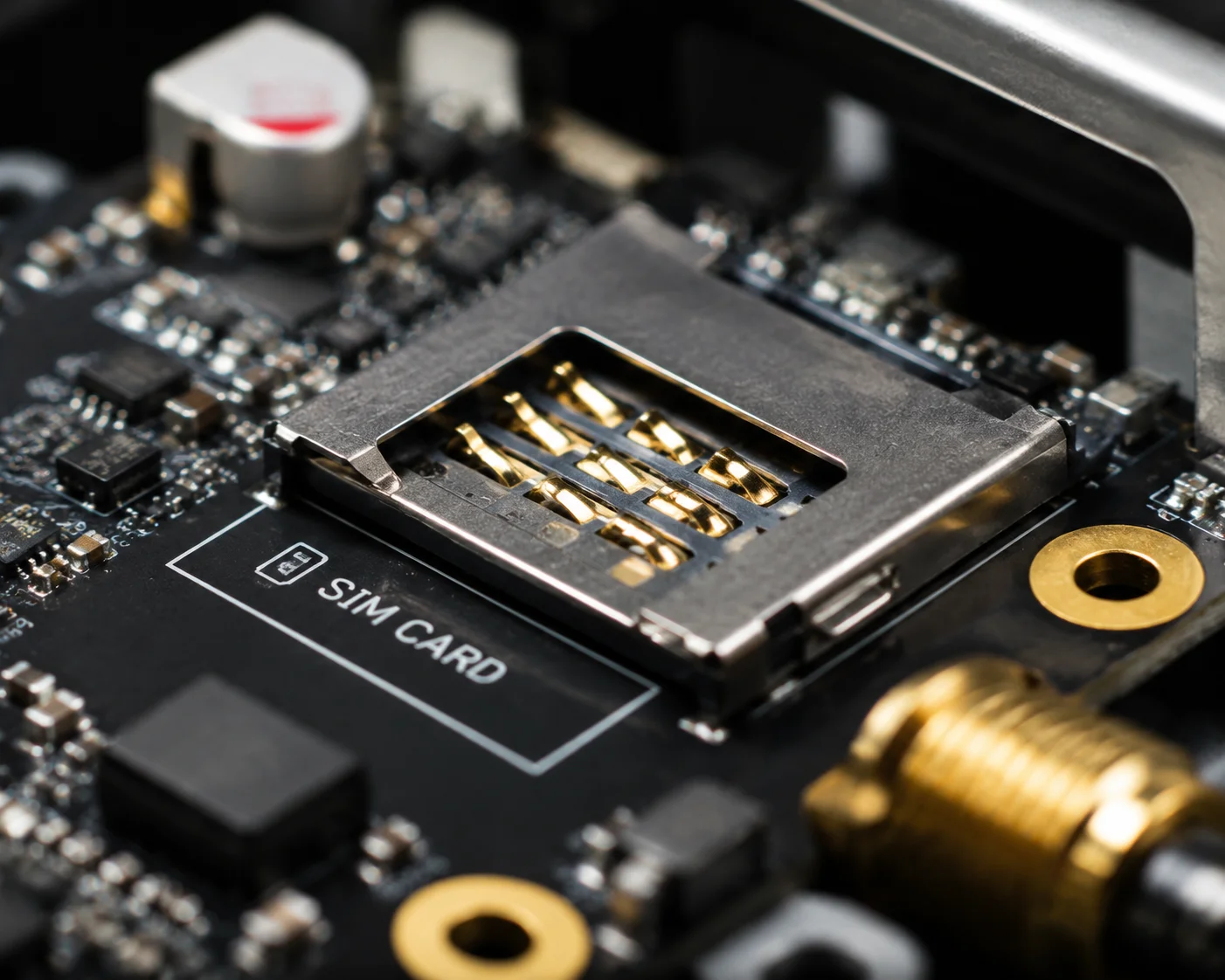
But gold plating alone is not the full story. The thickness of the gold layer, the slot mechanism, the housing seal, and the PCB coating all work together to keep your SIM connection alive. Let me break down each piece so you know exactly what to look for — and what to demand from any supplier.
Table of Contents
Will the SIM Contacts Corrode After 2 Years of Exposure to the Humid Air of a Coastal Farm?
I have personally handled warranty returns from Florida and Louisiana where the SIM slot was the single point of failure — green corrosion on the pins, and the 4G module throwing “SIM Error” every few hours.
On a cheap camera with thin plating and poor sealing, yes — SIM contacts can corrode within 12 to 24 months in coastal humidity. On our industrial-grade units with thick gold plating and IP67-sealed SIM compartments2, the contacts stay clean and functional for 5+ years without maintenance.

Why Non-Gold Contacts Fail So Fast
Most people do not think about the SIM slot when they buy an outdoor camera. They check the lens, the zoom, the night vision. But in a high-humidity environment like a coastal farm, the SIM slot is the weakest link in the entire system.
Here is what happens inside a poorly protected SIM slot:
- Warm, moist air enters the housing through a loose seal or a cracked gasket.
- Water vapor condenses on the cool metal contacts overnight.
- If the contacts are tin or nickel, an oxide layer forms on the surface.
- This oxide layer is not conductive. It acts like a tiny insulator between the SIM card and the pin.
- The contact resistance goes up. The 4G module starts losing its connection to the SIM card.
- You get intermittent “SIM Not Detected” errors, dropped video streams, and eventually a complete communication failure.
Gold does not do this. Gold is chemically inert. It does not react with water, oxygen, or sulfur compounds in the air. That is why every serious industrial connector uses gold on the contact surfaces.
The Real-World Corrosion Timeline
Here is a rough comparison based on what I have seen in field returns and accelerated aging tests:
| Contact Material | Environment | Time to First Failure |
|---|---|---|
| Tin-plated | Coastal / 85%+ RH | 6–12 months |
| Nickel-plated | Coastal / 85%+ RH | 12–18 months |
| Gold-plated (1–3 μ”) | Coastal / 85%+ RH | 18–30 months |
| Gold-plated (15–30 μ”) + IP67 seal | Coastal / 85%+ RH | 5–8+ years |
The difference between a $0.15 SIM slot and a $0.80 industrial SIM slot is enormous when you factor in the cost of sending a technician to a remote farm to swap a camera. David, you know this math better than anyone — one truck roll to a rural site can cost $300 to $500. That is more than the camera itself.
What About Internal Condensation?
Even if the SIM slot has perfect gold plating, condensation inside the housing can still cause problems. When warm daytime air cools at night, moisture collects on every surface inside the camera — including the SIM slot’s plastic base. Over time, this moisture can cause:
- Mold growth on the plastic carrier, which traps moisture against the pins.
- Leakage current between adjacent pins, causing data errors.
- Electromigration11 of metal ions across the PCB traces near the SIM slot.
This is why we apply conformal coating (three-proof lacquer)3 on the PCB around the SIM slot area. The coating creates a moisture barrier on the circuit board itself, so even if some humidity gets inside the housing, it cannot reach the electrical traces.
What Is the Thickness of the Gold Plating on Your Industrial-Grade SIM Connectors?
I get this question a lot from engineers who have been burned by suppliers claiming “gold-plated” without specifying the actual thickness. A flash of gold that is only 1 micro-inch thick is technically gold-plated — but it wears through after a few insertions.
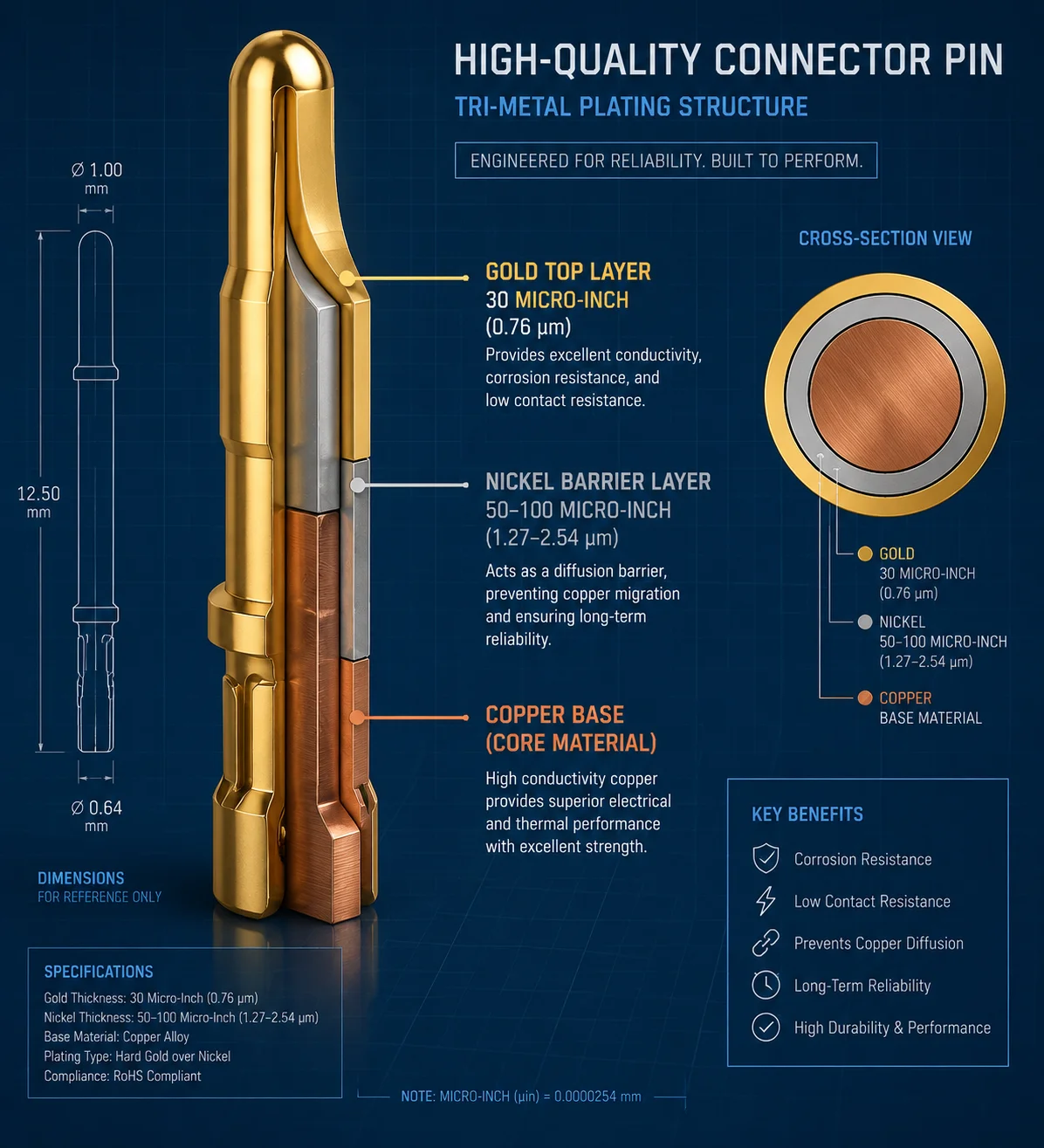
Our industrial-grade 4G modules use SIM connectors with gold plating thickness between 15μ” and 30μ” (micro-inches) over a nickel barrier layer8. This meets the standard for industrial-grade connectors rated for high-humidity and moderate salt-spray environments, and it supports over 5,000 insertion cycles without degradation.
Understanding Gold Plating Grades
Not all gold plating is the same. The thickness determines how long the gold layer lasts before the base metal underneath is exposed. Here is how the industry breaks it down:
| Gold Plating Thickness | Grade | Typical Use Case | Salt Spray Resistance |
|---|---|---|---|
| 1–3 μ” (micro-inches) | Consumer | Indoor routers, phones | Minimal (< 24 hours) |
| 15–30 μ” | Industrial | Outdoor IoT, cameras, telemetry | Moderate (48–240 hours) |
| 30–50 μ” | Heavy Industrial | Marine, oil & gas, military | High (240–960 hours) |
For outdoor PTZ cameras deployed on farms, construction sites, or along coastlines, the 15–30 μ” range is the sweet spot. It provides strong corrosion resistance without adding unnecessary cost. If you are deploying directly on a dock or an offshore platform, you may want to specify 30–50 μ” in your purchase agreement.
The Nickel Barrier Layer Matters Too
Gold plating is not applied directly onto the copper base of the connector pin. There is always a nickel layer in between. This nickel layer serves two critical functions:
- Diffusion barrier: Without nickel, copper atoms migrate through the gold layer over time. When copper reaches the surface, it oxidizes and defeats the purpose of the gold plating entirely.
- Hardness: Nickel is harder than gold. It gives the contact pin mechanical strength, so the soft gold layer does not wear away during SIM card insertion and removal.
A proper industrial SIM connector has this structure: Copper base → Nickel layer (50–100 μ”) → Gold layer (15–30 μ”). When you ask a supplier about gold plating, always ask about the nickel underplate too. If they cannot answer, that is a red flag.
How to Verify the Plating Specification
You cannot see the difference between 3 μ” and 30 μ” gold plating with your eyes. Both look shiny and gold. Here is how to verify:
- Ask for the SIM connector part number. A reputable manufacturer uses connectors from known brands like Molex, Hirose, JST, or established Chinese connector makers. Each part number has a published datasheet with plating specifications.
- Request the incoming quality control (IQC) report. Our factory tests a sample of every batch of SIM connectors using an X-ray fluorescence (XRF) thickness gauge9. This gives an exact reading of the gold and nickel layer thickness.
- Ask for salt spray test results. If the supplier has done a neutral salt spray (NSS) test10 on the assembled unit, the report will show whether the SIM slot survived the test without contact resistance increase.
How Does a Push-Push vs. a Tray-Loading SIM Slot Compare in Terms of Long-Term Oxidation?
I have tested both types in our environmental chamber, and the results surprised me. The mechanism you choose affects not just convenience — it directly impacts how well the contacts resist corrosion over time.
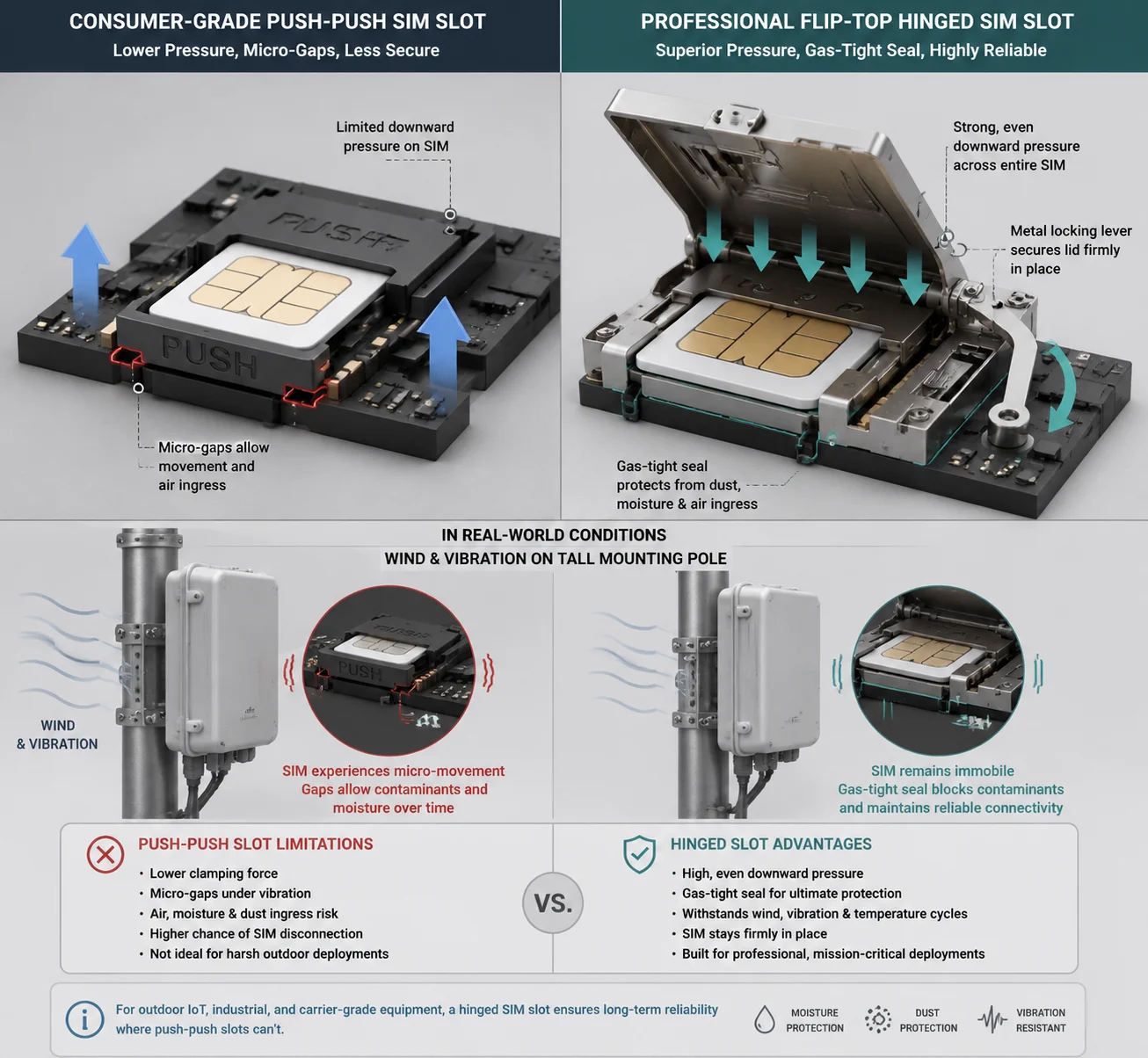
A flip-top (tray-loading) SIM slot6 with a metal locking lever provides stronger downward pressure on the SIM card, creating a tighter gas-tight contact seal. This makes it more resistant to oxidation than a push-push spring-loaded slot, which relies on lighter spring tension and is more vulnerable to vibration-induced micro-gaps that let moisture in.
Why Contact Pressure Matters for Corrosion
This is a point most people miss. Gold plating prevents oxidation on the surface. But the contact between the SIM card’s gold pad and the slot’s gold pin also creates what engineers call a “gas-tight joint”7. When two gold surfaces are pressed together with enough force, the contact area is so tight that air and moisture physically cannot reach the interface. This is the same principle used in high-reliability aerospace connectors.
A push-push SIM slot5 uses a small spring mechanism. You push the SIM card in, and a spring holds it in place. The contact force is relatively light — typically 0.3 to 0.5 Newtons per pin. This is fine for a phone that sits in your pocket. But on a PTZ camera mounted on a 30-foot pole in coastal wind, the constant vibration can cause the SIM card to micro-shift inside the slot. Each micro-shift breaks the gas-tight seal for a fraction of a second, letting moisture reach the contact surface.
A flip-top or hinged SIM slot works differently. The SIM card sits in a tray, and a metal lever clamps down on it. The contact force is higher — typically 0.8 to 1.5 Newtons per pin — and the card is mechanically locked in place. It cannot shift, even under heavy vibration.
Comparing the Two Mechanisms
| Feature | Push-Push Slot | Flip-Top / Hinged Slot |
|---|---|---|
| Contact force per pin | 0.3–0.5 N | 0.8–1.5 N |
| Vibration resistance | Moderate | High |
| Gas-tight seal quality | Good (static) / Fair (vibration) | Excellent |
| Ease of SIM insertion | One-hand push | Requires opening lever |
| Risk of accidental ejection | Low but possible | Very low |
| Long-term oxidation resistance | Good | Better |
| Typical use case | Consumer devices, indoor | Industrial, outdoor, vehicle |
Our Design Choice
For our outdoor 4G PTZ cameras, we use flip-top SIM slots with metal locking levers on all industrial-grade models. The extra mechanical stability is worth the slight inconvenience during installation. You insert the SIM card once during setup, and then the slot stays sealed for years.
We also add a small amount of silicone sealant around the SIM slot frame where it meets the PCB. This is not for waterproofing the slot itself — that is the job of the external IP67 cover. The sealant prevents capillary action from drawing moisture along the solder joints and underneath the slot housing.
Vibration Is the Hidden Enemy
On a pole-mounted PTZ camera, wind-induced vibration is constant. Even moderate wind at 20 mph creates micro-vibrations at the camera housing. Over months and years, these vibrations can loosen a push-push SIM card just enough to cause intermittent contact failures. The symptoms look exactly like a network problem — the camera drops offline for a few minutes, then reconnects. Your technician checks the cellular signal and it looks fine. The SIM card tests fine in another device. But the problem keeps coming back.
I have seen this pattern many times. In almost every case, switching to a flip-top slot with a positive locking mechanism solved the issue permanently.
Can I Use a Special Dielectric Grease to Further Protect the SIM Pins in Tropical Climates?
A customer in Southeast Asia asked me this exact question last year. He was deploying 200 cameras across palm oil plantations in Malaysia — 95% humidity, 35°C average temperature, and heavy rain six months a year.
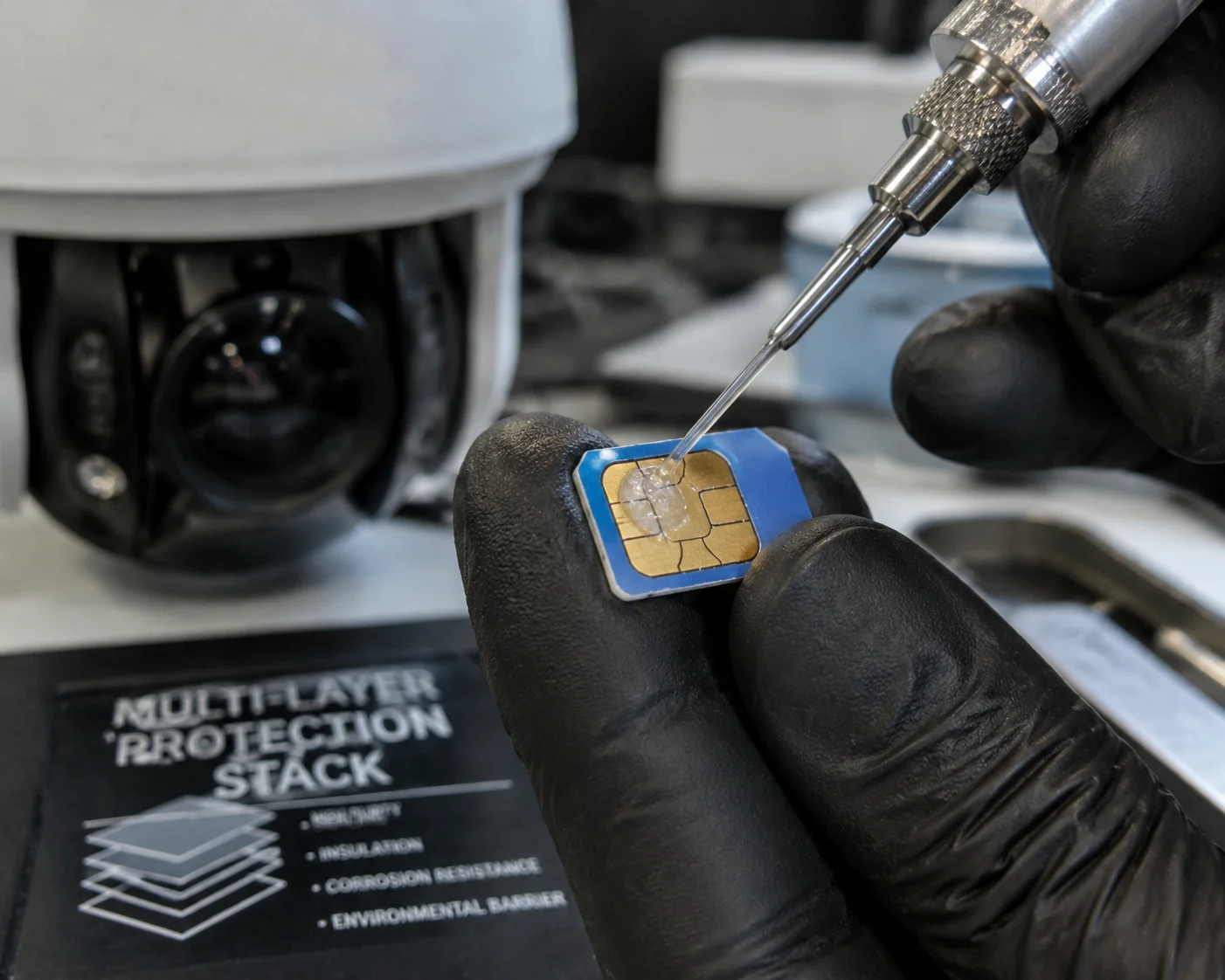
Yes, applying a thin layer of dielectric silicone grease4 on the SIM card contacts before insertion is an effective and low-cost way to add extra moisture protection. The grease creates a hydrophobic film that physically blocks water vapor from reaching the gold-plated pins, and it does not interfere with electrical conductivity because the contact pressure displaces the grease at the actual touch points.
How Dielectric Grease Works on Electrical Contacts
This confuses a lot of people. Dielectric grease is an insulator — so how can you put it on electrical contacts without blocking the signal?
The answer is simple physics. When the SIM card is pressed against the connector pin with enough force, the grease is squeezed out of the actual contact point. Metal touches metal directly. But the grease remains in the area around the contact point, filling all the tiny gaps and crevices where moisture would normally collect.
Think of it like this: the grease does not sit between the two metal surfaces. It sits around them, forming a protective moat that keeps water out.
Application Best Practices
Here is the method I recommend to our customers who deploy in tropical or coastal environments:
- Use only silicone-based dielectric grease. Do not use petroleum-based grease, as it can degrade the plastic SIM card holder and rubber gaskets over time. Brands like Dow Corning DC-4 or Permatex Dielectric Tune-Up Grease work well.
- Apply a very thin layer. Use a toothpick or a small brush. You want a barely visible film on the SIM card’s gold pads, not a thick glob. Too much grease can attract dust and create a paste that is harder to clean.
- Insert the SIM card immediately after applying. Do not let the grease sit exposed to air for a long time before insertion.
- Also apply a thin film around the SIM slot opening on the PCB side, covering the edges where the slot housing meets the board. This seals the capillary pathways.
- Re-apply every 3 to 5 years if you remove the SIM card for any reason. Under normal sealed conditions, the grease does not evaporate or break down.
Combining All Protection Layers
The best protection is not any single measure — it is the combination of all of them working together. Here is the full protection stack we recommend for high-humidity deployments:
- Layer 1: Gold-plated contacts (15–30 μ”) — Prevents oxidation at the metal surface.
- Layer 2: Flip-top locking mechanism — Maintains high contact pressure and gas-tight seal.
- Layer 3: Dielectric grease on SIM card pads — Blocks moisture from reaching the contact interface.
- Layer 4: Conformal coating on PCB — Protects solder joints and traces around the SIM slot from humidity damage.
- Layer 5: IP67 external SIM compartment cover with silicone gasket — Keeps rain, spray, and bulk moisture out of the SIM area entirely.
- Layer 6: Whole-unit salt spray testing (48–96 hours NSS minimum) — Validates that the entire system works together under simulated extreme conditions.
When all six layers are in place, the SIM interface becomes one of the most reliable parts of the entire camera — not the weakest link.
What to Put in Your Purchase Contract
If you are buying cameras for a harsh environment project, do not just accept “IP6612” and “gold-plated” at face value. Here is the language I suggest you include in your technical agreement:
“The SIM card connector shall use gold-plated contacts with a minimum plating thickness of 30 micro-inches over a nickel barrier layer. The SIM compartment shall feature an IP67-rated external cover with a silicone gasket. The supplier shall provide a neutral salt spray test report (minimum 48 hours) covering the assembled unit with the SIM compartment sealed. Any SIM-related communication failure caused by contact corrosion within the warranty period shall be covered under warranty at no cost to the buyer.”
This kind of specific language protects you and forces the supplier to back up their claims with real data.
Conclusion
Gold-plated SIM contacts are standard on our industrial 4G PTZ cameras — but real long-term reliability in humid environments comes from thick plating, proper slot mechanisms, sealed housings, and conformal coating working together as a system.
1. Understand why gold plating is the standard for corrosion-resistant electrical contacts. ↩︎ 2. Learn about IP67 rating and how sealed compartments prevent moisture ingress. ↩︎ 3. Discover how conformal coating protects PCB components from humidity and contaminants. ↩︎ 4. See how dielectric grease creates a hydrophobic barrier without affecting conductivity. ↩︎ 5. Compare push-push mechanisms and their suitability for vibration-prone environments. ↩︎ 6. Explore the advantages of flip-top SIM slots with metal locking levers for industrial use. ↩︎ 7. Understand the principle of gas-tight joints used in high-reliability connectors. ↩︎ 8. Learn why a nickel underplate is essential to prevent copper migration and improve durability. ↩︎ 9. Find out how XRF is used to verify plating thickness in quality control. ↩︎ 10. Review the standard salt spray test for evaluating corrosion resistance. ↩︎ 11. Understand how moisture can cause ion migration and failure in PCB traces. ↩︎ 12. Compare IP66 with IP67 ratings for outdoor equipment protection. ↩︎