
I’ve seen too many integrators lose hours debugging metadata issues — only to find their camera profile was the real problem.
Yes, ONVIF Profile T1 fully supports metadata transmission under H.265 (HEVC) encoding. Profile T was designed specifically to handle both H.264 and H.265 video streams alongside structured metadata, including AI analytics data, alarm events, and object detection results — all synchronized with the video feed.
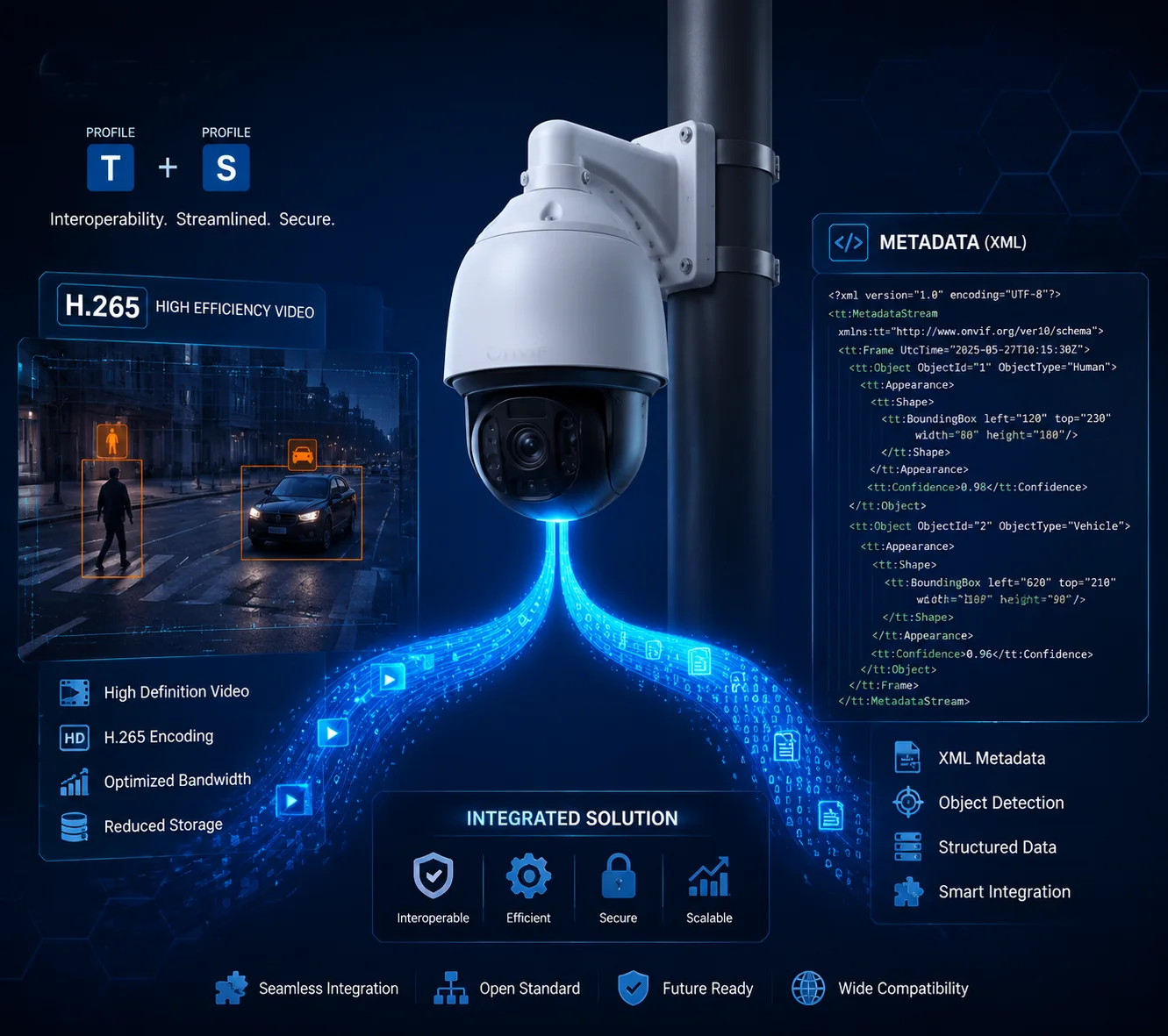
If you are building a system that relies on H.265 for bandwidth savings and still needs AI event data to flow to your VMS, this article breaks down exactly how Profile T handles that. I’ll walk through real-world concerns — from bounding box delivery to processing overhead — so you can make the right call for your next deployment.
Table of Contents
Can I Send AI Human-Detection Bounding Boxes Over H.265 via ONVIF?
This is the first question I get from integrators who want AI features but also need H.265 compression. They worry the two don’t play well together.
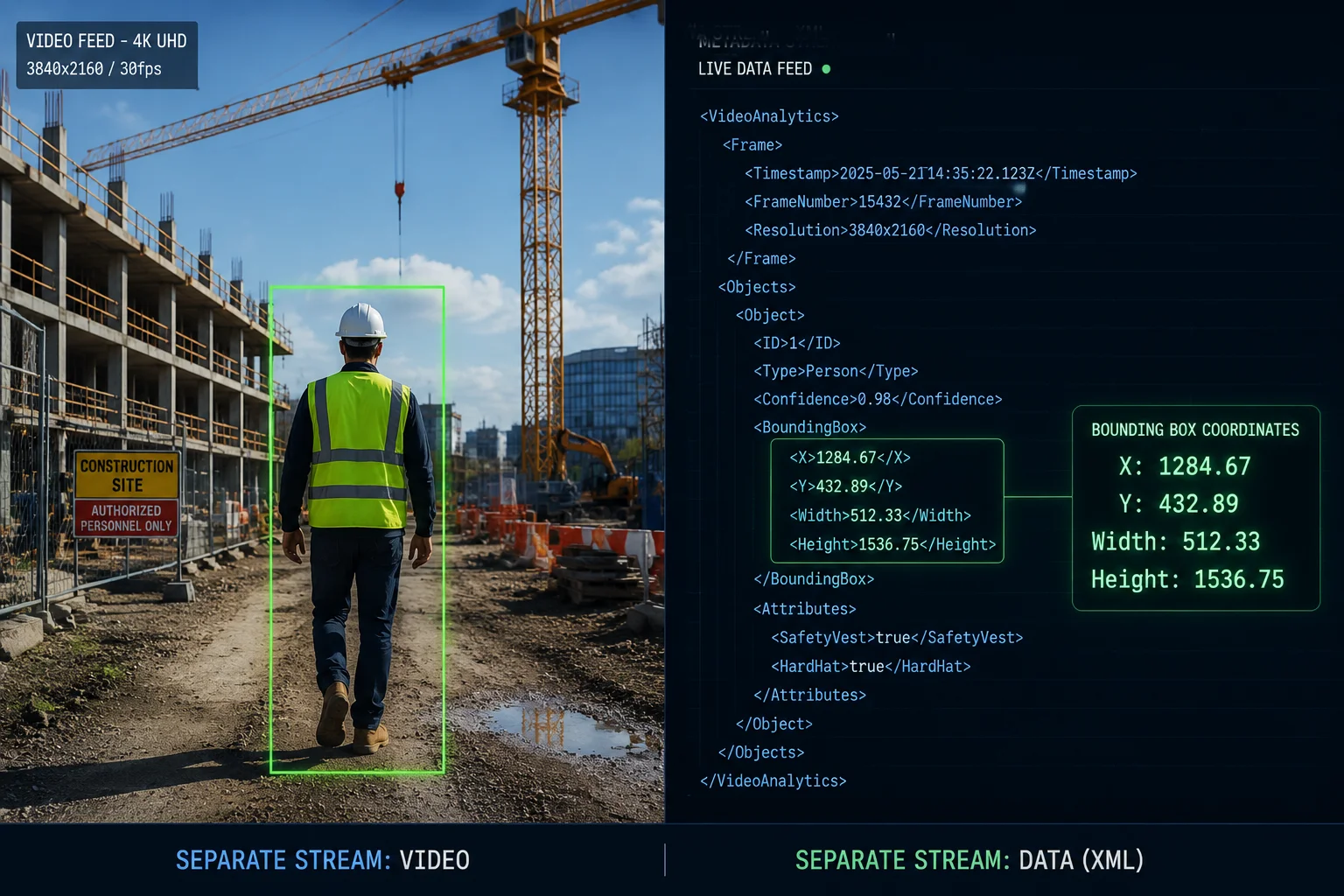
You can absolutely send AI human-detection bounding boxes over H.265 via ONVIF Profile T. The metadata — including object type, coordinates, and confidence scores — travels in a separate RTP stream within the same RTSP session, so it does not interfere with the H.265 video encoding at all.
How the Metadata Actually Travels
Let me explain what happens under the hood. When your camera detects a person, it does two things at the same time. First, it encodes the video frame in H.265. Second, it generates an XML-based metadata packet that describes what it found — a “Person” object, the bounding box coordinates, and a timestamp.
These two pieces of information travel through different channels, but they share the same RTSP session2. Think of it like a highway with two lanes. The video takes one lane. The metadata takes the other. They arrive at the same destination at the same time.
The XML Structure Behind the Bounding Box
The ONVIF Analytics Service3 defines a clear XML schema for detection results. Here is a simplified view of what a single detection event looks like:
| Field | Example Value | Description |
|---|---|---|
| Object Type | Person | What the AI detected |
| Bounding Box X | 0.35 | Horizontal position (normalized 0–1) |
| Bounding Box Y | 0.22 | Vertical position (normalized 0–1) |
| Width | 0.12 | Box width (normalized) |
| Height | 0.30 | Box height (normalized) |
| Timestamp | 2025-01-15T14:32:07Z | Frame-level time sync |
| Confidence | 0.92 | Detection confidence score |
Your VMS reads this XML data and draws the bounding box on the screen. The camera does not burn the box into the video. This is important. It means you can turn the boxes on or off at the software level. You can also search by object type later — without re-processing the video.
Why This Matters for 4G Solar Deployments
In our 4G solar PTZ systems at Loyalty-Secu, bandwidth is precious. H.265 already cuts the bitrate roughly in half compared to H.264. The metadata stream adds very little — usually between 10kbps and 50kbps for a few detected objects. So you get AI intelligence delivered to your VMS without a meaningful increase in data usage.
But here is a detail many people miss. If your camera is tracking 20 or 30 objects at once — say, a busy intersection — the metadata stream grows. In those cases, I recommend capping the maximum tracked objects in the firmware settings to keep the total bandwidth predictable over a 4G link.
Will My Third-Party VMS Be Able to Search the H.265 Metadata for Specific Events?
I’ve had customers buy cameras with great AI features, only to discover their VMS could not read the metadata. That’s a painful and expensive lesson.
Your third-party VMS can search H.265 metadata for specific events — but only if the VMS also supports ONVIF Profile T. If your VMS only supports Profile S, it will receive the video stream but ignore the metadata entirely, leaving you with no smart search capability.

The Profile T Compatibility Check
This is the single most important step before you commit to a project. You need to verify both ends of the chain. The camera must support Profile T. The VMS must also support Profile T. If either side is missing, the metadata link breaks.
Here is a quick compatibility matrix I use when advising our B2B partners:
| VMS Platform | Profile S Support | Profile T Support | Smart Search via Metadata |
|---|---|---|---|
| Milestone XProtect4 | ✅ | ✅ (2020+) | ✅ |
| Genetec Security Center5 | ✅ | ✅ (2021+) | ✅ |
| Blue Iris | ✅ | ⚠️ Limited | ❌ Native (requires plugin) |
| Nx Witness (Network Optix)6 | ✅ | ✅ (v5.0+) | ✅ |
| Digifort | ✅ | ✅ (v7.4+) | ✅ |
| iSpy / Agent DVR | ✅ | ❌ | ❌ |
If your VMS is in the “limited” or “no” column, you have two options. You can upgrade the VMS software. Or you can use the camera’s built-in web interface to access the AI events directly — most professional PTZ cameras, including ours, offer this as a fallback.
What “Smart Search” Actually Looks Like
When the metadata is flowing correctly, your VMS can do things like this:
- Show me all “Person” detections between 2:00 PM and 4:00 PM.
- Show me all “Vehicle” detections in Zone B.
- Show me all events where a person entered a restricted area.
The VMS does not need to re-analyze the video. It simply queries the stored metadata. This is much faster. On a system with 50 cameras recording 24/7, the difference between re-analyzing video and querying metadata is the difference between hours and seconds.
A Real-World Pitfall: Firmware Version Matters
I want to flag something that catches people off guard. Even if a camera model says “Profile T” on the datasheet, the actual firmware version matters. Early firmware releases sometimes had incomplete Profile T implementations. The metadata fields might be partially populated, or the timestamp sync might drift.
At Loyalty-Secu, we run a full Profile T validation test on every firmware release before it ships. We check that every XML field is populated correctly, that timestamps align within one frame, and that the metadata survives packet loss on a 4G connection. If you are evaluating any camera — ours or anyone else’s — ask for a Profile T conformance test report. It will save you a lot of trouble later.
Is the Metadata Stream Synchronized Perfectly with the High-Resolution 4K Video?
Sync issues are a nightmare. I’ve seen cases where the bounding box shows up two seconds after the person has already left the frame. That makes the entire AI feature useless.
Under ONVIF Profile T, the metadata stream is synchronized with the H.265 video using shared NTP timestamps at the frame level. This means the bounding box data and the corresponding video frame carry the same time reference, ensuring precise alignment even over unstable networks like 4G LTE.

How Synchronization Works at the Protocol Level
The key to synchronization is the RTP timestamp. Both the video stream and the metadata stream use RTP as their transport layer. Each RTP packet carries a timestamp derived from the camera’s internal clock. When the camera generates a video frame and a metadata packet for the same moment, both packets get the same timestamp value.
On the receiving end, the VMS matches these timestamps. It knows that metadata packet #4521 belongs to video frame #4521. So it draws the bounding box on the correct frame.
What Can Break the Sync?
In a perfect lab environment, sync is flawless. But in the field, several things can cause drift:
- NTP misconfiguration. If the camera’s clock is not synced to a reliable NTP server, the timestamps can drift over hours or days. Always configure NTP — even on 4G deployments. Most cellular networks provide NTP access.
- Network jitter. On a 4G link, packets can arrive out of order. The VMS needs a jitter buffer7 to re-sort them. If the buffer is too small, metadata and video can appear out of sync on the display.
- High CPU load. If the camera’s processor is overloaded — say, running multiple AI algorithms at 4K resolution — the metadata generation can lag behind the video encoding pipeline.
Practical Advice for 4G Solar PTZ Systems
For our customers deploying 4G solar PTZ cameras in remote locations, I always recommend three things to protect sync quality:
First, set the camera’s NTP server to a public pool like pool.ntp.org8 or your carrier’s NTP address. This keeps the clock accurate.
Second, set the VMS jitter buffer to at least 200ms. This gives the system enough room to re-order packets without visible delay.
Third, if you are running 4K at 25fps with multiple AI rules active, consider dropping to 15fps for the analytics stream. The video stream can stay at 25fps. This reduces the CPU load and keeps the metadata pipeline running smoothly.
The 4K Factor
4K resolution makes sync more challenging because the data volume is much larger. A single 4K H.265 frame can be 200KB or more. The metadata packet for that frame might be only 500 bytes. If the network drops the video packet and the VMS requests a retransmission, the metadata packet is already waiting in the buffer. The VMS needs to hold that metadata until the video catches up.
This is why I always tell our partners: test your full pipeline end-to-end before you deploy. Set up the camera, connect it over 4G, stream 4K H.265 with metadata enabled, and watch the output on your VMS for at least 24 hours. If the sync holds for a full day, it will hold in production.
Does H.265 Metadata Usage Consume More Processing Power Than H.264?
Every integrator I talk to asks about processing overhead. They want AI and H.265 — but they don’t want the camera to overheat or freeze in the field.
H.265 encoding does require more processing power than H.264 — typically 30% to 50% more CPU load for the same resolution and frame rate. However, the metadata generation itself adds minimal overhead regardless of the codec. The real processing cost comes from the AI analysis, not from packaging the results into ONVIF metadata.

Breaking Down the Processing Load
Let me separate the three main tasks that happen inside the camera:
- Video encoding — converting raw sensor data into compressed H.264 or H.265.
- AI analysis — running neural network models to detect people, vehicles, or other objects.
- Metadata packaging — wrapping the AI results into ONVIF-compliant XML and sending them via RTP.
Task 1 is where H.265 costs more than H.264. The HEVC algorithm is more complex. It uses larger coding tree units, more prediction modes, and more advanced entropy coding. All of this takes more compute cycles.
Task 2 is the same regardless of whether you use H.264 or H.265. The AI model runs on the raw or decoded video frames, not on the compressed stream.
Task 3 is trivial. Generating a small XML packet takes almost no CPU time.
A Side-by-Side Comparison
Here is a rough comparison based on our internal testing at Loyalty-Secu, using a typical 4K PTZ camera with an embedded AI chipset:
| Metric | H.264 + Metadata | H.265 + Metadata | Difference |
|---|---|---|---|
| Video Encoding CPU Usage | ~35% | ~50% | +15% |
| AI Detection CPU Usage | ~25% | ~25% | 0% |
| Metadata Packaging CPU Usage | ~1% | ~1% | 0% |
| Total CPU Usage | ~61% | ~76% | +15% |
| Bitrate (4K, 25fps) | ~8 Mbps | ~4 Mbps | -50% |
| Metadata Bandwidth | ~50 kbps | ~50 kbps | 0% |
The takeaway is clear. H.265 costs more CPU but saves a lot of bandwidth. The metadata layer is the same either way.
When Does This Become a Problem?
For most modern cameras with dedicated hardware encoders (like Hi3559 or similar SoCs), the extra H.265 load is handled by the hardware encoder, not the main CPU. So in practice, the CPU impact is much smaller than the raw numbers suggest.
But problems can appear in two scenarios:
- Dual-stream encoding. If you run both a 4K main stream and a 720p sub-stream, both in H.265, the hardware encoder is doing double duty. Add AI on top, and you might hit the ceiling.
- High object count. If the scene has 30+ moving objects and the AI is tracking all of them, the analysis engine — not the encoder — becomes the bottleneck.
My Recommendation for System Integrators
If you are deploying in a bandwidth-limited environment like a 4G solar site, use H.265 for the main stream and H.264 for the sub-stream. This balances the processing load while still giving you the bandwidth savings on the primary recording stream. Keep the AI detection limited to the objects you actually care about — usually people and vehicles. Don’t enable “all object” tracking unless you truly need it.
And always check the camera’s operating temperature under full load. At Loyalty-Secu, every unit goes through a 48-hour burn-in test at maximum resolution, maximum frame rate, and full AI enabled. If it survives that, it will survive the field.
Conclusion
ONVIF Profile T fully supports H.265 metadata transmission. Verify both your camera and VMS support Profile T, and your AI data will flow reliably — even over 4G.
1. Official ONVIF page for Profile T, which defines support for H.265 and metadata streaming. ↩︎ 2. Real Time Streaming Protocol (RTSP) specification – used to transport both video and metadata streams. ↩︎ 3. ONVIF specification for analytics services, defining the XML schema for detection metadata. ↩︎ 4. Milestone XProtect VMS – confirmed to support Profile T for smart search via metadata. ↩︎ 5. Genetec Security Center VMS – supports Profile T for metadata-based event search. ↩︎ 6. Nx Witness VMS – supports Profile T from v5.0 for metadata smart search. ↩︎ 7. Wikipedia explanation of jitter buffering – essential for re-ordering delayed packets over 4G links. ↩︎ 8. Public NTP pool recommended for camera clock synchronization in remote deployments. ↩︎