
I’ve seen too many security teams rely on basic motion alerts, only to miss the real threat: a group quietly forming in a blind spot until it’s too late.
Yes, industrial-grade AI cameras do support “Crowd Gathering” detection. This feature uses density map estimation, spatial proximity analysis, and duration tracking to identify abnormal clustering in real time. You can set custom thresholds for people count, area density, and dwell time to trigger instant alerts to your security center.
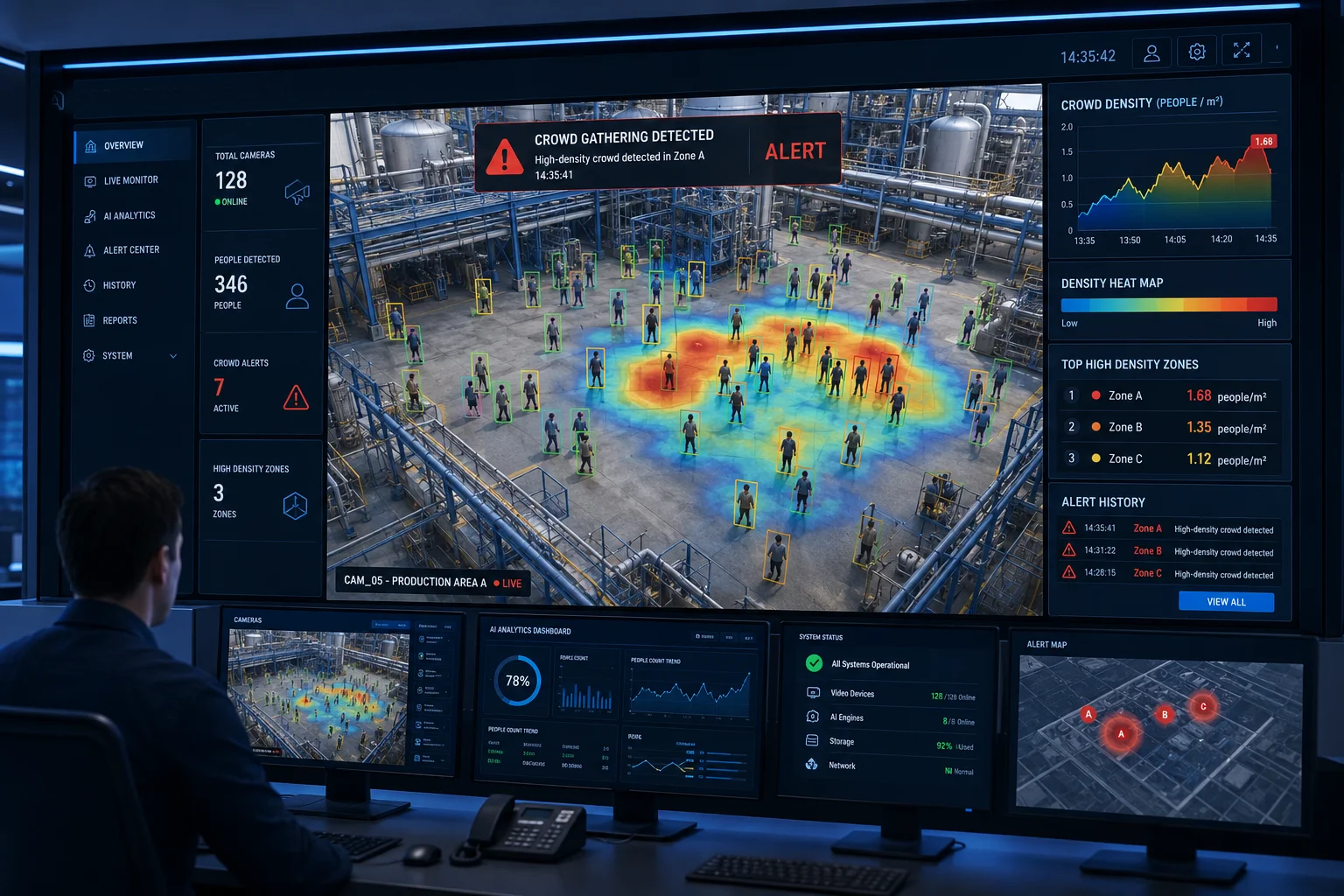
Below, I’ll break down exactly how this works, what you can customize, and how it performs in real-world conditions like low-resolution feeds and off-grid 4G deployments.
Table of Contents
Can I Set a Threshold (e.g., >5 People) to Trigger an Alert if a Group Gathers in a Restricted Area?
I used to think a simple headcount rule would be enough. But after testing in the field, I learned that raw numbers without context create more noise than value.
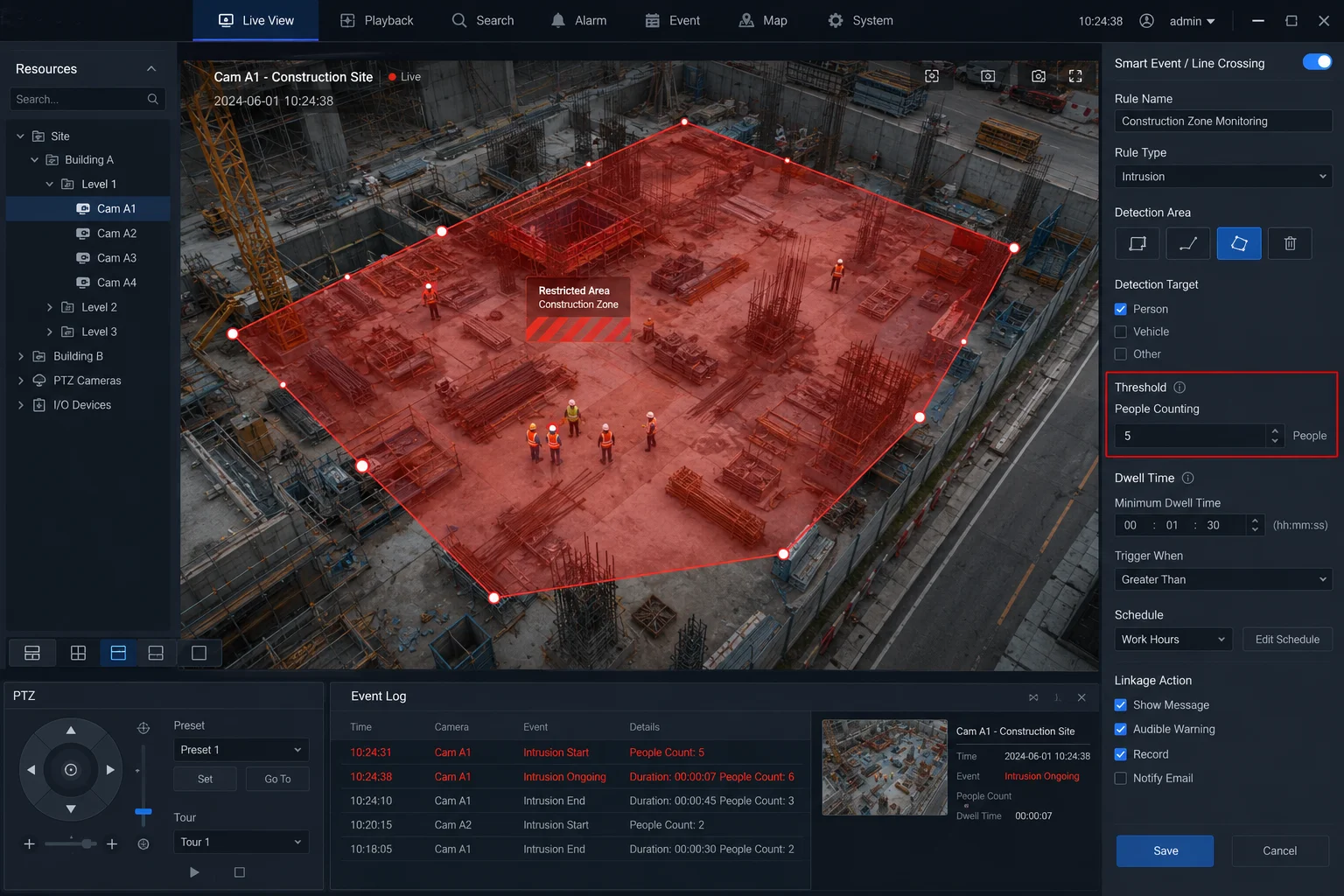
Yes, you can set a custom people-count threshold. Most professional VMS platforms1 and camera web interfaces let you define a number (like 5, 10, or 15 people) within a drawn zone. When that count is exceeded for a set duration, the system pushes an alert to your app or security center.
How Threshold Configuration Actually Works
Setting a threshold sounds simple. But in practice, you need to combine multiple parameters to get useful alerts without drowning in false positives.
Here’s what happens behind the scenes. The AI draws a virtual zone on the camera’s field of view. You define this zone in the camera’s web interface or your VMS software. Inside that zone, the algorithm counts distinct human targets frame by frame. When the count crosses your set number, a timer starts. If the count stays above the threshold for your defined duration (say, 30 seconds), the system confirms it as a real gathering event and fires the alert.
Key Parameters You Can Adjust
| Parameter | Typical Range | Purpose |
|---|---|---|
| People count threshold2 | 3 – 50 (adjustable) | Define what “abnormal” means for your specific zone |
| Minimum dwell time | 10s – 120s | Filter out people just walking through |
| Detection zone shape | Polygon (4–8 points) | Match the exact boundary of your restricted area |
| Alert cooldown | 1 – 10 minutes | Prevent repeated alerts during a single ongoing event |
| Sensitivity level | Low / Medium / High | Balance between catching real events and ignoring noise |
Why a Simple Number Isn’t Enough
Let me explain why you need more than just “5 people = alarm.” Imagine a sidewalk next to your restricted fence. Five workers walk past every 3 minutes during shift change. A raw count of 5 would trigger dozens of false alarms per day. That’s why the dwell time parameter matters so much. It tells the system: “Only alert me if 5 or more people stay in this zone for longer than 30 seconds.”
You can also layer in schedule-based rules. For example, during business hours (8 AM – 6 PM), set the threshold at 10 people because some foot traffic is normal. After hours, drop it to 3 people because nobody should be there at all.
Zone Drawing Best Practices
The shape of your detection zone matters more than most people think. Draw it too large, and you’ll catch people on adjacent paths. Draw it too small, and the AI might miss targets standing just outside the boundary. I recommend leaving a 1-meter buffer inside your actual restricted perimeter. This accounts for the slight position error that all video analytics have when converting 2D pixels to real-world coordinates.
For sites with multiple entry points, create separate zones for each approach path. This way, your alert tells you not just that people gathered, but where they gathered. That information helps your response team arrive faster.
How Does the Crowd Density Algorithm Handle Overlapping Targets in Low-Resolution 4K Feeds?
I’ve watched traditional bounding-box detection fall apart the moment two people stand close together. The boxes merge, the count drops, and the system thinks the crowd is smaller than it really is.
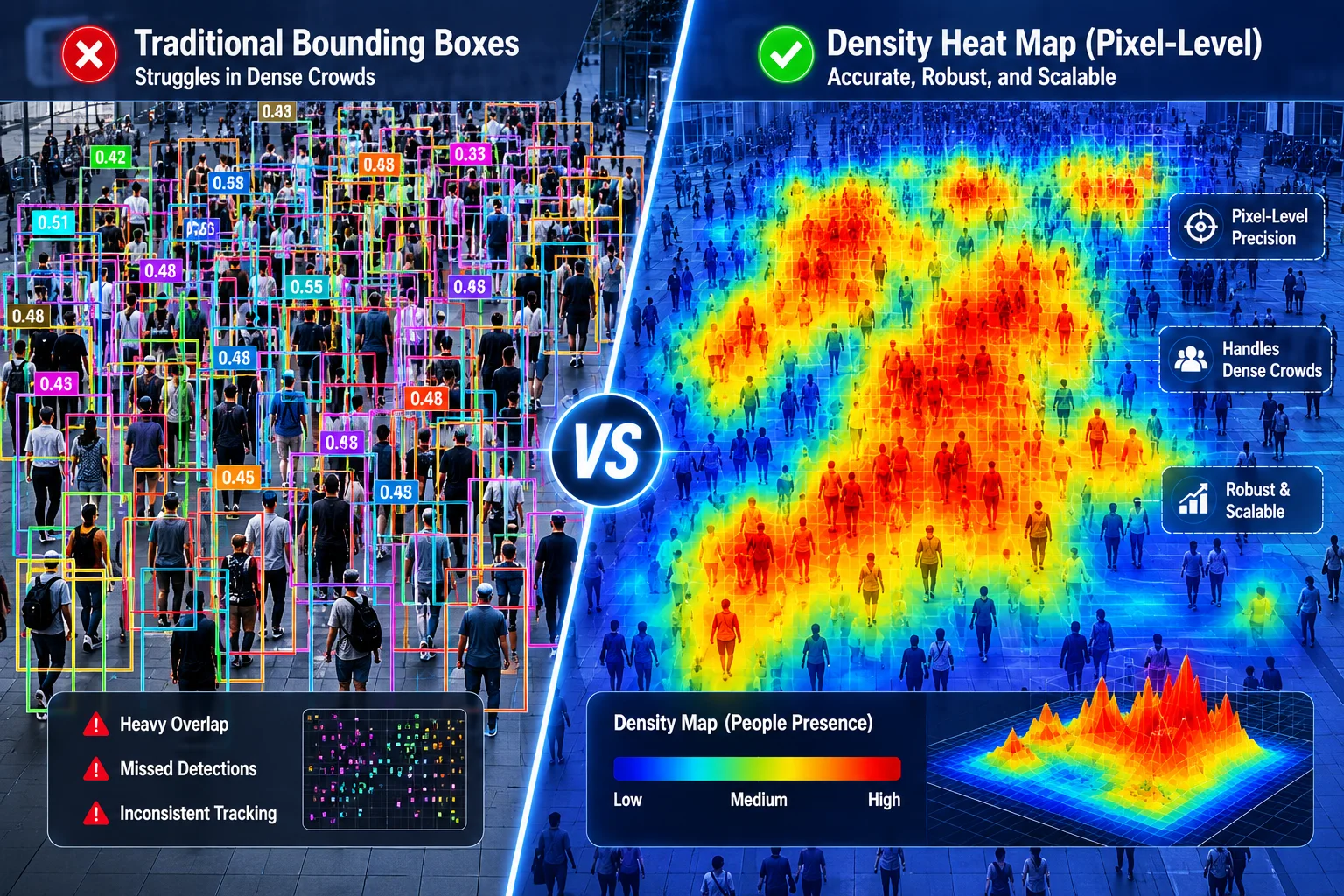
The crowd density algorithm bypasses bounding boxes entirely. Instead, it uses pixel-level density map estimation. This approach handles heavy occlusion and overlapping targets far better than box-based counting, even on compressed 4K streams.
Why Bounding Boxes Fail in Dense Crowds
Traditional object detection draws a rectangle around each person. When people overlap, the algorithm has two bad choices: merge them into one box (undercounting) or create unstable flickering boxes (noisy data). In a crowd of 20 people standing shoulder to shoulder, a bounding-box system might only count 12.
Density map estimation takes a completely different approach. It doesn’t try to isolate each individual. Instead, it asks: “How much human presence exists at each pixel?” The output is a heat map where bright areas mean high density and dark areas mean low density. By summing the values across your detection zone, the system gets an accurate total count even when bodies overlap heavily.
The 4K Compression Factor
Here’s something many integrators overlook. Your camera might capture at 4K resolution, but by the time that video travels over a 4G link, it’s been compressed. H.265 encoding3 at a typical 4–8 Mbps bitrate introduces artifacts. Fine details like the gap between two people standing close together can get smoothed out.
The density algorithm is designed to tolerate this. Because it works on learned feature patterns rather than sharp edges, moderate compression doesn’t break it. However, there is a limit. If your bitrate drops below 2 Mbps (common on congested 4G networks), accuracy will degrade. That’s why I recommend setting a minimum bitrate floor in your encoder settings.
Resolution vs. Frame Rate Trade-off
For crowd density analysis, frame rate matters more than raw resolution. Here’s why. The algorithm needs temporal consistency. It tracks how the density map changes over time to distinguish a growing crowd from a passing group. At 5 fps, the system has enough data points. At 1 fps (which some solar cameras drop to for power saving), the algorithm might miss rapid gathering events.
My recommendation: run at full 4K resolution but at 10–15 fps during normal monitoring. When the AI detects early signs of gathering (density rising), automatically switch to 25 fps for accurate tracking. This balances bandwidth, power, and detection quality.
Practical Accuracy Expectations
| Scenario | Expected Counting Accuracy | Notes |
|---|---|---|
| Sparse crowd (< 10 people, minimal overlap) | 95%+ | Bounding box works fine here too |
| Medium crowd (10–30 people, some overlap) | 85–92% | Density map clearly outperforms box detection |
| Dense crowd (30+ people, heavy overlap) | 75–85% | Accuracy depends on camera angle and height |
| Compressed stream (< 4 Mbps) | 70–80% | Artifacts reduce fine-grained separation |
| Optimal setup (high angle, 8+ Mbps, 15 fps) | 90%+ | Best-case for real deployments |
These numbers come from real field testing, not lab conditions. Your actual results depend on camera mounting height, lens angle, lighting, and network stability.
Is the “Gathering Detection” Sensitive Enough to Spot Illegal Loitering in Public Parking Lots?
I’ve had clients ask me this exact question after they installed basic cameras and still missed groups hanging around their lots at night. The problem wasn’t the camera. It was the algorithm’s inability to tell “loitering” apart from “parking.”
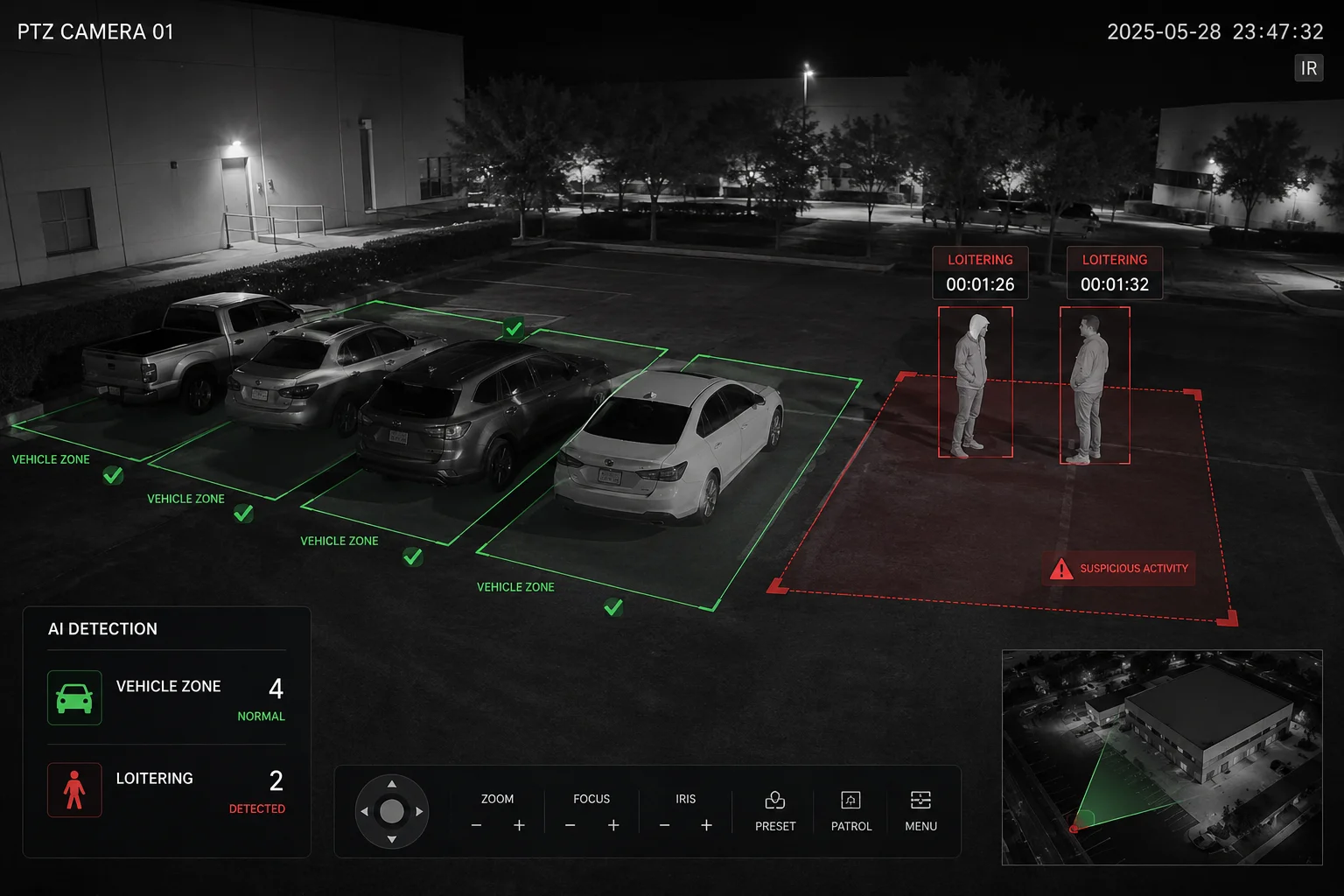
Yes, gathering detection can identify loitering in parking lots, but it requires careful tuning. The key is combining spatial zone rules with time-based thresholds. You define where people should not linger, set a dwell time (e.g., 60 seconds), and the AI flags anyone who stays beyond that limit.
The Difference Between Gathering and Loitering
These two behaviors look similar to a camera, but they’re different problems. Gathering means multiple people coming together in one spot. Loitering means one or more people staying in a spot longer than expected. A good AI system handles both, but you configure them differently.
For parking lots, you typically want both rules active at the same time:
- Loitering rule: Alert if any person stays in a non-parking zone (like between cars or near exits) for more than 90 seconds.
- Gathering rule: Alert if 3 or more people cluster together anywhere in the lot for more than 30 seconds.
Why Parking Lots Are Hard for AI
Parking lots create unique challenges for video analytics. Cars block sight lines. Headlights create sudden brightness changes. Shadows shift throughout the day. People legitimately walk to and from their vehicles, creating constant motion.
The AI needs to separate normal behavior (walking to a car, loading groceries) from abnormal behavior (three people standing between cars for five minutes). It does this through trajectory analysis6. A person walking in a straight line toward a car and then driving away is normal. A person walking in circles or standing still is not.
Optimizing for Night Detection
Most illegal loitering happens at night. This means your camera’s low-light performance directly affects detection accuracy. I recommend cameras with at least 1/1.8″ sensors and supplemental IR illumination. Starlight sensors4 can maintain color imaging down to 0.001 lux, which gives the AI more feature data to work with compared to black-and-white IR mode.
For solar-powered sites where power is limited, use smart IR scheduling5. Keep the IR LEDs off during daylight and activate them automatically at dusk. This saves power while ensuring the AI has enough image quality to detect human shapes at night.
Reducing False Alarms from Vehicles and Animals
In parking lots, the biggest source of false alarms isn’t people. It’s cars idling, animals crossing, and trash blowing in the wind. Modern AI handles this through target classification. The algorithm first identifies whether a detected object is a person, vehicle, or animal. Only confirmed human targets count toward the gathering or loitering threshold.
You can also set minimum target size filters. This eliminates small animals (cats, birds) that might otherwise trigger pixel-level density changes. Set the minimum height to around 0.8 meters in your perspective calibration, and most animal false alarms disappear.
Can I Customize the “Gathering Time” Before an Alarm Is Pushed to My Security Center?
I learned early on that instant alerts sound good in theory but create alert fatigue in practice. Your security team stops paying attention after the 50th false alarm in one shift.
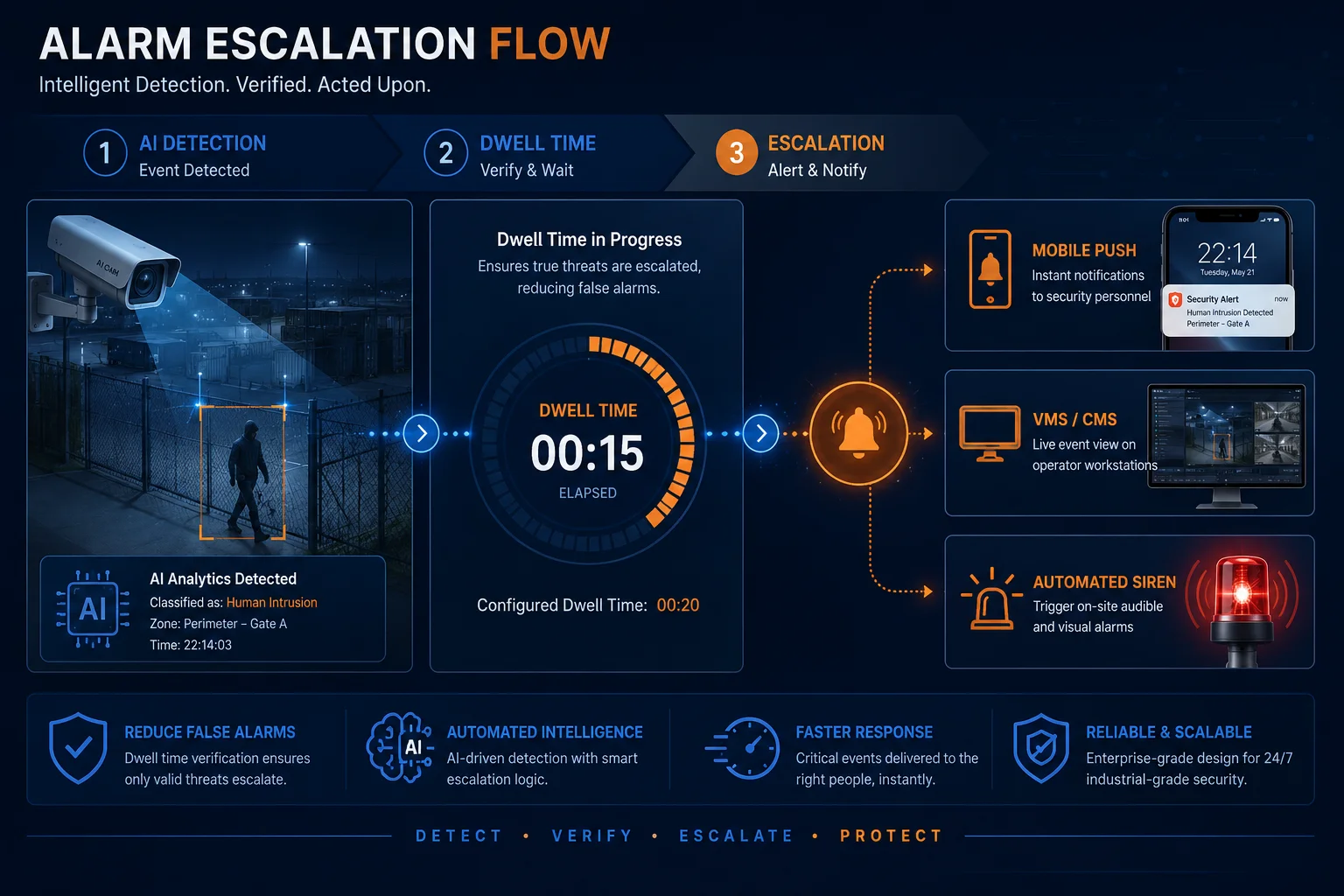
Yes, the gathering time (also called dwell time or minimum duration) is fully customizable. You can set it anywhere from 5 seconds to several minutes. This parameter tells the AI how long a group must remain clustered before the system confirms it as a real event and sends the notification.
Why Timing Is the Most Important Parameter
Of all the settings you can adjust, gathering time has the biggest impact on your team’s daily experience. Set it too short (under 10 seconds), and every group of coworkers chatting on a smoke break triggers an alarm. Set it too long (over 3 minutes), and a real threat has time to act before anyone responds.
The right value depends entirely on your site’s risk profile. A nuclear facility might set 10 seconds because any unauthorized gathering is critical. A retail parking lot might set 90 seconds because brief social interactions are normal.
How the Timer Works Internally
The timer isn’t a simple stopwatch. It uses a “sustained detection” model. Here’s the sequence:
- AI detects that the people count in a zone exceeds the threshold.
- Timer starts counting.
- If the count drops below the threshold at any point (someone leaves), the timer resets.
- Only when the count stays above the threshold continuously for the full duration does the alarm fire.
This “sustained” approach prevents false triggers from momentary crowding, like a group passing through a narrow corridor. They might exceed the count for 5 seconds, but they keep moving, so the timer resets.
Alarm Delivery Options
Once the timer confirms a real gathering event, you have multiple delivery channels:
- Push notification to your mobile app (fastest, 2–5 second delay)
- Email alert with snapshot attachment (good for records, 10–30 second delay)
- VMS popup on your monitoring workstation (instant if operator is watching)
- Relay output to trigger sirens, lights, or gate locks (hardwired, sub-second)
- API webhook7 to your custom platform or PSIM system8 (programmable)
Recommended Timing by Scenario
| Site Type | Suggested Gathering Time | Reasoning |
|---|---|---|
| Critical infrastructure (power plants, data centers) | 10 – 15 seconds | Zero tolerance for unauthorized groups |
| Construction sites | 30 – 60 seconds | Workers may briefly cluster; filter normal activity |
| Retail parking lots | 60 – 120 seconds | Social interactions are common; focus on prolonged loitering |
| Public parks / open areas | 120 – 180 seconds | High foot traffic; only flag sustained abnormal clusters |
| Remote off-grid sites (farms, solar fields) | 15 – 30 seconds | Any human presence is unusual; respond quickly |
Combining Time with Escalation Levels
For more advanced setups, you can create tiered responses. For example:
- 30 seconds: System logs the event and starts recording at full resolution.
- 60 seconds: Push notification sent to on-site guard’s phone.
- 120 seconds: Alarm escalates to central security center with live video feed.
- 180 seconds: Automated voice warning plays through the camera’s built-in speaker.
This graduated approach gives your team context before they respond. By the time the alarm reaches the security center, the system has already captured 2 minutes of high-quality evidence footage.
Conclusion
Crowd gathering detection is a proven AI capability that works best when you combine smart threshold settings, proper camera placement, and customized timing rules. If you need help configuring these parameters for your specific site, reach out to me at sales05@.com and I’ll walk you through it.
1. Video Management Software commonly used to configure and monitor AI detection rules. ↩︎ 2. Parameter that sets how many people must gather before triggering an alert. ↩︎ 3. Video compression standard that reduces bandwidth while preserving quality for analytics. ↩︎ 4. Low-light camera sensor technology that enables color imaging in near darkness for better AI detection. ↩︎ 5. Feature that activates IR LEDs only at dusk to save power on solar-powered cameras. ↩︎ 6. Method AI uses to understand if a person’s movement is normal (walking to car) or suspicious (loitering). ↩︎ 7. Programmable integration that allows the camera to send alerts to a custom platform or PSIM system. ↩︎ 8. Physical Security Information Management software that unifies multiple security subsystems. ↩︎